Amazon Elastic File System (EFS) vs. AWS CloudFormation

Overview
ProductRatingMost Used ByProduct SummaryStarting Price
Amazon Elastic File System (EFS)
Score 7.5 out of 10
N/A
The Amazon Elastic File System (EFS) provides a simple, scalable, elastic file system for Linux-based workloads for use with AWS Cloud services and on-premises resources.
$0.04
per GB
AWS CloudFormation
Score 8.9 out of 10
N/A
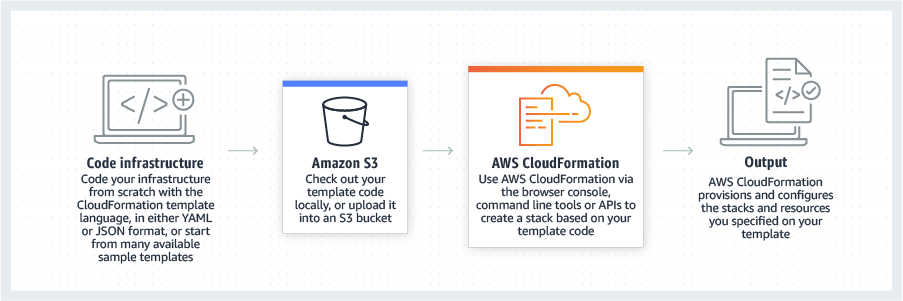
AWS CloudFormation gives developers and systems administrators a way to create and manage a collection of related AWS resources, provisioning and updating them in a predictable fashion. Use AWS CloudFormation’s sample templates or create templates to describe the AWS resources, and any associated dependencies or runtime parameters, required to run an application. Users don’t need to figure out the order for provisioning AWS services or the subtleties of making those dependencies work.…
$0
Pricing
Amazon Elastic File System (EFS)AWS CloudFormation
Editions & Modules
US East & West Region
$0.043
per month per GB (One zone)
Europe (Ireland) Region
$0.046
per month per GB (One zone)
Asia Pacific & Canada Region
$0.047
per month per GB (One zone)
Africa (Cape Town) Region
$0.054
per month per GB (One zone)
AWS GovCloud (US-East)
$0.056
per month per GB (One zone)
US East & West Region
$0.08
per month per GB (Standard)
Asia Pacific & Canada Region
$0.09
per month per GB (Standard)
Europe (Ireland) Region
$0.09
per month per GB (Standard)
Africa (Cape Town) Region
$0.10
per month per GB (Standard)
AWS GovCloud (US-East)
$0.11
per month per GB (Standard)
Free Tier - 1,000 Handler Operations per Month per Account
$0.00
Handler Operation
$0.0009
per handler operation
Offerings
Pricing Offerings
Amazon Elastic File System (EFS)AWS CloudFormation
Free Trial
YesYes
Free/Freemium Version
NoYes
Premium Consulting/Integration Services
NoYes
Entry-level Setup FeeNo setup feeNo setup fee
Additional DetailsThere is no minimum fee or setup charge. You pay only for the storage you use, for read and write access to data stored in Infrequent Access storage classes, and for any provisioned throughput. Amazon EFS offers four storage classes: two standard storage classes, including Amazon EFS Standard and Amazon EFS Standard-Infrequent Access (EFS Standard-IA), and two One Zone storage classes, including Amazon EFS One Zone and Amazon EFS One Zone-Infrequent AccessThere is no additional charge for using AWS CloudFormation with resource providers in the following namespaces: AWS::*, Alexa::*, and Custom::*. In this case you pay for AWS resources (such as Amazon EC2 instances, Elastic Load Balancing load balancers, etc.) created using AWS CloudFormation as if you created them manually. You only pay for what you use, as you use it; there are no minimum fees and no required upfront commitments. When you use resource providers with AWS CloudFormation outside the namespaces mentioned above, you incur charges per handler operation. Handler operations are create, update, delete, read, or list actions on a resource.
More Pricing Information
Community Pulse
Amazon Elastic File System (EFS)AWS CloudFormation
Features
Amazon Elastic File System (EFS)AWS CloudFormation
Infrastructure-as-a-Service (IaaS)
Comparison of Infrastructure-as-a-Service (IaaS) features of Product A and Product B
Amazon Elastic File System (EFS)
8.8
5 Ratings
7% above category average
AWS CloudFormation
-
Ratings
Service-level Agreement (SLA) uptime10.05 Ratings00 Ratings
Dynamic scaling10.05 Ratings00 Ratings
Elastic load balancing10.04 Ratings00 Ratings
Pre-configured templates4.04 Ratings00 Ratings
Monitoring tools8.55 Ratings00 Ratings
Pre-defined machine images7.03 Ratings00 Ratings
Operating system support9.55 Ratings00 Ratings
Security controls10.05 Ratings00 Ratings
Automation10.04 Ratings00 Ratings
Configuration Management
Comparison of Configuration Management features of Product A and Product B
Amazon Elastic File System (EFS)
-
Ratings
AWS CloudFormation
8.2
2 Ratings
2% above category average
Infrastructure Automation00 Ratings8.52 Ratings
Automated Provisioning00 Ratings8.52 Ratings
Parallel Execution00 Ratings8.02 Ratings
Node Management00 Ratings7.52 Ratings
Reporting & Logging00 Ratings7.52 Ratings
Version Control00 Ratings9.02 Ratings
Best Alternatives
Amazon Elastic File System (EFS)AWS CloudFormation
Small Businesses
DigitalOcean Droplets
Score 9.4 out of 10
HashiCorp Terraform
HashiCorp Terraform
Score 8.8 out of 10
Medium-sized Companies
SAP on IBM Cloud
SAP on IBM Cloud
Score 9.0 out of 10
Ansible
Ansible
Score 9.2 out of 10
Enterprises
SAP on IBM Cloud
SAP on IBM Cloud
Score 9.0 out of 10
Ansible
Ansible
Score 9.2 out of 10
All AlternativesView all alternativesView all alternatives
User Ratings
Amazon Elastic File System (EFS)AWS CloudFormation
Likelihood to Recommend
7.5
(5 ratings)
8.0
(7 ratings)
Usability
-
(0 ratings)
8.0
(2 ratings)
Support Rating
8.0
(1 ratings)
-
(0 ratings)
User Testimonials
Amazon Elastic File System (EFS)AWS CloudFormation
Likelihood to Recommend
Amazon AWS
While the idea is to utilize it enterprise wide; it sometimes doesn't work well in smaller applications and that causes slowdowns and impacts productivity. Also when evaluating EFS versus EBS - one needs to look at cost as EFS is a lot more expensive to implement and run so you need to weigh cost benefits of both systems and choose the best for you.
Read full review
Amazon AWS
I still give it an 8 because it's one of those tools that just quietly does the heavy lifting for you but it can really test your patience when it breaks esp with deep nested stacks. It's perfect for projects where we need clean consistent environments every time. It's less ideal for quick experimental setups like new EC2 configs or Lambda permission tweaks.
Read full review
Pros
Amazon AWS
  • This is very easy to setup and has a great performance.
  • As per the name, Elastic grows as your data grows.
  • We can run multiple EC2 instances.
Read full review
Amazon AWS
  • All resources can segregated based on stacks which provides greater visibility
  • A complete audit trail of what went wrong while deploying a particular resource
  • Automatically rollbacks if any service as part of CloudFormation results in an error
  • The UI tool is useful
Read full review
Cons
Amazon AWS
  • For early age start it would be costly
  • Not necessary for small scale system, but very beneficial for system which have high TPS and huge user base
Read full review
Amazon AWS
  • Error Description upon Failure Needs to be Improved.
  • Slow to create, delete or update.
  • Need to delete resources manually. It can ask before starting deletion whether to skip those resources or delete them.
Read full review
Usability
Amazon AWS
No answers on this topic
Amazon AWS
It's easy enough to get a shared template & apply it. You don't even have to download-then-upload or copy-and-paste, a publicly-accessible url works.
Diving deeper, it has enough powerful capabilities to make the life of a platform / DevOps engineer bearable.
However, you need equally deep knowledge to troubleshoot issues, when they inevitably pop up. This is the same for all IaC technologies, as they are additional abstraction layers on top of the native API provided by the cloud providers.
Read full review
Support Rating
Amazon AWS
The documentation is sufficient for setting up and it is basic NFS for mounting so not much support is required. I have not had any issues to warrant a request with AWS support.
Read full review
Amazon AWS
No answers on this topic
Alternatives Considered
Amazon AWS
EFS is easier to configure, no need for Active Directory.
Read full review
Amazon AWS
Cloning a virtual machine creates a virtual machine that is cloning a virtual machine creates a virtual machine that is a copy of the original. The new virtual machine is configured with the same virtual hardware, installed software, and other properties that were configured for the original virtual machine. For information about persistent memory and PMem storage, see the vSphere Cloning a virtual machine creates a virtual machine that is a copy of the original. The new virtual machine is configured with the same virtual hardware, installed software, and other properties that were configured for the original virtual machine. For information. Management guide.For information copy of the original. The new virtual Cloning virtual machine creates a virtual machine that is a copy of the original. The new virtual machine is configured with the same virtual hardware, installed software, and other properties that were configured for the original virtual machine. For information about persistent memory and PMem storage, see the vSphere Resource Management Guide. For information is configured with the same virtual hardware, installed software, and other properties that were configured for the original virtual machine. For information about persistent memory and PMem storage, see the vSphere Resource Management Guide. For information
Read full review
Return on Investment
Amazon AWS
  • Cost is always a paramount issue when looking at ROI
  • It is fast and if that's what you need for your implementation - you probably will not find a better solution
  • Expertise in EFS is sometimes hard to come by so it's best to look at your employee's ability to grasp this technology. Otherwise, it's a pretty steep learning curve.
Read full review
Amazon AWS
  • + We can standup a VPC in minutes
  • - It took a lot of inital time to set up
  • + With logging/rollback, made testing much easier.
Read full review
ScreenShots

AWS CloudFormation Screenshots

Screenshot of CloudFormation - How it works overviewScreenshot of CloudFormation - High level how it worksScreenshot of CloudFormation - Template exampleScreenshot of CloudFormation - Template inputs overview