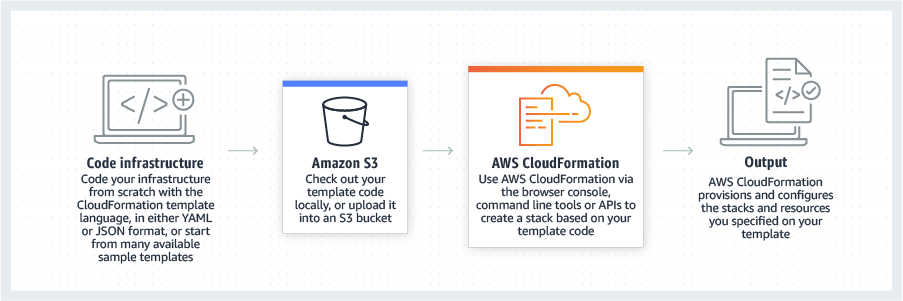
AWS CloudFormation gives developers and systems administrators a way to create and manage a collection of related AWS resources, provisioning and updating them in a predictable fashion. Use AWS CloudFormation’s sample templates or create templates to describe the AWS resources, and any associated dependencies or runtime parameters, required to run an application. Users don’t need to figure out the order for provisioning AWS services or the subtleties of making those dependencies work.…
$0
Pricing
AWS CloudFormation
Editions & Modules
Free Tier - 1,000 Handler Operations per Month per Account
$0.00
Handler Operation
$0.0009
per handler operation
Offerings
Pricing Offerings
AWS CloudFormation
Free Trial
Yes
Free/Freemium Version
Yes
Premium Consulting/Integration Services
Yes
Entry-level Setup Fee
No setup fee
Additional Details
There is no additional charge for using AWS CloudFormation with resource providers in the following namespaces: AWS::*, Alexa::*, and Custom::*. In this case you pay for AWS resources (such as Amazon EC2 instances, Elastic Load Balancing load balancers, etc.) created using AWS CloudFormation as if you created them manually. You only pay for what you use, as you use it; there are no minimum fees and no required upfront commitments.
When you use resource providers with AWS CloudFormation outside the namespaces mentioned above, you incur charges per handler operation. Handler operations are create, update, delete, read, or list actions on a resource.
More Pricing Information
Community Pulse
AWS CloudFormation
Considered Both Products
Amazon AWS
Verified User
Chose AWS CloudFormation
The only real comparison would be to Terraform, which is another IaC technology at the infra level. Terraform is cloud-agnostic, which means most popular cloud providers are supported. While AWS CloudFormation is AWS-only. Although, if you consider CDK, CDK for Terraform …
A de minimis incentive was given to thank the reviewer for their time. The incentive was not used to bias or drive a particular response, nor was the incentive contingent on a positive endorsement. More Info
Verified User
Chose AWS CloudFormation
Since the product I'm involved is primarily hosted on AWS we use CloudFormation but in some other products where we have hybrid cloud deployments we prefer Terraform which is opensource.
A de minimis incentive was given to thank the reviewer for their time. The incentive was not used to bias or drive a particular response, nor was the incentive contingent on a positive endorsement. More Info
Verified User
Chose AWS CloudFormation
Cloning a virtual machine creates a virtual machine that is cloning a virtual machine creates a virtual machine that is a copy of the original. The new virtual machine is configured with the same virtual hardware, installed software, and other properties that were configured …
A de minimis incentive was given to thank the reviewer for their time. The incentive was not used to bias or drive a particular response, nor was the incentive contingent on a positive endorsement. TR verified that a representative sample of customers was invited. More Info
Verified User
Chose AWS CloudFormation
As we have our whole infrastructure on AWS, that is why we selected AWS CloudFormation. AWS CloudFormation is better integrated with AWS services than other available products and also provides visibility and tracking on AWS. AWS CloudFormation is free while Terraform …
A de minimis incentive was given to thank the reviewer for their time. The incentive was not used to bias or drive a particular response, nor was the incentive contingent on a positive endorsement. More Info
Verified User
Chose AWS CloudFormation
We didn't look into anything else as Cloudformation was "built-in" for AWS, it just kind of made sense to go with that. Terraform was something that we briefly looked into Terraform but decides to stick with Cloudformation because our task was relatively "simple". Apparently if …
A de minimis incentive was given to thank the reviewer for their time. The incentive was not used to bias or drive a particular response, nor was the incentive contingent on a positive endorsement. More Info
Senior Full Stack Developer in Engineering at Intellisys D. Corp. (Computer Software, 51-200 employees)
Chose AWS CloudFormation
AWS CloudFormation has more features and robustness. It is suited for professional projects since it provides stability and a wide variety of options for configurations. These include not only dividing stacks by specific code changes, but also in regions. This allows more …
A de minimis incentive was given to thank the reviewer for their time. The incentive was not used to bias or drive a particular response, nor was the incentive contingent on a positive endorsement. More Info
I still give it an 8 because it's one of those tools that just quietly does the heavy lifting for you but it can really test your patience when it breaks esp with deep nested stacks. It's perfect for projects where we need clean consistent environments every time. It's less ideal for quick experimental setups like new EC2 configs or Lambda permission tweaks.
A de minimis incentive was given to thank the reviewer for their time. The incentive was not used to bias or drive a particular response, nor was the incentive contingent on a positive endorsement. More Info
A de minimis incentive was given to thank the reviewer for their time. The incentive was not used to bias or drive a particular response, nor was the incentive contingent on a positive endorsement. More Info
A de minimis incentive was given to thank the reviewer for their time. The incentive was not used to bias or drive a particular response, nor was the incentive contingent on a positive endorsement. More Info
It's easy enough to get a shared template & apply it. You don't even have to download-then-upload or copy-and-paste, a publicly-accessible url works.
Diving deeper, it has enough powerful capabilities to make the life of a platform / DevOps engineer bearable.
However, you need equally deep knowledge to troubleshoot issues, when they inevitably pop up. This is the same for all IaC technologies, as they are additional abstraction layers on top of the native API provided by the cloud providers.
A de minimis incentive was given to thank the reviewer for their time. The incentive was not used to bias or drive a particular response, nor was the incentive contingent on a positive endorsement. More Info
Cloning a virtual machine creates a virtual machine that is cloning a virtual machine creates a virtual machine that is a copy of the original. The new virtual machine is configured with the same virtual hardware, installed software, and other properties that were configured for the original virtual machine. For information about persistent memory and PMem storage, see the vSphere Cloning a virtual machine creates a virtual machine that is a copy of the original. The new virtual machine is configured with the same virtual hardware, installed software, and other properties that were configured for the original virtual machine. For information. Management guide.For information copy of the original. The new virtual Cloning virtual machine creates a virtual machine that is a copy of the original. The new virtual machine is configured with the same virtual hardware, installed software, and other properties that were configured for the original virtual machine. For information about persistent memory and PMem storage, see the vSphere Resource Management Guide. For information is configured with the same virtual hardware, installed software, and other properties that were configured for the original virtual machine. For information about persistent memory and PMem storage, see the vSphere Resource Management Guide. For information
A de minimis incentive was given to thank the reviewer for their time. The incentive was not used to bias or drive a particular response, nor was the incentive contingent on a positive endorsement. TR verified that a representative sample of customers was invited. More Info
A de minimis incentive was given to thank the reviewer for their time. The incentive was not used to bias or drive a particular response, nor was the incentive contingent on a positive endorsement. More Info