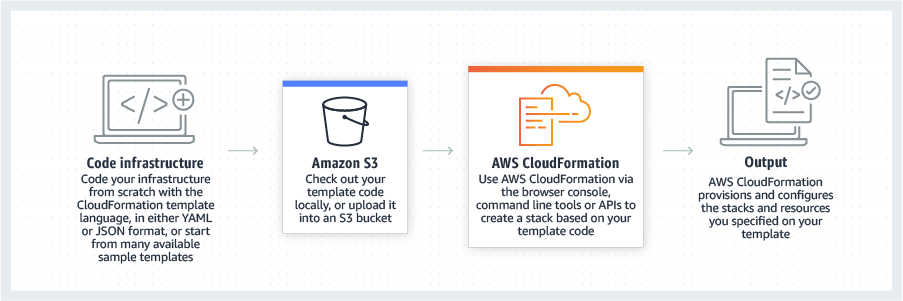
AWS CloudFormation gives developers and systems administrators a way to create and manage a collection of related AWS resources, provisioning and updating them in a predictable fashion. Use AWS CloudFormation’s sample templates or create templates to describe the AWS resources, and any associated dependencies or runtime parameters, required to run an application. Users don’t need to figure out the order for provisioning AWS services or the subtleties of making those dependencies work.…
$0
HashiCorp Vagrant
Score 9.0 out of 10
N/A
Vagrant is a tool designed to create and configure lightweight, reproducible, and portable development environments. It leverages a declarative configuration file which describes all software requirements, packages, operating system configuration, and users.
N/A
Pricing
AWS CloudFormation
HashiCorp Vagrant
Editions & Modules
Free Tier - 1,000 Handler Operations per Month per Account
$0.00
Handler Operation
$0.0009
per handler operation
No answers on this topic
Offerings
Pricing Offerings
AWS CloudFormation
HashiCorp Vagrant
Free Trial
Yes
No
Free/Freemium Version
Yes
Yes
Premium Consulting/Integration Services
No
No
Entry-level Setup Fee
No setup fee
No setup fee
Additional Details
There is no additional charge for using AWS CloudFormation with resource providers in the following namespaces: AWS::*, Alexa::*, and Custom::*. In this case you pay for AWS resources (such as Amazon EC2 instances, Elastic Load Balancing load balancers, etc.) created using AWS CloudFormation as if you created them manually. You only pay for what you use, as you use it; there are no minimum fees and no required upfront commitments.
When you use resource providers with AWS CloudFormation outside the namespaces mentioned above, you incur charges per handler operation. Handler operations are create, update, delete, read, or list actions on a resource.
—
More Pricing Information
Community Pulse
AWS CloudFormation
HashiCorp Vagrant
Considered Both Products
AWS CloudFormation
Verified User
Anonymous
Chose AWS CloudFormation
The only real comparison would be to Terraform, which is another IaC technology at the infra level. Terraform is cloud-agnostic, which means most popular cloud providers are supported. While AWS CloudFormation is AWS-only. Although, if you consider CDK, CDK for Terraform …
Since the product I'm involved is primarily hosted on AWS we use CloudFormation but in some other products where we have hybrid cloud deployments we prefer terraform which is opensource.
Cloning a virtual machine creates a virtual machine that is cloning a virtual machine creates a virtual machine that is a copy of the original. The new virtual machine is configured with the same virtual hardware, installed software, and other properties that were configured …
As we have our whole infrastructure on AWS, that is why we selected AWS CloudFormation. AWS CloudFormation is better integrated with AWS services than other available products and also provides visibility and tracking on AWS. AWS CloudFormation is free while Terraform …
We didn't look into anything else as Cloudformation was "built-in" for AWS, it just kind of made sense to go with that. Terraform was something that we briefly looked into Terraform but decides to stick with Cloudformation because our task was relatively "simple". Apparently if …
AWS CloudFormation has more features and robustness. It is suited for professional projects since it provides stability and a wide variety of options for configurations. These include not only dividing stacks by specific code changes, but also in regions. This allows more …
Docker has a few advantages, especially with the disk size bloat brought on by Vagrant's hosting an entire OS and project in a VM. It relies on native tools, however, and may not support every software. Vagrant provides uniformity, efficiency and repeatability within team work …
I liked lando better because lando seemed extremely easy to setup compared to other VM's and it seemed faster though that project was simpler. Virtualbox I ran on windows and it has a gui and has often been slow. The vagrant boxes I used did well but had slightly more …
Docker feels lighter, faster, but Vagrant offers better support across platforms, which is a must in my company where there are users on Linux, Mac OS and Windows.
Virtualbox and VMware were easier products to set up but did not stack up against Vagrant with the customization and the ability to specifically test and work with our code base. Virtualbox and VMware were more generic solutions that may be easier but they did not fulfill the …
MAMP is a much simpler solution than Vagrant. Pretty much anyone should be able to get MAMP up and running quickly, and it's much easier to maintain. However, MAMP is fairly limited to specific versions of software and runs within macOS, so it won't always completely be an …
Previously I had used MAMP and DesktopServer. MAMP was constantly giving me MySQL problems and is frustrating in that it limits how many installs you can have. DesktopServers was a little better, but broke when i switched to High Sierra OSX. Their website and support were very …
I like Vagrant much more than Docker. In my opinion it's easier and more flexible to configure a Vagrant machine how i like it compared to Docker. Of course Docker executes faster, but with Vagrant only the machine creation or booting process is slower, normally you don't …
There's not much that I'm aware of that really does exactly what Vagrant does. Many of its tasks could be accomplished manually or via custom scripts. However, with Vagrant, automation is within easy grasp as well as a large community of experts who have pre-built solutions …
Vagrant is a little different than other options out there. It blurs the lines between the server environment and the local environment. Options like MAMP and XAMPP allow a developer to run a local version of Apache, MySQL and PHP locally, but it's all based on the local …
Vagrant is more of a meta-tool compared to traditional VM software. It provides a layer on top of VMware or VirtualBox. Configurations in a Vagrantfile are so much easier to manage than complete VMs.
In comparison to Docker, Vagrant is a lot easier to create its [containers] boxes, than it is with Docker. Our company already dealt with and its devops team knew somewhat well the way of Vagrant, so it was quite natural to go Vagrant when trying to choose which would be our …
By default Vagrant uses VirtualBox but compared to using VirtualBox directly, I've found using Vagrant makes things easier. For one, you can commit your Vagrant configuration to GitHub and manage changes that way. I'm not sure how you'd handle updated virtual machines to all …
I still give it an 8 because it's one of those tools that just quietly does the heavy lifting for you but it can really test your patience when it breaks esp with deep nested stacks. It's perfect for projects where we need clean consistent environments every time. It's less ideal for quick experimental setups like new EC2 configs or Lambda permission tweaks.
If you're writing software, particularly software that depends on other services (web servers or databases for example) then Vagrant is great. I know some people skip Vagrant and just set up virtual machines on their own, but I've found that Vagrant streamlines the process nicely and makes it easy to update or swap out versions. If you're a web developer (which I am) it's amazing. I can have several boxes configured for my different projects and I just spin them up or down based on what I'm working on. One scenario where this might not be ideal is if you're running Vagrant on a computer that has limited resources. Since you're running a virtual machine with its own operating system and such you'll want a host computer with enough RAM, hard drive space and CPU to run the virtual machine properly without killing the performance of the host. The virtual disks can also take up a lot of space if you're not careful so if you have many virtual machines provisioned and don't clean up the old ones that you're not using, you may find that your hard drive is full. Each of my Linux servers take up about 10GB of disk space.
Easy to create machines with different OS's, list of them can be found from Vagrant's website with configuration details.
Flexible configuration, user can determine what software will be pre-installed to machine. Saves time because it doesn't need to be done manually every time.
Easily manage full environments, not just single machines, with single command.
Learning curve is steep - It can be challenging for someone to set up initially. After some coaching, the basics come pretty quickly though.
Relies on external Virtual Machine applications - It would be great if Vagrant itself could run the virtual machine instead of leaning on other virtualization software. This is a small detail, but would make setup simple.
You just have to learn how it thinks then you'll be set. That however comes with a learning curve. Writing YAML or jSON templates feels natural now but early on, even a small syntax mistake could break a whole stack.
Since the product I'm involved is primarily hosted on AWS we use CloudFormation but in some other products where we have hybrid cloud deployments we prefer Terraform which is opensource.
Docker has a few advantages, especially with the disk size bloat brought on by Vagrant's hosting an entire OS and project in a VM. It relies on native tools, however, and may not support every software. Vagrant provides uniformity, efficiency and repeatability within team work and for deployment and testing.