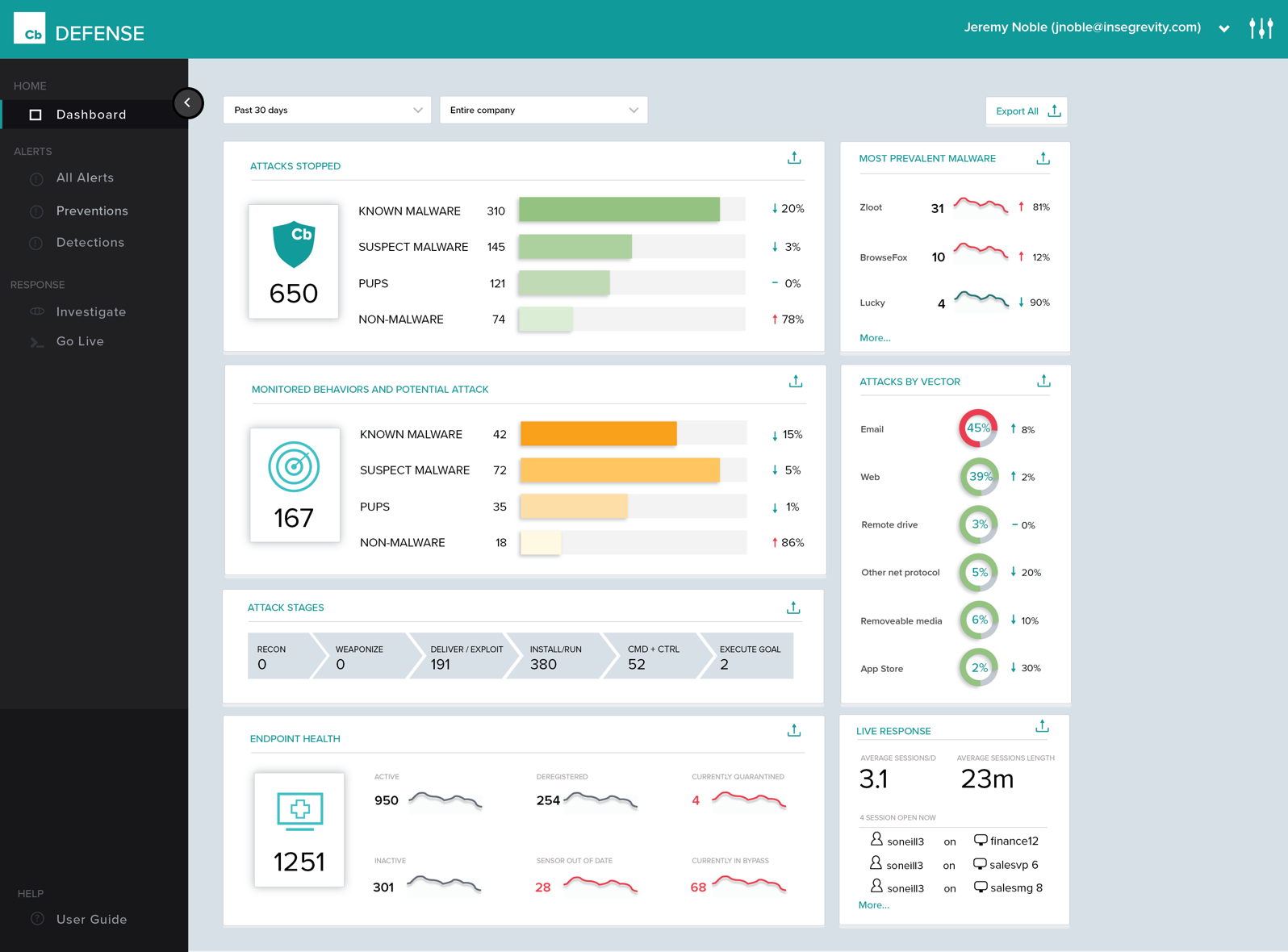
Carbon Black Endpoint is an endpoint security and "next-gen antivirus (NGAV)" that uses machine learning and behavioral models to analyze endpoint data and uncover malicious activity to stop all types of attacks before they reach critical systems.
N/A
Jamf Protect
Score9 out of 10
N/A
Developed exclusively for macOS, Jamf Protect provides a solution to maintain endpoint compliance, monitor for, respond to, and remediate security incidents on macOS with minimal impact to the device and end-user experience. Jamf Protect detects Mac-specific threats, and prevents known malware from running on devices and quarantines them for later analysis. Jamf Protect forwards data to a system of record to ensure a security posture, fleetwide, stays compliant by monitoring security settings on…
Cb Defense has been working very well in our organization. It is giving us much better insight into the applications that people are running on their systems (without authorization). This software is also great because it provides visibility into systems that are remote (off the network but still have Internet access). The out of band feature is great to help ensure that the systems are protected even when a user is traveling.
A de minimis incentive was given to thank the reviewer for their time. The incentive was not used to bias or drive a particular response, nor was the incentive contingent on a positive endorsement. More Info
If the environment is predominantly Apple based then Jamf Protect is a strong solution for providing EDR capabilities to endpoints. The detection capabilities are up to par with other leading EDR tools and it integrates well with Jamf MDM. Additionally, the compliance, telemetry, log forwarding, and USB device management being included as part of Jamf Protect provide good ROI.
A de minimis incentive was given to thank the reviewer for their time. The incentive was not used to bias or drive a particular response, nor was the incentive contingent on a positive endorsement. More Info
History of Process Execution, really anything that happens in the system is easily seen within the Dashboard. I can determine if a bad actor has infected the system, be it malware, backdoor, rootkit, Trojan, then from that point, I can put the system into Quarantine.
Being able to quarantine the system from the Dashboard. With these type of tools, pulling the power and running a hard drive image is not needed. Put the system in quarantine, start the analysis. A year ago, the network engineer might move the system into a VLAN that has no access to anything, except the system performing the remote analysis... Now I do not have to rely on anyone to move a system, power it down, pull the drive, or image the drive. I can just start the analysis right from my workstation.
The Live Response, again goes hand in hand with the quarantine feature.
By now, I am sure you see a process. Its simple, and easy and all done from a cloud-based console, called the dashboard. .. deploy the agent, create the policy, and active live response, set up email alerts, and monitor your endpoints... you are now ready to perform a triage in the event of an infection. We have step 1, step 2, step 3... but, just remember, things do happen, nothing is perfect, but this product has its advantages.
A de minimis incentive was given to thank the reviewer for their time. The incentive was not used to bias or drive a particular response, nor was the incentive contingent on a positive endorsement. More Info
Low resource use Protected Agent - stops tampering with agent and is not a resource hog
Managed and custom Analytics - along with the out of the box Analytics provided by JAMF, admins can also set up their own to focus on areas of concern eg NISTcompliance items
Vendor support - support is very responsive and knowledgeable
A de minimis incentive was given to thank the reviewer for their time. The incentive was not used to bias or drive a particular response, nor was the incentive contingent on a positive endorsement. More Info
Policy management can be cumbersome. It is simple to set up a single policy but you have no way to apply the rules to multiple groups. If you need to set up the same rule to multiple policies, you need to type it over again.
Agent updates can be very slow to deploy. We use a mix of rolling out updates via the web console and our management appliance. It can take several weeks to update all agents.
We can be confused on why a rule will apply to a file. Sometimes something is blocked but we don't understand why.
A de minimis incentive was given to thank the reviewer for their time. The incentive was not used to bias or drive a particular response, nor was the incentive contingent on a positive endorsement. More Info
A de minimis incentive was given to thank the reviewer for their time. The incentive was not used to bias or drive a particular response, nor was the incentive contingent on a positive endorsement. More Info
The console of the product is very easy to use. It provides great detailed information about all aspects of things occurring on the endpoint. It was easy to deploy and set up. The centralized cloud-based interface has made it easy to add two domains and manage them under a single pane with multiple admins. The only reason I wouldn't give it a higher score is a little bit of lag between updated info from the clients and also the lack of accountability in the deployment process. You set the deployment up for multiple machines and can't easily see if it was successful and/or it takes a while to see if it succeeded or failed.
A de minimis incentive was given to thank the reviewer for their time. The incentive was not used to bias or drive a particular response, nor was the incentive contingent on a positive endorsement. More Info
Jamf Protect is easy to manage. It is a separate interface from Jamf MDM which is nice for Security Operations teams. It allows Security teams to manage only the Security aspects without having to dig through all of the MDM configurations. For exception uses cases, Jamf Protect does provide options to customize settings where needed.
A de minimis incentive was given to thank the reviewer for their time. The incentive was not used to bias or drive a particular response, nor was the incentive contingent on a positive endorsement. More Info
First, I need to disclose that our support is provided by SecureWorks. We purchased CB Defense from them, and they provide 24x7 monitoring and notification services for the solution and its deployment on our endpoints. To date, we are very pleased with this arrangement
A de minimis incentive was given to thank the reviewer for their time. The incentive was not used to bias or drive a particular response, nor was the incentive contingent on a positive endorsement. More Info
Cb is cloud-based and has a more advanced policy management. It also has better forensics information. Cost was similar, but Cb added cost savings in terms of IT management resources. We also have the ability to talk directly with engineers and have input on feature updates.
A de minimis incentive was given to thank the reviewer for their time. The incentive was not used to bias or drive a particular response, nor was the incentive contingent on a positive endorsement. More Info
In some aspects, Jamf Protect was far superior to the others mentioned above. The only downside I can see is that it is only macOS which could be a problem for hybrid environments.
A de minimis incentive was given to thank the reviewer for their time. The incentive was not used to bias or drive a particular response, nor was the incentive contingent on a positive endorsement. More Info
A de minimis incentive was given to thank the reviewer for their time. The incentive was not used to bias or drive a particular response, nor was the incentive contingent on a positive endorsement. More Info
A de minimis incentive was given to thank the reviewer for their time. The incentive was not used to bias or drive a particular response, nor was the incentive contingent on a positive endorsement. More Info