Chose HCL Notes
It helps in organizing work by just speaking to it, and you don't have to specifically type in the data and use it. It has a better UI and also is faster.

| Product | Rating | Most Used By | Product Summary | Starting Price |
|---|---|---|---|---|
 Carbonio Community Edition | N/A | Carbonio Community Edition (Carbonio CE) is a free and open-source (FOSS) email and collaboration platform designed by Zextras. The email solution allows organizations to maintain digital sovereignty through on-premises self-hosted servers, ensuring privacy and control over its communications. Carbonio CE's features include email management, calendaring, chat, video chats, dedicated file management, and collaborative document editing. Additionally, its dedicated iOS and Android apps… | N/A | |
 HCL Notes | N/A | Notes from HCL (formerly from IBM, acquired by HCL in late 2018) is a collaboration platform based on the Lotus platform. | N/A |
| Carbonio Community Edition | HCL Notes | |||||||||||||||
|---|---|---|---|---|---|---|---|---|---|---|---|---|---|---|---|---|
| Editions & Modules | No answers on this topic | No answers on this topic | ||||||||||||||
| Offerings |
| |||||||||||||||
| Entry-level Setup Fee | No setup fee | No setup fee | ||||||||||||||
| Additional Details | — | — | ||||||||||||||
| More Pricing Information | ||||||||||||||||
| Carbonio Community Edition | HCL Notes | |
|---|---|---|
| Considered Both Products |  Carbonio Community Edition No answer on this topic | HCL Notes  Mogana Tashiani Research Analyst and Consulting (Technology) Chose HCL Notes n/a  Christopher Stark Division Network Support Specialist Chose HCL Notes Outlook has been considered for years as a replacement platform. Pricing and support staff made it prohibitive. Our long-time use of Microsoft Office productivity suite naturally led us to consider the adoption of Office365. A recent investigation told us that Azure Cloud …  Chris Whisonant Lead Consultant Chose HCL Notes As I stated previously, mail is mail. Notes is a fantastic option as a frontend for mail. On top of that, a business can be built from the custom applications that can be developed in it. We do have gmail as an option, but the vast majority of users are on Notes. We also choose …  Matthew J. Fitzpatrick Sr Technology Engineer Chose HCL Notes I've already answered this question in the previous questions however to sum it up IBM Notes stacks up VERY WELL! It has a LOT of really good business/enterprise features like enterprise-grade Dropbox-like storage, synced email/calendar/contacts, it supports a LOT of …  Umar Qureshi Dy Manager Enterprise Chose HCL Notes Exchange is too resource hungry and cumbersome to restore granular. It requires several other Microsoft Servers to integrate just to meet IBM Notes in terms of features. As someone once described, doing an apple to apple [comparison] is difficult. If Exchange were taken as an …  Jeremiah Benjamin Messaging and Collaboration Technology Developer Chose HCL Notes We've looked at Exchange a few times. However, for more costly licensing and about the same amount of administrative support required, Exchange only does mail, calendar and contacts. We do all that with Notes already, plus dozens of custom applications, and for less costly …  Lynn Sturgis Service Desk Engineer Chose HCL Notes We originally selected Notes for it's ease of use, and ability to be customized. As the industry has progressed we have had to move on to a more progressive path.  Tom Le Lead Application Developer/Lotus Notes Domino Developer Chose HCL Notes We are a small IT team and always had to deal with very high expectation, faster turn around time from users. Every application we've developed has very short turn around time and less resources. In the past 15 years, we can provide more application and doing it faster than …  Ficker Adrian Sales & Marketing Manager Chose HCL Notes Database development capabilities. Document management orientation. |
| Carbonio Community Edition | HCL Notes | |||||||||||||||||||||||||||
|---|---|---|---|---|---|---|---|---|---|---|---|---|---|---|---|---|---|---|---|---|---|---|---|---|---|---|---|---|
| Project Management |
| |||||||||||||||||||||||||||
| Communication |
| |||||||||||||||||||||||||||
| File Sharing & Management |
|
| Carbonio Community Edition | HCL Notes | |
|---|---|---|
| Small Businesses |  Zoho Mail Score 9.2 out of 10 |  Stackby Score 8.9 out of 10 |
| Medium-sized Companies |  Front Score 9.2 out of 10 |  Troop Messenger Score 9.8 out of 10 |
| Enterprises | Front Score 9.2 out of 10 | HCL Connections Score 9.0 out of 10 |
| All Alternatives | View all alternatives | View all alternatives |
| Carbonio Community Edition | HCL Notes | |
|---|---|---|
| Likelihood to Recommend | - (0 ratings) | 7.0 (0 ratings) |
| Likelihood to Renew | - (0 ratings) | 1.7 (0 ratings) |
| Usability | - (0 ratings) | 10.0 (0 ratings) |
| Availability | - (0 ratings) | 10.0 (0 ratings) |
| Performance | - (0 ratings) | 10.0 (0 ratings) |
| Support Rating | - (0 ratings) | 9.0 (0 ratings) |
| Online Training | - (0 ratings) | 10.0 (0 ratings) |
| Implementation Rating | - (0 ratings) | 9.0 (0 ratings) |
| Carbonio Community Edition | HCL Notes | |
|---|---|---|
| Likelihood to Recommend | No answers on this topic |
Mogana Tashiani Research Analyst and Consulting (Technology) |
| Pros | No answers on this topic |
Christopher Stark Division Network Support Specialist |
| Cons | No answers on this topic |
|
| Likelihood to Renew | No answers on this topic |
|
| Usability | No answers on this topic |
Tom Le Lead Application Developer/Lotus Notes Domino Developer |
| Support Rating | No answers on this topic |
Tom Le Lead Application Developer/Lotus Notes Domino Developer |
| Implementation Rating | No answers on this topic |
Tom Le Lead Application Developer/Lotus Notes Domino Developer |
| Alternatives Considered | No answers on this topic |
Matthew J. Fitzpatrick Sr Technology Engineer |
| Return on Investment | No answers on this topic |
Jeremiah Benjamin Messaging and Collaboration Technology Developer |
| ScreenShots | Carbonio Community Edition Screenshots  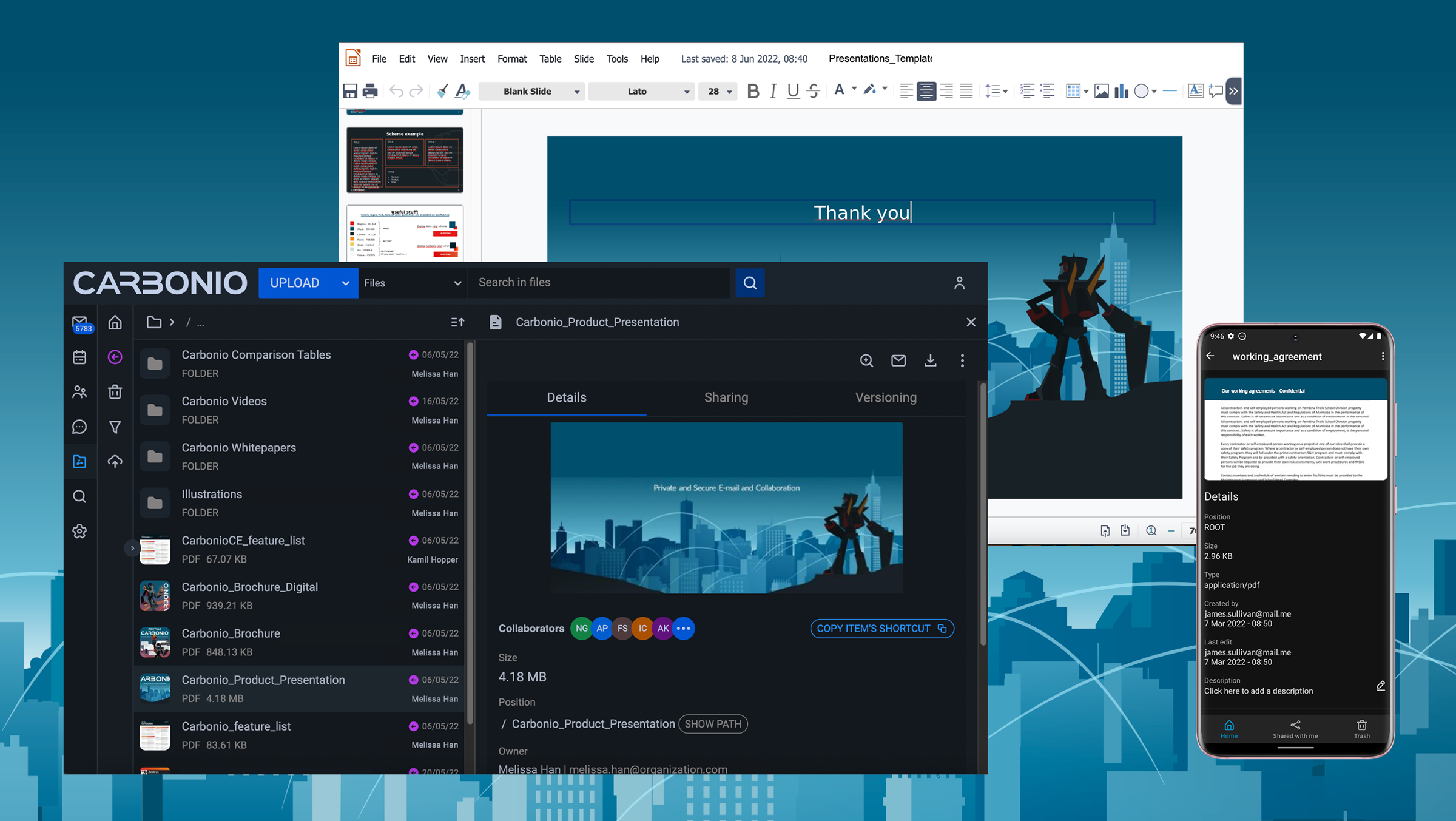 |