Chrome DevTools is a set of authoring, debugging, and profiling tools built into Google Chrome.
N/A
Rencore Code (SPCAF)
Score8.8 out of 10
Enterprise companies (1,001+ employees)
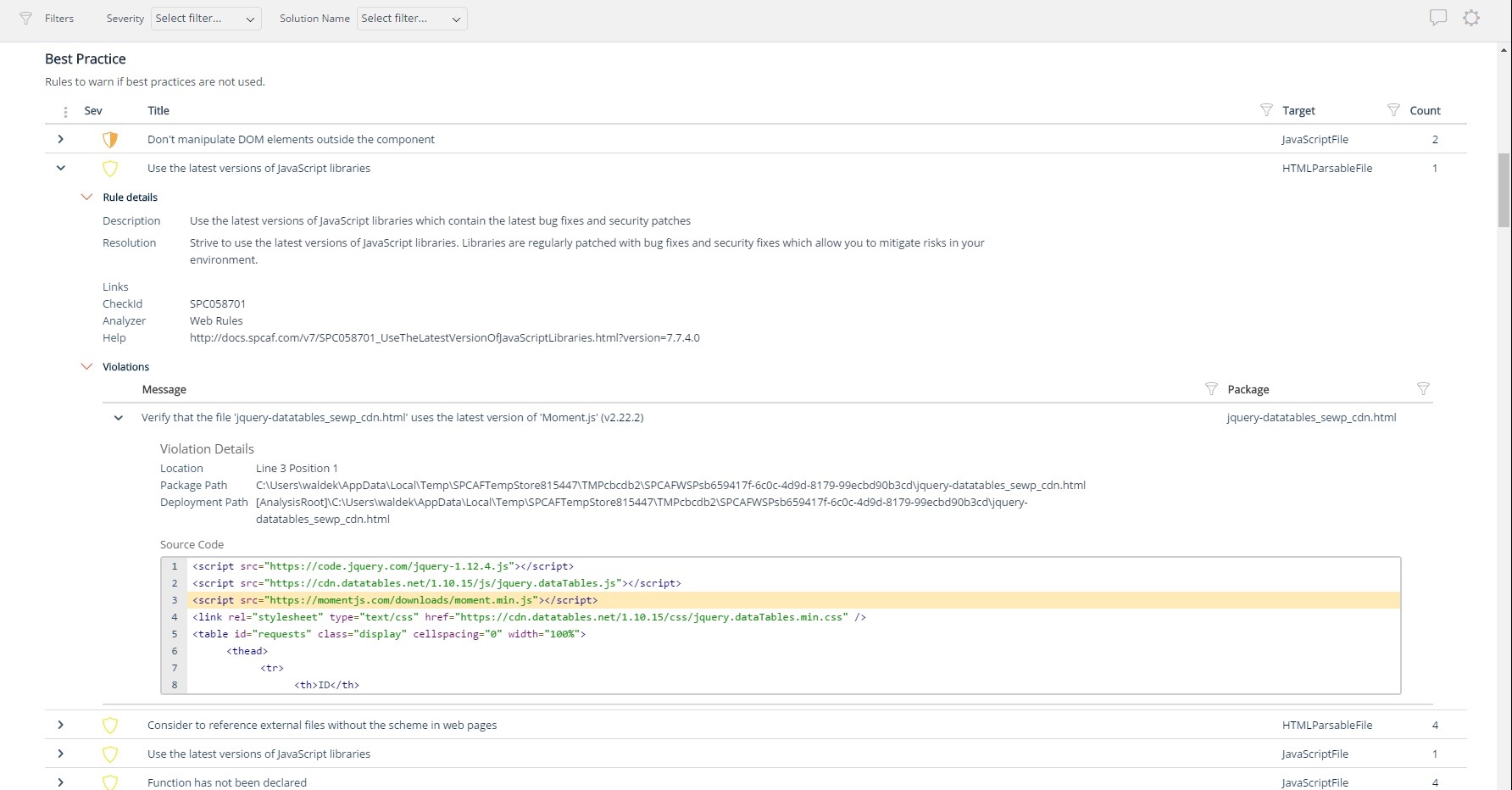
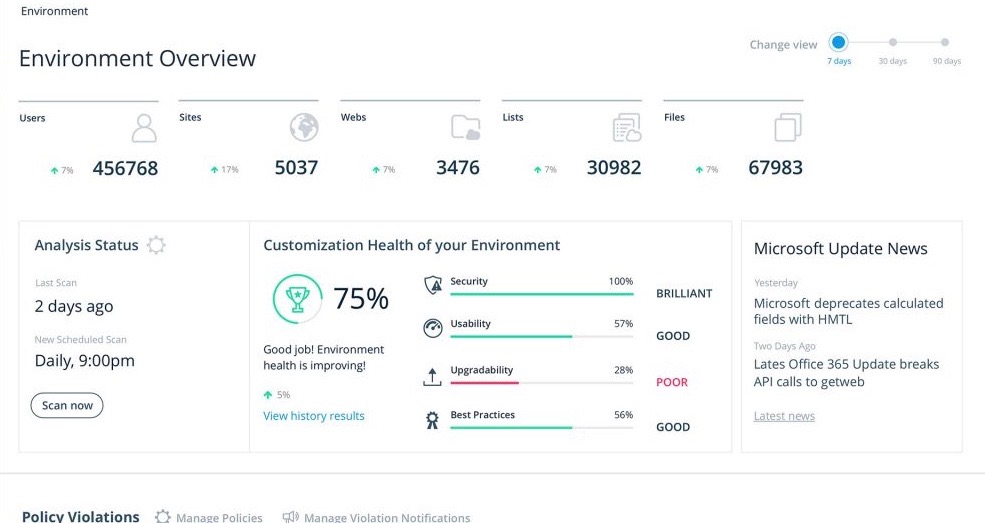
Many organizations that use Office 365 are exposed to security risks that they are unaware of. As they extend SharePoint to meet their business needs, they build applications using technologies that range from end-user Microsoft Flow to developer-focused SharePoint Framework. Unfortunately, all of these custom applications are capable of circumventing the security measures organizations have in place exposing the organization and its data to security…
Chrome DevTools are great for troubleshooting bugs, broken elements on pages, styling issues, responsiveness, identifying performance issues, third-party connections for data privacy, reviewing cookies and local storage, screenshots in different dimensions. Chrome DevTools are for technical users, so you do need to have a decent understanding of some basics like HTML and CSS to get started using them.
A de minimis incentive was given to thank the reviewer for their time. The incentive was not used to bias or drive a particular response, nor was the incentive contingent on a positive endorsement. More Info
For Microsoft shops that are doing custom development on the Microsoft cloud platform in Office 365 and Azure, the Rencore toolset is an absolute must, especially if you are involved in converting farm solutions to cloud, or just moving into cloud development for the first time.
A de minimis incentive was given to thank the reviewer for their time. The incentive was not used to bias or drive a particular response, nor was the incentive contingent on a positive endorsement. More Info
Unique expert knowledge of their target platforms. Not many companies have such a unique position in their target market. Their employees have a deep understanding of SharePoint, Office 365 and Azure and also regularly advise Microsoft on these matters.
Community involvement and contribution to open source projects. Key employees at Rencore are considered thought leaders in their area of expertise and contribute to high profile Microsoft open source initiatives.
Rencore's unique position when it comes to code quality analysis in the SharePoint space sets it apart. There's really no alternative.
Platform governance is another Rencore strength. No other product provides the insights into your SharePoint Online environment with full auditing of not only configuration changes but also who changed which code where and when. Again no alternatives exist.
As one delves into DevTools, one encounters a gradually steeper learning curve. You can do a lot very quickly, but to fully utilize DevTools takes time as one explores what it can do.
With many new updates, tools and items are moved, and a comfortable workflow becomes a frustrating search. This often happens when following only slightly outdated tutorials on a given feature, even in Google's own documentation.
The experimental flags, settings, and options are scattered about and a little clunky to configure when one has to make changes in multiple places.
A de minimis incentive was given to thank the reviewer for their time. The incentive was not used to bias or drive a particular response, nor was the incentive contingent on a positive endorsement. More Info
Rencore's product line is of course still a bit of a niche: SharePoint code quality is not something every organization on the planet is concerned with - although Rencore does much more than that.
We feel Rencore's marketing efforts are mainly targeted at technologists. There's a lot of other potential, especially for their platform governance product.
While Chrome DevTools are very powerful, it's not the easiest thing to use, as there are so many different tools built in. It takes some exploring to discover all the options possible within DevTools, but with a little exploring, the DevTools become a very powerful asset. Accessing the basic HTML and CSS inspection is very easy though, and that's the most common usage for the DevTools.
A de minimis incentive was given to thank the reviewer for their time. The incentive was not used to bias or drive a particular response, nor was the incentive contingent on a positive endorsement. More Info
I'm not entirely sure what to rate the support for DevTools, because I don't have any experience dealing with official customer support for DevTools. I would guess the primary support for DevTools would be in a Chrome forum. Typically if I have a question or issue, I am able to find an answer from doing a quick Google search. It's pretty widely used, so it's not difficult to find answers.
A de minimis incentive was given to thank the reviewer for their time. The incentive was not used to bias or drive a particular response, nor was the incentive contingent on a positive endorsement. More Info
I find them pretty much the same, they have the same tools except Firefox doesn't provide the lighthouse functionality. I do prefer firefox's dark theme and colour palette. But I use Chrome Dev tools because of the Light house functionality that analyzes the page load and scores the website on desktop and mobile experience.
A de minimis incentive was given to thank the reviewer for their time. The incentive was not used to bias or drive a particular response, nor was the incentive contingent on a positive endorsement. More Info
I don't know of any products that compete in the space and if there were any, they would not stand a chance against Rencore. Behind any good product is a team of highly skilled individuals, who all have the same goal, who are passionate what they do and lastly, are in it for the betterment of where they started; As Developers themselves. You can't buy that
A de minimis incentive was given to thank the reviewer for their time. The incentive was not used to bias or drive a particular response, nor was the incentive contingent on a positive endorsement. More Info
The clear impact was the amount of time saved code reviewing or going through lines of code marked off by other tools that are not relevant. We cannot put a number on it since the project started off with the tool in place but based on the rules applied it could be as high as 20% of the project time.