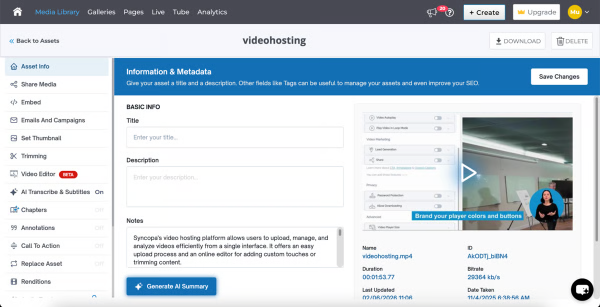
Cincopa is a video knowledge management platform that converts video and document assets into searchable, structured knowledge environments. The solution utilizes Artificial Intelligence (AI) to index multimedia content, allowing users to query libraries using natural language to locate specific information within media files. Key Capabilities Structured Knowledge Environments: The platform organizes Video Assets and Digital Documents into categorized…
$99
per month
Knova
Score7 out of 10
N/A
Knova KM is a full-featured knowledge management software solution for large customer service and support organizations, especially those that must handle complex queries across channels in industries such as high tech, telecommunications, financial services, and the IT help desk. It was supported by Avolin, the company created from the sale of Aptean Vertical Business Applications to ESW Capital in 2018, and is now part of IgniteTech.
N/A
Pricing
Cincopa
Knova
Editions & Modules
Starter
$99.00
per month
Growth
$349.00
per month
No answers on this topic
Offerings
Pricing Offerings
Cincopa
Knova
Free Trial
No
No
Free/Freemium Version
No
No
Premium Consulting/Integration Services
No
No
Entry-level Setup Fee
Optional
No setup fee
Additional Details
—
—
More Pricing Information
Features
Cincopa
Knova
Video Marketing
Comparison of Video Marketing features of Cincopa and Knova
Feature
Cincopa
8.6
17 Ratings
13% above category average
Knova
-
Ratings
Lead generation
7.014 Ratings
00 Ratings
Video personalization
9.914 Ratings
00 Ratings
eCommerce
8.76 Ratings
00 Ratings
Support for advertisements
8.59 Ratings
00 Ratings
Video SEO
8.913 Ratings
00 Ratings
Integration to Marketing Automation
8.69 Ratings
00 Ratings
Video Platform Integrations
Comparison of Video Platform Integrations features of Cincopa and Knova
Feature
Cincopa
8.2
5 Ratings
28% above category average
Knova
-
Ratings
Integration to Salesforce.com
8.24 Ratings
00 Ratings
Integration to Marketo
8.24 Ratings
00 Ratings
Integration to HubSpot
8.35 Ratings
00 Ratings
Video Security
Comparison of Video Security features of Cincopa and Knova
Feature
Cincopa
9.2
16 Ratings
7% above category average
Knova
-
Ratings
Video access controls
9.016 Ratings
00 Ratings
User management
9.016 Ratings
00 Ratings
Video link sharing
9.915 Ratings
00 Ratings
Internal video
9.013 Ratings
00 Ratings
External video
9.014 Ratings
00 Ratings
Video Player
Comparison of Video Player features of Cincopa and Knova
Feature
Cincopa
9.0
19 Ratings
9% above category average
Knova
-
Ratings
Player customization
9.019 Ratings
00 Ratings
Embedded videos
9.018 Ratings
00 Ratings
Video quality / Bandwidth controls
9.016 Ratings
00 Ratings
Mobile compatibility
9.017 Ratings
00 Ratings
Video Analytics
Comparison of Video Analytics features of Cincopa and Knova
Feature
Cincopa
9.9
14 Ratings
23% above category average
Knova
-
Ratings
Per viewer tracking
10.013 Ratings
00 Ratings
Per video tracking
9.914 Ratings
00 Ratings
Video analytics dashboard
9.712 Ratings
00 Ratings
Video Hosting, Management & Storage
Comparison of Video Hosting, Management & Storage features of Cincopa and Knova
Feature
Cincopa
8.7
15 Ratings
1% above category average
Knova
-
Ratings
On-Demand video
9.010 Ratings
00 Ratings
Live streaming
9.06 Ratings
00 Ratings
Video upload & format support
8.115 Ratings
00 Ratings
Video library / File management
9.015 Ratings
00 Ratings
Video portal
8.110 Ratings
00 Ratings
Video Engagement
Comparison of Video Engagement features of Cincopa and Knova
I would say that Cincopa is a first-stop for any dev project without an internal gallery option. This is especially true if the person in charge of content or building the galleries is not a coder. Cincopa makes designing a good looking gallery and inserting it into nearly any webpage a pretty simple process, so it is a great starting place. There may be other options that would fit a different development project better (internal gallery functions or a full-scale DAM with importable galleries), but for our purposes Cincopa was (and is) a perfect fit.
A de minimis incentive was given to thank the reviewer for their time. The incentive was not used to bias or drive a particular response, nor was the incentive contingent on a positive endorsement. More Info
We expereienced an upgrade by Aptean in March 2014 and it actually created issues with our interfaces to Word and well as performance issues. As of November, we have most of the performance issues resolved, however our interface with Word is still not working. It takes alot of upfront work to convert with Word and with the upgrade that was affected. Authors are still frustrated with many issues in the formatting and editing of existing data. A vital tool to update the product home pages has not been available except for sporadic late night periods since the upgrade in March. Overall, many authors are not happy with this knowledge management tool
Aptean offers simple access to Knowledge Management for our Clients, Customer Support teams as well as internal support teams. Allows our knowledge management team the ability to provide consistent and up-to-date processes and troubleshooting tips for our associates as well as ADP Clients.
Aptean provides an easy to use user interface with tools for authors that mimic Microsoft Word (Cut, Paste, Spell Check, Bullets, Indentation etc). It also provides an easy to user user interface for our associates in accessing the Knowledge Management solutions. The Search tool is very powerful and allows the users quick access to the information they need!
In the more than 3 years that we have been using Consona/Aptean, we have had very little down time. This is important to our authors as well as end users in being able to access the information. Allowing the authors the ability to update the information in near real time is another key feature of keeping our information current.
The number of pictures for the upload should be slightly higher.
The previous calculation of the traffic is difficult.
If many pictures have to be deleted from a gallery, that does not happen so fast, because only 50 pictures are loaded. Then you have to scroll all the way down and wait until the next 50 images are loaded, in order to be able to mark them for deletion. This takes a while with 800 pictures for example.
We have experienced some slowness with importing pictures into our Aptean application. While they do eventually complete, it is very timeconsuming when several images are needed. Definitely tries our patience, or consider not including them at all!
Some of the formatting issues transfering our information from Word to Aptean are still challenging and require too much manual intervention than necessary.
Many business units are using the Aptean product for knowledge management and a change now would be too crucial to the processes that the associates are becoming familiar with using. We have spent a lot of time promoting our Aptean Knowledge Management tool and interfaced it with our call tracking system.
Cincopa is very easy to use, especially to the uninitiated. You don't need a degree in CS or years of experience to set-up a fantastic looking gallery. The interface is self-explanatory for the most part and very easy to use. The drag-and-drop functionality makes it simple and inviting for all users.
A de minimis incentive was given to thank the reviewer for their time. The incentive was not used to bias or drive a particular response, nor was the incentive contingent on a positive endorsement. More Info
Cincopa has nice templates that are easy to use. The images can be moved about, more images added, and the size changed.
I particularly like the Pinterest style template, as it fits in well with the number of images that I need to display on my website. The more choices displayed, the more likely customers are to order.
A de minimis incentive was given to thank the reviewer for their time. The incentive was not used to bias or drive a particular response, nor was the incentive contingent on a positive endorsement. More Info
The video that we uploaded to our website will show prospects in the area around our apartment community and hopefully give them a good idea of how close they can be to work/school.
Our video will result in more apartments being rented which will have a positive impact on our ROI.
Our video will give residents and prospects a positive image of our community.
A de minimis incentive was given to thank the reviewer for their time. The incentive was not used to bias or drive a particular response, nor was the incentive contingent on a positive endorsement. More Info
Increased Employee Effciency adding ability to look up processes and troubleshooting tips is invaluable.
Ability to share information with our Client Facing interface, which results in better customer service. Encouraging ADP associates and clients to become more self sufficient is what we're all about!
Ability to keep the information current with the effciency of the product.