Clockboost vs. Toggl Track

Overview
ProductRatingMost Used ByProduct SummaryStarting Price
Clockboost
Score 0.0 out of 10
N/A
ClockBoost is a time tracking and productivity platform designed for small teams and remote companies. It helps managers gain visibility into daily work activity, reduce unproductive hours, and organize task flow without micromanagement. Key Features: • Automatic time tracking with idle time detection • Task and project boards with assignment tracking • Daily and weekly performance summaries • Activity insights by user, task, and time spent • Lightweight…
$6.40
per month per user
Toggl Track
Score 9.2 out of 10
N/A
A solution for employee time tracking software that allows your team to track time on multiple platforms with just one click, featuring integrations with 100+ apps via browser extensions, and native calendar and integrations for any preferred project management tools.
$10
per month
Pricing
ClockboostToggl Track
Editions & Modules
Starter
$6.40
per month per user
Standard
$9.60
per month per user
Growth
$15
per month per user
Starter
$69.12
per year per user
Standard
$103.68
per year per user
Growth
$180
per year per user
Enterprise
Tailored Solutions
Starter
$10.00
per month
Premium
$20.00
per month
Enterprise
Custom
Offerings
Pricing Offerings
ClockboostToggl Track
Free Trial
YesYes
Free/Freemium Version
NoYes
Premium Consulting/Integration Services
NoNo
Entry-level Setup FeeNo setup feeNo setup fee
Additional DetailsClockBoost is billed per user, per month or per year. A 3-month free trial is available with full feature access and no credit card required. Enterprise pricing is customized based on team size and needs. Discounts are available for annual billing and larger teams.
More Pricing Information
Community Pulse
ClockboostToggl Track
Best Alternatives
ClockboostToggl Track
Small Businesses
Dayforce Powerpay
Dayforce Powerpay
Score 9.3 out of 10
Dayforce Powerpay
Dayforce Powerpay
Score 9.3 out of 10
Medium-sized Companies
TimeClock Plus
TimeClock Plus
Score 9.5 out of 10
TimeClock Plus
TimeClock Plus
Score 9.5 out of 10
Enterprises
Zoho People
Zoho People
Score 8.9 out of 10
Zoho People
Zoho People
Score 8.9 out of 10
All AlternativesView all alternativesView all alternatives
User Ratings
ClockboostToggl Track
Likelihood to Recommend
-
(0 ratings)
9.7
(38 ratings)
Usability
-
(0 ratings)
9.3
(3 ratings)
Support Rating
-
(0 ratings)
8.6
(9 ratings)
User Testimonials
ClockboostToggl Track
Likelihood to Recommend
Geeks
No answers on this topic
Toggl
I have been using Toggl for about seven years now, and I absolutely love it. It keeps me on track with the tasks I complete throughout the day. Tracking my time makes me more accountable for the work I produce and how much time my work takes. Having the breakdown of my tasks helps inform decisions on hiring support staff. I can see exactly where my time goes and then formulate a strategy to either bring in more help, delegate work, or re-prioritize. When coupled with other productivity apps (I particularly use ToDoist), you can unlock even more of Toggl's power. Toggl Track isn't so much a checklist tool--it's a time tracker; but when I integrate my to-do app with the time tracking, I can quickly and easily switch between tasks without disrupting workflow.
Read full review
Pros
Geeks
No answers on this topic
Toggl
  • Toggl integrates smoothly across multiple devices. I can seamlessly move from the field on my phone to the office on my computer and utilize Toggl the entire time.
  • It has great customization. Setting up multiple customers in a variety of ways is easy and quick to do. We haven't found something we needed that we couldn't set up.
  • The reporting is clean and informative. Reports can be generated for multiple criteria.
Read full review
Cons
Geeks
No answers on this topic
Toggl
  • I am genuinely trying to come up with room for improvement, but I am struggling
  • Toggl is seriously my favorite tool I use as a freelancer, and they offer so much functionality for free - that's why I always write reviews
  • Maybe they could make it a little easier to adjust time tracking mistakes (leaving the timer running too long) -- I have to do several clicks to fix it and I make this error frequently
Read full review
Usability
Geeks
No answers on this topic
Toggl
Very easy to use, can enter projects and tasks on the fly, can use either a timer or enter hours later manually, the interface is simple and intuitive. Has a mobile app that is also easy to use.
Read full review
Support Rating
Geeks
No answers on this topic
Toggl
I haven't needed much support from Toggl, as it's mostly come from a small team trying out the tool. I'm not entirely sure what the best way to reach them would be if I did need them. I'm also not sure how responsive they would be to support requests. But I think it's positive that I have not needed them
Read full review
Alternatives Considered
Geeks
No answers on this topic
Toggl
One year ago I compared it to several tools, trying to use them in parallel. Now I don't remember the exact names of those tools, but Toggl was the best for its simplicity. It is easier to use, with fewer clicks and hence less destruction
Read full review
Return on Investment
Geeks
No answers on this topic
Toggl
  • My timetracking needs are simple, so this is a great tool for me. Start the timer, stop the timer as client work is performed, whether that is uninterrupted time or not.
  • It is very easy to review work time invested for each of my clients, making it easy for me to track my daily time and review monthly hours for preparing invoices.
  • Daily time is automatically aggregated.
  • Each time entry can be tagged with work activity, or projects can be segmented and time assigned to the segments with start and stop times.
Read full review
ScreenShots

Clockboost Screenshots

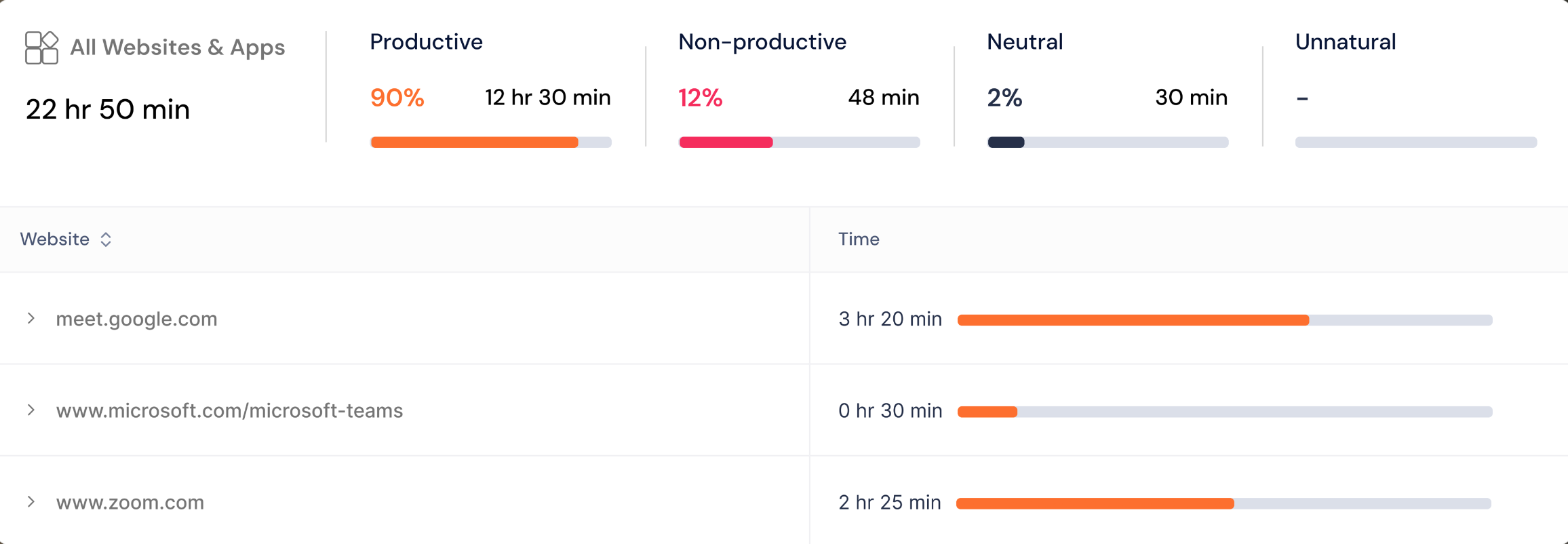
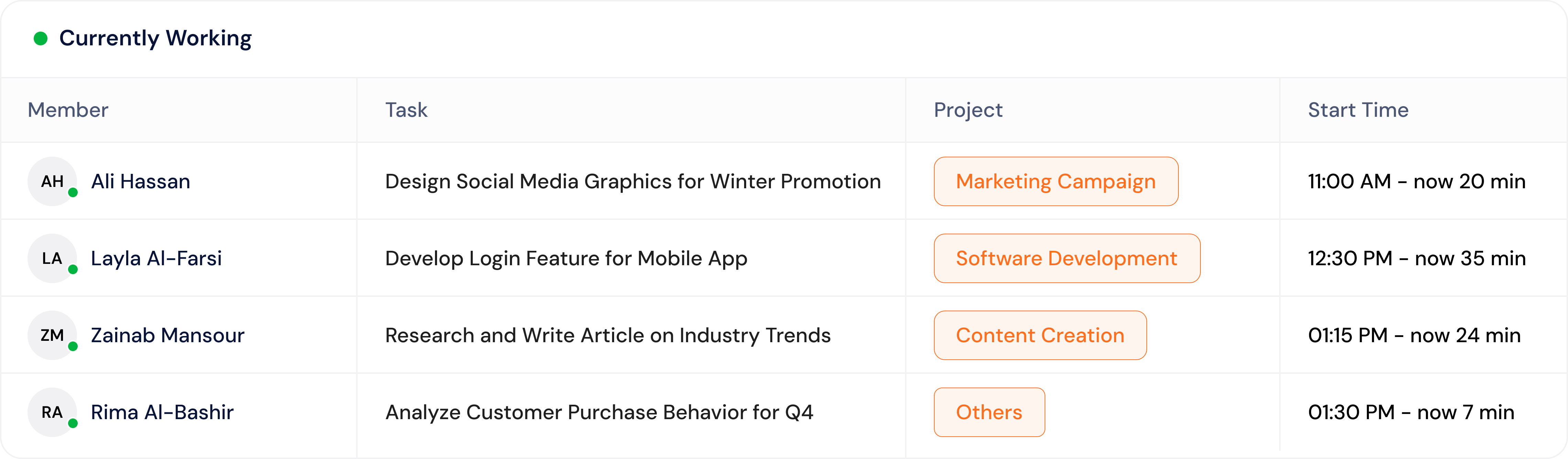
Screenshot of the dashboard view with active task tracking. Shows real-time task tracking with project names and total time spent on each task that day.Screenshot of an idle time percentage breakdown. Displays idle minutes per user to highlight productivity gaps and reduce burnout or underperformance.Screenshot of a website and app usage breakdown. Shows a detailed view of time spent on websites and apps, categorized as productive, non-productive, neutral and unnatural.Screenshot of a visual breakdown of top projects by time spent. Easily spot where team efforts are going across different categories.Screenshot of a display of what each team member is working on in real time, including task name, project, and how long they’ve been active. ClockBoost gives managers instant visibility without needing constant check-ins or status updates.