Cloud Elements (discontinued) vs. resynced.io

Overview
ProductRatingMost Used ByProduct SummaryStarting Price
Cloud Elements (discontinued)
Score 5.0 out of 10
N/A
Cloud Elements was a cloud API integration service acquired by UiPath in 2021. It used cooperative apps to connect an organization’s customers, partners and employees to the cloud services they use. The product was discontinued in 2023.N/A
resynced.io
Score 0.0 out of 10
N/A
resynced.io is a platform used to keep data in sync across different tools like monday.com, Google Sheets, Notion, and Smarsheet. It supports both one-way and two-way synchronization, so that the user decides whether changes flow in a single direction or stay in sync across both platforms. The goal of resynced.io is to reduce the need for manual data copying or repetitive updates between tools. For example, if a team manages tasks in monday.com but builds reports in Google…
$29
per month
Pricing
Cloud Elements (discontinued)resynced.io
Editions & Modules
No answers on this topic
Micro
$29
per month (500 items in sync & 5 active syncs)
Starter
$59
per month (1000 items in sync & 10 active syncs)
Standard
$119
per month (5000 items in sync & 20 active syncs)
Pro
$359
per month (25000 items in sync & 30 active syncs)
Custom
Custom Pricing
Offerings
Pricing Offerings
Cloud Elements (discontinued)resynced.io
Free Trial
YesYes
Free/Freemium Version
NoNo
Premium Consulting/Integration Services
YesYes
Entry-level Setup FeeNo setup feeNo setup fee
Additional DetailsDiscount of up to 20% for annual pricing.
More Pricing Information
Best Alternatives
Cloud Elements (discontinued)resynced.io
Small Businesses
Make
Make
Score 9.3 out of 10
Make
Make
Score 9.3 out of 10
Medium-sized Companies
IBM App Connect
IBM App Connect
Score 9.2 out of 10
IBM App Connect
IBM App Connect
Score 9.2 out of 10
Enterprises
IBM App Connect
IBM App Connect
Score 9.2 out of 10
IBM App Connect
IBM App Connect
Score 9.2 out of 10
All AlternativesView all alternativesView all alternatives
User Ratings
Cloud Elements (discontinued)resynced.io
Likelihood to Recommend
8.6
(8 ratings)
-
(0 ratings)
User Testimonials
Cloud Elements (discontinued)resynced.io
Likelihood to Recommend
Discontinued Products
Cloud Elements shines when you want to offer multiple options to the user on a type of system, such as supporting integration to CRM and wanting to offer Dynamics, Salesforce, and HubSpot on equal footing. If you only have a single integration with a single system, using Cloud Elements adds an unnecessary layer of abstraction.
Read full review
LeanyLabs
No answers on this topic
Pros
Discontinued Products
  • The API itself is very robust and easy to use, being a standard REST interface, standard HTTP response codes, well-packaged error messages, etc.
  • Their uptime is great! I think I've seen one (short) 5-minute' blip' the entire time we've been connected for any type of primary function.
  • Their support is top notch, they respond quickly, and the team that works with you is communicative and knowledgable.
Read full review
LeanyLabs
No answers on this topic
Cons
Discontinued Products
  • The only thing I can think of that they could improve is the quality of the assets they produce in the go-to-market process. This is a huge value add service, but the quality of what was produced was lower than what we would have produced internally. We spent more time going back and forth on the assets than it would have taken us to build them from scratch.
Read full review
LeanyLabs
No answers on this topic
Alternatives Considered
Discontinued Products
At the time we found Cloud Elements we found no other option that had a Unified API for cloud storage providers.
Read full review
LeanyLabs
No answers on this topic
Return on Investment
Discontinued Products
  • Not my area of expertise, but it made my job as an implementer much easier, especially after finishing the first integration.
Read full review
LeanyLabs
No answers on this topic
ScreenShots

resynced.io Screenshots

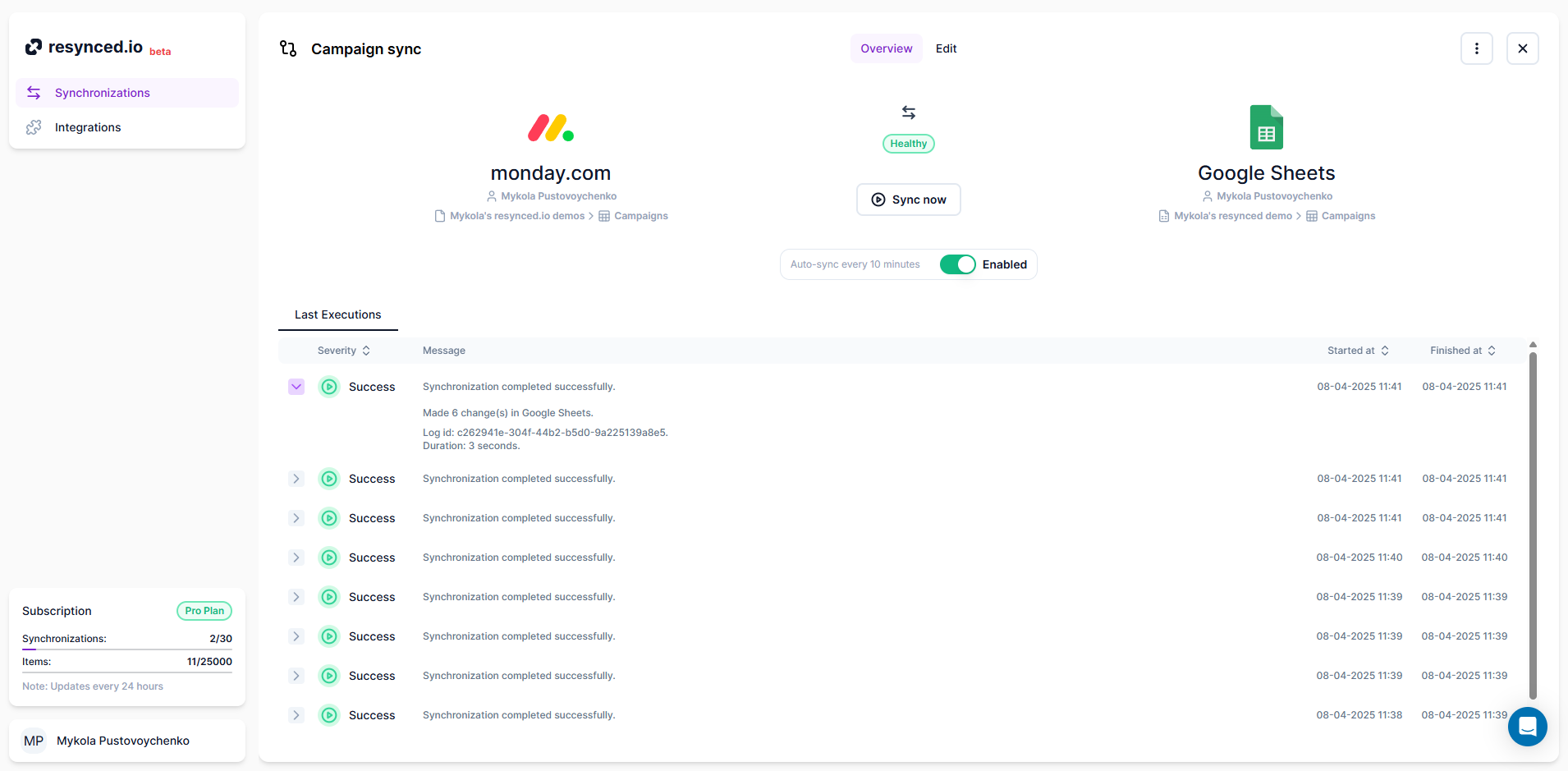
Screenshot of the synchronization editor, which is the heart of resynced.io This is how the synchronization is created. Here, the user can decide on sync sources, sync direction, and map columns between their tools.Screenshot of how resynced.io allows having multiple synchronizations between different tools managed in one place.Screenshot of where it's shown every synchronization has a detailed log for every execution, so users can see a summary of each sync and, in case of an error, a detailed explanation with actionable steps.