Coda by Grammarly vs. Lightning Tools Lightning Conductor

Overview
ProductRatingMost Used ByProduct SummaryStarting Price
Coda by Grammarly
Score 8.9 out of 10
N/A
Coda, acquired by Grammarly in early 2025, is a template-based document creation and collaboration solution, supporting a variety of use cases.
$0
per month
Lightning Tools Lightning Conductor
Score 9.0 out of 10
Mid-Size Companies (51-1,000 employees)
The Lightning Conductor is a content aggregation tool for Microsoft SharePoint Online and Microsoft Teams. Users can build rich, modern content reports based upon SharePoint lists, SharePoint Search, Microsoft Graph or Microsoft 365 Groups. Content can be aggregated from lists and libraries, and other applications such as Planner, To Do, OneDrive, and Teams.
$2,200
per year per installation
Pricing
Coda by GrammarlyLightning Tools Lightning Conductor
Editions & Modules
Free
$0.00
per month
Pro
$10.00
per month per doc maker; unlimited editors (paid annually)
Team
$30.00
per month per doc maker; unlimited editors (paid annually)
Enterprise
Custom Pricing
Lightning Conductor WSP
From 1950
per year One WFE
Lightning Conductor Enterprise Edition
POA
per year Four or more WFE
Lightning Conductor Online
From 2200
per year per installation
Lightning Conductor Plus (Includes Data Viewer)
From 2500
per year per installation
Lightning Conductor Online Enterprise Edition (>10,000 users)
POA
per year per installation
Offerings
Pricing Offerings
Coda by GrammarlyLightning Tools Lightning Conductor
Free Trial
YesYes
Free/Freemium Version
YesNo
Premium Consulting/Integration Services
YesYes
Entry-level Setup FeeNo setup feeNo setup fee
Additional DetailsWith Coda, you only pay for Doc Makers. Often one person creates a doc, others edit it, and some simply observe from afar. Instead of charging for everyone, we only charge for the people who create docs. Interested in enterprise pricing? Visit coda.io/enterprisePrices stated are minimum per installation for "stock" products. $2.20 per user/year on top of base price. Enterprise editions can be amended to suit business needs if deemed necessary, additional costs incurred and TBD. All packages include free technical support. Free upgrades available to latest versions of tool as they are released. (online version)
More Pricing Information
Community Pulse
Coda by GrammarlyLightning Tools Lightning Conductor
Features
Coda by GrammarlyLightning Tools Lightning Conductor
Project Management
Comparison of Project Management features of Product A and Product B
Coda by Grammarly
-
Ratings
Lightning Tools Lightning Conductor
8.6
2 Ratings
10% above category average
Task Management00 Ratings8.82 Ratings
Search00 Ratings8.42 Ratings
Best Alternatives
Coda by GrammarlyLightning Tools Lightning Conductor
Small Businesses
Stackby
Stackby
Score 9.0 out of 10
Stackby
Stackby
Score 9.0 out of 10
Medium-sized Companies
Troop Messenger
Troop Messenger
Score 9.8 out of 10
Troop Messenger
Troop Messenger
Score 9.8 out of 10
Enterprises
HCL Connections
HCL Connections
Score 9.0 out of 10
HCL Connections
HCL Connections
Score 9.0 out of 10
All AlternativesView all alternativesView all alternatives
User Ratings
Coda by GrammarlyLightning Tools Lightning Conductor
Likelihood to Recommend
8.0
(26 ratings)
9.0
(4 ratings)
Likelihood to Renew
9.1
(2 ratings)
9.1
(1 ratings)
Usability
7.6
(3 ratings)
-
(0 ratings)
Availability
9.1
(1 ratings)
-
(0 ratings)
Performance
9.1
(1 ratings)
-
(0 ratings)
Support Rating
7.8
(2 ratings)
9.1
(1 ratings)
Implementation Rating
8.2
(1 ratings)
-
(0 ratings)
Configurability
8.2
(1 ratings)
-
(0 ratings)
Ease of integration
4.5
(1 ratings)
-
(0 ratings)
Product Scalability
9.1
(1 ratings)
-
(0 ratings)
Vendor post-sale
7.3
(1 ratings)
-
(0 ratings)
User Testimonials
Coda by GrammarlyLightning Tools Lightning Conductor
Likelihood to Recommend
Grammarly
Coda is great to build a place for your users to go to and see information. It is easy to navigate through and the variety of content creation is great. However, it is not always easy to create what you want and there is a lot of playing around and learning. Coda also sometimes misses some functionality which is expected. For example, downloading a list of users that have access to the platform. Being able to send push notifications when a new page has been created etc. Overall it is a good tool to use just be prepared to invest time!
Read full review
Lightning Tools
Having experience of SharePoint On Premise and also SharePoint Online, there isn't an out of the box app/webpart that enables you to 'roll up content' from a variety of source's (in my case SP Lists, but there are many other data sources it works with) across site collections with an easy to use and intuitive interface which is what Lightning tools excels at.
Read full review
Pros
Grammarly
  • Flexibility. It's easy to get started on a small scale, but add more complex organization strategies as needed.
  • Integrations. It's simple to ingest data from sources like Zapier for time-saving automations.
  • Useful components. View table data across different formats like cards or custom detail views.
Read full review
Lightning Tools
  • Aggregate documents across SharePoint site & libraries
  • Filtering for owner/person responsible & due dates
  • Ease of end-user filtering on columns
  • Color-coding & other formatting
Read full review
Cons
Grammarly
  • It takes getting used to in terms of how the formulas per column is implemented, in contrast to how we build tables in Excel. For organization/team purchase, it would be worth considering having a training for the core team of users. Right now, we do a lot of self-learning.
  • Inability to email charts or image without these objects being hosted on a third party. The community has been great in providing workarounds but it would be much more convenient to be able to have such ability natively.
  • APAC Support. I'm based in Malaysia, due to timezone differences, even with a livechat implemented, the support for each step and conversation takes up to 24 hours per response. Having some hours covered in our timezone would greatly improve customer support experience.
Read full review
Lightning Tools
  • Mobile Friendly
  • Calendar/Gantt views
  • Complex/Custom Logic
Read full review
Likelihood to Renew
Grammarly
Coda is definitely something that has been proven to drive positive impact in our organization. We have many divisions that can benefit from this that we have yet to explore. It would definitely be worth renewing.
Read full review
Lightning Tools
No answers on this topic
Usability
Grammarly
There is a little bit of a learning curve on where to point and click to add in different elements and make edits. But it is still very manageable once you get the hang of it. I do still have some issues with some of my connected pages updating each other when I don't want them to sync. So I'll end up editing one page, and it will make the same edits on another page.
Read full review
Lightning Tools
No answers on this topic
Reliability and Availability
Grammarly
So far in the past year, we haven't had situations that Coda has gone down for us which is great.
Read full review
Lightning Tools
No answers on this topic
Performance
Grammarly
We haven't done any integrations - the initial part of our experience we found that for docs with complex formulas, the page tends to load slowly but in recent months, Coda has improved and optimized the loading times in general and we generally don't find any problems in terms of speed anymore.
Read full review
Lightning Tools
No answers on this topic
Support Rating
Grammarly
Mainly due to timezone differences. I think Coda's support in general is well implemented and executed. They know their stuff and are helpful. But since I'm not in the same timezone, solution rates are slower for me, and that's not something I prefer. I work in customer service, too, and more often than not, time is important. Shortening the solution time would be a much greater experience.
Read full review
Lightning Tools
The Lightning Tools support team responds quickly, and team members are very friendly and helpful.
Read full review
Implementation Rating
Grammarly
I'm relatively inexperienced but this experience is meaningful. It would have been nice to have some guidance from Coda so that we understood more on Coda's purpose and potential.
Read full review
Lightning Tools
No answers on this topic
Alternatives Considered
Grammarly
While all of the products listed have great features and platforms, there was always one thing missing from them that I would need to get from another application. Coda was the first one we used that really combined some of the best parts of those products and allowed us to use it in one place. I also appreciate the flexibility of creating your own framework and workflow, unlike in other tools where you have to follow how they capture data and organize projects.
Read full review
Lightning Tools
I haven't found another product to compare this one to. Only in SharePoint Online which has a similar App 'Highlight Webpart' ... it's far too complicated to set up and requires learning yet another language and exporting and importing via PowerShell to get any real results that would be useful.
Read full review
Scalability
Grammarly
I think scalability is definitely good here since it's based on number of doc makers. Implementation into each dept becomes simpler. That being said, due to the nature of our work, we find it easier that we have a "super user" and then a team of other doc makers. This would make the doc creation and management more efficient.
Read full review
Lightning Tools
No answers on this topic
Return on Investment
Grammarly
  • Increased insight for all stakeholders involved--both in terms of overview and details
  • Better grip on issues and escalations--reduced friction, confusion, and higher clarity on status, next actions, and ownership.
  • Reduced time required by those who need to maintain all information. Record (a detail) once and use multiple times.
Read full review
Lightning Tools
  • Policies easier to portray
Read full review
ScreenShots

Coda by Grammarly Screenshots

Screenshot of One unified surface means ideas aren’t limited to a file type. A project doesn’t have to be split across tabs of documents, spreadsheets, and apps.Screenshot of Packs are a version of integrations or plug-ins. They connect the  doc to the apps in use every day, so as to pull live data in or push updates out automatically.Screenshot of Drag-and-drop templates provide a quick-start shortcut to commonly used templates like Upvote/Downvote, To-Do List, and Team Sentiment Tracker.Screenshot of Slice, dice, and chop data using Views. A View is a mirror of data that can be tailored to unique needs, all while staying connected to the source.Screenshot of When accessing the doc from a mobile device, it should feel like an app. Doc pages become tabs, buttons become swipe actions and doc notifications become push notifications.Screenshot of The Doc Gallery contains docs self-published by the Coda community. These published docs have a webpage-like interface and have varying levels of interactivity like view, play or edit. Find and share tools, templates, tiny apps, interactive handbooks, and anything else that can be built in Coda.

Lightning Tools Lightning Conductor Screenshots

Screenshot of MODERN SHAREPOINT LIST ROLLUP
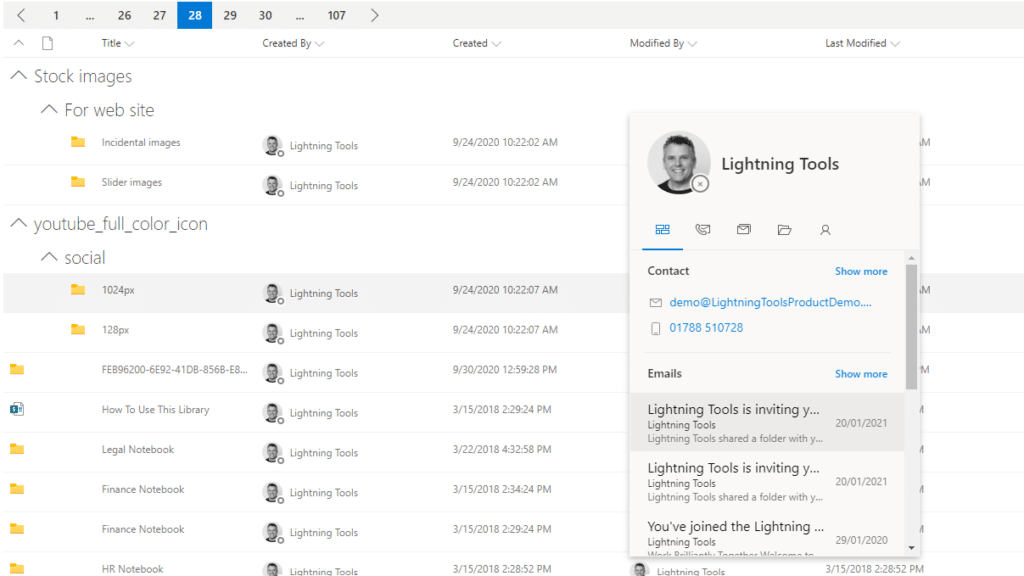
The Lightning Conductor is a SharePoint Content Aggregator that can be configured quickly by business users. The Lightning Conductor can be used to aggregate content from SharePoint Lists such as Tasks, Document Libraries, Contact Lists, and Custom Lists making it easy to view content in one place even if it is distributed across many sites and site collections. Key data can be highlighted using conditional formatting and data-bars as shown. Content from Search and Microsoft Graph can also be aggregated with the Lightning Conductor.Screenshot of CONTENT AGGREGATION WITHIN MICROSOFT TEAMS
The Lightning Conductor Web Part can be used within Microsoft SharePoint or Microsoft Teams. Even if content is stored within SharePoint sites, it is useful to have aggregated Documents, Tasks, Announcements, Calendars or Custom Lists from multiple sites displayed in a single handy view in Microsoft Teams. The Lightning Conductor can be added as a Teams Tab in any Microsoft Teams Channel.Screenshot of BUILDING REPORTS ON MICROSOFT GRAPH
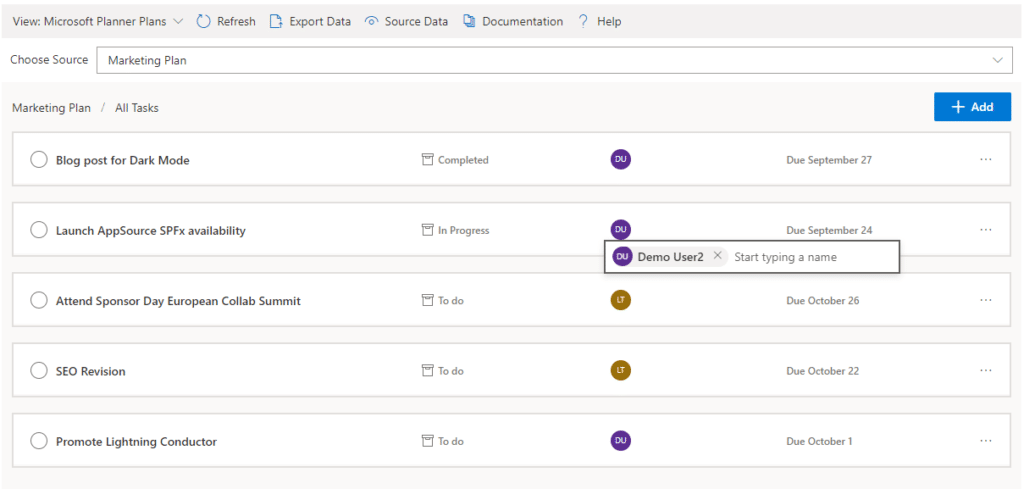
The Lightning Conductor can be used (without code) to aggregate content from Microsoft Graph as well as Search and SharePoint Lists. This example displays Microsoft Planner Plans and Microsoft Planner Tasks where users can Add new Tasks, Assign Users to Planner Tasks, Delete Tasks, and Complete Tasks. The same can be performed on Microsoft To Do items and displayed within Modern SharePoint pages or Microsoft Teams Tabs. The Lighting Conductor can also contain multiple views of content, making it ideal to display all of your tasks from SharePoint Task lists, Microsoft To Do and Microsoft Planner in a single web part or Teams Tab.

*Microsoft Graph Reports are only available for SharePoint Online and not SharePoint 2019.Screenshot of BUILDING REPORTS ON MICROSOFT 365 GROUPS
Powered by Microsoft Graph, the Microsoft 365 Group Rollup Provider enables users to aggregate content by browsing and selecting Microsoft 365 Groups. Within Microsoft 365 Groups, you’ll be able to select entities such as Drive Items, Owners, Members, Planner Plans, Planner Tasks, Events, Posts,  Sites, Lists, and Calendars.

*Microsoft Graph Reports are only available for SharePoint Online and not SharePoint 2019.Screenshot of AGGREGATING USING SEARCH
When performance is critical, search can be used for rollups. The Lightning Conductor offers three data source configurations to get to content. Object Model (Real Time Aggregation from SharePoint Lists), Microsoft Graph (Aggregation from Graph Entities such as Planner, OneDrive, Outlook), and Search. The Search Data Source enables the aggregation of content from large SharePoint lists and libraries when performance is critical. Thousands of documents can be displayed in under a second using Search.Screenshot of HIGHLIGHTING KEY BUSINESS DATA WITHIN VIEWS
End users and Site Owners can highlight the data that is important to them, the data that they need to prioritize. Using conditional formatting, data bars, and icons, conditions can be configured to highlight the data that is most important. Icons and Data Bars can be any color or size desired. Examples include highlighting High Priority tasks, Showing data bars for the completion progress of Tasks, or indicating which tasks are assigned to any particular user.