
Coda by Grammarly vs. ProProfs Project
Coda by Grammarly vs. ProProfs Project
| Product | Rating | Most Used By | Product Summary | Starting Price |
|---|---|---|---|---|
 Coda by Grammarly | N/A | Coda, acquired by Grammarly in early 2025, is a template-based document creation and collaboration solution, supporting a variety of use cases. | $0 per month | |
 ProProfs Project | Mid-Size Companies (51-1,000 employees) | ProProfs Project is an online project management software for managing both teams and multiple projects on one dashboard. From creating project goals and objectives to tracking work progress, this PM tool aims to allow users to meet project deadlines efficiently. The PM tool allows users to communicate with in-house or remote teams - anytime, anywhere. Moreover, the vendor says users can generate insightful reports and accurate invoices in just a few clicks. Along with these features,… | $0 3 Projects |
| Coda by Grammarly | ProProfs Project | |||||||||||||||
|---|---|---|---|---|---|---|---|---|---|---|---|---|---|---|---|---|
| Editions & Modules |
|
| ||||||||||||||
| Offerings |
| |||||||||||||||
| Entry-level Setup Fee | No setup fee | No setup fee | ||||||||||||||
| Additional Details | With Coda, you only pay for Doc Makers. Often one person creates a doc, others edit it, and some simply observe from afar. Instead of charging for everyone, we only charge for the people who create docs. Interested in enterprise pricing? Visit coda.io/enterprise | — | ||||||||||||||
| More Pricing Information | ||||||||||||||||
| Coda by Grammarly | ProProfs Project |
|---|
| Coda by Grammarly | ProProfs Project | ||||||||||||||||||||||||||||||||||||||||||
|---|---|---|---|---|---|---|---|---|---|---|---|---|---|---|---|---|---|---|---|---|---|---|---|---|---|---|---|---|---|---|---|---|---|---|---|---|---|---|---|---|---|---|---|
| Project Management |
| ||||||||||||||||||||||||||||||||||||||||||
| Professional Services Automation |
|
| Coda by Grammarly | ProProfs Project | |
|---|---|---|
| Small Businesses |  Stackby Score 8.9 out of 10 | Stackby Score 8.9 out of 10 |
| Medium-sized Companies |  Troop Messenger Score 9.8 out of 10 |  InEight Score 8.3 out of 10 |
| Enterprises |  HCL Connections Score 9.0 out of 10 | InEight Score 8.3 out of 10 |
| All Alternatives | View all alternatives | View all alternatives |
| Coda by Grammarly | ProProfs Project | |
|---|---|---|
| Likelihood to Recommend | 8.0 (26 ratings) | 8.2 (6 ratings) |
| Likelihood to Renew | 9.1 (2 ratings) | - (0 ratings) |
| Usability | 7.7 (3 ratings) | - (0 ratings) |
| Availability | 9.1 (1 ratings) | - (0 ratings) |
| Performance | 9.1 (1 ratings) | - (0 ratings) |
| Support Rating | 7.8 (2 ratings) | 10.0 (1 ratings) |
| Implementation Rating | 8.2 (1 ratings) | - (0 ratings) |
| Configurability | 8.2 (1 ratings) | - (0 ratings) |
| Ease of integration | 4.5 (1 ratings) | - (0 ratings) |
| Product Scalability | 9.1 (1 ratings) | - (0 ratings) |
| Vendor post-sale | 7.3 (1 ratings) | - (0 ratings) |
| Coda by Grammarly | ProProfs Project | |
|---|---|---|
| Likelihood to Recommend | Grammarly
| ProProfs
 Arindam Saha Senior UX Designer |
| Pros | Grammarly
 Matt Woods Growth Product Manager | ProProfs
|
| Cons | Grammarly
 Pearl Cheah Physics & Application Manager | ProProfs
|
| Likelihood to Renew | Grammarly
Pearl Cheah Physics & Application Manager | ProProfs No answers on this topic |
| Usability | Grammarly
| ProProfs No answers on this topic |
| Reliability and Availability | Grammarly
Pearl Cheah Physics & Application Manager | ProProfs No answers on this topic |
| Performance | Grammarly
Pearl Cheah Physics & Application Manager | ProProfs No answers on this topic |
| Support Rating | Grammarly
Pearl Cheah Physics & Application Manager | ProProfs
|
| Implementation Rating | Grammarly
Pearl Cheah Physics & Application Manager | ProProfs No answers on this topic |
| Alternatives Considered | Grammarly
 Camille Hidalgo Nussbaum, CSM® Project Manager, Creative Technologies | ProProfs
 Carlton Smith Owner |
| Scalability | Grammarly
Pearl Cheah Physics & Application Manager | ProProfs No answers on this topic |
| Return on Investment | Grammarly
| ProProfs
|
| ScreenShots | Coda by Grammarly Screenshots      | ProProfs Project Screenshots  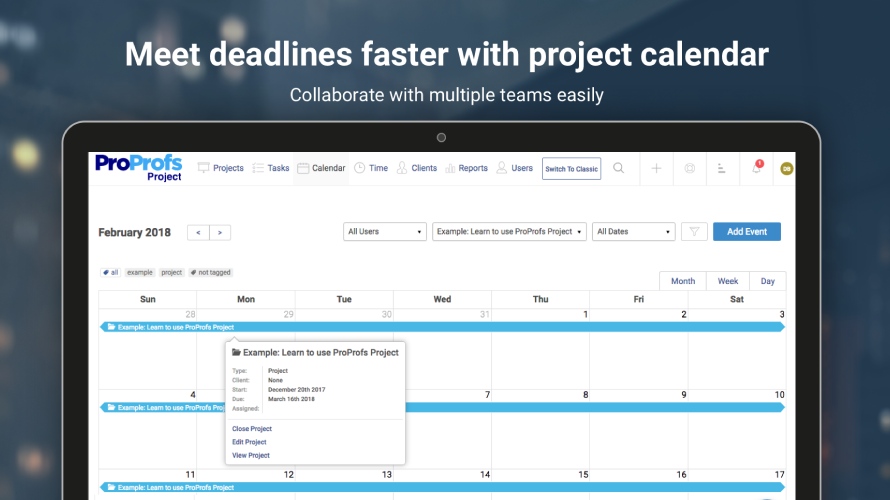   |