DashboardFox vs. Metabase

Overview
ProductRatingMost Used ByProduct SummaryStarting Price
DashboardFox
Score 0.0 out of 10
N/A
DashboardFox is cloud-based business intelligence and dashboard software from 5000fish, built for teams that create and deliver dashboards and reports to clients, departments, or business units. It is priced by monthly active users (MAU) rather than per seat, so organizations pay for a tier instead of for every login, and accounts that do not sign in are not counted. Row-level security, white-label branding, and custom domains are included in every plan, which…
$99
per month Monthly Active User (MAU)
Metabase
Score 8.5 out of 10
N/A
Metabase aims to bring data tools with the simplicity of consumer products to the crufty world of enterprise business intelligence. Their open source analytics and business intelligence applications connect to most commonly used databases to let anyone in a company ask questions, and create dashboards or nightly emails without knowing SQL. Metabase Enterprise enables the user to embed branded analytics into customer applications.
$85
per month
Pricing
DashboardFoxMetabase
Editions & Modules
Starter
$99
per month Monthly Active Users (MAU)
Growth
$249
per month Monthly Active Users (MAU)
Scale
$499
per month Monthly Active Users (MAU)
Starter
$4,995
one-time fee per user
Growth
$9,995
one-time fee per user
Business
$14,995
one-time fee per user
Premium
$19,995
one-time fee per user
Starter
$85
per month (includes 5 users, then $5 per user, per month)
Starter
$85
per month up to 5 users
Pro
$500
per month up to 10 users
Growth
$749
per month (includes 10 users, then $15 per user, per month)
Enterprise
15,000
per year
Open Source
Free
Offerings
Pricing Offerings
DashboardFoxMetabase
Free Trial
YesYes
Free/Freemium Version
NoYes
Premium Consulting/Integration Services
YesNo
Entry-level Setup FeeNo setup feeNo setup fee
Additional DetailsA primary pricing consideration is the licensing model: DashboardFox is priced by monthly active users (MAU), not per seat. You pay for a tier, and only users who actually log in count toward it — recipients who view shared or scheduled reports without logging in are excluded. For teams with many occasional or read-only users, this is often more cost-effective than per-seat BI tools. Feature inclusion is also notable: row-level security, white-label branding, custom domains, and unlimited reports and dashboards are standard on every plan, including the $99/month Starter tier. Higher tiers scale capacity (more MAU, concurrent load, larger datasets, FastCache, Server Sync) and support levels rather than unlocking core features. Connecting data sources incurs no cost — there are no per-connector fees and no ETL requirement. Additional factors for buyers: annual billing provides a 20% discount; every plan includes a 7-day trial with no credit card required; discounts are available for nonprofits, education, government, and agencies/resellers; and for teams preferring to avoid subscriptions, a self-hosted perpetual license is available from $4,995, with the first year of upgrades and priority support included.
More Pricing Information
Community Pulse
DashboardFoxMetabase
Features
DashboardFoxMetabase
BI Standard Reporting
Comparison of BI Standard Reporting features of Product A and Product B
DashboardFox
-
Ratings
Metabase
7.5
4 Ratings
9% below category average
Pixel Perfect reports00 Ratings8.02 Ratings
Customizable dashboards00 Ratings8.04 Ratings
Report Formatting Templates00 Ratings6.44 Ratings
Ad-hoc Reporting
Comparison of Ad-hoc Reporting features of Product A and Product B
DashboardFox
-
Ratings
Metabase
8.3
4 Ratings
3% above category average
Drill-down analysis00 Ratings8.54 Ratings
Formatting capabilities00 Ratings7.44 Ratings
Integration with R or other statistical packages00 Ratings7.82 Ratings
Report sharing and collaboration00 Ratings9.54 Ratings
Report Output and Scheduling
Comparison of Report Output and Scheduling features of Product A and Product B
DashboardFox
-
Ratings
Metabase
8.7
2 Ratings
6% above category average
Publish to Web00 Ratings9.01 Ratings
Publish to PDF00 Ratings9.01 Ratings
Report Versioning00 Ratings8.02 Ratings
Report Delivery Scheduling00 Ratings9.01 Ratings
Data Discovery and Visualization
Comparison of Data Discovery and Visualization features of Product A and Product B
DashboardFox
-
Ratings
Metabase
8.8
4 Ratings
10% above category average
Pre-built visualization formats (heatmaps, scatter plots etc.)00 Ratings8.54 Ratings
Location Analytics / Geographic Visualization00 Ratings10.02 Ratings
Predictive Analytics00 Ratings8.82 Ratings
Pattern Recognition and Data Mining00 Ratings7.82 Ratings
Access Control and Security
Comparison of Access Control and Security features of Product A and Product B
DashboardFox
-
Ratings
Metabase
9.5
4 Ratings
11% above category average
Multi-User Support (named login)00 Ratings8.64 Ratings
Role-Based Security Model00 Ratings10.03 Ratings
Multiple Access Permission Levels (Create, Read, Delete)00 Ratings9.54 Ratings
Report-Level Access Control00 Ratings9.53 Ratings
Single Sign-On (SSO)00 Ratings10.04 Ratings
Mobile Capabilities
Comparison of Mobile Capabilities features of Product A and Product B
DashboardFox
-
Ratings
Metabase
9.0
2 Ratings
15% above category average
Responsive Design for Web Access00 Ratings8.01 Ratings
Mobile Application00 Ratings10.01 Ratings
Dashboard / Report / Visualization Interactivity on Mobile00 Ratings9.02 Ratings
Application Program Interfaces (APIs) / Embedding
Comparison of Application Program Interfaces (APIs) / Embedding features of Product A and Product B
DashboardFox
-
Ratings
Metabase
8.8
3 Ratings
13% above category average
REST API00 Ratings8.93 Ratings
Javascript API00 Ratings9.02 Ratings
iFrames00 Ratings9.02 Ratings
Java API00 Ratings10.01 Ratings
Themeable User Interface (UI)00 Ratings7.02 Ratings
Customizable Platform (Open Source)00 Ratings9.01 Ratings
Best Alternatives
DashboardFoxMetabase
Small Businesses
Yellowfin
Yellowfin
Score 8.6 out of 10
Yellowfin
Yellowfin
Score 8.6 out of 10
Medium-sized Companies
Reveal
Reveal
Score 10.0 out of 10
Reveal
Reveal
Score 10.0 out of 10
Enterprises
Kyvos Semantic Layer
Score 9.5 out of 10
Kyvos Semantic Layer
Score 9.5 out of 10
All AlternativesView all alternativesView all alternatives
User Ratings
DashboardFoxMetabase
Likelihood to Recommend
-
(0 ratings)
8.5
(4 ratings)
Usability
-
(0 ratings)
8.0
(3 ratings)
User Testimonials
DashboardFoxMetabase
Likelihood to Recommend
5000fish
No answers on this topic
Metabase
Metabase is an easy tool to use if you are interested in collecting and aggregating data from multiple platforms. It is also easy to set up and start receiving the data results as a report. It is also easy to integrate with other tools that generate visual reports and take the necessary actions based on the data details.
Read full review
Pros
5000fish
No answers on this topic
Metabase
  • We're currently using it to fetch reports for our products, such as daily sales, pipeline, visits, and attendance reports.
  • Data representation from database directly.
Read full review
Cons
5000fish
No answers on this topic
Metabase
  • Report Types
  • Updates
  • Colour/Branding
Read full review
Usability
5000fish
No answers on this topic
Metabase
Its generally quite easy to use but some SQL is definitely important
Read full review
Alternatives Considered
5000fish
No answers on this topic
Metabase
It does not stack up against Metabase, they complete each other.
Read full review
Return on Investment
5000fish
No answers on this topic
Metabase
  • It is serving us whatever we're looking for, and we've recommended many organizations to implement it if they want better data analytics as it provides better functionality than we will build.
  • As a negative it gets difficult to get control over data to be fetch initially.
Read full review
ScreenShots

DashboardFox Screenshots

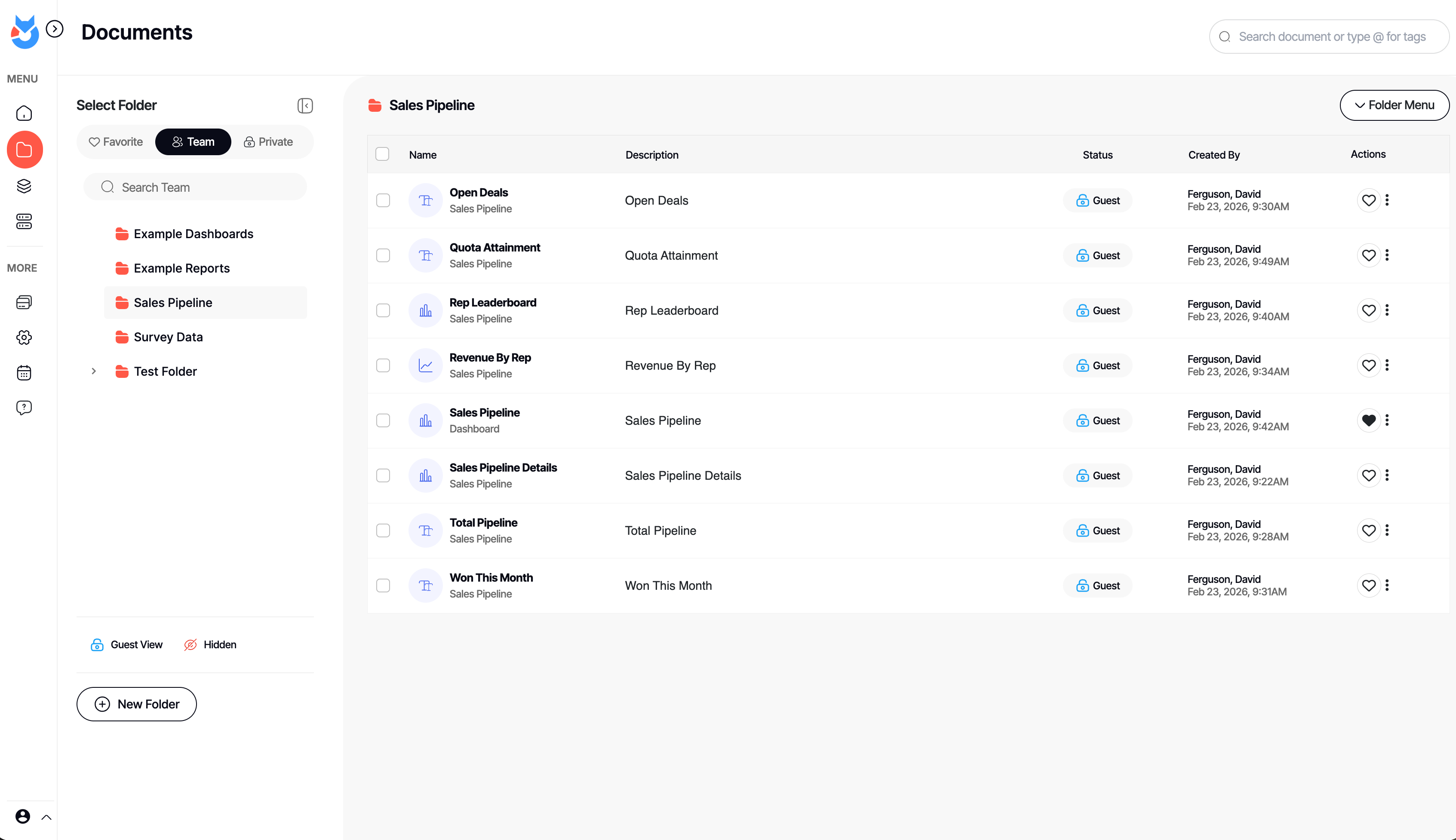
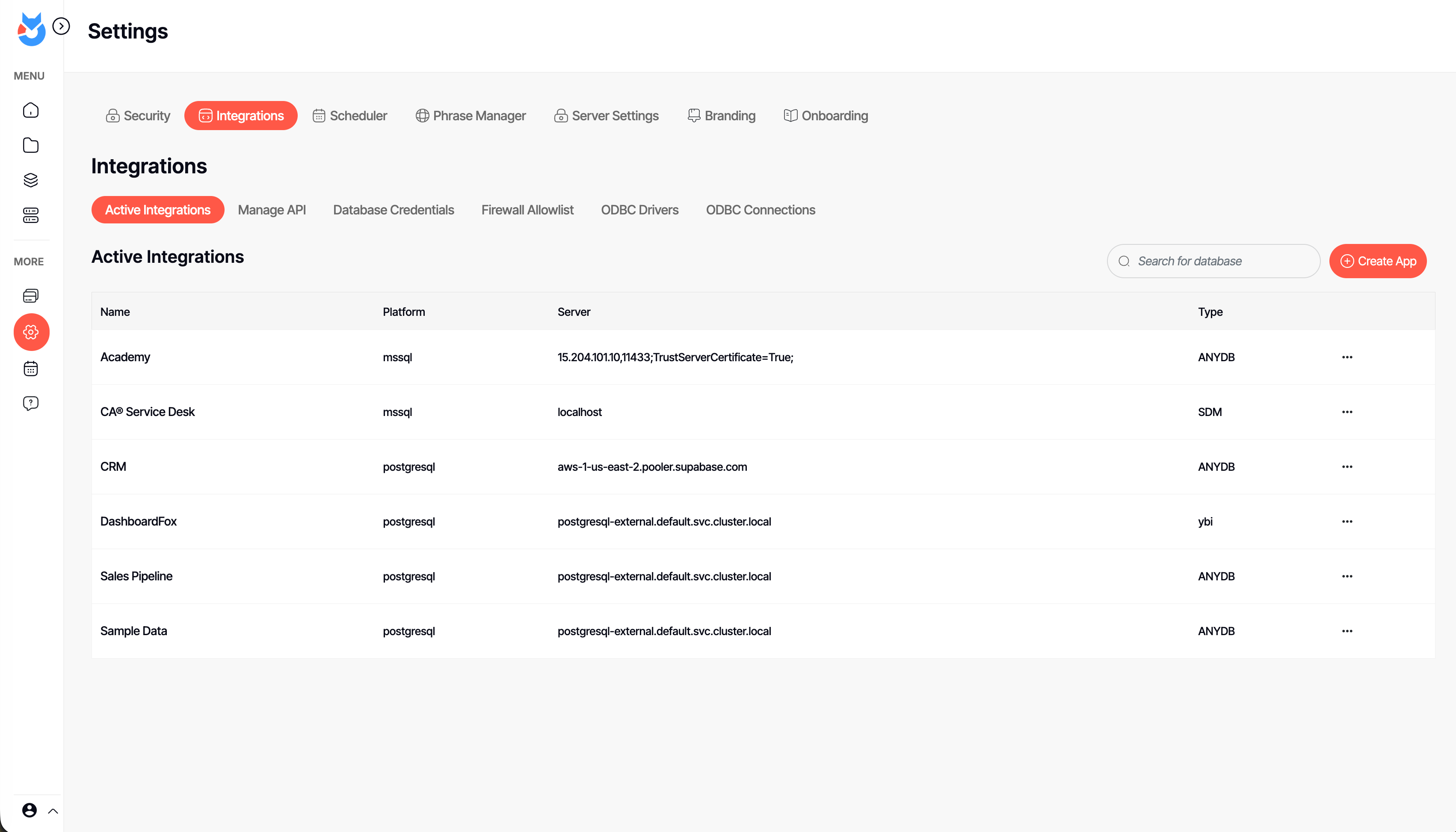
Screenshot of an interactive DashboardFox sales pipeline dashboard with KPI tiles, a revenue-by-rep chart, and a rep leaderboard. Business users filter by region, industry, or fiscal year and save their own views — self-service analytics with no SQL required.Screenshot of the Documents library in DashboardFox, where teams organize dashboards and reports into Team, Private, and Favorite folders. Share them with colleagues or clients, control guest access per item, and find any report fast with search and tags.Screenshot of DashboardFox's report Composer: pick fields, apply formulas and sorting, and preview the result live as a chart. Build dashboards and reports across 20+ visualizations without writing code, then save and share them with your team or clients.Screenshot of the App Builder in DashboardFox, where admins connect a data source and choose the exact tables and fields users can report on. Set up governed self-service reporting once, so business users only ever see the data they're allowed to.Screenshot of DashboardFox admin settings: manage data-source integrations, ODBC drivers, API access, scheduling, branding, and security in one place. Connect SQL Server, PostgreSQL, and more with no ETL, and white-label the experience for your clients.Screenshot of a single DashboardFox report shown as a color-coded calendar heatmap, flagging good, watch, and bad days at a glance. Open any report from the library, refresh or schedule it, and deliver it branded to your team or clients.