TrustRadius: an HG Insights company

Save this comparison

Save this comparison

Add Product

Recommended Comparisons

    Overview
    ProductRatingMost Used ByProduct SummaryStarting Price

    Review Assistant

    Score7 out of 10
    N/AReview Assistant is a peer code review tool which integrates with popular control systems namely: TFS, Subversion, Mercurial, Git and Perforce. It is an plugin for Visual Studio 2010, 2012, 2013, 2015 developed to enhance the team development process. The tool includes support for formal code review and allows users to add comments to a piece of code or to the entire review level. It allows teams to discuss code without scheduled meetings.

    $349.95

    Hatica

    Score9.4 out of 10
    N/AHatica equips engineering teams with work visibility dashboards, actionable insights and workflows to drive team productivity and engagement in remote and in-office environments alike. The vendor offers a free forever plan to help get started. Features: Engineering metrics dashboards 100+ metrics from 20+ apps including Github, Jira, Slack, Zoom, Google Workplace Remote work insights Aggregated work overview, sprint and retro…

    $0

    per month per user

    Pricing
    Review AssistantHatica
    Editions & Modules
    10 Users License
    $349.95
    No answers on this topic
    Offerings
    Pricing Offerings
    Review AssistantHatica
    Free Trial
    YesYes
    Free/Freemium Version
    NoYes
    Premium Consulting/Integration Services
    NoNo
    Entry-level Setup FeeNo setup feeOptional
    Additional Details——
    More Pricing Information
    Community Pulse
    Review AssistantHatica
    Considered Both Products
    Devart
    No answer on this topic
    Hatica
    No answer on this topic
    Key User Insights
    Would buy again
    No answers on this topic
    100%
    Would buy again
    9 Answers
    Delivers good value for the price
    No answers on this topic
    100%
    Delivers good value for the price
    9 Answers
    Happy with the feature set
    No answers on this topic
    100%
    Happy with the feature set
    9 Answers
    Lived up to sales and marketing promises
    No answers on this topic
    100%
    Lived up to sales and marketing promises
    9 Answers
    Implementation went as expected
    No answers on this topic
    100%
    Implementation went as expected
    9 Answers
    Best Alternatives
    Review AssistantHatica
    Small Businesses
    Beyond Compare
    Score9.3 out of 10
    No answers on this topic
    Medium-sized Companies
    Beyond Compare
    Score9.3 out of 10
    No answers on this topic
    Enterprises
    Beyond Compare
    Score9.3 out of 10
    No answers on this topic
    All AlternativesView all alternativesView all alternatives
    User Ratings
    Review AssistantHatica
    Likelihood to Recommend
    7.0
    (1 ratings)
    9.4
    (9 ratings)
    User Testimonials
    Review AssistantHatica
    Likelihood to Recommend
    Devart
    Combined with Code Compare and running Review Assistant on the TFS server, it provides a good way to share code and comments amount our team. It does everything we need it to do for code reviews and has a reporting tool.
    Read full review
    Hatica
    Engineering team management can be done better if we use metrics and the SPACE metrics are the best in that aspect. This product follows that research to deliver great analytics for team management. We also really like that the support is very hands-on, integration happened without any glitches and works well with our stack
    Read full review
    Pros
    Devart
    • Review Assistant does everything that I was hoping the default Visual Studio reviews would do. The iterations through accept/reject were the key winner.
    • The functionality for code reviews is great, especially the ability to comment on specific lines of code.
    • You don't have to leave the IDE.
    Read full review
    Hatica
    • Great visibility
    • Fewer risks, so better schedule management
    • Historical data is present so we're able to see how we're progressing
    Read full review
    Cons
    Devart
    • Integration with JIRA is missing.
    • Ability to search, filter and order comments.
    • There is no support for Visual Studio Code.
    Read full review
    Hatica
    • There are so many metrics that you’re able to measure - it can get overwhelming at first
    • We had a walkthrough session with the founder that helped us approach the platform with more confidence so maybe they can include help documents for first-time users
    Read full review
    Alternatives Considered
    Devart
    Microsoft provides a handy feature for code review inside the Visual Studio IDE. Review Assistant, though providing a similar code review user experience, supports work scenarios that are not covered by the Microsoft's IDE. Moreover, the version control systems support is broader in Review Assistant.
    Read full review
    Hatica
    No answers on this topic
    Return on Investment
    Devart
    • The tool saves a huge amount of time while reviewing the code. Review Assistant supports threaded comments, so team members can discuss code without scheduled meetings.
    Read full review
    Hatica
    • Better team management because we can avoid blockers and help the tech team to work seamlessly
    Read full review
    ScreenShots

    Review Assistant Screenshots

    Product screenshot

    Hatica Screenshots

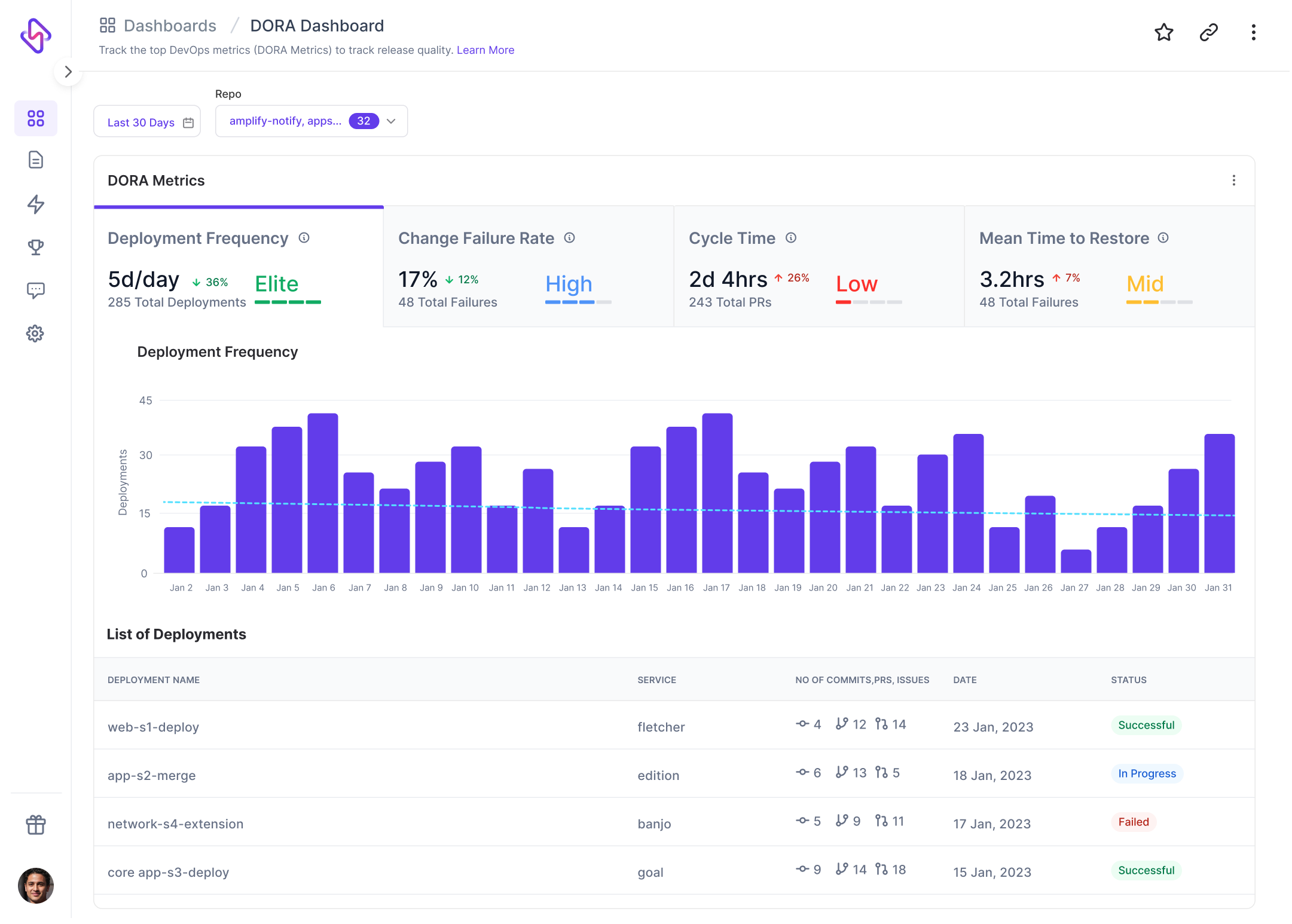
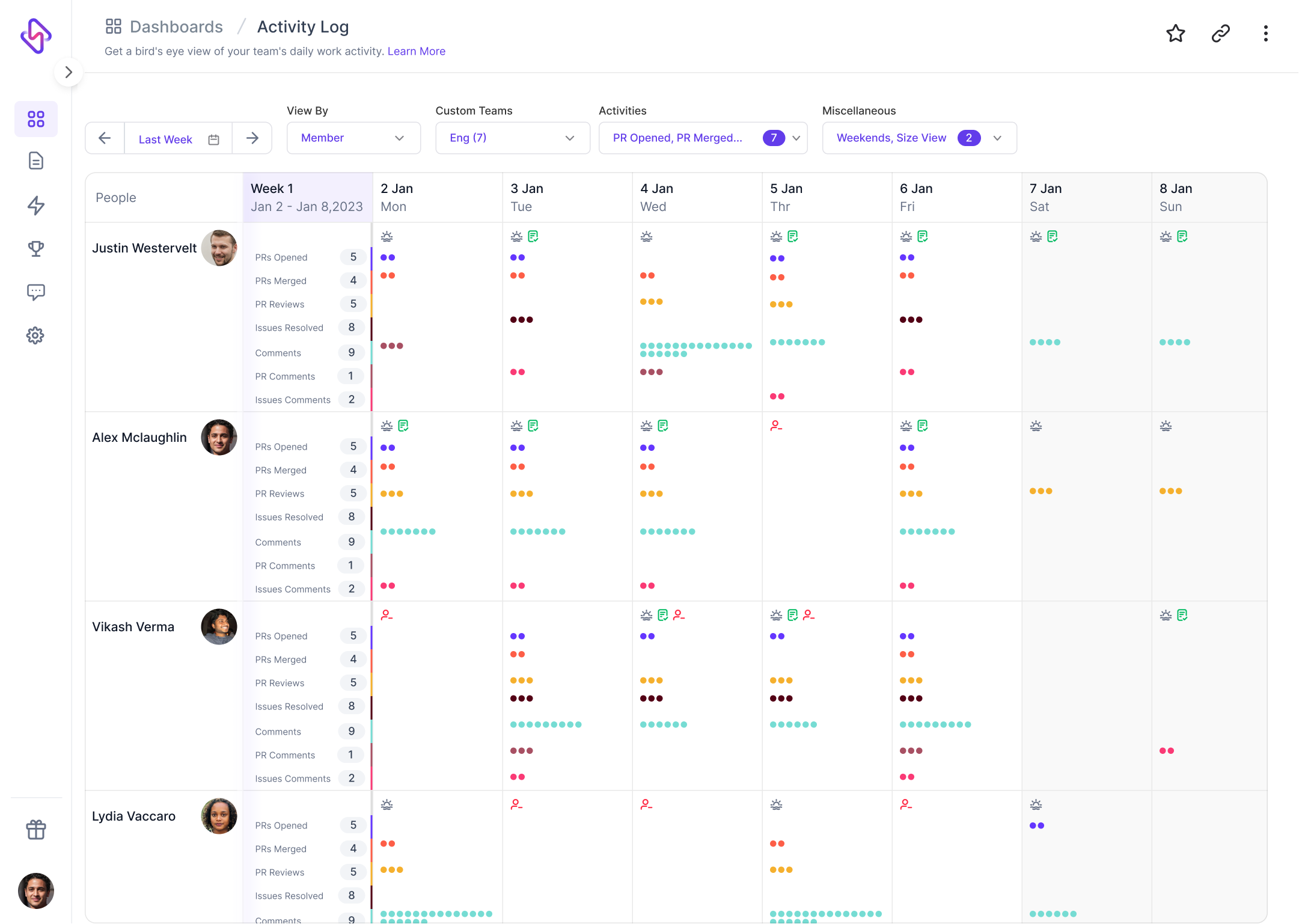
    Screenshot of Code cycle time dashboard: Used to track and measure first commit-to-deployment cycle time to identify trends, bottlenecks, and pain points.Screenshot of Team Well-being: Offers insight into team well-being metrics like focus time, meeting time (and its breakdown), and other metrics.Screenshot of Resource Allocation: Provides insight into data and trends around how business strategy translates into engineering work.Screenshot of DORA: Helps to understand DevOps' release velocity and quality.Screenshot of Project Delivery Dashboard: Reveals sprint-over-sprint trends around sprint health, planning and delivery, importance of work, and work allocation.Screenshot of Activity Log: Calendarized view to help visualize work actions, spot trends in unbalanced workload, and be less hands-on.