DocuXplorer vs. Oracle BPM Suite

Overview
ProductRatingMost Used ByProduct SummaryStarting Price
DocuXplorer
Score 0.0 out of 10
N/A
DocuXplorer is a document management solution for any file belonging to any business, from the company of the same name in Charleston, South Carolina. WIth it, users can control their data with its methods of locating, accessing, and sharing any type of document, whether scanned or electronic. DocuXplorer’s Microsoft's File Explorer-style interface is designed to require little training and virtually no technology expertise to operate, and it is available in 8 languages and suits businesses of…N/A
Oracle BPM Suite
Score 8.5 out of 10
N/A
The Oracle Business Process Management Suite is an integrated environment for developing, administering, and using business applications centered around business processes.N/A
Pricing
DocuXplorerOracle BPM Suite
Editions & Modules
No answers on this topic
Offerings
Pricing Offerings
DocuXplorerOracle BPM Suite
Free Trial
NoNo
Free/Freemium Version
NoNo
Premium Consulting/Integration Services
YesNo
Entry-level Setup FeeNo setup feeNo setup fee
Additional Details
More Pricing Information
Community Pulse
DocuXplorerOracle BPM Suite
Features
DocuXplorerOracle BPM Suite
Reporting & Analytics
Comparison of Reporting & Analytics features of Product A and Product B
DocuXplorer
-
Ratings
Oracle BPM Suite
6.0
5 Ratings
27% below category average
Dashboards00 Ratings6.04 Ratings
Standard reports00 Ratings6.05 Ratings
Custom reports00 Ratings6.04 Ratings
Process Engine
Comparison of Process Engine features of Product A and Product B
DocuXplorer
-
Ratings
Oracle BPM Suite
7.4
6 Ratings
12% below category average
Process designer00 Ratings8.06 Ratings
Process simulation00 Ratings7.06 Ratings
Business rules engine00 Ratings9.06 Ratings
SOA support00 Ratings8.06 Ratings
Process player00 Ratings8.05 Ratings
Support for modeling languages00 Ratings7.04 Ratings
Form builder00 Ratings4.05 Ratings
Model execution00 Ratings8.05 Ratings
Collaboration
Comparison of Collaboration features of Product A and Product B
DocuXplorer
-
Ratings
Oracle BPM Suite
6.0
4 Ratings
33% below category average
Social collaboration tools00 Ratings6.04 Ratings
Content Management Capabilties
Comparison of Content Management Capabilties features of Product A and Product B
DocuXplorer
-
Ratings
Oracle BPM Suite
7.0
3 Ratings
15% below category average
Content management00 Ratings7.03 Ratings
Best Alternatives
DocuXplorerOracle BPM Suite
Small Businesses
Square 9 Softworks
Square 9 Softworks
Score 9.5 out of 10
Square 9 Softworks
Square 9 Softworks
Score 9.5 out of 10
Medium-sized Companies
MSB Docs
MSB Docs
Score 9.4 out of 10
Square 9 Softworks
Square 9 Softworks
Score 9.5 out of 10
Enterprises
Tungsten Capture
Tungsten Capture
Score 7.9 out of 10
CMW Platform
CMW Platform
Score 9.2 out of 10
All AlternativesView all alternativesView all alternatives
User Ratings
DocuXplorerOracle BPM Suite
Likelihood to Recommend
-
(0 ratings)
8.0
(8 ratings)
Likelihood to Renew
-
(0 ratings)
6.0
(2 ratings)
Usability
-
(0 ratings)
6.0
(1 ratings)
Implementation Rating
-
(0 ratings)
6.0
(1 ratings)
User Testimonials
DocuXplorerOracle BPM Suite
Likelihood to Recommend
DocuXplorer
No answers on this topic
Oracle
Oracle BPM is well suited to organizations and environments that have a good understanding of their business processes and organizational structures. Trying to introduce a tool such as Oracle BPM into the organization without a good grasp on how the business operates is a recipe for disaster as the implementation will uncover all of the dirty secrets of an organizations business processes and bring them to light. BPM is not to be utilized for smaller service orchestrations or technical service implementations, these should be handled by the Oracle SOA Suite using the BPEL process manager, leaving BPM to handle the organizational business processes, referring to and including lower level services and BPEL processes as needed.
Read full review
Pros
DocuXplorer
No answers on this topic
Oracle
  • Oracle BPM [Suite] can support unlimited number of cases. No limitations in cases raised.
  • Oracle Weblogic can handle multiple traffic. [It] can handle lots of heavy load[s].
  • Oracle BPM has extensive integration with database[s]. Huge number[s] of customization can be created.
Read full review
Cons
DocuXplorer
No answers on this topic
Oracle
  • Oracle BPM is left behind by other tools more modern in terms of user experience, usability and ability to integrate with everything else.
  • To really harvest the potential of Oracle BPM you need to do it in JDeveloper and with ADF. This restricts its usage to very technical people.
  • The administration of the Oracle BPM tools has really put a burden on our team. It is running on Weblogic and we experience issues very often either with performance or with a bad configuration of the system.
  • As with all Oracle products, the price can be an issue for smaller shops.
Read full review
Likelihood to Renew
DocuXplorer
No answers on this topic
Oracle
In many scenarios it should have provided more features. It took a lot of effort while debugging, making it difficult to maintain.
Read full review
Usability
DocuXplorer
No answers on this topic
Oracle
Not easy to debug errors.
Read full review
Implementation Rating
DocuXplorer
No answers on this topic
Oracle
Overall satisfactory
Read full review
Alternatives Considered
DocuXplorer
No answers on this topic
Oracle
We evaluated Bonita and found that it might fit a smaller-sized company better; we found that Oracle BPM Suite scaled much more evenly. We almost went with one of the competitors, but in the end chose Oracle BPM Suite after we factored in the cost of VMware licensing. There are literally tons of analytics on the back end which are great for upper management, but not so much for average users, but this fits our business model quite well.
Read full review
Return on Investment
DocuXplorer
No answers on this topic
Oracle
  • You'll most certainly need a deep dive and extensive training before your users can even think of using the product and they are very expensive.
  • Lack of documentation makes it very difficult to manage the application if any error is encountered which will result in you ending up hiring a dedicated person to look into the application once it's deployed.
  • For a very large org., if properly implemented and used, it can help identify the cost-intensive and inefficient processes.
Read full review
ScreenShots

DocuXplorer Screenshots

Screenshot of the AI Insights that automate analysis securely as a localized large language model (LLM). It operates entirely within the DocuXplorer interface, protecting proprietary company data.

Key benefits of AI Insights include:
- Full text search. Whether or not the information within a document is indexed, Insights can search and retrieve the information, including links or references to documents, when prompted.
- Conversational queries. Quickly locate and summarize company reports, policies, contracts, or financial statements without the research.
- Data privacy. Data remains in a secure storage container within a dedicated LLM model, ensuring security.
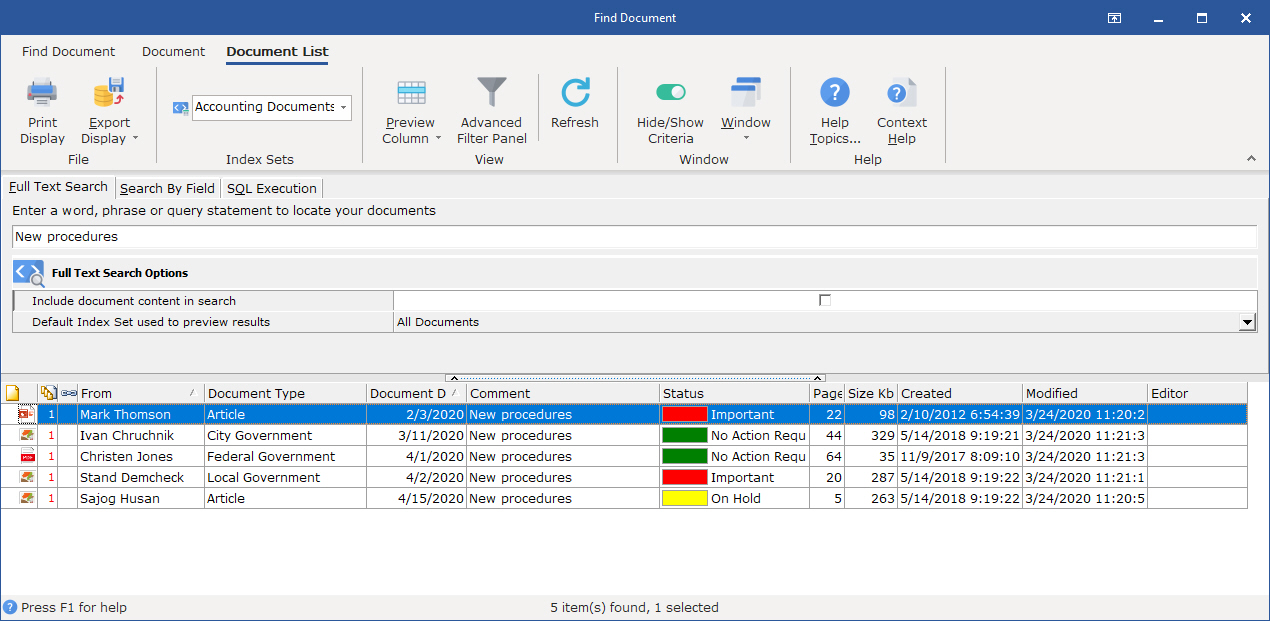
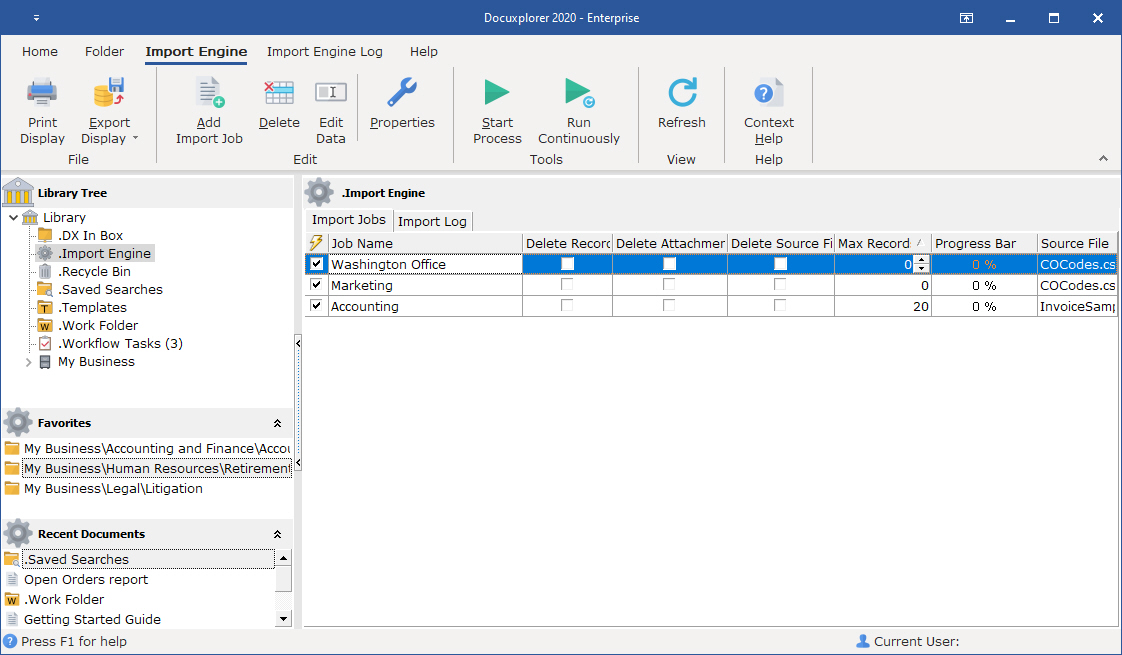
- Permission adherence. Teams only gets answers based on the files they have access to.Screenshot of DocuXplorer's full-text search, which lets users search by key fields (metadata) like date, document type, invoice number, customer/vendor name, or even unstructured data within the document.Screenshot of the Import Engine, used to automate document import from email, local drives, third-party software, and industry systems. It can:
- Handle one-time imports for bulk data migrations—useful when digitizing cabinets of paper records or moving from another system.
- Run ongoing imports by monitoring external folders, email inboxes, or third-party platforms for new files and pulling them into DocuXplorer automatically.
- Create new cabinets, drawers, and folders as needed, so there is no need to build the infrastructure manually.
- Populate index fields with key data during import, so every file is organized and searchable from day one.
- Run in the background—no need to tie up a specific workstation. Imports and organization happen everywhere, all the time, without any user effort.

Everything from PDFs and Word documents to PowerPoint presentations, Excel sheets, and QuickBooks transactions can be automatically pulled into DocuXplorer and organized.