EasePDF vs. Nitro PDF Pro

Overview
ProductRatingMost Used ByProduct SummaryStarting Price
EasePDF
Score 9.0 out of 10
N/A
EasePDF, headquartered in Hong Kong, provides more than 20 pdf editing tools, including Word to PDF Converter, Excel to PDF Converter, eSign PDF, Split PDF, Merge PDF, Unlock PDF and so on. EasePDF is available via free plan, and a premium plan that removes user limits.
$4.95
per month
Nitro PDF Pro
Score 8.3 out of 10
N/A
Nitro PDF Pro is a document management platform that supports PDF creation, modification, conversion, organization, review, and protection across Windows, Mac, and iOS environments. Key Capabilities Document Authoring & Modification: Native editing capabilities for PDF creation and content updates. Format Conversion: Conversion between PDF and standard office document formats. Document Organization & Management: File organization and management…
$7.50
Billed every 3 years. This is a subscription product with a 3-year fee of $270.00 per license. per seat
Pricing
EasePDFNitro PDF Pro
Editions & Modules
No answers on this topic
Nitro PDF Classic
$7.5/month
Billed every 3 years. This is a subscription product with a 3-year fee of $270.00 per license. per seat
Nitro PDF Standard
$15/month
This is a subscription product with a yearly fee of $180.00 per license. per seat
Nitro PDF Plus
Contact Sales
Offerings
Pricing Offerings
EasePDFNitro PDF Pro
Free Trial
NoYes
Free/Freemium Version
YesNo
Premium Consulting/Integration Services
NoNo
Entry-level Setup FeeNo setup feeNo setup fee
Additional Details32% discount for annual pricing.
More Pricing Information
Community Pulse
EasePDFNitro PDF Pro
Best Alternatives
EasePDFNitro PDF Pro
Small Businesses
Tungsten Power PDF
Tungsten Power PDF
Score 9.8 out of 10
Tungsten Power PDF
Tungsten Power PDF
Score 9.8 out of 10
Medium-sized Companies
pdfFiller
pdfFiller
Score 9.0 out of 10
pdfFiller
pdfFiller
Score 9.0 out of 10
Enterprises
Bluebeam
Bluebeam
Score 9.0 out of 10
Bluebeam
Bluebeam
Score 9.0 out of 10
All AlternativesView all alternativesView all alternatives
User Ratings
EasePDFNitro PDF Pro
Likelihood to Recommend
9.0
(1 ratings)
9.3
(17 ratings)
Likelihood to Renew
-
(0 ratings)
10.0
(1 ratings)
Usability
-
(0 ratings)
9.0
(4 ratings)
Performance
-
(0 ratings)
8.0
(1 ratings)
Support Rating
-
(0 ratings)
9.2
(3 ratings)
Ease of integration
-
(0 ratings)
5.0
(1 ratings)
User Testimonials
EasePDFNitro PDF Pro
Likelihood to Recommend
EasePDF
Scenarios where EasePDDF is well suited:
  1. PDF editor.
  2. PDF compressor.
  3. PDF convertor.
  4. PDF merger.
  5. PDF split.
Scenarios where it is less suited: as of now I have not found any specific scenarios as such.
Read full review
Nitro Inc
I run a professional services business from home. I need to edit documents quickly and easily and with minimal subscriptions to minimize overheads. I love that Nitro is a one-off payment to get a license to the software, and you can simply upgrade to the latest version if that's what you want, but you're not obligated to. I've been using the same version of Nitro for 7-8 years now. Despite the fact the upgraded versions have a lot of great, nice-to-have features, the version I'm on still does the job.
Read full review
Pros
EasePDF
  • PDF Compression is a great feature. This helps to reduce size of the pdf
  • PDF convertor - Helps you to convert different files to pdf format. Example jpeg to pdf, excel to pdf, word to pdf
  • Merge PDF - You can combine multiple pdf in the order required to create a single file.
Read full review
Nitro Inc
  • Ability to combine files SEAMLESSLY and order them around as necessary (so underrated)
  • Signing not only for yourself but for others. Helpful for those who have been granted the authority to sign for VPs and directors
  • Much easier to use than some other PDF viewing services
Read full review
Cons
EasePDF
  • Pricing part can be improved on a competitive basis. Also short versions can be given free of cost.
Read full review
Nitro Inc
  • Converting from PDF to Microsoft Word can be complicated at times. Some parts of a document such as tables are not converted properly.
  • Sometimes it appears to be easier to save MS Word documents to PDF rather than using NPS to convert. It can be a bit slow to convert at times.
  • In my view, it wasn't user friendly at the beginning.
Read full review
Likelihood to Renew
EasePDF
No answers on this topic
Nitro Inc
We will definitely be renewing the Nitro Productivity Suite. Saves the company a lot of money for something we use everyday
Read full review
Usability
EasePDF
No answers on this topic
Nitro Inc
For the most part, the entire software is extremely easy to navigate and use. You won't need to follow tutorials or anything for the bulk of the core features, as it's all pretty seamlessly designed.
Read full review
Performance
EasePDF
No answers on this topic
Nitro Inc
It works as advertised.
Read full review
Support Rating
EasePDF
No answers on this topic
Nitro Inc
Nitro checks all the boxes for what we need. It is fairly priced, it allows us to read and edit PDF documents, convert PDF to MS Word and convert MS Word to PDF. It allows us to combine multiple files and do all the post processing like adding page numbers and adding headers and footers
Read full review
Alternatives Considered
EasePDF
GUI is best suited and easy to use. Drag and drop feature is good enough. Tasks can be stored and can be tracked anytime.
Read full review
Nitro Inc
Every 1-2 years will do a check on current PDF options to include trialing the software. Have tried Foxit and several that seem to have failed in the marketplace. Over the last 4 years, I have always stuck with Nitro. Unfortunately, we still need to keep Adobe Acrobat (free version) installed to view a small percentage of some PDFs we receive.
Read full review
Return on Investment
EasePDF
  • Overall impact is good. I am currently on the trial version only and it is sufficient to my requirement. So overall it is good.
Read full review
Nitro Inc
  • ROI was very quick as the license costs were so low. We purchased 8 licenses versus the initial 2 we were planning on for Adobe.
  • More people were able to use the product than we initially thought due to low purchase costs.
  • We haven't had any further costs to own the product after the initial purchase. We would need to purchase new licenses if we wanted to upgrade.
Read full review
ScreenShots

Nitro PDF Pro Screenshots

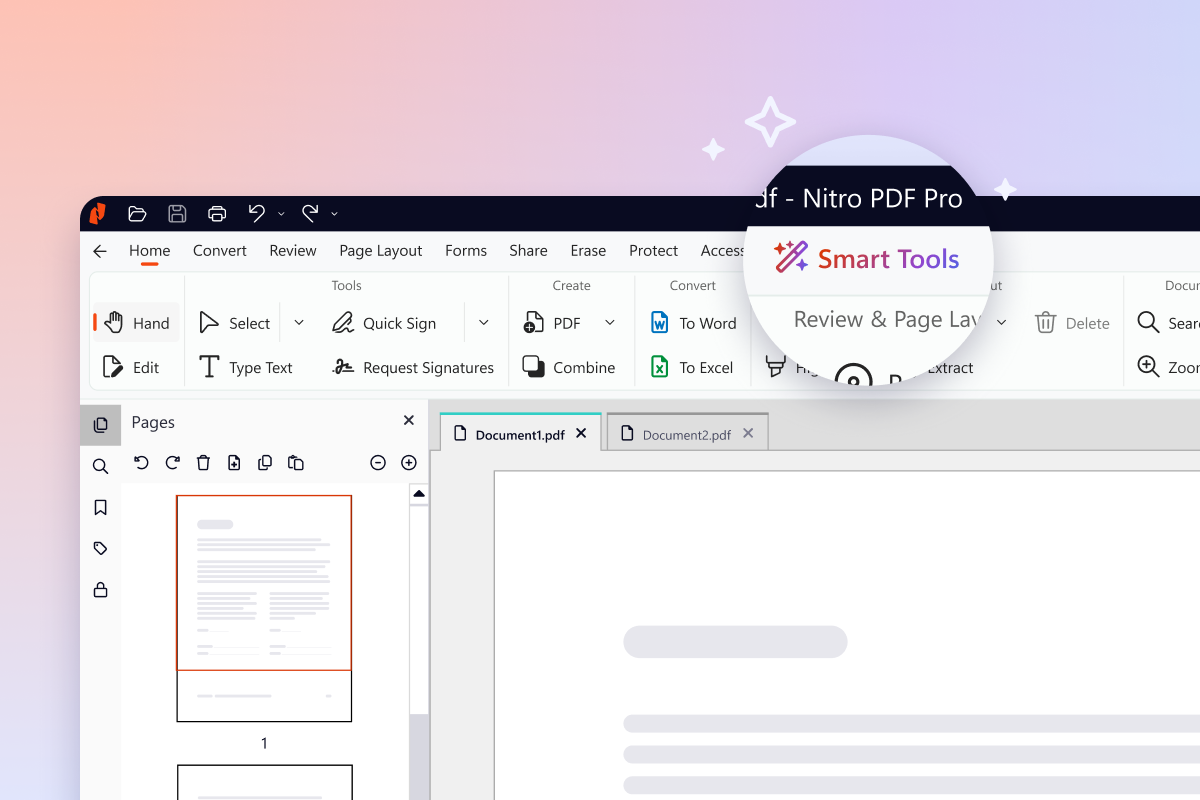
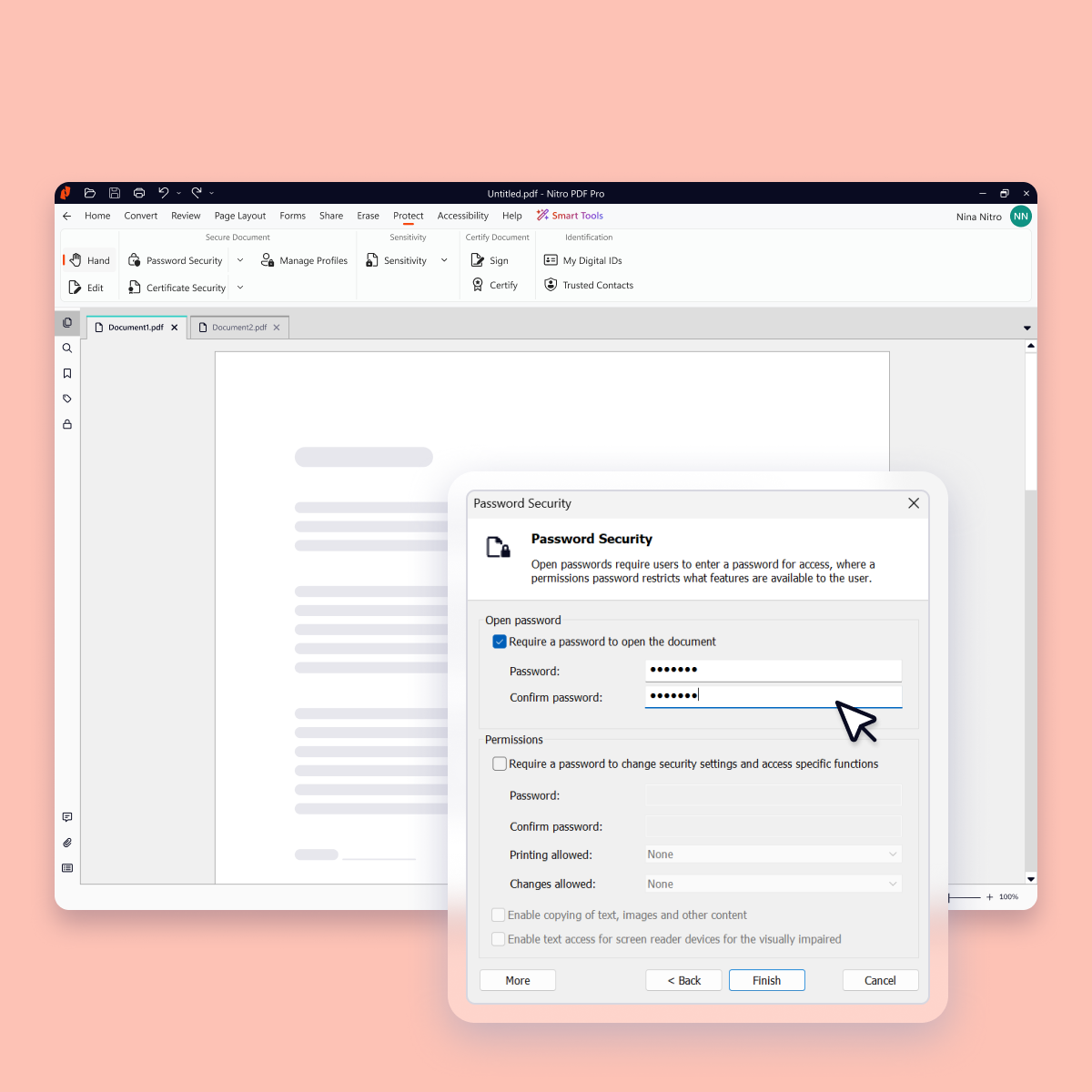
Screenshot of Version 26 (Nitro's latest version) introduces a new dedicated home for every AI-powered capability, giving you everything you need in one place to analyze content in any language, extract critical data, and protect sensitive information.Screenshot of Data-clearing capabilities like Redact and Remove Metadata now live together in one place, so the tool you need is where you'd expect it.Screenshot of Keep every document, and everything inside it, safe with advanced security features such as password protection, encryption, permission controls, and audit trails.Screenshot of Work together securely with Nitro's built-in collaboration tools. Gather and manage feedback across teams and devices with comments, highlights, and markup tools.Screenshot of Update, restructure, and optimize any PDF into exactly the document you want, organized the way you need, without switching back to the original file.Screenshot of Create and convert PDFs to and from popular formats like Word, Excel, PowerPoint, and image files while preserving layout and quality.