Entendo vs. Google Charts

Overview
ProductRatingMost Used ByProduct SummaryStarting Price
Entendo
Score 0.0 out of 10
Mid-Size Companies (51-1,000 employees)
Entendo is a conversational business intelligence platform that turns plain-language questions into charts and numbers — without SQL, BI specialists, or weeks of setup. Built for Brazilian mid-market companies (50–300 employees), Entendo connects directly with XSLX/CSV to PostgreSQL, MySQL , SQL Server and Oracle databases — typically behind ERPs such as Totvs Protheus, SAP Business One, Bling, or Omie — and lets any decision-maker ask a question in natural language and get an answer in…
$29
per month per organization
Google Charts
Score 8.2 out of 10
N/A
Google Charts provides a way to visualize data on your website - for free. From simple line charts to complex hierarchical tree maps, the chart gallery provides a large number of ready-to-use chart types. The most common way to use Google Charts is with simple JavaScript that you embed in your web page.N/A
Pricing
EntendoGoogle Charts
Editions & Modules
Free
$0
one-time fee Up to 5 users 30 free queries CSV / Excel upload Agents: Chart, Table Exports (CSV, PDF, PNG)
Starter
$29
per month Up to 15 users 80 queries / month SQL, Postgres, Sheets connection Basic Analytics Agent Dashboard Sharing
Pro
$69
per month Up to 40 users 200 queries / month Prediction Agent (Forecast) Full Analytics Agent Prompt audit logs
Business
$149
per month Up to 100 users 500 queries / month Execution priority Embedded Analytics Optional contract
Enterprise
tbd
per month Custom Full control: your cloud, your rules, your data. Unlimited users SSO / SAML Custom SLA BYOK (bring your own AI key)
No answers on this topic
Offerings
Pricing Offerings
EntendoGoogle Charts
Free Trial
NoNo
Free/Freemium Version
YesYes
Premium Consulting/Integration Services
YesNo
Entry-level Setup FeeNo setup feeNo setup fee
Additional DetailsEntendo is priced per workspace, not per seat. A 40-person data team on the Pro plan pays the equivalent of ~$1.75 per user per month. Query quotas refer to natural-language questions asked to the AI agents. Traditional dashboard views, chart interactions, drill-downs, cross-filters, report sharing, and data exports (CSV, PDF, PNG) are unlimited on all plans, including Free. Plan capabilities scale as follows: - Free (R$0 / ~$0): 5 users, 30 queries/month. CSV and Excel file upload only. Includes Chart Agent and Table Agent. Exports in CSV, PDF, PNG. - Starter (R$149 / ~$29): 15 users, 80 queries/month. Adds database connectors (PostgreSQL, MySQL, SQL Server, Oracle, Google Sheets). Adds Basic Analytics Agent. Adds Dashboard Sharing. - Pro (R$349 / ~$69, most popular): 40 users, 200 queries/month. Adds Prediction Agent (time-series forecasting with ARIMA and Holt-Winters). Upgrades to Full Analytics Agent. Adds prompt audit logs for governance and compliance. - Business (R$749 / ~$149): 100 users, 500 queries/month. Adds query execution priority, Embedded Analytics (iframe/embed in third-party applications), and optional annual contract terms. - Enterprise (custom): Unlimited users, custom query quotas, on-premise or hybrid deployment, BYOK (Bring Your Own Key) for LLM providers including OpenAI, Anthropic, and Google Gemini, SSO, audit trails, LGPD compliance, and SLA. Note on currency: Entendo is a Brazilian product and billing is currently available in Brazilian Reais (BRL) only. USD prices shown in this listing are approximate conversions at R$5.00 per USD and are provided for reference. Actual billed amounts are R$149 (Starter), R$349 (Pro), and R$749 (Business) per month.
More Pricing Information
Community Pulse
EntendoGoogle Charts
Features
EntendoGoogle Charts
BI Standard Reporting
Comparison of BI Standard Reporting features of Product A and Product B
Entendo
-
Ratings
Google Charts
8.6
50 Ratings
5% above category average
Pixel Perfect reports00 Ratings8.144 Ratings
Customizable dashboards00 Ratings9.048 Ratings
Report Formatting Templates00 Ratings8.843 Ratings
Ad-hoc Reporting
Comparison of Ad-hoc Reporting features of Product A and Product B
Entendo
-
Ratings
Google Charts
9.3
51 Ratings
15% above category average
Drill-down analysis00 Ratings8.046 Ratings
Formatting capabilities00 Ratings10.051 Ratings
Integration with R or other statistical packages00 Ratings9.537 Ratings
Report sharing and collaboration00 Ratings9.645 Ratings
Report Output and Scheduling
Comparison of Report Output and Scheduling features of Product A and Product B
Entendo
-
Ratings
Google Charts
9.0
50 Ratings
9% above category average
Publish to Web00 Ratings9.648 Ratings
Publish to PDF00 Ratings9.645 Ratings
Report Versioning00 Ratings8.642 Ratings
Report Delivery Scheduling00 Ratings8.736 Ratings
Delivery to Remote Servers00 Ratings8.830 Ratings
Data Discovery and Visualization
Comparison of Data Discovery and Visualization features of Product A and Product B
Entendo
-
Ratings
Google Charts
7.7
50 Ratings
4% below category average
Pre-built visualization formats (heatmaps, scatter plots etc.)00 Ratings8.049 Ratings
Location Analytics / Geographic Visualization00 Ratings6.047 Ratings
Predictive Analytics00 Ratings9.040 Ratings
Access Control and Security
Comparison of Access Control and Security features of Product A and Product B
Entendo
-
Ratings
Google Charts
8.8
44 Ratings
4% above category average
Multi-User Support (named login)00 Ratings8.943 Ratings
Role-Based Security Model00 Ratings8.838 Ratings
Multiple Access Permission Levels (Create, Read, Delete)00 Ratings8.840 Ratings
Single Sign-On (SSO)00 Ratings8.831 Ratings
Mobile Capabilities
Comparison of Mobile Capabilities features of Product A and Product B
Entendo
-
Ratings
Google Charts
8.2
48 Ratings
5% above category average
Responsive Design for Web Access00 Ratings7.046 Ratings
Mobile Application00 Ratings9.629 Ratings
Dashboard / Report / Visualization Interactivity on Mobile00 Ratings8.044 Ratings
Application Program Interfaces (APIs) / Embedding
Comparison of Application Program Interfaces (APIs) / Embedding features of Product A and Product B
Entendo
-
Ratings
Google Charts
8.4
40 Ratings
8% above category average
REST API00 Ratings8.931 Ratings
Javascript API00 Ratings10.039 Ratings
iFrames00 Ratings8.825 Ratings
Java API00 Ratings8.925 Ratings
Themeable User Interface (UI)00 Ratings5.028 Ratings
Customizable Platform (Open Source)00 Ratings8.827 Ratings
Best Alternatives
EntendoGoogle Charts
Small Businesses
Yellowfin
Yellowfin
Score 8.6 out of 10
Yellowfin
Yellowfin
Score 8.6 out of 10
Medium-sized Companies
Reveal
Reveal
Score 10.0 out of 10
Reveal
Reveal
Score 10.0 out of 10
Enterprises
Kyvos Semantic Layer
Score 9.5 out of 10
Kyvos Semantic Layer
Score 9.5 out of 10
All AlternativesView all alternativesView all alternatives
User Ratings
EntendoGoogle Charts
Likelihood to Recommend
-
(0 ratings)
9.0
(61 ratings)
Likelihood to Renew
-
(0 ratings)
7.3
(8 ratings)
Usability
-
(0 ratings)
9.0
(33 ratings)
Availability
-
(0 ratings)
10.0
(1 ratings)
Performance
-
(0 ratings)
5.0
(1 ratings)
Support Rating
-
(0 ratings)
8.3
(32 ratings)
Online Training
-
(0 ratings)
5.0
(1 ratings)
Implementation Rating
-
(0 ratings)
10.0
(1 ratings)
Configurability
-
(0 ratings)
8.0
(1 ratings)
Ease of integration
-
(0 ratings)
10.0
(1 ratings)
Product Scalability
-
(0 ratings)
8.0
(1 ratings)
Vendor post-sale
-
(0 ratings)
10.0
(1 ratings)
Vendor pre-sale
-
(0 ratings)
10.0
(1 ratings)
User Testimonials
EntendoGoogle Charts
Likelihood to Recommend
Sozo Data Ltda
No answers on this topic
Google
We can easily recommend Google Charts to any company that needs a way to visually represent their data. Another great thing about Google Charts is that it is free to use and does not require any membership fees. Although it requires a skilled used to be able to use the charts, the results are great and can be beneficial to any company who is looking to make better decisions.
Read full review
Pros
Sozo Data Ltda
No answers on this topic
Google
  • they're free with Google suite and they have backing in terms of powerful Google apps which can be plugged in to perform multiple actions like using Google sheets to import raw data into Google Charts
  • they're the most simple app to use when it comes to creating charts and visual dashboards
  • ease of customization
  • ease of using custom APIs from developers side to help make any types of charts and dashboards you want
Read full review
Cons
Sozo Data Ltda
No answers on this topic
Google
  • I would like a couple more introductory videos or a live chat option for when you run into an issue. I think this is a Google-wide problem, not only linked to Google Charts.
  • I have run into some issues with the Dynamic Data but also admittedly could potentially dive in deeper and investigate.
  • It would be great if Google Charts made it possible to integrate Google Chat into the platform.
Read full review
Likelihood to Renew
Sozo Data Ltda
No answers on this topic
Google
Google Charts is a good product. It's widely supported with deep documentation and a large community. But for me, it wasn't customizable enough. When we started with simple charts, it was great, but as we got deeper and more complex, our needs outgrew the library. If I was going forward, I would choose a more barebones library with more freedom and extensibility.
Read full review
Usability
Sozo Data Ltda
No answers on this topic
Google
Google Charts is about as easy to use as the rest of their applications. The UI is very well thought out, allowing you to add what you need, and customize it to your exact liking. The default theme is actually really nice, which helps as most of the time, customizing is not needed.
Read full review
Reliability and Availability
Sozo Data Ltda
No answers on this topic
Google
Google charts is always available and provides fast output.
Read full review
Performance
Sozo Data Ltda
No answers on this topic
Google
Connectivity is occasionally very slow.
Read full review
Support Rating
Sozo Data Ltda
No answers on this topic
Google
As a free tool with massively powerful, infinitely customisable charts that can be dynamically updated - Google Charts is my favourite data visualisation tool. However, my hatred of JavaScript does jade my view on it. This is the price of the tool though, and I'm glad it's available for me.
Read full review
Online Training
Sozo Data Ltda
No answers on this topic
Google
The online training was solely done through self training on google's guide to charts.
Read full review
Implementation Rating
Sozo Data Ltda
No answers on this topic
Google
Easy to implement
Read full review
Alternatives Considered
Sozo Data Ltda
No answers on this topic
Google
Google Charts stacks up better since it is free and does not have the constant pressure for cost overruns, add-ons, annual maintenance and implementation services. The speed of using Google Charts is quick, saving users potentially weeks in getting up and going. For the readers of websites with limited resources, the application shows up nicely is look and feel with charts. Great way of showing data visually.
Read full review
Scalability
Sozo Data Ltda
No answers on this topic
Google
Google Charts is essential for quick, easy, reporting. There are opportunities for advanced features.
Read full review
Return on Investment
Sozo Data Ltda
No answers on this topic
Google
  • teams were easily able to create charts and find out progress on our learning courses and thus take actionable insights to their managers, professors
  • students could also know their progress on various courses from one single view, same for instructors in terms of imparting education
  • sales team could learn which kind of courses sold more to focus more on those areas
Read full review
ScreenShots

Entendo Screenshots

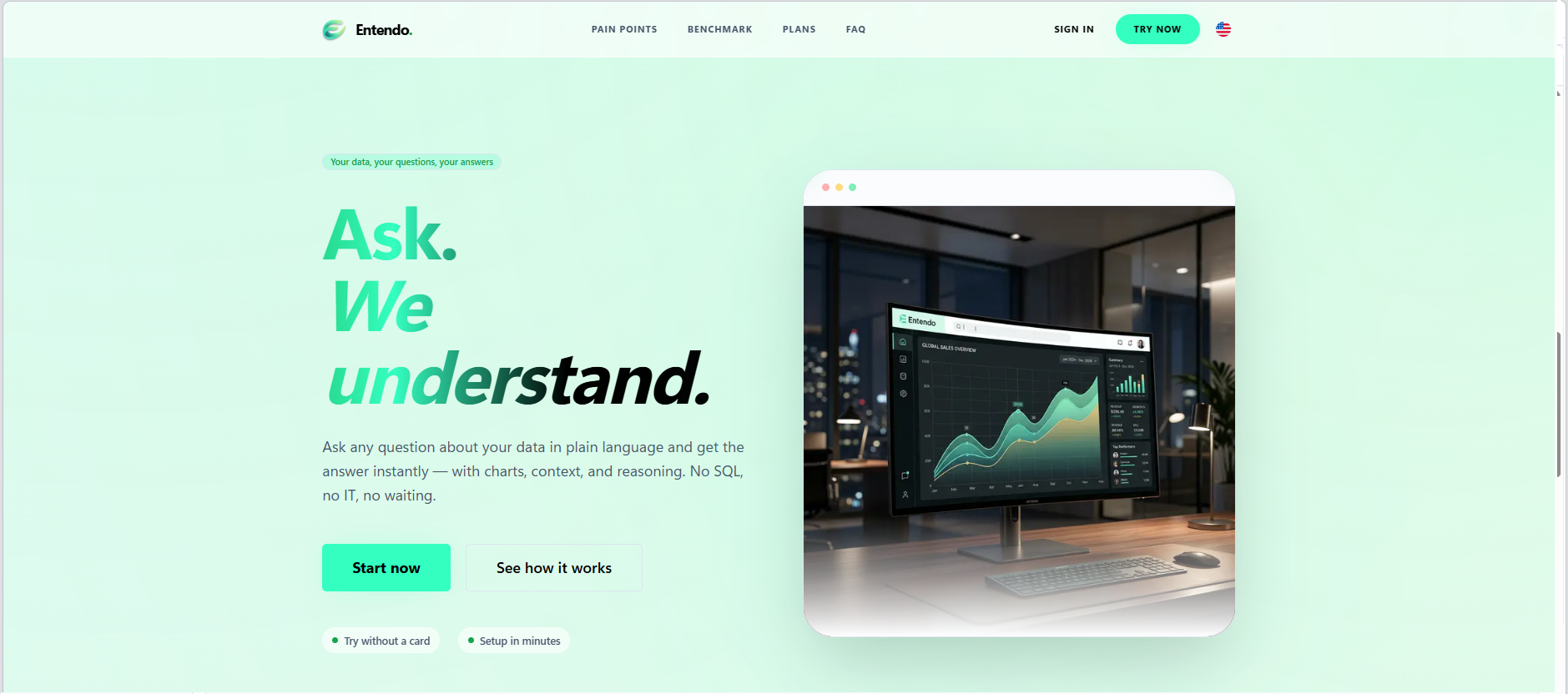
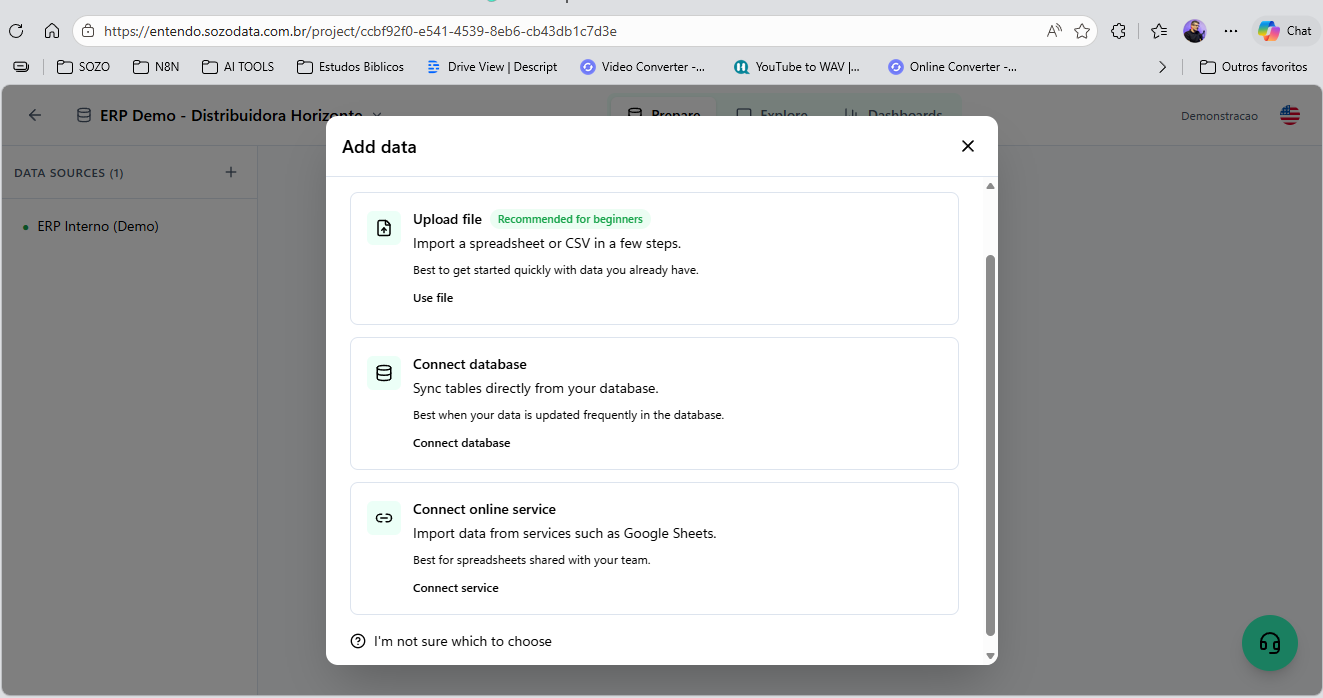
Screenshot of Entendo's landing page, which introduces the product's core promise: Ask. We  understand. Users type any business question in plain language and get the answer instantly — with charts, context, and reasoning — no SQL, no IT tickets, no waiting for the BI team.Screenshot of where users can upload a spreadsheet or CSV, connect their own SQL database (PostgreSQL, MySQL, SQL Server, Oracle), or sync tables from a cloud service like Google Sheets. File  upload is the recommended path for first-time users who want to evaluate the product on their own data before connecting production systems.Screenshot of where Entendo connects directly to existing production databases —   PostgreSQL, MySQL, SQL Server, and Oracle — using read-only credentials you control. The architecture is read-only by design with  four layers of SQL sanitization, so the AI agents can never write, update, or delete data.Screenshot of the conversational interface, which delivers analysis as a complete answer. In this view, the AI is responding about a pessimistic scenario: a revenue line chart on top, headline KPIs in the middle (current revenue, scenario impact, variation percentage), and a comparative bar chart at the bottom. Everything is generated live from the connected database.Screenshot of the Business Analytics Agent responding to a real question:   "show me an analysis of the actions being continuously taken to grow revenue by 30%." Instead of dumping a chart, the agent delivers a   structured diagnosis — overall picture, central problem, root-cause hypothesis, and concrete actions — grounded in the user's own data.Screenshot of an AI generated chart that can be pinned to a dashboard with a click. This example shows a wholesale operations dashboard with four views: weekly sales by day, top products by unit, critical stock   products, and inventory turnover ratio. Dashboards are shareable across the workspace, so the whole team sees the same numbers.