Estimating Link vs. PlanSwift, by ConstructConnect

Overview
ProductRatingMost Used ByProduct SummaryStarting Price
Estimating Link
Score 0.0 out of 10
N/A
Heavy/Civil Estimating Software designed for unit price and lump sum bidding, used to calculate job costs using resources like labor and equipment. Users can add markup, OH, profit, bonds, and indirect costs to finalize a bid, and build professional proposals for customers.
$1,995
per year per user
PlanSwift, by ConstructConnect
Score 9.8 out of 10
N/A
PlanSwift is a quantity takeoff software for construction estimating. It features a drag-and-drop interface and automatically calculates material and labor estimations in exportable formats. PlanSwift was acquired by ConstructConnect in the middle of 2018.
$1,595
per installation
Pricing
Estimating LinkPlanSwift, by ConstructConnect
Editions & Modules
No answers on this topic
Standard
$1,595
per installation
Offerings
Pricing Offerings
Estimating LinkPlanSwift, by ConstructConnect
Free Trial
YesNo
Free/Freemium Version
NoNo
Premium Consulting/Integration Services
NoNo
Entry-level Setup FeeRequiredNo setup fee
Additional Details
More Pricing Information
Community Pulse
Estimating LinkPlanSwift, by ConstructConnect
Best Alternatives
Estimating LinkPlanSwift, by ConstructConnect
Small Businesses
Bluebeam
Bluebeam
Score 9.3 out of 10
Bluebeam
Bluebeam
Score 9.3 out of 10
Medium-sized Companies
InEight
InEight
Score 8.5 out of 10
InEight
InEight
Score 8.5 out of 10
Enterprises
InEight
InEight
Score 8.5 out of 10
InEight
InEight
Score 8.5 out of 10
All AlternativesView all alternativesView all alternatives
User Ratings
Estimating LinkPlanSwift, by ConstructConnect
Likelihood to Recommend
-
(0 ratings)
9.9
(9 ratings)
Likelihood to Renew
-
(0 ratings)
10.0
(2 ratings)
Usability
-
(0 ratings)
10.0
(1 ratings)
Availability
-
(0 ratings)
10.0
(1 ratings)
Performance
-
(0 ratings)
9.0
(1 ratings)
Support Rating
-
(0 ratings)
9.0
(2 ratings)
Implementation Rating
-
(0 ratings)
10.0
(1 ratings)
Product Scalability
-
(0 ratings)
9.0
(1 ratings)
User Testimonials
Estimating LinkPlanSwift, by ConstructConnect
Likelihood to Recommend
The Construction Link, Inc.
No answers on this topic
ConstructConnect
I use PlanSwift for all my projects - it has just cut my time by a major percentage when it comes to quantifying a blueprint. At times there are funky areas, which are just hard to calculate on paper. It also has a great tool for scaling according to the dimensions, so if a drawing is missing a scale, you can always allot a scale by giving directions and then marking the points. I use this tool to check the scale as well - sometimes the drawings say something but the scale if off and you are left with an incorrect take-off. The dimension tool is a good way to check that. We don't use it much for pricing purposes though, we have found other software which are more robust when it comes to estimation, but we can see using PlanSwift for pricing sometime in the future.
Read full review
Pros
The Construction Link, Inc.
No answers on this topic
ConstructConnect
  • Easy to use and intuitive.
  • Accurate data to use for projects, allowing for a central hub for all teams to work from.
  • It's a central stop from take off and plan review all the way to plugging numbers into our estimating.
  • The ability to link through SharePoint, which always access from any user and location.
Read full review
Cons
The Construction Link, Inc.
No answers on this topic
ConstructConnect
  • Submittals are not user friendly in PlanGrid. In fact, this is the one feature we would like to see improved.
  • Billing is based on how many users you have. It would be very nice if they would do it based on revenue or other factors such as other programs do.
Read full review
Likelihood to Renew
The Construction Link, Inc.
No answers on this topic
ConstructConnect
It's become the go to program for our takeoffs. We have tried others but this is the simplest.
Read full review
Usability
The Construction Link, Inc.
No answers on this topic
ConstructConnect
Plan Swift is a user friendly program that makes takeoffs easy to perform. Not a whole lot of knowledge or skill is required.
Read full review
Reliability and Availability
The Construction Link, Inc.
No answers on this topic
ConstructConnect
Never had an issue
Read full review
Performance
The Construction Link, Inc.
No answers on this topic
ConstructConnect
Plan Swift is only as fast as your computer system and internet
Read full review
Support Rating
The Construction Link, Inc.
No answers on this topic
ConstructConnect
I have called once needing support. I was asking about the "compare" tool to compare different versions. They told be about their desktop app and I downloaded. They answered quickly, you could understand them, and they took care of my question
Read full review
Implementation Rating
The Construction Link, Inc.
No answers on this topic
ConstructConnect
just know what use you want to get out of it. In our case it was just to do area take offs.
Read full review
Alternatives Considered
The Construction Link, Inc.
No answers on this topic
ConstructConnect
Bluebeam is amazing and can accomplish any take-off needs, but you will spend much more time creating your conditions and take off items. It is not as user-friendly as PlanSwift. OST (On screen takeoff). This product is by far better than PlanSwift, as it is amazingly easy to use. However, it is much more expensive. Cloud-based takeoff software -- this kind of software is difficult for me to use because of how slow the pages load and navigate. It's hard to beat that from PlanSwift or OST.
Read full review
Scalability
The Construction Link, Inc.
No answers on this topic
ConstructConnect
Several of our departments can use the take off feature to assist them in their job responsibilities.
Read full review
Return on Investment
The Construction Link, Inc.
No answers on this topic
ConstructConnect
  • The estimators' productivity is greatly increased, I do takeoffs in less than half the time with more accuracy and detail captured.
  • Easy sharing of what was taken off, I'm able to ensure everything is captured.
Read full review
ScreenShots

Estimating Link Screenshots

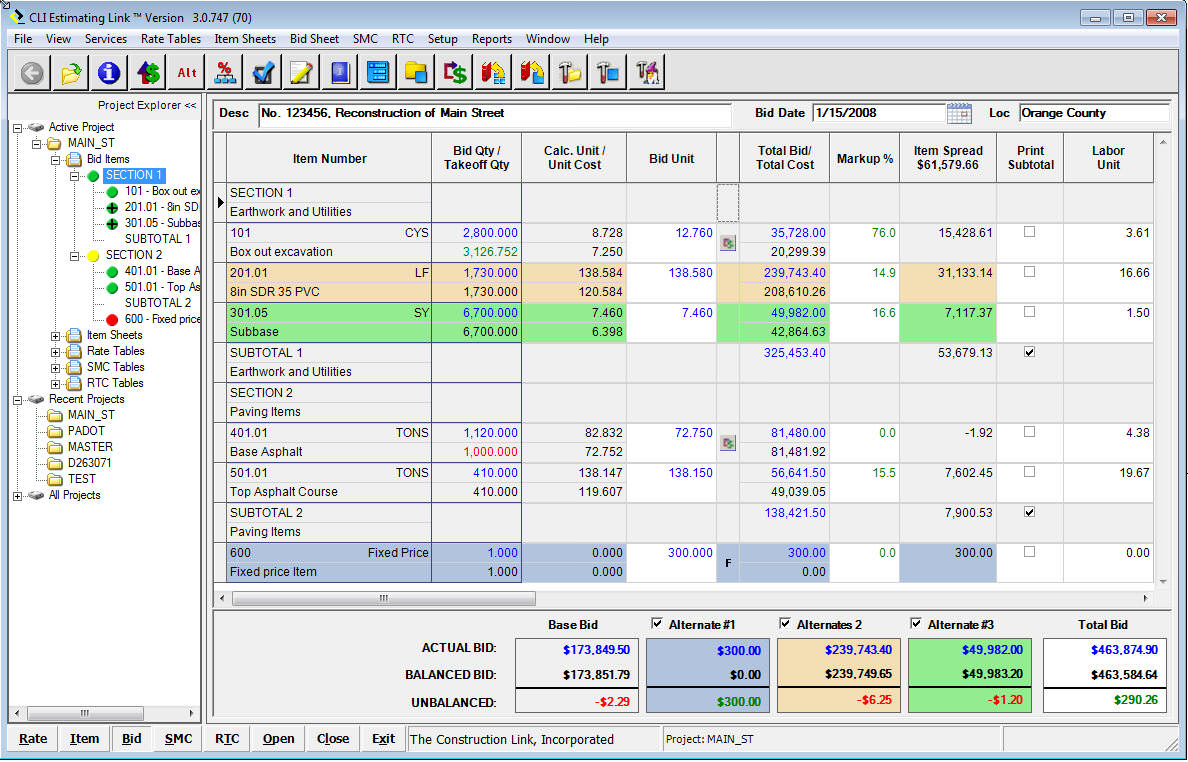
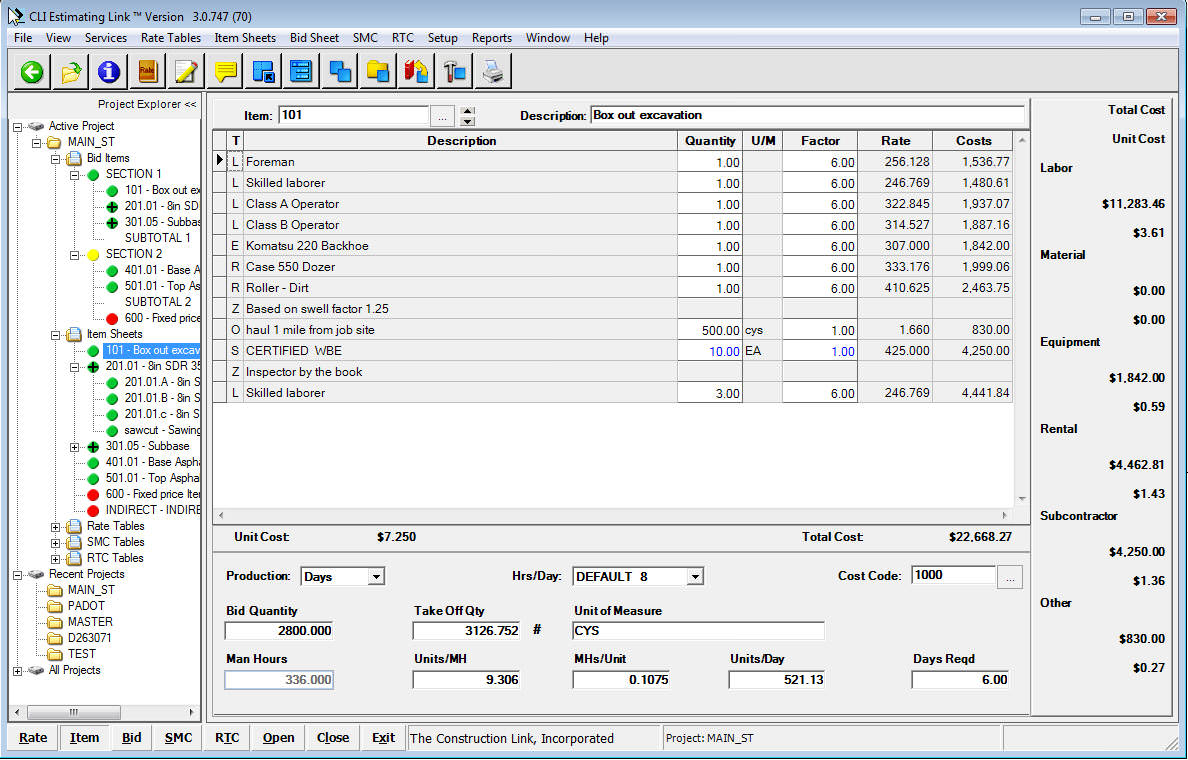
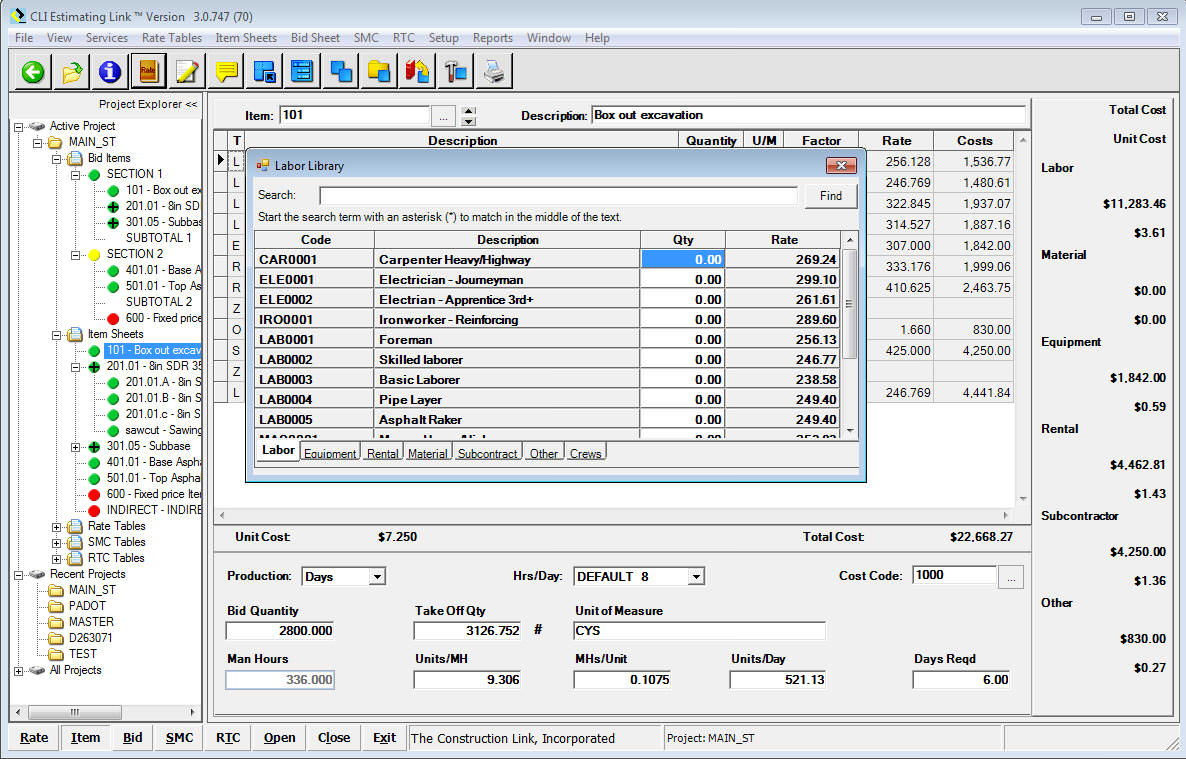
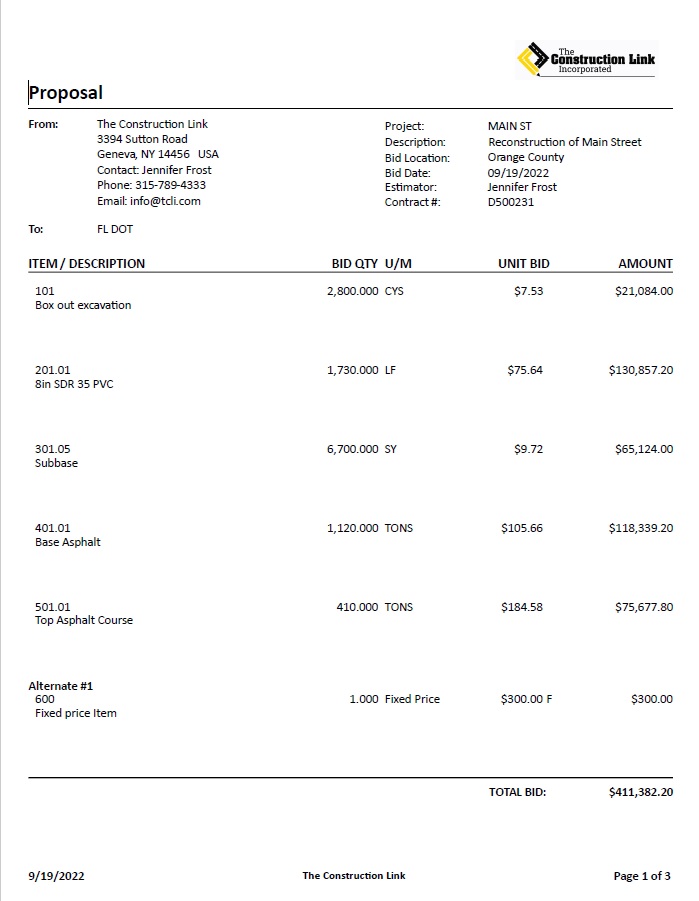
Screenshot of The bid sheet is where you start and end your bid.  Lists your Items with Unit and Total Costs for each Item, Markup, and Item Spread.  See your total Bid Price, along with alternates highlighted in color.Screenshot of The Item sheet is where you build each item with labor, equipment, rental, material, and subcontractor resources.  Add your production in days or hours to determine overall item cost.  Visible resource breakdown by unit and total is listed to the side.Screenshot of The Rate Library is used to add resources to your items.  By simply toggling between your resources within your Rate Library, simply double click a resource to add it to your item.  Rate Libraries are customized to your business.Screenshot of Develop a professional proposal for your customer.  Be as detailed as you want with customizable letterheads.  More then 7 Proposal Templates to choose from - detailed itemization or lump sum.  Include Totals, Project Inclusions/Exclusions, and a Signature Line.