Fivetran replicates applications, databases, events and files into a high-performance data warehouse, after a five minute setup. The vendor says their standardized cloud pipelines are fully managed and zero-maintenance. The vendor says Fivetran began with a realization: For modern companies using cloud-based software and storage, traditional ETL tools badly underperformed, and the complicated configurations they required often led to project failures. To streamline and accelerate…
$0.01
Qlik Replicate
Score10 out of 10
N/A
Qlik Replicate enables organizations to accelerate data real-time replication, ingestion and streaming via change data capture, across a wide range of heterogeneous databases, data warehouses and data lake platforms.
N/A
Pricing
Fivetran
Qlik Replicate
Editions & Modules
Starter
$0.01
per credit
Standard
$0.01
per credit
Enterprise
$0.01
per credit
No answers on this topic
Offerings
Pricing Offerings
Fivetran
Qlik Replicate
Free Trial
Yes
Yes
Free/Freemium Version
No
No
Premium Consulting/Integration Services
No
Yes
Entry-level Setup Fee
Optional
Required
Additional Details
—
—
More Pricing Information
Community Pulse
Fivetran
Qlik Replicate
Considered Both Products
Fivetran
No answer on this topic
Qlik
Verified User
Chose Qlik Replicate
Qlik Replicate / Attunity was able to be put on our server behind our firewall where with Fivetran would have required. Fivetran would also have required a different SQL server CDC setup. HVR was just as powerful if not more but was more costly and the user interface was not …
A de minimis incentive was given to thank the reviewer for their time. The incentive was not used to bias or drive a particular response, nor was the incentive contingent on a positive endorsement. TR verified that a representative sample of customers was invited. More Info
Vice President of Database Development in Engineering at NGP VAN (Information Technology & Services, 501-1000 employees)
Chose Qlik Replicate
The biggest advantage of Replicate in comparison to Fivetran is that we can run the application on-prem. This allows us to configure it precisely how we desire, avoid opening additional ports in our firewall, and monitor its resource consumption directly. That level of …
A de minimis incentive was given to thank the reviewer for their time. The incentive was not used to bias or drive a particular response, nor was the incentive contingent on a positive endorsement. TR verified that a representative sample of customers was invited. More Info
A de minimis incentive was given to thank the reviewer for their time. The incentive was not used to bias or drive a particular response, nor was the incentive contingent on a positive endorsement. More Info
Data Engineer in Information Technology at Inxite Out (Computer Software, 201-500 employees)
Chose Qlik Replicate
I found this as my lifesaver in terms of its efficacy and approachable to scale the streaming data from our ecommerce platform and analytics of data made much easier than compared to others. As it's partners with azure and other platforms which made our applications faster to …
A de minimis incentive was given to thank the reviewer for their time. The incentive was not used to bias or drive a particular response, nor was the incentive contingent on a positive endorsement. More Info
Fivetran's business model justifies the use-case where we require data from a single source basically a lot of data but if the requirement is not on the heavier side, Fivetran comes to costly operation when compared to its peers. Otherwise, I'll recommend Fivetran for stability and update and seamless service provider.
A de minimis incentive was given to thank the reviewer for their time. The incentive was not used to bias or drive a particular response, nor was the incentive contingent on a positive endorsement. More Info
Qlik Replicate works very well with relational data platforms, both on premise and in the cloud, for example Oracle, SQL Server, PostgreSQL, MySQL and others, it also works very well with DB2. If the data source is MongoDB, it is more complicated and currently there is no possibility of sending data to MongoDB.
A de minimis incentive was given to thank the reviewer for their time. The incentive was not used to bias or drive a particular response, nor was the incentive contingent on a positive endorsement. More Info
Replicate is extremely stable and does not generate a lot of alerts/failures/issues that take up time to troubleshoot.
It is very easy to add new source tables to a Replicate task so that we're always in sync with new data available from the CRM.
It's nice that Qlik Replicate also allows you to create a job to stop and then restart your tasks during maintenance windows that occur on both the source and target systems.
A de minimis incentive was given to thank the reviewer for their time. The incentive was not used to bias or drive a particular response, nor was the incentive contingent on a positive endorsement. More Info
A de minimis incentive was given to thank the reviewer for their time. The incentive was not used to bias or drive a particular response, nor was the incentive contingent on a positive endorsement. More Info
The base Replicate web GUI is lacking. If you have dozens or more tasks, it's hard to get a sense of how they're performing. Enterprise Manager solves all of these problems but is a separate install.
The support portal is extremely difficult to navigate. It's hard to track down exactly what you're looking for.
It would be helpful to have better documentation and example queries for the tables in the Enterprise Manager analytics database.
Destination databases that don't support common DDL commands behave unpredictably. And the replication of schema changes isn't consistent.
A de minimis incentive was given to thank the reviewer for their time. The incentive was not used to bias or drive a particular response, nor was the incentive contingent on a positive endorsement. TR verified that a representative sample of customers was invited. More Info
The availability of the replicated data in disparate environments has is now crucial. Replacing a product like Qlik Replicate would require significant time, investments, and work. In addition, Qlik Replicate is reasonably reliable with few failures.
A de minimis incentive was given to thank the reviewer for their time. The incentive was not used to bias or drive a particular response, nor was the incentive contingent on a positive endorsement. More Info
Very easy and intuitive to setup and maintain as there usually are not that many options. Very well documented (e.g. how to setup each connector, how the schema looks like, any specific features of this connector etc.). Also the operation is intuitive, e.g. you have status pages, log pages, configuration pages etc. for each connector.
A de minimis incentive was given to thank the reviewer for their time. The incentive was not used to bias or drive a particular response, nor was the incentive contingent on a positive endorsement. More Info
We now have greater business flexibility and scalability, and our big data integration projects have a quick rate of growth, which has been profitable for us. Independent of the sources involved, maintaining data consistency between sources is easy. One of my favorite features is the way it lets owners of the source system start and stop processes from updating their system windows.
A de minimis incentive was given to thank the reviewer for their time. The incentive was not used to bias or drive a particular response, nor was the incentive contingent on a positive endorsement. More Info
It runs pretty well and gets our data from point A to point cluster quickly enough. Honestly, it's not something I think about unless it breaks and that's pretty rare.
A de minimis incentive was given to thank the reviewer for their time. The incentive was not used to bias or drive a particular response, nor was the incentive contingent on a positive endorsement. More Info
The issue I've had is that Qlik does an awful job of keeping their customers informed when new versions of the software are available. We found that we were using a version that was no longer supported and could never get help. When it came time to get us upgraded so that we were on a current version, no one knew how to help get us to where we needed to be. We had to purchased professional services time and even then I was basically on my own to get everything built out and set up. Qlik needs to be more proactive with communicating about new releases and how to get your version upgraded in the most secure, safe way possible.
A de minimis incentive was given to thank the reviewer for their time. The incentive was not used to bias or drive a particular response, nor was the incentive contingent on a positive endorsement. More Info
Follow the directions from the Qlik documentation. They are pretty straight forward and easy enough to follow. If you follow these, then you are not likely to have issues on implementation.
A de minimis incentive was given to thank the reviewer for their time. The incentive was not used to bias or drive a particular response, nor was the incentive contingent on a positive endorsement. More Info
We never seriously considered using anything else. Our data engineers had used Fivetran extensively in previous roles so when it came time to make a decision, there wasn't much of a process. They gladly signed the contract with Fivetran pretty quickly.
A de minimis incentive was given to thank the reviewer for their time. The incentive was not used to bias or drive a particular response, nor was the incentive contingent on a positive endorsement. More Info
Great tool for data replication solution for Oracle/SQLServers/etc. Real easy to get it set up and start realizing business value. Getting the PoC accomplished in a short window. Product costing and easy to start small and scale as needed. It helped cover most of our ask compared to other solutions.
A de minimis incentive was given to thank the reviewer for their time. The incentive was not used to bias or drive a particular response, nor was the incentive contingent on a positive endorsement. TR verified that a representative sample of customers was invited. More Info
A de minimis incentive was given to thank the reviewer for their time. The incentive was not used to bias or drive a particular response, nor was the incentive contingent on a positive endorsement. More Info
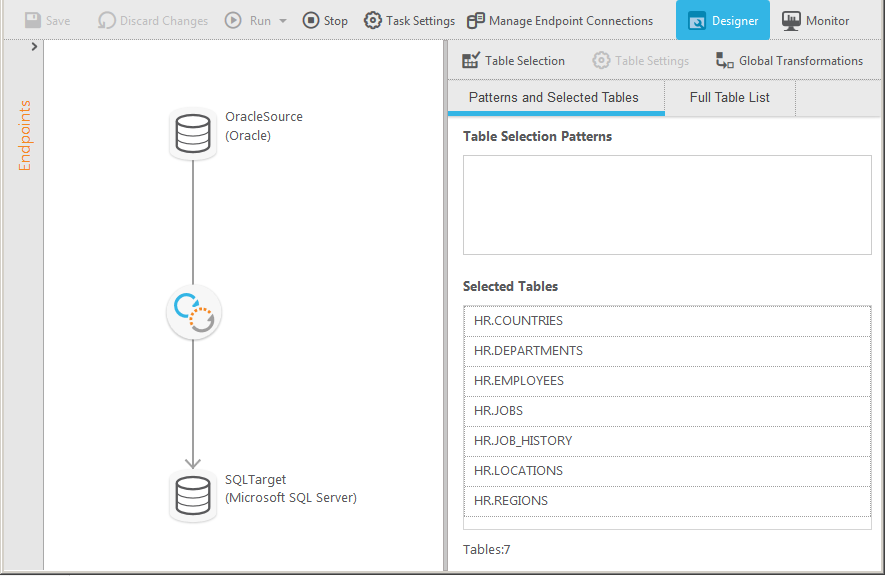
Prior to using Qlik Replicate, we used an ETL solution to copy data from the Oracle ERP system to the Microsoft SQL Server BI system at a 15-minute interval. It was very tedious to maintain. Qlik Replicate is much easier to use and we replicate data near real-time now.
A de minimis incentive was given to thank the reviewer for their time. The incentive was not used to bias or drive a particular response, nor was the incentive contingent on a positive endorsement. TR verified that a representative sample of customers was invited. More Info