Flexmonster Pivot Table & Charts Component vs. Tableau Public

Overview
ProductRatingMost Used ByProduct SummaryStarting Price
Flexmonster Pivot Table & Charts Component
Score 10.0 out of 10
Mid-Size Companies (51-1,000 employees)
Flexmonster Pivot Table & Charts is a component for interactive pivot reports that can be inserted into a web page or a web application. It’s a JavaScript tool that enables a user to visualize their business data. This solution supports Microsoft Analysis Services OLAP cubes, Mondrian, icCube, JSON, SQL (MS SQL, MySQL and others) databases or static JSON or CSV files. According to the vendor, this solution allows users to work extremely quickly with really large data…
$0
Annual SaaS Subscription
Tableau Public
Score 9.8 out of 10
N/A
Tableau Public is a free edition of the Desktop product. With this edition, data can only be published to the Tableau public website and does not allow work to be saved or exported locally.
$0
per month
Pricing
Flexmonster Pivot Table & Charts ComponentTableau Public
Editions & Modules
Pivot Table for SQL/CSV/JSON Unlimited
$0
Annual SaaS Subscription
Pivot Table for Pentaho Mondrian
$0
Annual SaaS Subscription
Pivot Table for MS Analysis Services
$0
Annual SaaS Subscription
Pivot Table for SQL/CSV/JSON Basic
$299
Annual subscription
Pivot Table for Pentaho Mondrian
$799
Annual subscription
Pivot Table for SQL/CSV/JSON Unlimited
$799
Annual subscription
Pivot Table for MS Analysis Services
$799
Annual subscription
No answers on this topic
Offerings
Pricing Offerings
Flexmonster Pivot Table & Charts ComponentTableau Public
Free Trial
YesNo
Free/Freemium Version
NoYes
Premium Consulting/Integration Services
YesNo
Entry-level Setup FeeNo setup feeNo setup fee
Additional Details
More Pricing Information
Community Pulse
Flexmonster Pivot Table & Charts ComponentTableau Public
Features
Flexmonster Pivot Table & Charts ComponentTableau Public
BI Standard Reporting
Comparison of BI Standard Reporting features of Product A and Product B
Flexmonster Pivot Table & Charts Component
10.0
1 Ratings
20% above category average
Tableau Public
9.8
12 Ratings
19% above category average
Report Formatting Templates10.01 Ratings9.712 Ratings
Pixel Perfect reports00 Ratings9.710 Ratings
Customizable dashboards00 Ratings10.012 Ratings
Ad-hoc Reporting
Comparison of Ad-hoc Reporting features of Product A and Product B
Flexmonster Pivot Table & Charts Component
9.5
1 Ratings
17% above category average
Tableau Public
9.7
12 Ratings
22% above category average
Formatting capabilities9.01 Ratings9.712 Ratings
Report sharing and collaboration10.01 Ratings9.811 Ratings
Drill-down analysis00 Ratings9.812 Ratings
Integration with R or other statistical packages00 Ratings9.59 Ratings
Report Output and Scheduling
Comparison of Report Output and Scheduling features of Product A and Product B
Flexmonster Pivot Table & Charts Component
10.0
1 Ratings
20% above category average
Tableau Public
9.5
11 Ratings
15% above category average
Publish to PDF10.01 Ratings10.09 Ratings
Publish to Web00 Ratings10.011 Ratings
Report Versioning00 Ratings9.89 Ratings
Report Delivery Scheduling00 Ratings9.69 Ratings
Delivery to Remote Servers00 Ratings8.17 Ratings
Mobile Capabilities
Comparison of Mobile Capabilities features of Product A and Product B
Flexmonster Pivot Table & Charts Component
10.0
1 Ratings
26% above category average
Tableau Public
-
Ratings
Responsive Design for Web Access10.01 Ratings00 Ratings
Data Discovery and Visualization
Comparison of Data Discovery and Visualization features of Product A and Product B
Flexmonster Pivot Table & Charts Component
-
Ratings
Tableau Public
9.8
11 Ratings
23% above category average
Pre-built visualization formats (heatmaps, scatter plots etc.)00 Ratings9.811 Ratings
Location Analytics / Geographic Visualization00 Ratings9.811 Ratings
Predictive Analytics00 Ratings9.79 Ratings
Best Alternatives
Flexmonster Pivot Table & Charts ComponentTableau Public
Small Businesses
Yellowfin
Yellowfin
Score 8.7 out of 10
Supermetrics
Supermetrics
Score 9.7 out of 10
Medium-sized Companies
Reveal
Reveal
Score 10.0 out of 10
Supermetrics
Supermetrics
Score 9.7 out of 10
Enterprises
Kyvos Semantic Layer
Score 9.5 out of 10
IBM Analytics Engine
Score 7.2 out of 10
All AlternativesView all alternativesView all alternatives
User Ratings
Flexmonster Pivot Table & Charts ComponentTableau Public
Likelihood to Recommend
10.0
(1 ratings)
8.5
(14 ratings)
Likelihood to Renew
-
(0 ratings)
9.1
(2 ratings)
Usability
9.0
(1 ratings)
10.0
(5 ratings)
Support Rating
10.0
(1 ratings)
9.6
(6 ratings)
Online Training
-
(0 ratings)
9.0
(1 ratings)
Implementation Rating
-
(0 ratings)
9.1
(2 ratings)
User Testimonials
Flexmonster Pivot Table & Charts ComponentTableau Public
Likelihood to Recommend
Flexmonster
Fantastic product to embed in any SaaS solution for reporting and data exports. Excellent performance, ability to customize fields and tons of other features out of the box that makes it a well-rounded tool that is easy to use. To top it off their support is amazing for answering technical questions quickly and they provide great examples to learn how to interact with the code. We are very happy with our choice to use Flexmonster!
Read full review
Tableau
Tableau public is the best platform to build dashboards for your personal profile and share with recruiters. It's always good to keep ourselves updated on the latest features, create sample dashboards and save them to a personal profile. Tableau public is free and doesn't need any subscription. anyone can create an account and start building reports.
Read full review
Pros
Flexmonster
No answers on this topic
Tableau
  • Data visualization: lots of different options, including bar, scatter, pie, waterfall charts to explore relationships between variables, and to present findings/trends to different teams
  • Integrates readily with limited, though different data sources: TXT, CSV, TDE, Access
  • Exports reports for review of different dashboards: client-ready/team-ready, with a clean and tidy presentation in PDF format (or hardcopy)
Read full review
Cons
Flexmonster
No answers on this topic
Tableau
  • Tableau Public (both Desktop and Server) like their "for a fee" counterparts offer very easy to learn and use tools to transform data into pictures and gain insights into your data. Most organizations report a reduction in development time of 10x vs. other similar tools, due to the intuitive user interface. That said, with Tableau Public, published workbooks are "disconnected" from the underlying data sources and require periodic updates when the data changes. Users are limited to 1 Gb of storage space per user ID and password as well.
  • I would like to see better options for public sharing of visualizations and data from within the "for a fee" products as more and more organizations are moving in the direction of data sharing with partners and their communities.
Read full review
Likelihood to Renew
Flexmonster
No answers on this topic
Tableau
It's free, right? I'll keep using the free version. So the real question to ask is this? Will I pay $999 for the Personal version or $1,999 for the Professional? Yikes! That is a big stretch. I'm not sure about that. The product comparison chart is at: http://www.tableausoftware.com/public/comparison
Read full review
Usability
Flexmonster
Checks all the boxes! Easy to use, great out of the box feature set and fantastic support team
Read full review
Tableau
Tableau public is a great training tool to understand the basics of Tableau before buying it. A great tool to extend Excel's visualization and to publish data for others. Not useful for anything you need secure. No ability to access databases. Static information only.
Read full review
Support Rating
Flexmonster
Quick response to questions and feedback, excellent documentation for learning about the product and tons of examples to leverage.
Read full review
Tableau
I have not yet required to contact support as the documentation and help i found online has always worked so far
Read full review
Online Training
Flexmonster
No answers on this topic
Tableau
I found it sufficient, and fast. I could easily "kick the tires" with Tableau on my data so I got up and running fast.
Read full review
Implementation Rating
Flexmonster
No answers on this topic
Tableau
Start at the end and work backward. Identify the business case / issue and questions the end users have, then identify the data needed, and where to get it.
Read full review
Alternatives Considered
Flexmonster
No answers on this topic
Tableau
Google Charts/Drive is sufficient for simpler data sets, but it does not integrate with other web platforms and the visualization does not look as professional. I'm not aware of any other competitors that offer the same package as Microsoft.
Read full review
Return on Investment
Flexmonster
No answers on this topic
Tableau
  • Tableau Public visualizations have helped drive traffic to our content and sites
  • The lack of cost means it's easy to demonstrate our experience to attract paying clients
Read full review
ScreenShots

Flexmonster Pivot Table & Charts Component Screenshots

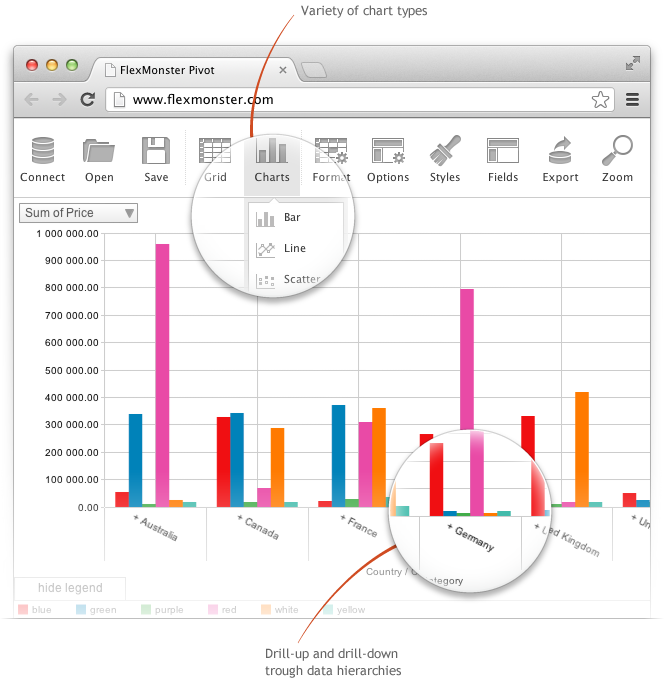
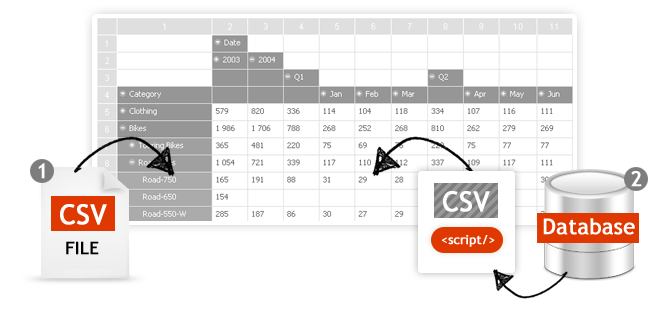
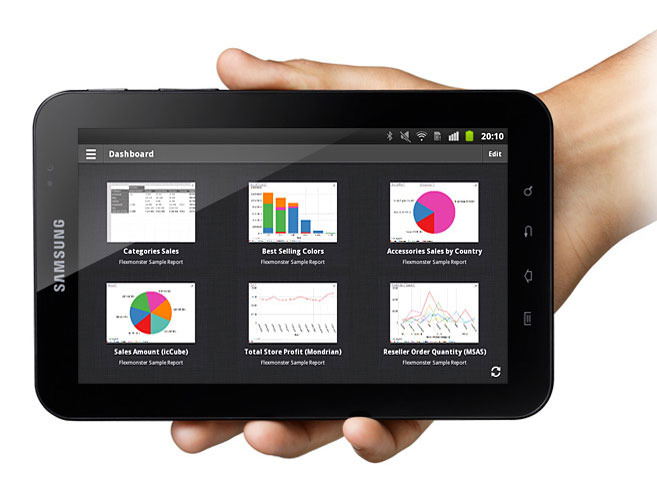
Screenshot of Pivot Component supports the printing of the Pivot view. Additionally users can export the reports into a variety of formats.Screenshot of Pivot Table Component helps you to create interactive pivot tables and charts reports for web and Flex applications. Pivot Component will provide your customers with an extremely intuitive end-user experience while creating and analyzing reports.Screenshot of Pivot Charts provide an alternative, interactive way to visualize data.Screenshot of The component will connect to any database: MS SQL, MySQL, Oracle, PostgreSQL - using simple script generating CSV output to enable real-time business analysis. Pivot Component is full browser-side component, thus you can use any desired server-side to generate CSV data.Screenshot of Pivot Table Component can connect to OLAP cubes via XMLA protocol. XMLA is XML for Analysis - an industry standard for data access in analytical systems, such as OLAP and Data Mining.Screenshot of Start mobile business reporting with the Flexmonster mobile application. It can be downloaded to your tablets from Google Play or Apple App Store.