TrustRadius: an HG Insights company

Save this comparison

Save this comparison

Add Product

Recommended Comparisons

    Overview
    ProductRatingMost Used ByProduct SummaryStarting Price

    Food Label Maker

    N/AN/AFood Label Maker is a nutrition and supplement labeling software designed to streamline and secure the product lifecycle from concept development to store shelf. The platform simplifies recipe management, nutrition analysis, and the creation of regulatory market compliant nutrition labels for food businesses of any size. Key Features and Benefits Expert-Led Compliance & Expertise: The system is built upon the principle of…N/A

    PTC Creo

    Score7.6 out of 10
    N/APTC offers Creo, the company's line of computer-aided design (CAD) products that support the product lifecycle management (PLM) process with 2D and 3D design kits (Creo Elements and Creo Direct), an augmented reality module, Creo Illustrate for technical illustrations, Creo Sketch, Creo Schematics and Creo View for diagramming and sharing information, Creo simulate for running simulations, and other modules.

    $2,480

    Pricing
    Food Label MakerPTC Creo
    Editions & Modules
    No answers on this topic
    Design Package
    $2,480.00
    Offerings
    Pricing Offerings
    Food Label MakerPTC Creo
    Free Trial
    NoNo
    Free/Freemium Version
    NoNo
    Premium Consulting/Integration Services
    NoNo
    Entry-level Setup FeeNo setup feeNo setup fee
    Additional Details——
    More Pricing Information
    Community Pulse
    Food Label MakerPTC Creo
    Considered Both Products
    Food Label Maker
    No answer on this topic
    PTC
    No answer on this topic
    Key User Insights
    Would buy again
    No answers on this topic
    90%
    Would buy again
    9 Answers
    Delivers good value for the price
    No answers on this topic
    80%
    Delivers good value for the price
    8 Answers
    Happy with the feature set
    No answers on this topic
    80%
    Happy with the feature set
    8 Answers
    Lived up to sales and marketing promises
    No answers on this topic
    100%
    Lived up to sales and marketing promises
    5 Answers
    Implementation went as expected
    No answers on this topic
    100%
    Implementation went as expected
    7 Answers
    Features
    Food Label MakerPTC Creo
    Computer-Aided Design Software
    Comparison of Computer-Aided Design Software features of Food Label Maker and PTC Creo
    Feature
    Food Label Maker
    -
    Ratings
    PTC Creo
    4.0
    1 Ratings
    61% below category average
    3D Modeling00 Ratings4.01 Ratings
    2D Drafting00 Ratings1.01 Ratings
    Rendering and Visualization00 Ratings6.01 Ratings
    Parametric Design00 Ratings8.01 Ratings
    Collaboration and Sharing00 Ratings6.01 Ratings
    Compatibility with other software and formats00 Ratings2.01 Ratings
    Assembly Design00 Ratings3.01 Ratings
    Documentation and Annotation00 Ratings2.01 Ratings
    Best Alternatives
    Food Label MakerPTC Creo
    Small Businesses
    No answers on this topic
    Onshape
    Score6.4 out of 10
    Medium-sized Companies
    Arena PLM and QMS
    Score8.5 out of 10
    Onshape
    Score6.4 out of 10
    Enterprises
    SAP Integrated Product Development
    Score9 out of 10
    Rhino
    Score8.7 out of 10
    All AlternativesView all alternativesView all alternatives
    User Ratings
    Food Label MakerPTC Creo
    Likelihood to Recommend
    -
    (0 ratings)
    2.2
    (14 ratings)
    Support Rating
    -
    (0 ratings)
    8.0
    (1 ratings)
    User Testimonials
    Food Label MakerPTC Creo
    Likelihood to Recommend
    Food Label Maker
    No answers on this topic
    PTC
    PTC Creo is great for assemblies that multiple users are collaborating on. Models can reference other models that someone in another department has released and when those models are changed, the referenced parts and assemblies are changed. These changes are very helpful when working on collaborative machine designs and comparing forging dies with the final parts.
    Incentivized
    Read full review
    Pros
    Food Label Maker
    No answers on this topic
    PTC
    • PTC Creo contains many advanced tools with better optimization for creating part models and other production related drawings.
    • The initial concept designs can be done more adequately.
    • The parameters of 2D drawings can be changed easily by editing the 3D model.
    • The productivity can be increased by customized tools for modeling.
    Incentivized
    Read full review
    Cons
    Food Label Maker
    No answers on this topic
    PTC
    • No autosave
    • No clear message if it has problems saving the file
    • Not so easy to use
    • In my experience, has a lot of things missing that other CAD already have in years
    • In my experience, it's extremely easy to lose work/time
    Read full review
    Support Rating
    Food Label Maker
    No answers on this topic
    PTC
    I liked the training manuals I used to learn some, as I didn’t have CAD background in college or before this job. My coworkers were able to share with me what they learned in PTC training and I was able to get support online and through reading.
    Incentivized
    Read full review
    Alternatives Considered
    Food Label Maker
    No answers on this topic
    PTC
    Learning curve of SOLIDWORKS is higher compared to Creo, however, stability and more design control is provided by Creo. Creo also have more robust and stable interfaces. For larger assemblies, Creo works better than SOLIDWORKS. New upgrades of Creo has given liberty to open different file data of different software without any file conversion. Creo costs comparable to SOLIDWORKS cost, with more capabilities.
    Incentivized
    Read full review
    Return on Investment
    Food Label Maker
    No answers on this topic
    PTC
    • Having PTC Creo as our primary tool positions us as forward thinking and creative in the eyes of our clients.
    • PTC Creo constantly evolves in the ability to increase our productivity; new capabilities and features are added, which reduce our level of effort for some tasks.
    Incentivized
    Read full review
    ScreenShots

    Food Label Maker Screenshots

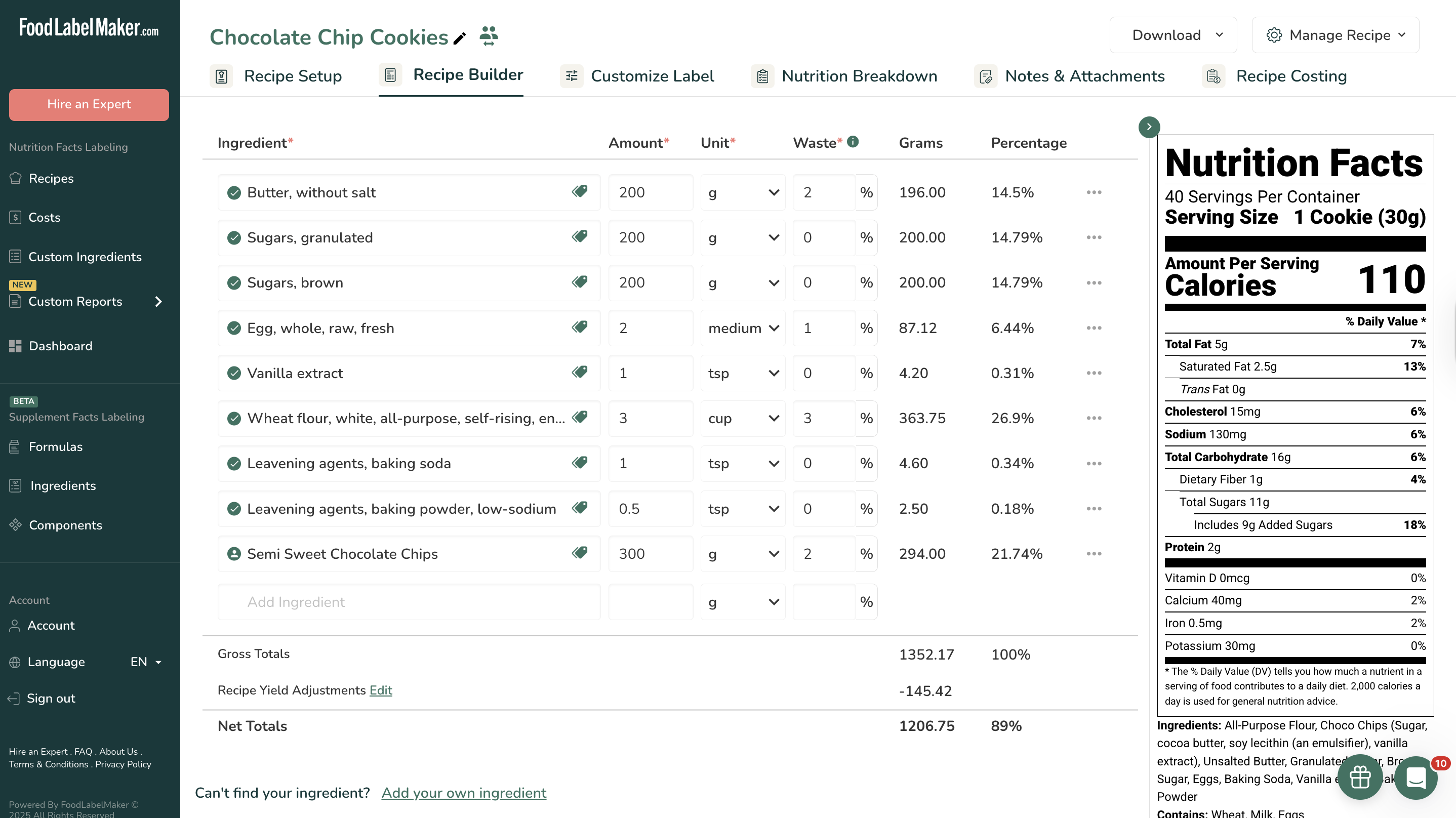
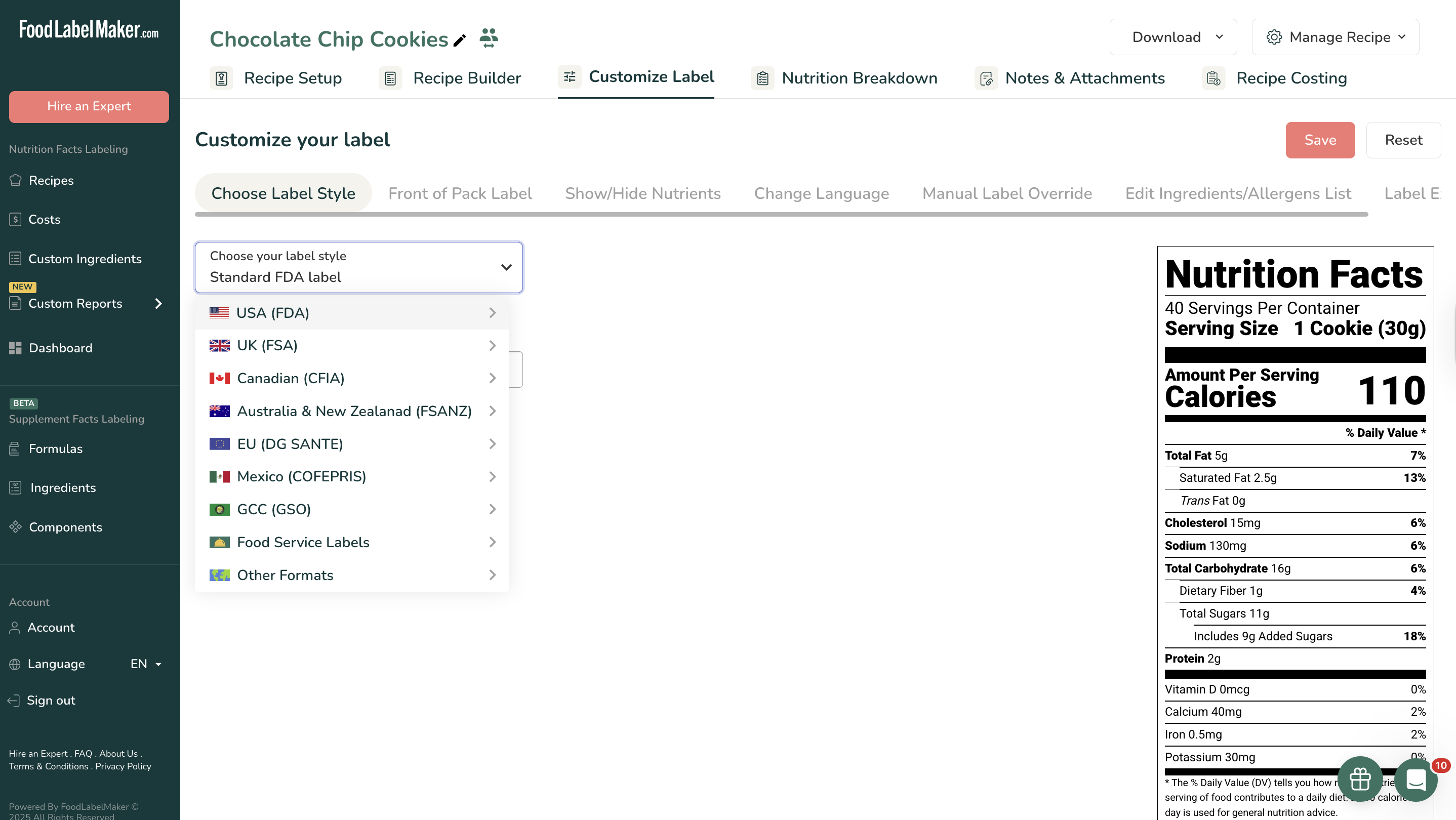
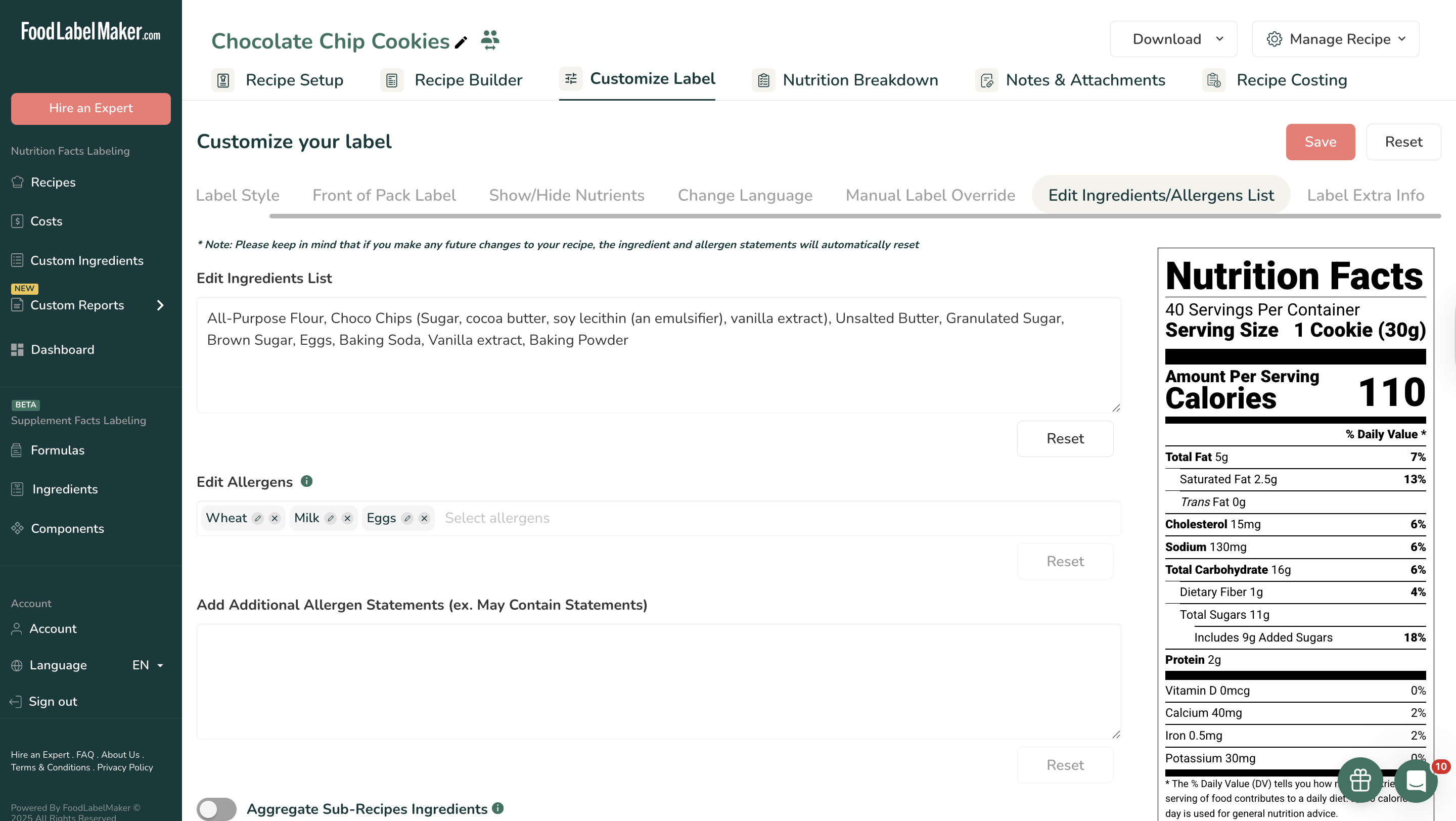
    Screenshot of The Recipe Builder, which is the central hub for formula management. Users input precise ingredient amounts, units, and waste percentages to establish an accurate foundation for nutrition analysis. The system automatically calculates Gross and Net Totals, applies Recipe Yield Adjustments, and provides the percentage breakdown of all ingredients.Screenshot of where users select their required regulatory format from a list that includes the USA (FDA), Canada (CFIA), UK (FSA), EU (DG SANTE), Mexico (COFEPRIS), Australia & New Zealand (FSANZ), and the GCC (GSO). This ensures the resulting label design meets specific international requirements.Screenshot of the Edit Ingredients/Allergens List feature that allows for manual review and adjustment of the automatically generated ingredient statement. The system displays automatically identified allergens (e.g., Wheat, Milk, Eggs), and users can manually select or add essential "May Contain Statements" to ensure complete consumer safety information.Screenshot of the Nutrition Breakdown tab provides deep data analysis of the recipe. It offers a high-level view of key metrics like Total Calories, Carbs, Fat, and Protein per serving or per 100g. Visual aids, including pie charts and bar graphs, show the ingredient contribution to total recipe weight and calories, assisting in product formulation adjustments.