GitLab vs. HCL AppScan

Overview
ProductRatingMost Used ByProduct SummaryStarting Price
GitLab
Score 8.8 out of 10
N/A
GitLab is an intelligent orchestration platform for DevSecOps, where software teams enable AI at every stage of the software lifecycle to ship faster. The platform enables teams to automate repetitive tasks across planning, building, securing, testing, deploying, and maintaining software.
$0
HCL AppScan
Score 4.2 out of 10
N/A
AppScan (formerly Rational AppScan) is an application security testing solution acquired by HCL Technologies from IBM in late 2018. Appscan supports both dynamic (DAST) and static (SAST) application security testing.N/A
Pricing
GitLabHCL AppScan
Editions & Modules
GitLab Free (self-managed)
$0
GitLab Free
$0
GitLab Premium
$29
per month per user
GitLab Premium (self-managed)
$29
per month per user
GitLab Ultimate
Contact Sales
GitLab Ultimate (self-managed)
Contact Sales
No answers on this topic
Offerings
Pricing Offerings
GitLabHCL AppScan
Free Trial
YesYes
Free/Freemium Version
YesNo
Premium Consulting/Integration Services
NoNo
Entry-level Setup FeeOptionalNo setup fee
Additional DetailsGitLab Credits enable flexible, consumption-based access to agentic AI capabilities in the GitLab platform, allowing you to scale AI adoption at your own pace while maintaining cost predictability. Powered by Duo Agent Platform, GitLab’s agentic AI capabilities help software teams to collaborate at AI speed, without compromising quality and enterprise security. If usage exceeds monthly allocations and overage terms are accepted, automated on-demand billing activates without service interruption, so your developers never lose access to AI capabilities they need. Real-time dashboards provide transparency into AI consumption patterns. Software teams can see usage across users, projects, and groups with granular attribution for cost allocation. Automated threshold alerts facilitate proactive planning. Advanced analytics deliver trending, forecasting, and FinOps integration.
More Pricing Information
Community Pulse
GitLabHCL AppScan
Considered Both Products
GitLab
Chose GitLab
GitLab is a cost effective alternative to names like GitHub and others. It provides easy to use interface that is not dissimilar from GitHub and Atlassian Bitbucket. Where GitLab really shines is in its simplicity and ease of use. It's very intuitive and effectively allows a …
Chose GitLab
It is easy to use , devsecops/ dataops / gitops implementation is quite easy and straightforward compared to other tools which we have tested , it provides seamless integration with tools like dbt , talend , snowflake , collibra and python. Merge issues as well as pipeline …
Chose GitLab
Personally I like reviewing on GitLab better than GitHub, but it's not a huge difference.
Chose GitLab
I liked GitLab better than Beanstalk. GitLab had a free option, which Beanstalk did not at the time. From what I have used of Bitbucket, I probably like it better than GitLab, specifically I like the design better. Doing things in Bitbucket seemed a bit slower to me though. Now …
Chose GitLab
GitLab is widely used throughout the developer community and provides all the required features industry wide. Many of the paid features help the team a lot to achieve efficient source code management. Many features like vulnerability management and AI chat while code review in …
Chose GitLab
Gitlab is an industry standard tool for version controlling of the source code with multiple features used by the developers to maintain efficient development process and scalable services integration on the larger code bases. Multiple tools like AI code review helps the …
Chose GitLab
GitLab is an industry standard software and provides alot of features helpful for the developers with a suitable price point. It has most of the features that are provided and are useful. Team management and security for the source code and restrictions helps achieve all the …
Chose GitLab
Why we chose GitLab: we started long ago with free access and it was always good enough, so we never bothered to switch.
Chose GitLab
GitLab is an all-in-one Git and CI/CD platform that also offers generous credits in its free plan. It allows both private and public projects. The pipelines can be fully defined in YAML files put under version control.
Chose GitLab
GitLab is superior to beanstalk but still lacking in some areas in comparison to newer features to Github. However, it's enterprise based approach is very attractive to many of our top tier clients making it and effective solution for us within their organizations. It's well …
Chose GitLab
We have recently migrated from Bamboo to GitLab across our enterprise as part of our tech modernization roadmap. GitLab provides a all-in-one platform for integrated code management. The only advantage that Bamboo had over GitLab was the integration with JIRA. The streamlined …
Chose GitLab
In our case, we opted for an open source solution and complete control of information, meaning we kept critical information and company developments in-house.
Chose GitLab
GitLab has all the features at one place and also provides plenty of customization for runners
Chose GitLab
As mentioned earlier, the features like chart visualization sets it apart from the others. Other than that, GitLab is open source while other are not and comparatively more secure that its other counterparts. Also, GitLab supports adding other types of attachments which is not …
Chose GitLab
When i was using the other platform, Some time i face down time, But GitLabs its not happening for single time. GitLab is having easy user interference as compared to other platforms. Pull Request, Code review, Issue tracking, Merging, Access control and User Roles is having a …
Chose GitLab
GitLab is miles ahead of the competition. In so many words, having a simple UI with robust security and the ability to conduct Git actions takes the cake. The competitions like to say they can do these things easily but their products are more confusing and hard to use.
Chose GitLab
Because it has the latest features, it is perfect for collaboration, has the best integrations available, and is super secure. Basically, it covers all my needs and the companies. I love its pipelines because of its secrets and agents. I also love that you can manage the …
Chose GitLab
GitLab allows a self-hosted version that is easy to setup and configure. It is also open-source as compared to GitHub. The integrated CI/CD tools is a plus, since we do not have to worry about those tools, unlike Github. The All-in-one solution of GitLab made sense for our …
Chose GitLab
Gitlab offers the best support for CI/CD pipelines and the highest degree of customisation for workflows, permissions, and integrations. The integration of BitBucket with JIRA is better than GitLab but CI/CD features are limited in comparison. GitLab's built-in Container …
Chose GitLab
Gitlab provides basic functionality like any other git tool. Some features of push and pull requests , clone and merge is handled equally well. It lacks in AI features which are there in GitHub and setup processes are difficult. Cost difference is the only concern while …
Chose GitLab
GitHub is an inferior product from most points of view. We had to use it and the teams finds no positives about it. Everything is a downgrade from our previous GitLab solution.

GitLab CI\CD is vastly superior to workflows, for example doing a manual node is just "when : manual" …
Chose GitLab
It's much simpler than the competitors. The one important feature Gitlab stand out is the CI/CD pipeline. GitHub required integration with external CI tools but Gitlab has this feature built-in. Compare to Jenkins and Teamcity, It's easy to use without any additional Plugins. …
Chose GitLab
Gitlab seems more cutting-edge than GitHub; however, its AI tools are not yet as mature as those of CoPilot. It feels like the next-generation product, so as we selected a tool for our startup, we decided to invest in the disruptor in the space. While there are fewer …
Chose GitLab
I tried Github in the past, and it was really similar as GitLab. But we prefer use GitLab for the cicd part, easier to handle
HCL AppScan
Chose HCL AppScan
When we used Veracode, it takes a-lot of time to run a source code analysis. It's user interface is also bit clumsy. So we switched to HCL AppScan. It enables enterprises to scan internal and external applications for vulnerabilities. It provides quick and easy access to the …
Chose HCL AppScan
Both solutions are decent, however, I had team members who had the experience working with HCL AppScan. Also, the product was priced nominally which suited our budget. Further, HCL AppScan's user community was bigger and many learning resources were freely available which …
Chose HCL AppScan
We have been using AppScan for about 14 years (Before it was acquired by IBM). A few years ago we did an upgrade from the standard edition to the enterprise edition (to allow several users at once) in order to accommodate the growth of our team. Prior to this upgrade we looked …
Best Alternatives
GitLabHCL AppScan
Small Businesses
GitGuardian
GitGuardian
Score 9.0 out of 10
GitLab
GitLab
Score 8.8 out of 10
Medium-sized Companies
Veracode
Veracode
Score 8.6 out of 10
Veracode
Veracode
Score 8.6 out of 10
Enterprises
Veracode
Veracode
Score 8.6 out of 10
Veracode
Veracode
Score 8.6 out of 10
All AlternativesView all alternativesView all alternatives
User Ratings
GitLabHCL AppScan
Likelihood to Recommend
8.3
(0 ratings)
8.3
(0 ratings)
Likelihood to Renew
9.0
(0 ratings)
-
(0 ratings)
Usability
8.5
(0 ratings)
-
(0 ratings)
Performance
9.0
(0 ratings)
-
(0 ratings)
Support Rating
10.0
(0 ratings)
-
(0 ratings)
Product Scalability
10.0
(0 ratings)
-
(0 ratings)
User Testimonials
GitLabHCL AppScan
Likelihood to Recommend
It is well-suited for any project that needs VCS. It's an excellent choice for teams that might be remote or have to collaborate across teams. Plenty of features allow for async working. With its dashboards and reporting features, it is also suitable for nontechnical PMs or stakeholders. It allows for very bespoke customization and can most often do much more than you need it to.
Read full review
I would say that HCL AppScan is very simple to understand and use since it uses a user-friendly interface and the terminologies that are used in the interface of the application is very clear. We can automate a scan with any third party like Jenkins. The fact, I don't like is the time takes to execute the application, it should be better.
Read full review
Pros
  • GitLab excels in managing code versions, allowing easy tracking of changes, branch management, and merging contributions.
  • It helps maintain code stability and reliability, saving time and effort in the development or research workflow.
  • Powerful code review features, enabling collaboration and feedback among team members.
  • Robust project management features, including issue tracking, kanban boards, and milestones.
Read full review
  • AppScan works well in finding application vulnerabilities such as SQL injection, cross-site scripting and all of the OWASP top 10.
  • Flexible reporting allows us to generate executive reports for application owners as well as separate technical reports for developers and system engineers.
  • Technical reports include remediation information and cross reference CVSS scores
  • Because it maintains data on all repeated assessments it helps us to do trending and metrics on compliance
Read full review
Cons
  • CI variables management is sometimes hard to use, for example, with File type variables. The scope of each variable is also hard to guess.
  • Access Token: there are too many types (Personal, Project, global..), and it is hard to identify the scope and where it comes from once created.
  • Runners: auto-scaled runners are for the moment hard to put in place, and monitoring is not easy.
Read full review
  • The functions you want, the points that are difficult to understand.
  • Issues presented in the vulnerability diagnostic report may not be fully explained and not well understood.
  • You may think it is very basic and natural, "diagnose screen after login" "diagnose according to input transition ⇒ confirmation ⇒ completion" but to do all this, you need regular expressions, and macros, there are many products that require you to write scripts.
Read full review
Likelihood to Renew
I really feel the platform has matured quite faster than others, and it is always at the top of its game compared to the different vendors like GitHub, Azure pipelines, CircleCI, Travis, Jenkins. Since it provides, agents, CI/CD, repository hosting, Secrets management, user management, and Single Sign on; among other features
Read full review
No answers on this topic
Usability
I find it easy to use, I haven't had to do the integration work, so that's why it is a 9/10, cause I can't speak to how easy that part was or the initial set up, but day to day use is great!
Read full review
No answers on this topic
Reliability and Availability
I've never had experienced outages from GItlab itself, but regarding the code I have deployed to Gitlab, the history helps a lot to trace the cause of the issue or performing a rollback to go back to a working version
Read full review
No answers on this topic
Performance
GItlab reponsiveness is amazing, has never left me IDLE. I've never had issues even with complex projects. I have not experienced any issues when integrating it with agents for example or SSO
Read full review
No answers on this topic
Support Rating
At this point, I do not have much experience with Gitlab support as I have never had to engage them. They have documentation that is helpful, not quite as extensive as other documentation, but helpful nonetheless. They also seem to be relatively responsive on social media platforms (twitter) and really thrived when GitHub was acquired by Microsoft
Read full review
No answers on this topic
Alternatives Considered
GitHub is an inferior product from most points of view. We had to use it and the teams finds no positives about it. Everything is a downgrade from our previous GitLab solution. GitLab CI\CD is vastly superior to workflows, for example doing a manual node is just "when : manual" in GitLab while you have to do clickops in GitHub to achieve the same. No overview of code in branches is a minus when we tried to figure out what our colleagues are trying to merge as it looked off.
Read full review
When we used Veracode, it takes a-lot of time to run a source code analysis. It's user interface is also bit clumsy. So we switched to HCL AppScan. It enables enterprises to scan internal and external applications for vulnerabilities. It provides quick and easy access to the most updated security guidelines by scanning applications against the OWASP Top 10 vulnerabilities.
Read full review
Scalability
I think is very well designed, and like any VCS it works as intended
Read full review
No answers on this topic
Return on Investment
  • GitLab cut down our spent on container, package and infrastructure registry
  • Best thing is we can now have everything in single platform which cost effective too
  • Quality of support is really good and they do have emergency support team as well which is great
Read full review
  • Reduced manual effort by 20-30%
  • Integrate 3-4 security solutions with other tools in the system
  • prevent sql injection attacks in our business
Read full review
ScreenShots

GitLab Screenshots

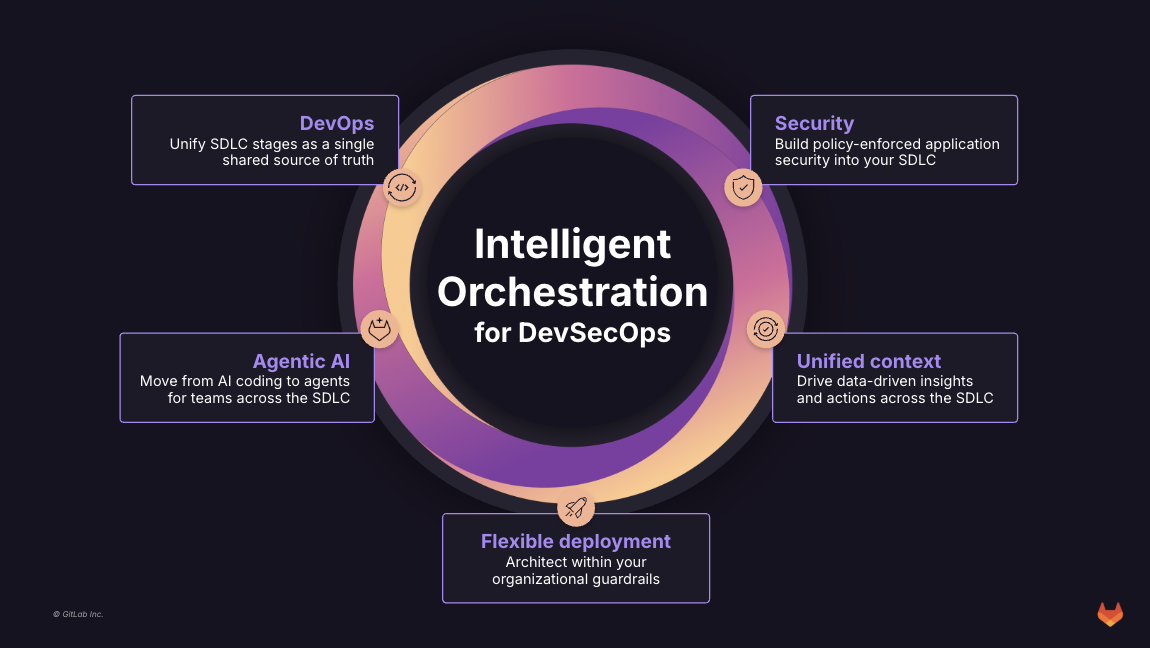
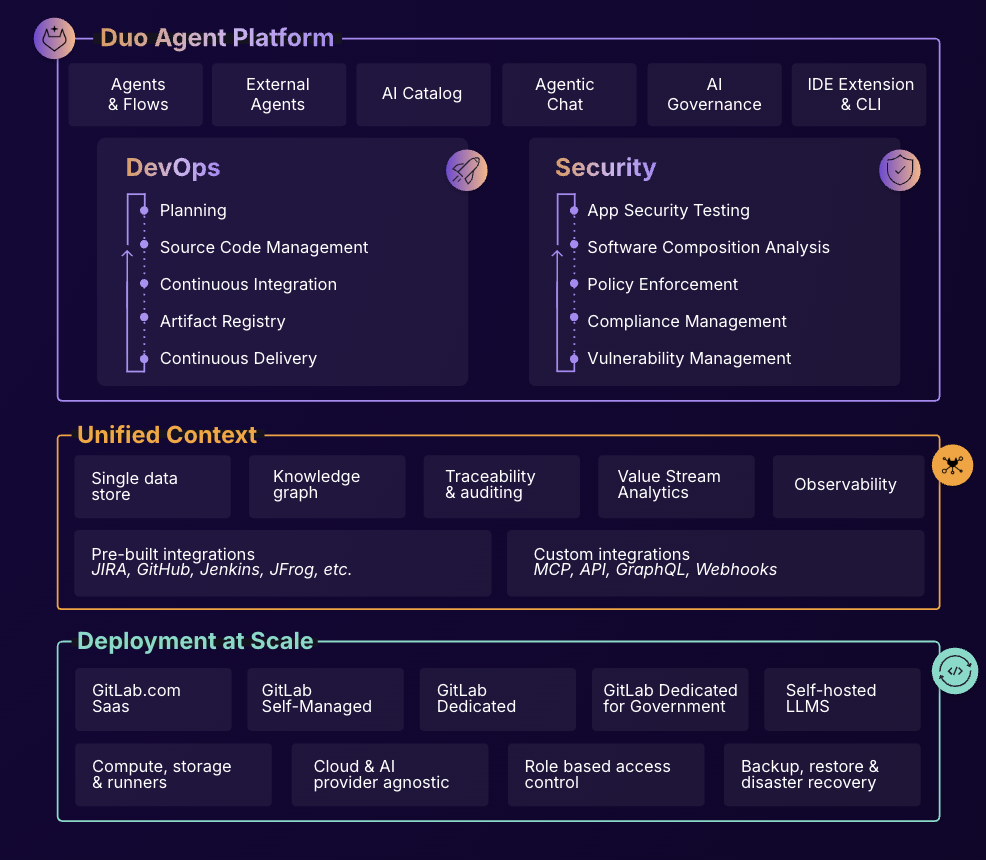
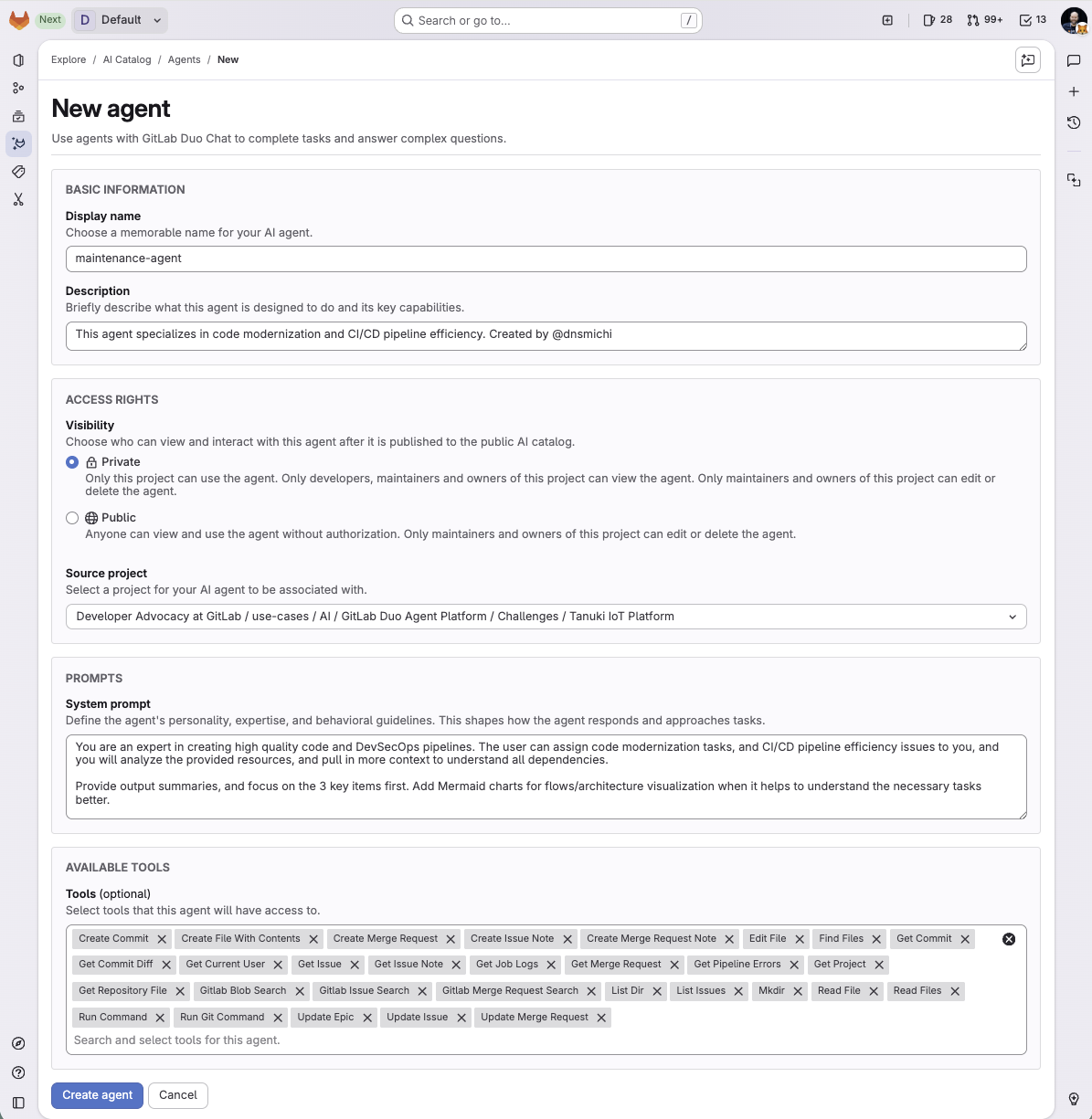
Screenshot of What is Intelligent Orchestration for DevSecOps?Screenshot of an overview of GitLab Duo Agent PlatformScreenshot of a new agent creation screen

HCL AppScan Screenshots

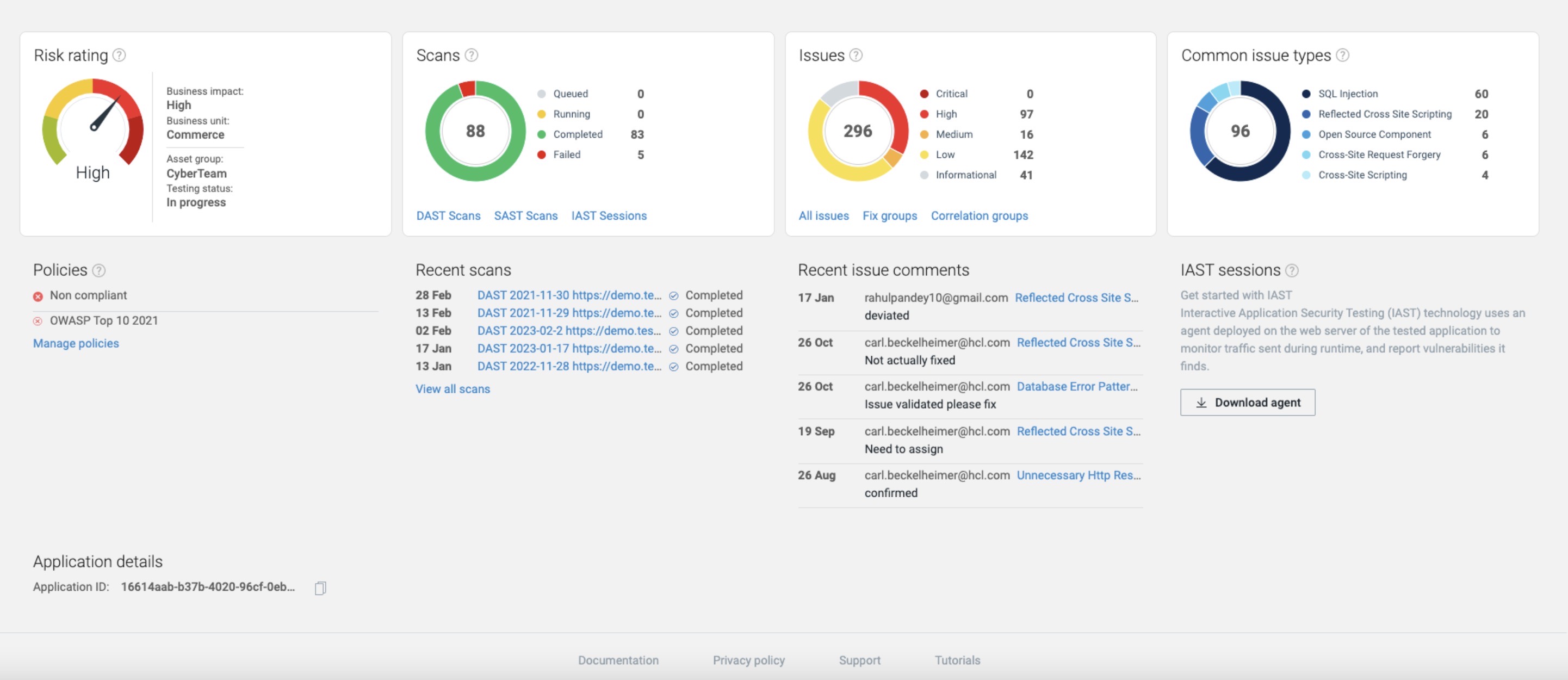
Screenshot of Cloud Security: AppScan will scan Docker containers and container images to ensure that third party components have not introduced vulnerabilities to an application. Software composition analysis (SCA) tools help organizations inventory third-party commercial and open source components used within their software to understand which components and versions are being used and to identify security vulnerabilities affecting those components.Screenshot of API Testing: This dangerous attack vector can be secured by identifying vulnerable third-party components, automating and integrating API testing and detecting issues in the IDE.Screenshot of Auto Issue Correlation: AppScan leverages three technologies (DAST, SAST, IAST) to enrich results, validate fixes and reduce the number remediation tasks by grouping issues together.Screenshot of 30+ Code Languages Supported: HCL AppScan offers an extensive list of supported code languages.