GitLab vs. Login Enterprise By Login VSI

Overview
ProductRatingMost Used ByProduct SummaryStarting Price
GitLab
Score 8.8 out of 10
N/A
GitLab is an intelligent orchestration platform for DevSecOps, where software teams enable AI at every stage of the software lifecycle to ship faster. The platform enables teams to automate repetitive tasks across planning, building, securing, testing, deploying, and maintaining software.
$0
per month per user
Login Enterprise By Login VSI
Score 8.2 out of 10
Mid-Size Companies (51-1,000 employees)
Login Enterprise is a performance validation and Digital Experience Monitoring (DEM) platform designed for Virtual Desktop Infrastructure (VDI), Desktop-as-a-Service (DaaS), and physical endpoint environments. Developed by Login VSI, the platform uses synthetic user simulation to benchmark login times, application launch latency, and workflow execution across enterprise workspace infrastructure. Key Capabilities Synthetic Workload Testing: Simulates…N/A
Pricing
GitLabLogin Enterprise By Login VSI
Editions & Modules
GitLab Free (self-managed)
$0
GitLab Free
$0
GitLab Premium
$29
per month per user
GitLab Premium (self-managed)
$29
per month per user
GitLab Ultimate
Contact Sales
GitLab Ultimate (self-managed)
Contact Sales
No answers on this topic
Offerings
Pricing Offerings
GitLabLogin Enterprise By Login VSI
Free Trial
YesNo
Free/Freemium Version
YesNo
Premium Consulting/Integration Services
YesNo
Entry-level Setup FeeOptionalOptional
Additional DetailsGitLab Credits enable flexible, consumption-based access to agentic AI capabilities in the GitLab platform, allowing you to scale AI adoption at your own pace while maintaining cost predictability. Powered by Duo Agent Platform, GitLab’s agentic AI capabilities help software teams to collaborate at AI speed, without compromising quality and enterprise security. If usage exceeds monthly allocations and overage terms are accepted, automated on-demand billing activates without service interruption, so your developers never lose access to AI capabilities they need. Real-time dashboards provide transparency into AI consumption patterns. Software teams can see usage across users, projects, and groups with granular attribution for cost allocation. Automated threshold alerts facilitate proactive planning. Advanced analytics deliver trending, forecasting, and FinOps integration.
More Pricing Information
Community Pulse
GitLabLogin Enterprise By Login VSI
Best Alternatives
GitLabLogin Enterprise By Login VSI
Small Businesses
GitGuardian
GitGuardian
Score 9.0 out of 10
GitLab
GitLab
Score 8.8 out of 10
Medium-sized Companies
Veracode
Veracode
Score 8.6 out of 10
GitLab
GitLab
Score 8.8 out of 10
Enterprises
Checkmarx
Checkmarx
Score 7.6 out of 10
GitLab
GitLab
Score 8.8 out of 10
All AlternativesView all alternativesView all alternatives
User Ratings
GitLabLogin Enterprise By Login VSI
Likelihood to Recommend
8.4
(162 ratings)
8.0
(1 ratings)
Likelihood to Renew
9.0
(5 ratings)
-
(0 ratings)
Usability
8.9
(14 ratings)
-
(0 ratings)
Performance
9.0
(1 ratings)
-
(0 ratings)
Support Rating
10.0
(12 ratings)
-
(0 ratings)
Product Scalability
10.0
(1 ratings)
-
(0 ratings)
User Testimonials
GitLabLogin Enterprise By Login VSI
Likelihood to Recommend
GitLab
GitLab is good if you work a lot with code and do complex repository actions. It gives you a very good overview of what were the states of your branches and the files in them at different stages in time. It's also way easier and more efficient to write pipelines for CI\CD. It's easier to read and it's easier to write them. It takes fewer clicks to achieve the same things with GitLab than it does for competitor products.
Read full review
Login VSI
Login Enterprise is well suited for monitoring server status and customer's performance on a specific server that its tracking. Do not expect easy learning curve as documentation could take time to read through and distinguish which is good and bad. Overall, it's a great product for server monitoring but only if enough resourced is provided for it.
Read full review
Pros
GitLab
  • GitLab excels in managing code versions, allowing easy tracking of changes, branch management, and merging contributions.
  • It helps maintain code stability and reliability, saving time and effort in the development or research workflow.
  • Powerful code review features, enabling collaboration and feedback among team members.
  • Robust project management features, including issue tracking, kanban boards, and milestones.
Read full review
Login VSI
No answers on this topic
Cons
GitLab
  • CI variables management is sometimes hard to use, for example, with File type variables. The scope of each variable is also hard to guess.
  • Access Token: there are too many types (Personal, Project, global..), and it is hard to identify the scope and where it comes from once created.
  • Runners: auto-scaled runners are for the moment hard to put in place, and monitoring is not easy.
Read full review
Login VSI
No answers on this topic
Likelihood to Renew
GitLab
I really feel the platform has matured quite faster than others, and it is always at the top of its game compared to the different vendors like GitHub, Azure pipelines, CircleCI, Travis, Jenkins. Since it provides, agents, CI/CD, repository hosting, Secrets management, user management, and Single Sign on; among other features
Read full review
Login VSI
No answers on this topic
Usability
GitLab
GitLab is very useable even new hires are not getting a hard time learning it. You can clone the repository with different options, pushinh and pulling branches are a breeze. Giving code review is intuitive, posting comments and comparing changes on the code doesn't give you a hard time since it's very readable.
Read full review
Login VSI
No answers on this topic
Reliability and Availability
GitLab
I've never had experienced outages from GItlab itself, but regarding the code I have deployed to Gitlab, the history helps a lot to trace the cause of the issue or performing a rollback to go back to a working version
Read full review
Login VSI
No answers on this topic
Performance
GitLab
GItlab reponsiveness is amazing, has never left me IDLE. I've never had issues even with complex projects. I have not experienced any issues when integrating it with agents for example or SSO
Read full review
Login VSI
No answers on this topic
Support Rating
GitLab
At this point, I do not have much experience with Gitlab support as I have never had to engage them. They have documentation that is helpful, not quite as extensive as other documentation, but helpful nonetheless. They also seem to be relatively responsive on social media platforms (twitter) and really thrived when GitHub was acquired by Microsoft
Read full review
Login VSI
No answers on this topic
Alternatives Considered
GitLab
Gitlab seems more cutting-edge than GitHub; however, its AI tools are not yet as mature as those of CoPilot. It feels like the next-generation product, so as we selected a tool for our startup, we decided to invest in the disruptor in the space. While there are fewer out-of-the-box templates for Gitlab, we have never discovered a lack of feature parity.
Read full review
Login VSI
Overall, Login Enterprise is a unique product that is useful for server, virtual laptop, user monitoring that enable us to see statistics and performance of our servers to make sure everything is good to go. I haven't use any software that is similar to this so I would recommend this to others.
Read full review
Scalability
GitLab
I think is very well designed, and like any VCS it works as intended
Read full review
Login VSI
No answers on this topic
Return on Investment
GitLab
  • GitLab cut down our spent on container, package and infrastructure registry
  • Best thing is we can now have everything in single platform which cost effective too
  • Quality of support is really good and they do have emergency support team as well which is great
Read full review
Login VSI
No answers on this topic
ScreenShots

GitLab Screenshots

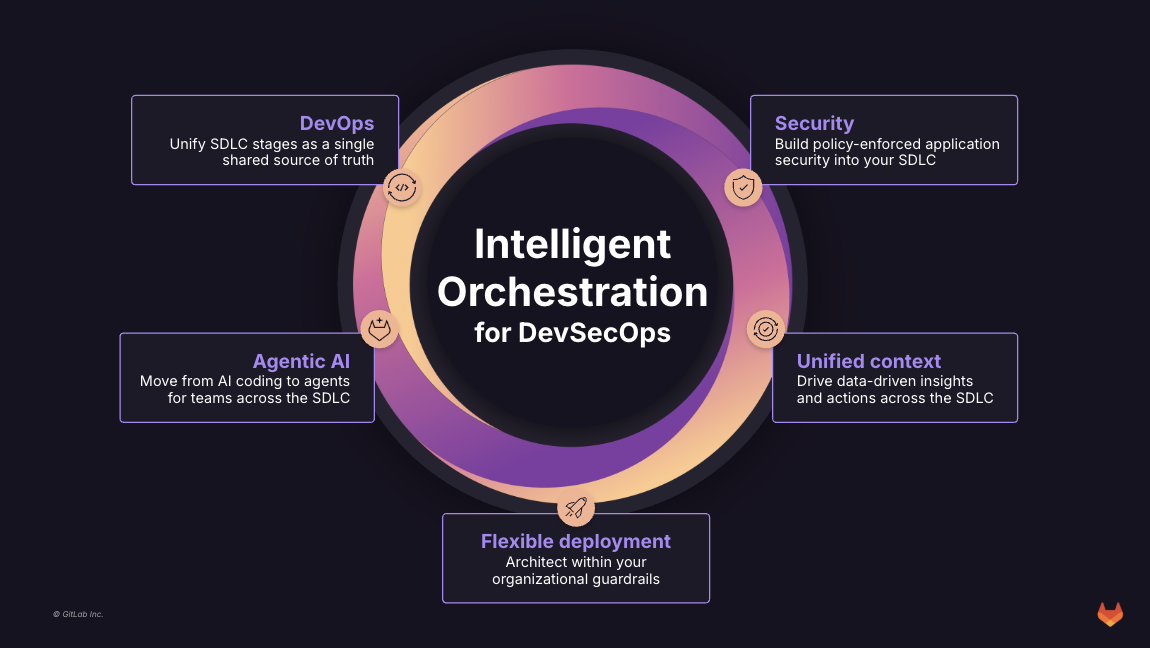
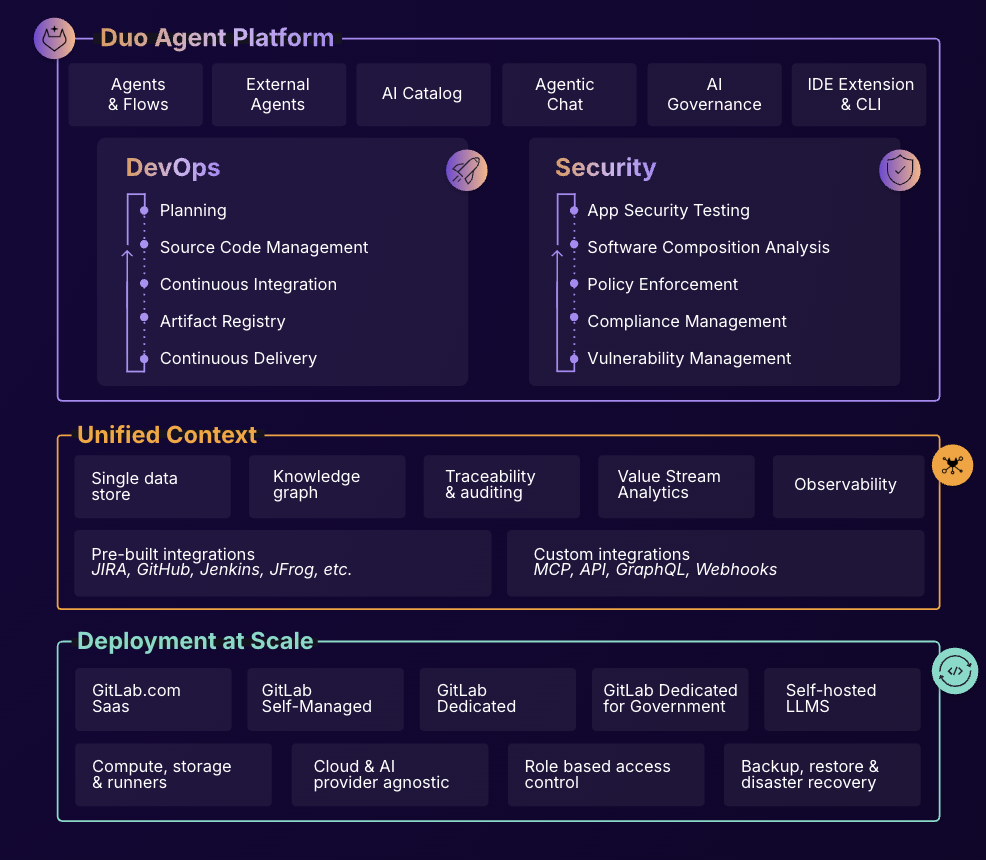
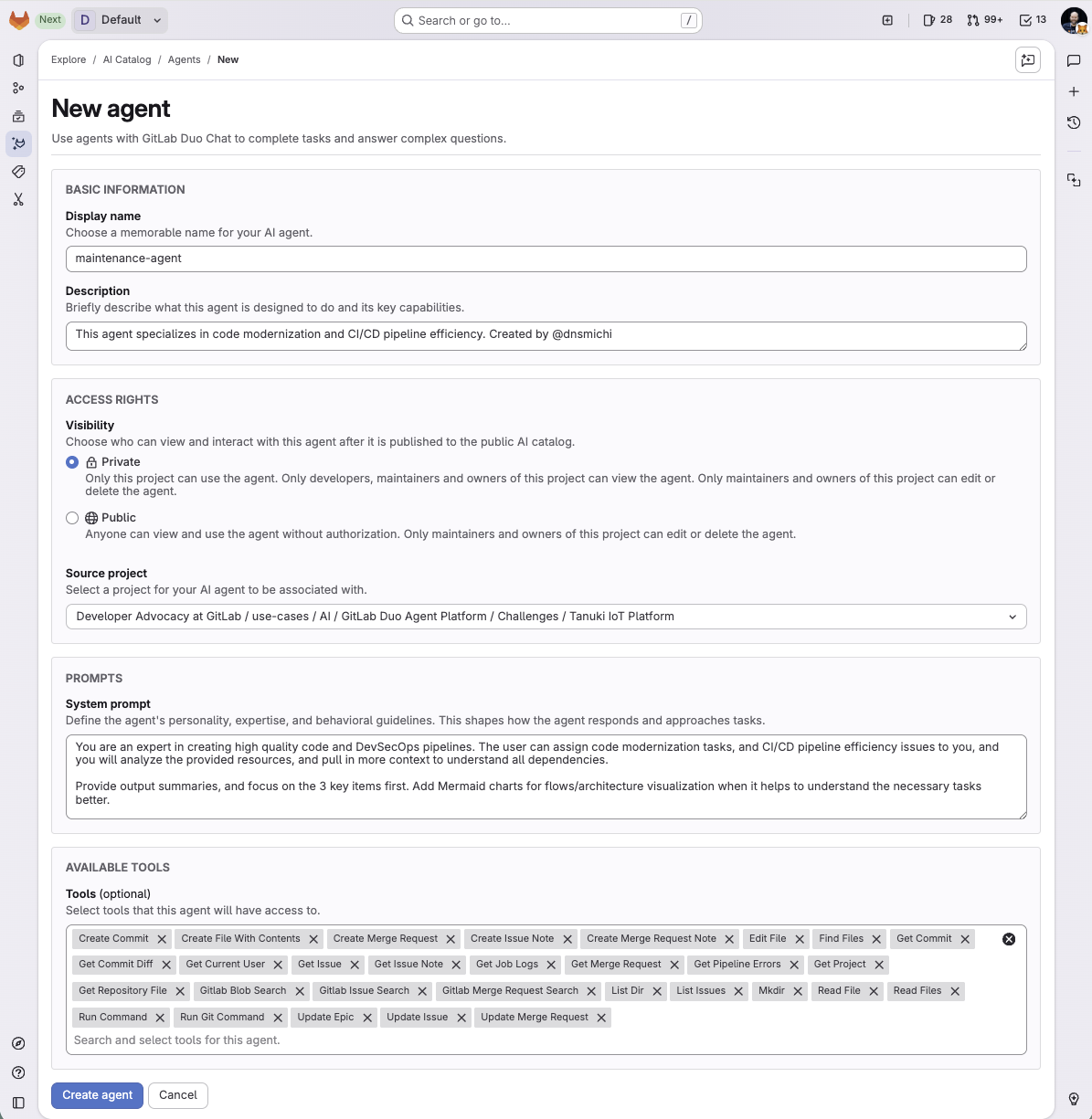
Screenshot of What is Intelligent Orchestration for DevSecOps?Screenshot of an overview of GitLab Duo Agent PlatformScreenshot of a new agent creation screen

Login Enterprise By Login VSI Screenshots

Screenshot of Performance and Availability Testing:
Proactively determining when performance and availability are at risk, and taking action before a situation arises, can prevent loss of productivity and employee engagement.

Login VSI uses virtual users, running 24x7x365, to test and safeguard infrastructure, virtual desktops, and applications from one or more locations (including cloud). Login VSI alerts users when changes affect the performance of desktop and application logons and interactions, protocol latency and network performance.Screenshot of Application Compatibility Testing:
Login Enterprise automatically tests the compatibility of applications after updates to their desktop images. Login Enterprise delivers plain and simple reports so users can make quick decisions on whether to move forward with a change or dive deeper into a specific application to see what the potential issues might be.

Login Enterprise catches productivity problems early in the change management process, tests many applications a day, and prevents breaking changes from reaching production systems. It aims to increase the effectiveness of the change management process and prevents loss of end-user experience.Screenshot of Application and Infrastructure Load Testing:
Applications largely define the end-user experience and productivity on any desktop infrastructure. In practice, many potential bottlenecks or changes in behavior only manifest themselves when the system is under high load. Login Enterprise enables enterprises to identify potential performance issues by measuring and comparing application load times and application responsiveness. Its virtual users log on to a desktop, start and interact with the applications and measure the responsiveness.

Login VSI offers  benchmark and load testing for all digital workspace environments. It is is used to right-size production environments while maximizing desktop and application performance. Login VSI also plays a role in a continuous delivery pipeline, predicting the impact of change on capacity and performance virtual desktop infrastructures.Screenshot of Lab and Image Management:
Login VSI automates the creation and update of desktop images, saving IT administrators days while ensuring end-user satisfaction. Login VSI automates the deployment and maintenance of desktop virtualization platforms as well as the creation and maintenance of the desktop images associated with them.