GitLab vs. NuGet

Overview
ProductRatingMost Used ByProduct SummaryStarting Price
GitLab
Score 8.9 out of 10
N/A
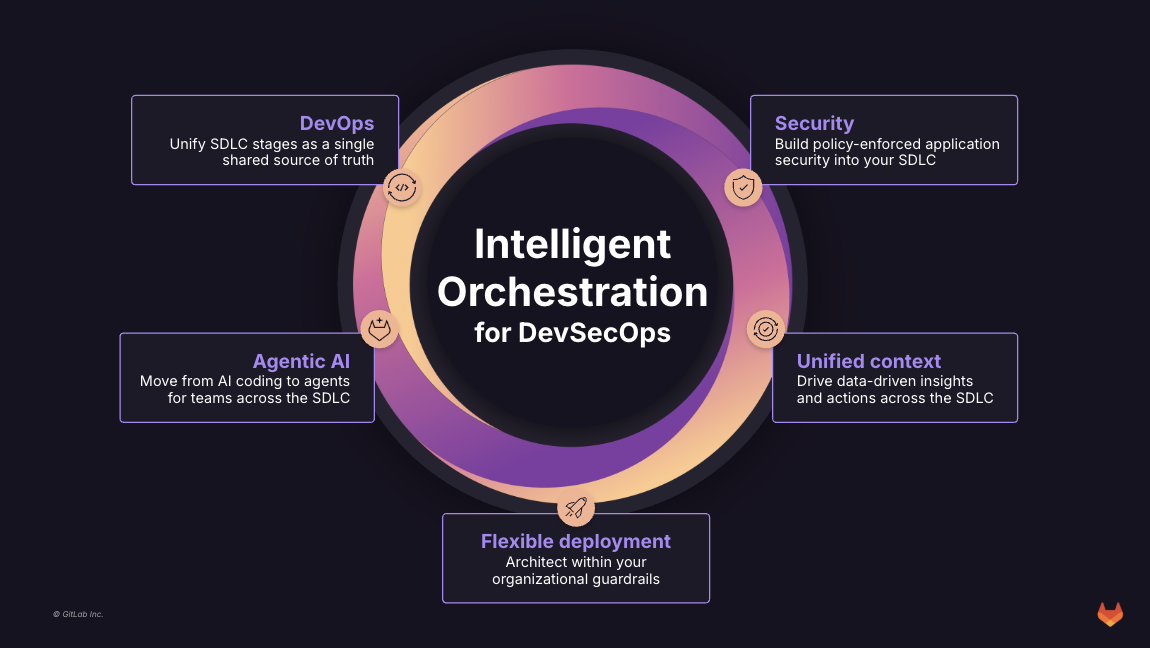
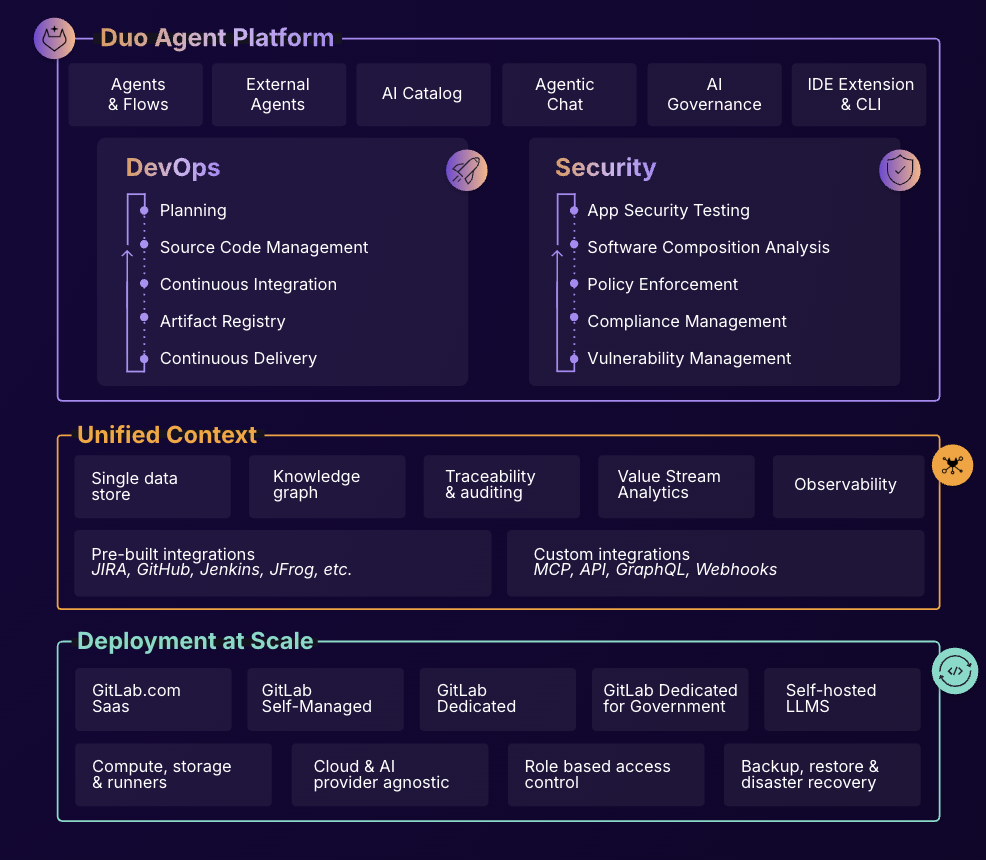
GitLab is an intelligent orchestration platform for DevSecOps, where software teams enable AI at every stage of the software lifecycle to ship faster. The platform enables teams to automate repetitive tasks across planning, building, securing, testing, deploying, and maintaining software.
$0
per month per user
NuGet
Score 8.0 out of 10
N/A
NuGet is the package manager for .NET. The NuGet client tools provide the ability to produce and consume packages. The NuGet Gallery is the central package repository used by all package authors and consumers.N/A
Pricing
GitLabNuGet
Editions & Modules
GitLab Free (self-managed)
$0
GitLab Free
$0
GitLab Premium
$29
per month per user
GitLab Premium (self-managed)
$29
per month per user
GitLab Ultimate
Contact Sales
GitLab Ultimate (self-managed)
Contact Sales
No answers on this topic
Offerings
Pricing Offerings
GitLabNuGet
Free Trial
YesNo
Free/Freemium Version
YesNo
Premium Consulting/Integration Services
YesNo
Entry-level Setup FeeOptionalNo setup fee
Additional DetailsGitLab Credits enable flexible, consumption-based access to agentic AI capabilities in the GitLab platform, allowing you to scale AI adoption at your own pace while maintaining cost predictability. Powered by Duo Agent Platform, GitLab’s agentic AI capabilities help software teams to collaborate at AI speed, without compromising quality and enterprise security. If usage exceeds monthly allocations and overage terms are accepted, automated on-demand billing activates without service interruption, so your developers never lose access to AI capabilities they need. Real-time dashboards provide transparency into AI consumption patterns. Software teams can see usage across users, projects, and groups with granular attribution for cost allocation. Automated threshold alerts facilitate proactive planning. Advanced analytics deliver trending, forecasting, and FinOps integration.
More Pricing Information
Community Pulse
GitLabNuGet
Best Alternatives
GitLabNuGet
Small Businesses
GitGuardian
GitGuardian
Score 9.0 out of 10
Git
Git
Score 10.0 out of 10
Medium-sized Companies
Veracode
Veracode
Score 8.6 out of 10
Git
Git
Score 10.0 out of 10
Enterprises
Checkmarx
Checkmarx
Score 7.6 out of 10
Git
Git
Score 10.0 out of 10
All AlternativesView all alternativesView all alternatives
User Ratings
GitLabNuGet
Likelihood to Recommend
8.6
(166 ratings)
8.0
(2 ratings)
Likelihood to Renew
9.0
(6 ratings)
-
(0 ratings)
Usability
8.7
(18 ratings)
-
(0 ratings)
Performance
9.0
(1 ratings)
-
(0 ratings)
Support Rating
10.0
(12 ratings)
-
(0 ratings)
Product Scalability
10.0
(1 ratings)
-
(0 ratings)
User Testimonials
GitLabNuGet
Likelihood to Recommend
GitLab
In general it's a good product with a huge number of features. It can do CI/CD checks, deployment, repo hosting, integrations etc. A lot of it can be managed from just the UI but also has an ok API. It does tend to release new features semi-often too which is nice. It can have a steep learning curve for certain features so not a starter-friendly vendor, but great for most businesses.
Read full review
Microsoft
Whenever your projects need some packages which are available on NuGet it is easy to consume them with the help of tools such as Visual Studio, and MSBuild. We can add customized functionality to existing packages and can host them as a separate packages easily. Packages that depend on other packages are well managed by NuGet.
Read full review
Pros
GitLab
  • GitLab excels in managing code versions, allowing easy tracking of changes, branch management, and merging contributions.
  • It helps maintain code stability and reliability, saving time and effort in the development or research workflow.
  • Powerful code review features, enabling collaboration and feedback among team members.
  • Robust project management features, including issue tracking, kanban boards, and milestones.
Read full review
Microsoft
  • The built-in package explorer / manager in Visual Studio work reliably
  • Integration with popular web-based repository manager is good
  • Command-line options are enough even for complex use cases like publishing to private, credentials-protected repositories
Read full review
Cons
GitLab
  • CI variables management is sometimes hard to use, for example, with File type variables. The scope of each variable is also hard to guess.
  • Access Token: there are too many types (Personal, Project, global..), and it is hard to identify the scope and where it comes from once created.
  • Runners: auto-scaled runners are for the moment hard to put in place, and monitoring is not easy.
Read full review
Microsoft
  • Incomplete download resume in case of network disruptions
  • Adding user friendly platform to add and update the packages
  • Package creation option in Visual Studio
Read full review
Likelihood to Renew
GitLab
I really feel the platform has matured quite faster than others, and it is always at the top of its game compared to the different vendors like GitHub, Azure pipelines, CircleCI, Travis, Jenkins. Since it provides, agents, CI/CD, repository hosting, Secrets management, user management, and Single Sign on; among other features
Read full review
Microsoft
No answers on this topic
Usability
GitLab
GitLab is easy to use once we familiar with it. managing branches, merge request and code review is straightforward. It keeps most of development work in one place, which is useful for our team. while working with very large projects or large merge requests, the diff can be harder to review, and some pages may take some time to load. So overall it is easy to use for our daily work.
Read full review
Microsoft
No answers on this topic
Reliability and Availability
GitLab
I've never had experienced outages from GItlab itself, but regarding the code I have deployed to Gitlab, the history helps a lot to trace the cause of the issue or performing a rollback to go back to a working version
Read full review
Microsoft
No answers on this topic
Performance
GitLab
GItlab reponsiveness is amazing, has never left me IDLE. I've never had issues even with complex projects. I have not experienced any issues when integrating it with agents for example or SSO
Read full review
Microsoft
No answers on this topic
Support Rating
GitLab
At this point, I do not have much experience with Gitlab support as I have never had to engage them. They have documentation that is helpful, not quite as extensive as other documentation, but helpful nonetheless. They also seem to be relatively responsive on social media platforms (twitter) and really thrived when GitHub was acquired by Microsoft
Read full review
Microsoft
No answers on this topic
Alternatives Considered
GitLab
GitHub is an inferior product from most points of view. We had to use it and the teams finds no positives about it. Everything is a downgrade from our previous GitLab solution. GitLab CI\CD is vastly superior to workflows, for example doing a manual node is just "when : manual" in GitLab while you have to do clickops in GitHub to achieve the same. No overview of code in branches is a minus when we tried to figure out what our colleagues are trying to merge as it looked off.
Read full review
Microsoft
Not really have a choice here, especially when working with .NET Framework / .NET Core. At least the built-in GUI of NuGet helps beginners get up to speed quickly. However, advanced users would be able to be more productive with Maven / Ivy thanks to the complete text-based format. Basically, people from the Java world are spoiled by a much better dependency management system.
Read full review
Scalability
GitLab
I think is very well designed, and like any VCS it works as intended
Read full review
Microsoft
No answers on this topic
Return on Investment
GitLab
  • GitLab cut down our spent on container, package and infrastructure registry
  • Best thing is we can now have everything in single platform which cost effective too
  • Quality of support is really good and they do have emergency support team as well which is great
Read full review
Microsoft
  • Saves a rework by sharing the common functionalities across the projects
  • Helped to optimize the given package using a central repository
  • Helped to make use of existing useful packages
Read full review
ScreenShots

GitLab Screenshots

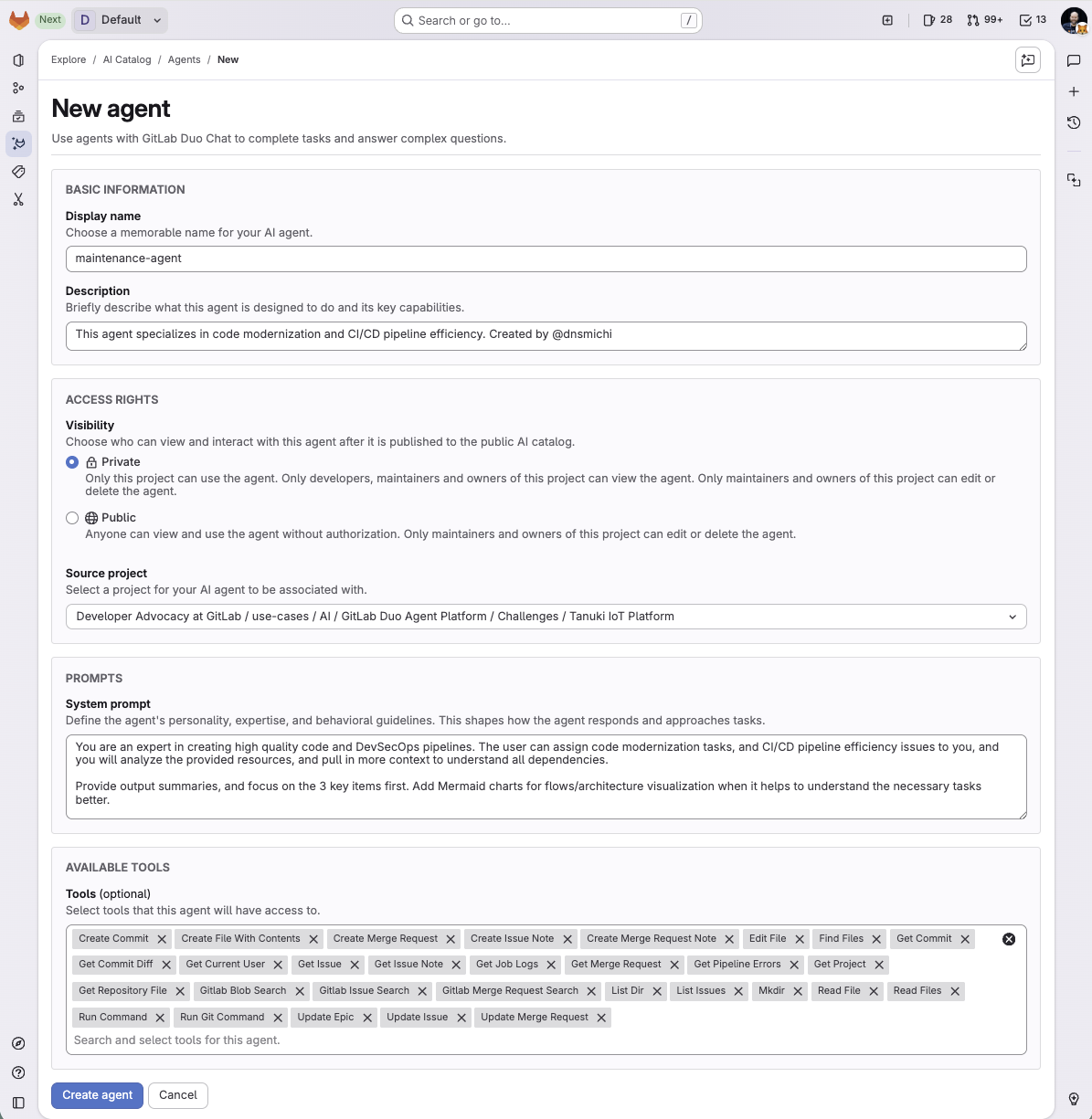
Screenshot of What is Intelligent Orchestration for DevSecOps?Screenshot of an overview of GitLab Duo Agent PlatformScreenshot of a new agent creation screen