TrustRadius: an HG Insights company

Ideagen Risk Management vs. Web QMS Software by Mireaux

Save this comparison

Save this comparison

Add Product

Recommended Comparisons

    Overview
    ProductRatingMost Used ByProduct SummaryStarting Price

    Ideagen Risk Management

    Score7.3 out of 10
    N/AIdeagen's Enterprise Risk Management (ERM) software solution (formerly known as Pentana Risk) fully integrates risk management processes, from identifying and assessing risk business-wide, to assigning and monitoring mitigation plans, all the way through to reporting and defining a long-term strategy for enhanced performance.N/A

    Web QMS Software

    Score8.2 out of 10
    N/AWeb QMS is a cloud-based, all-encompassing management system software that helps organizations achieve, maintain and improve their ISO or API certifications; giving employees full access and visibility to their quality, environmental, occupational health & safety, or information security management systems. Web QMS software contains modules and dynamic applications that can be configured to meet the organization's needs and certification…N/A
    Pricing
    Ideagen Risk ManagementWeb QMS Software
    Editions & Modules
    No answers on this topic
    No answers on this topic
    Offerings
    Pricing Offerings
    Ideagen Risk ManagementWeb QMS Software
    Free Trial
    NoNo
    Free/Freemium Version
    NoNo
    Premium Consulting/Integration Services
    YesNo
    Entry-level Setup FeeOptionalOptional
    Additional Details——
    More Pricing Information
    Features
    Ideagen Risk ManagementWeb QMS Software
    Governance, Risk & Compliance
    Comparison of Governance, Risk & Compliance features of Ideagen Risk Management and Web QMS Software by Mireaux
    Feature
    Ideagen Risk Management
    7.3
    1 Ratings
    2% below category average
    Web QMS Software by Mireaux
    -
    Ratings
    Common repository of GRC items6.41 Ratings00 Ratings
    Risk management8.21 Ratings00 Ratings
    User Ratings
    Ideagen Risk ManagementWeb QMS Software
    Likelihood to Recommend
    7.3
    (1 ratings)
    8.2
    (1 ratings)
    Usability
    6.4
    (1 ratings)
    -
    (0 ratings)
    Support Rating
    9.1
    (1 ratings)
    -
    (0 ratings)
    User Testimonials
    Ideagen Risk ManagementWeb QMS Software
    Likelihood to Recommend
    Ideagen
    Pentana is great for monitoring PIs and risks. We find it less helpful for monitoring projects (with the Actions module); it isn't quite flexible enough for our needs, though the support team have been very helpful in adding custom fields for us.
    Read full review
    Mireaux Management Solutions
    We appreciate the maintenance and calibration tracking.
    Read full review
    Pros
    Ideagen
    • Pentana is excellent for monitoring, recording and reporting on PIs. Very easy to use the PI module.
    • Pentana is excellent for monitoring risks at various levels (service, strategic etc.). Risks are displayed very clearly in a tree structure and the module is relatively easy to use.
    Read full review
    Mireaux Management Solutions
    • Flexible--it can be adjusted to fit the way we do things
    • Support--we are a small company and Mireaux has been very helpful getting us started
    • Comprehensive--it covers all aspects of common management system standards
    Read full review
    Cons
    Ideagen
    • Pentana could improve the free Documents module that comes with Pentana Risk. At the moment documents have to be linked to an action in order to display query results (such as how many documents are due for review) - this can be confusing for users who don't understand why there is an action linked. There is also no easy way for users to see the documents that are assigned to them.
    • We would like to use the Actions module fully in order to monitor our corporate projects, but it a bit confusing for users and not very flexible when a project doesn't mirror Pentana's way of monitoring actions.
    Read full review
    Mireaux Management Solutions
    • The delay and refresh screen after entering certain information
    Read full review
    Usability
    Ideagen
    Some modules are more user-friendly than others. It's sometimes not obvious where to click to update the fields (or even that field titles can be clicked on). We have written 'Howdys' to help users. There can also seem to be a lot of steps/clicks to updating risks and actions. The Reports module on Pentana classic is certainly not user-friendly, particularly the Report Layout and Charts modules - we were told these would be integrated into the web version but this hasn't happened yet.
    Read full review
    Mireaux Management Solutions
    No answers on this topic
    Support Rating
    Ideagen
    The support team are excellent and always answer queries promptly. They are very helpful.
    Read full review
    Mireaux Management Solutions
    No answers on this topic
    Alternatives Considered
    Ideagen
    We selected Pentana because our neighbouring authorities are users and had spoken highly of the product and given us demonstrations; some of our staff were also familiar with Pentana when it was called Covalent. It seemed to be the best product on the market for monitoring risks, PIs and projects.
    Read full review
    Mireaux Management Solutions
    No answers on this topic
    Return on Investment
    Ideagen
    • Pentana Risk has allowed my team to focus on other areas of work whereas before we would be manually chasing for updates on PIs and risk. Pentana Risk does the chasing for us!
    • We are able to produce reports for audit purposes very easily, rather than sending spreadsheets which is what we used to do.
    • New managers can easily inherit risks, projects and PIs and see all of this on a custom portal, saving them time when they start.
    Read full review
    Mireaux Management Solutions
    No answers on this topic
    ScreenShots

    Ideagen Risk Management Screenshots

    Screenshot of a dashboard showing the risk profile and scores for each individual risk, with a range of visual toolsProduct screenshotScreenshot of a step-by-step form filling exercise that guides the user through each field

    Web QMS Software Screenshots

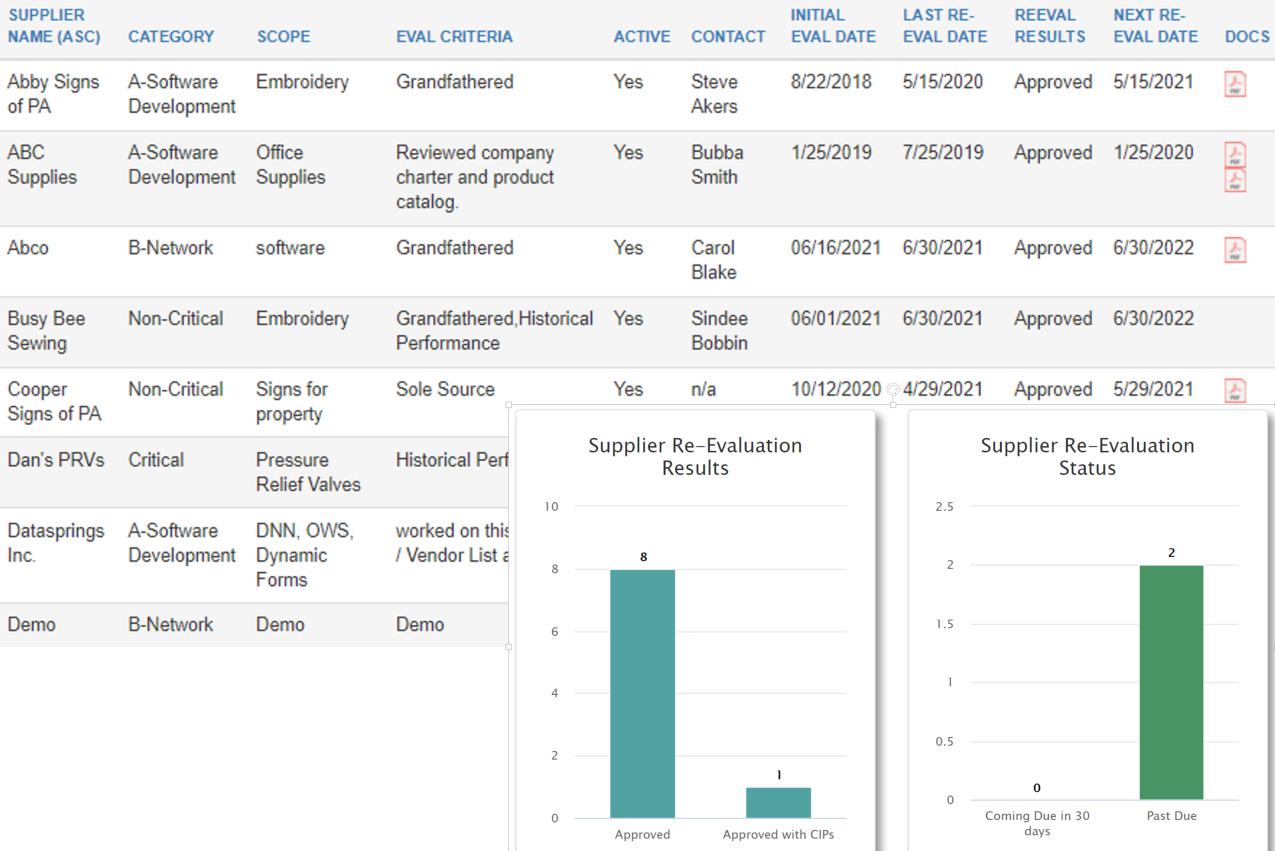
    Screenshot of The Dashboard displays tasks pending, such as Documents awaiting approval, Corrective Actions awaiting Root Cause Analysis, NCRs awaiting disposition, equipment in need of calibration, pending training, employee certifications requiring renewal, and more.Screenshot of Calibration app: Keep a register of equipment in need of calibration, with details such as accuracy, calibration intervals, tolerances, etc. Upload certificates or generate your own. Receive notifications for calibration past due or coming due.Screenshot of The Maintenance application uses automated email notifications that include color coded PM Reports to clearly show equipment that is overdue, due, or coming due for maintenance. The E-Learning application tracks course progress, so employees can easily see which training courses they have not completed.Screenshot of Risk Assessment app: Create risk events, add and analyze risks using your own predefined scale, ratings and attributes. Based on your risk appetite, the system will help evaluate risks, and discern significant risks which need to be controlled or treated.Screenshot of The Approved Supplier List (ASL) application helps maintain a register of approved suppliers along with the necessary documentation.  Automatic email notifications provide visibility of suppliers coming due or past due for reevaluation. KPIs available.Screenshot of Organize your electronic library of documents with the Master Documents app. In addition to making documents accessible in the format of choice, you are able to see important details, such as document number, revision, date, owner, and next review date.