TrustRadius: an HG Insights company

Informatica Cloud Data Integration vs. resynced.io

Save this comparison

Save this comparison

Add Product

Recommended Comparisons

    Overview
    ProductRatingMost Used ByProduct SummaryStarting Price

    Informatica Cloud Data Integration

    Score8.9 out of 10
    N/AInformatica Cloud Data Integration, for Cloud ETL and ELT, enables users to ingest, integrate and cleanse data within Informatica's cloud-native ETL and ELT solution. Users can link source and target data with thousands of connectors that recognize metadata, to make it easier to run complex integrations.N/A

    resynced.io

    N/AN/Aresynced.io is a platform used to keep data in sync across different tools like monday.com, Google Sheets, Notion, and Smarsheet. It supports both one-way and two-way synchronization, so that the user decides whether changes flow in a single direction or stay in sync across both platforms. The goal of resynced.io is to reduce the need for manual data copying or repetitive updates between tools. For example, if a team manages tasks in monday.com but builds reports in Google…

    $29

    per month

    Pricing
    Informatica Cloud Data Integrationresynced.io
    Editions & Modules
    No answers on this topic
    Micro
    $29
    per month (500 items in sync & 5 active syncs)
    Starter
    $59
    per month (1000 items in sync & 10 active syncs)
    Standard
    $119
    per month (5000 items in sync & 20 active syncs)
    Pro
    $359
    per month (25000 items in sync & 30 active syncs)
    Custom
    Custom Pricing
    Offerings
    Pricing Offerings
    Informatica Cloud Data Integrationresynced.io
    Free Trial
    YesYes
    Free/Freemium Version
    NoNo
    Premium Consulting/Integration Services
    NoYes
    Entry-level Setup FeeNo setup feeNo setup fee
    Additional Details—Discount of up to 20% for annual pricing.
    More Pricing Information
    Features
    Informatica Cloud Data Integrationresynced.io
    Data Source Connection
    Comparison of Data Source Connection features of Informatica Cloud Data Integration and resynced.io
    Feature
    Informatica Cloud Data Integration
    10.0
    2 Ratings
    18% above category average
    resynced.io
    -
    Ratings
    Connect to traditional data sources10.02 Ratings00 Ratings
    Connecto to Big Data and NoSQL10.02 Ratings00 Ratings
    Data Transformations
    Comparison of Data Transformations features of Informatica Cloud Data Integration and resynced.io
    Feature
    Informatica Cloud Data Integration
    8.5
    2 Ratings
    4% above category average
    resynced.io
    -
    Ratings
    Simple transformations10.02 Ratings00 Ratings
    Complex transformations7.02 Ratings00 Ratings
    Data Modeling
    Comparison of Data Modeling features of Informatica Cloud Data Integration and resynced.io
    Feature
    Informatica Cloud Data Integration
    8.3
    2 Ratings
    4% above category average
    resynced.io
    -
    Ratings
    Data model creation9.01 Ratings00 Ratings
    Metadata management9.01 Ratings00 Ratings
    Business rules and workflow9.01 Ratings00 Ratings
    Collaboration7.02 Ratings00 Ratings
    Testing and debugging7.02 Ratings00 Ratings
    Data Governance
    Comparison of Data Governance features of Informatica Cloud Data Integration and resynced.io
    Feature
    Informatica Cloud Data Integration
    9.0
    1 Ratings
    11% above category average
    resynced.io
    -
    Ratings
    Integration with data quality tools9.01 Ratings00 Ratings
    Integration with MDM tools9.01 Ratings00 Ratings
    Best Alternatives
    Informatica Cloud Data Integrationresynced.io
    Small Businesses
    Skyvia
    Score10 out of 10
    Make
    Score9.3 out of 10
    Medium-sized Companies
    IBM InfoSphere Information Server
    Score10 out of 10
    IBM App Connect
    Score9.2 out of 10
    Enterprises
    SolarWinds Task Factory
    Score8.3 out of 10
    Workato
    Score9.4 out of 10
    All AlternativesView all alternativesView all alternatives
    User Ratings
    Informatica Cloud Data Integrationresynced.io
    Likelihood to Recommend
    8.0
    (2 ratings)
    -
    (0 ratings)
    Usability
    6.0
    (1 ratings)
    -
    (0 ratings)
    User Testimonials
    Informatica Cloud Data Integrationresynced.io
    Likelihood to Recommend
    Informatica
    We use it a lot for importing data. We transform the incoming data to match the formatting of our CRM. We also match on existing records to avoid creating duplicates. Informatica handles all of this exceptionally well. Our users are system administrators. The tool is not well-suited for users who do not have a technical background
    Incentivized
    Read full review
    LeanyLabs
    No answers on this topic
    Pros
    Informatica
    • Data synchronisation
    • Data replication
    • Data integration
    Read full review
    LeanyLabs
    No answers on this topic
    Cons
    Informatica
    • There is a moderately steep learning curve
    • Has some idiosyncrasies
    • Can be finicky with date formats
    Incentivized
    Read full review
    LeanyLabs
    No answers on this topic
    Usability
    Informatica
    There is a learning curve with Informatica. It is not always intuitive to use. It is best suited for technical users such as system administrators
    Incentivized
    Read full review
    LeanyLabs
    No answers on this topic
    Alternatives Considered
    Informatica
    It is really easy to comply and understand its features.
    Read full review
    LeanyLabs
    No answers on this topic
    Return on Investment
    Informatica
    • Really greatest than any other conventional application.
    Read full review
    LeanyLabs
    No answers on this topic
    ScreenShots

    resynced.io Screenshots

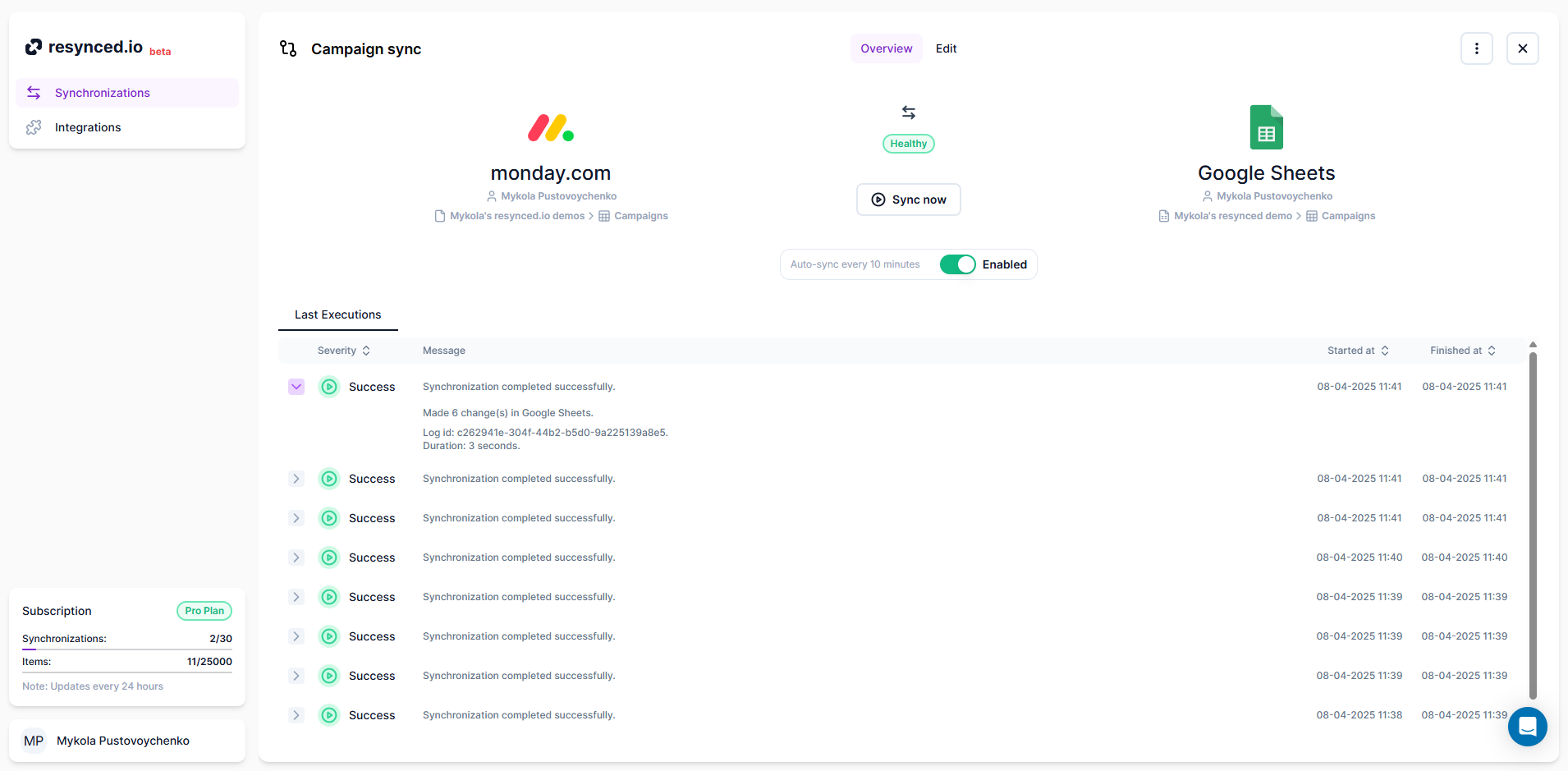
    Screenshot of the synchronization editor, which is the heart of resynced.io This is how the synchronization is created. Here, the user can decide on sync sources, sync direction, and map columns between their tools.Screenshot of how resynced.io allows having multiple synchronizations between different tools managed in one place.Screenshot of where it's shown every synchronization has a detailed log for every execution, so users can see a summary of each sync and, in case of an error, a detailed explanation with actionable steps.