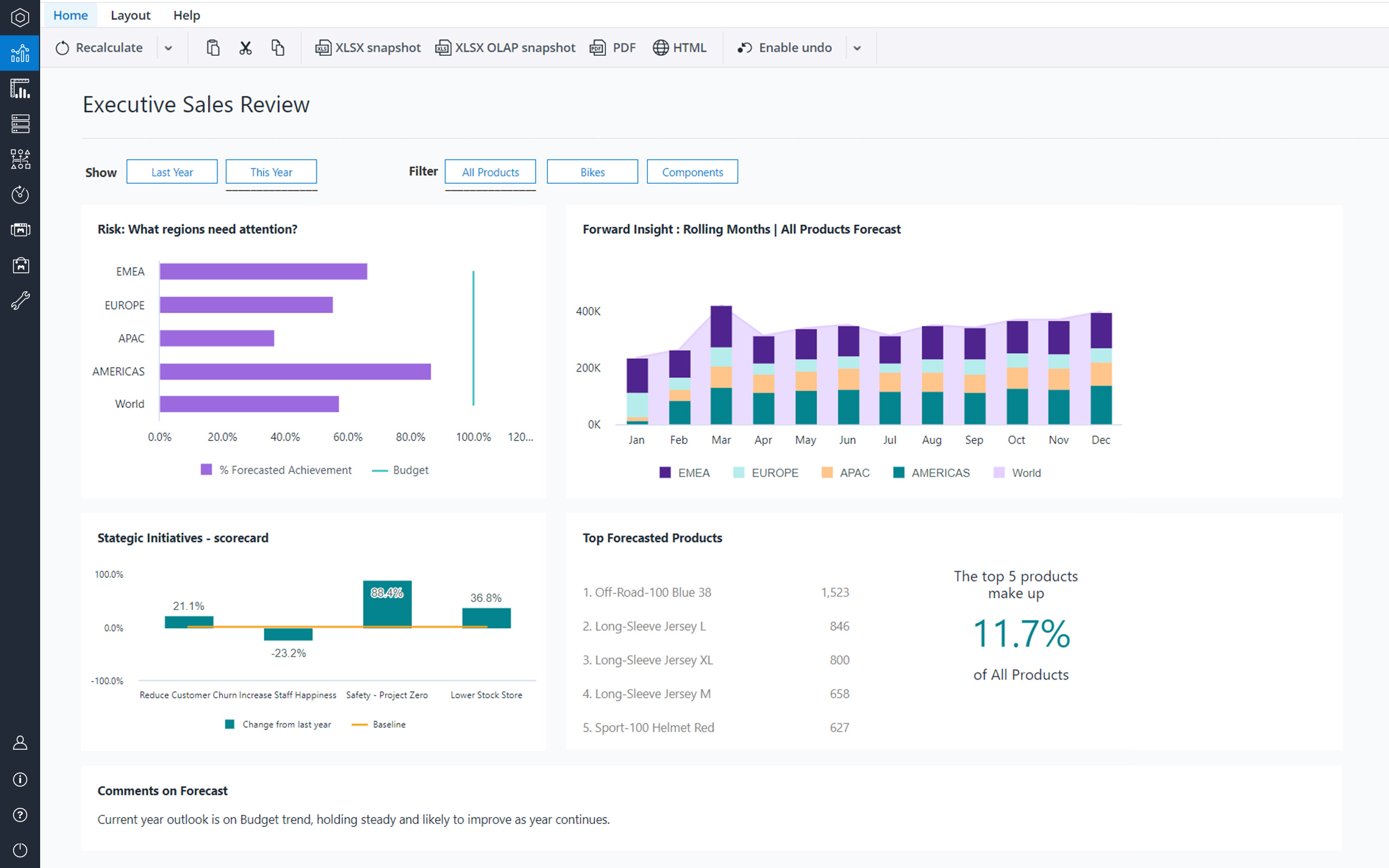
Formerly from Magnitude Software and now from Insightsoftware, Angles is a solution to accelerate the distribution of actionable, operational reports and analytics.
N/A
Jedox
Score8.8 out of 10
N/A
Jedox is a Business Intelligence and Corporate Performance Management solution. According to the vendor, their solution’s unified planning, analysis and reporting empowers decision makers from finance, sales, purchasing and marketing. Additionally, the vendor says this solution helps business users work smarter, streamline business collaboration, and make insight-based decisions with confidence. The vendor also says 1,900 organizations in 127 countries are using Jedox for real-time planning…
N/A
Pricing
Angles by Insightsoftware
Jedox
Editions & Modules
No answers on this topic
No answers on this topic
Offerings
Pricing Offerings
Angles by Insightsoftware
Jedox
Free Trial
No
Yes
Free/Freemium Version
No
Yes
Premium Consulting/Integration Services
No
Yes
Entry-level Setup Fee
No setup fee
No setup fee
Additional Details
Contact vendor for pricing information.
—
More Pricing Information
Features
Angles by Insightsoftware
Jedox
BI Standard Reporting
Comparison of BI Standard Reporting features of Angles by Insightsoftware and Jedox
Feature
Angles by Insightsoftware
-
Ratings
Jedox
9.1
4 Ratings
19% above category average
Pixel Perfect reports
00 Ratings
9.14 Ratings
Customizable dashboards
00 Ratings
9.14 Ratings
Report Formatting Templates
00 Ratings
9.14 Ratings
Ad-hoc Reporting
Comparison of Ad-hoc Reporting features of Angles by Insightsoftware and Jedox
Feature
Angles by Insightsoftware
-
Ratings
Jedox
8.3
3 Ratings
7% above category average
Drill-down analysis
00 Ratings
8.23 Ratings
Formatting capabilities
00 Ratings
8.23 Ratings
Integration with R or other statistical packages
00 Ratings
8.53 Ratings
Report sharing and collaboration
00 Ratings
8.53 Ratings
Report Output and Scheduling
Comparison of Report Output and Scheduling features of Angles by Insightsoftware and Jedox
Feature
Angles by Insightsoftware
-
Ratings
Jedox
7.9
3 Ratings
0% below category average
Publish to Web
00 Ratings
8.53 Ratings
Publish to PDF
00 Ratings
7.93 Ratings
Report Versioning
00 Ratings
7.03 Ratings
Report Delivery Scheduling
00 Ratings
8.23 Ratings
Data Discovery and Visualization
Comparison of Data Discovery and Visualization features of Angles by Insightsoftware and Jedox
If you desire to 'empower' employees to create or edit their own reports, Noetix is a great tool, though I am not particularly an 'empowerment' person. In my experience most people have enough work of their own, so to tell them they now have to create their own reports can cause problems. If someone is available, like I am, to create the reports based on user requirements, then the report can be shared with the user and they can make changes as needed. I have several users who use the same report over and over for slightly different applications, and they are happy to make the small alterations, but creating whole new reports can seem like a daunting task. I tell my users I don't want them to become frustrated. If they want to try on their own, fine, but don't waste more than half an hour, and if you start to get frustrated, stop and IM me. Ninety-nine times out of 100 I already have a report that will give them exactly what they need. I've done extensive training, and find it's quite easy for users to pick up
A de minimis incentive was given to thank the reviewer for their time. The incentive was not used to bias or drive a particular response, nor was the incentive contingent on a positive endorsement. More Info
Best suited for financial consolidation and / or as a highly customized and compact EPM / BI solution (up to 100 CCU) with individual workflows, planning and reporting functionalities, with moderate number of users (no restrictions for any industry, all industries are covered well). It also has advanced reporting & data analysis requirements and provides an integration and reporting layer of imported data from different external systems (via ETL). It can help with migrating your legacy Excel-based business models to the Web. It is not well suited for Enterprise BI applications with expecting >500 CCU (users at the same time working with the system) - this may cause serious performance issues, as all data is kept in RAM. Jedox is also less suited for applications with heavy document management requirements (document management is not an out of the box functionality in Jedox and rather requires custom development through custom widgets etc.).
Noetix makes reporting easy. Users can combine vtables (the Noetix term for its views), add or delete columns, add filters or parameters, sort, add totals to columns, all from an easy to use interface. It comes with a very large number of already written reports for all areas of Oracle reporting, but it also allows for custom vtables to be written, for Oracle or any database, to expand the number of available reports.
Noetix has an Excel add-in that is marvelous. It eliminates the need to run a report in the web application and export to Excel. The add-in can run very large reports, up to a million lines. Once a report is run in Excel, it can be saved, and then refreshed whenever needed. It's a really good tool.
Noetix is flexible. Joins can be added to existing Noetix vtables and also to custom vtables, to give users a large amount of data configurations to choose from. It also allows users to create calculated fields to any report.
Noetix is easy to administer. Users can be added or removed and grouped by the level of permission. Although, in our case, it validates against Oracle, the level of security is dictated by Noetix.
A de minimis incentive was given to thank the reviewer for their time. The incentive was not used to bias or drive a particular response, nor was the incentive contingent on a positive endorsement. More Info
A de minimis incentive was given to thank the reviewer for their time. The incentive was not used to bias or drive a particular response, nor was the incentive contingent on a positive endorsement. More Info
I like the fact that the output is standard, but I would like to be able to move columns around on the output screen, rather than having to go back to the editing screen, move the columns, then rerun the report.
Drag and drop of columns would be nice on the edit screen. Currently if you add a column to a report, it automatically goes to the bottom. Relocation of the column has to be done a line at a time. I would prefer to be able to grab the field I want from those available, and drop it into the report where I want it.
When adding a filter (or parameter), the available fields automatically come up in alphabetical order, but on the columns screen, they don't. They come up in the order they actually are in the query. That means, when creating custom vtables, to have the fields in alphabetical order, one must put them that way. It would be nice if Noetix put the fields in alphabetical order for the user.
A de minimis incentive was given to thank the reviewer for their time. The incentive was not used to bias or drive a particular response, nor was the incentive contingent on a positive endorsement. More Info
Diversity. Jedox can be applied to many different use cases from small to large deployments and from budgeting to enterprise class BI solutions. But rarely is one tool able to fulfill all of these requirements in one organisation. This value proposition can be complicated for prospective users.
Awareness. Jedox punches above its weight in capability and scalability, but not enough people have heard about it and therefore procurement processes can be drawn out as a result.
To me Jedox deserves 10/10 because it is a consistent one-in-all platform with a modern look and feel. It is intuitive to use and allows you to make intuitive applications integrating traditional business intelligence with performance management functionality. It certainly has a short learning curve, especially for those that are familiar with MS Excel. An example: I've lost count but Jedox it is available in more than 25 languages. Another: Jedox does not require programming skills... it is developed to be used by the business.
Jedox has very few bugs. Reports are available through an Excel add-in, the web and/or mobile device (IOS/Android). In my opinion, availability also means high performance, not having to wait for the system to give you the required reports, analysis, dashboards instantly.
Jedox support in general is a professional and fast responding team. An easy-to-use ticketing system is in place. Bug-related questions are solved fast (responses come usually in a few hours after the question), but some questions / tickets, that are not Jedox-related bugs (for example some advanced questions about Jedox functionality), may be forwarded to Application Management team for further processing and then it may take several days or even weeks to get a response here -> there is room for improvement here.
The implementation of SSO, SAML Authentication, HTTPS, Server splitting (Frontend / Backend servers) could be more standardized and made more user friendly to set up (e.g. via setup guide). Otherwise the implementation of Jedox is quick and simple when compared to other similar technologies.
I believe Noetix is much easier to use than either Crystal Reports or InfoMaker. When I worked with InfoMaker I used to say it took 5 minutes to get the data and 5 hours (and sometimes days) to make it look good. The same can be true for Crystal Reports. Noetix has a standard format, and most people export to Excel anyway. Who prints reports? So formatting is not all that important.
A de minimis incentive was given to thank the reviewer for their time. The incentive was not used to bias or drive a particular response, nor was the incentive contingent on a positive endorsement. More Info
Calumo is similar product to Jedox. I have used it extensively in my previous role. It was a major contender when we evaluated a BI platform for NIDA. Calumo is a great product as well and it was a very close call. Where we found Jedox to be a better fit for NIDA was the ability to prepare dynamic reports with ease without the need to learn MDX which was used extensively by Calumo to make dynamic reports which expand or shrink based on the underlying data. Another major benefit we saw in Jedox was the whole ETL process could be managed within Jedox instead of doing it in SQL server which negates having a dedicated SQL specialist role when the scale expands.
A de minimis incentive was given to thank the reviewer for their time. The incentive was not used to bias or drive a particular response, nor was the incentive contingent on a positive endorsement. More Info
Scalability is often another word for speed. Given enough data, enough users or enough calculations, the tool becomes slower and slower. You will find that Jedox has a very high performance that can even be increased by the use of grafical cards. Other thaen that it does not only offer BI (looking back based on historical ERP data) but also allows you to look forward through integrated budgetting, planning, forecasting, workflow and collaboration. Not easy to find a tool that can support so much business functionality. So, also pretty scalable in that respect.
Financial budgeting and Forecasting are done in a centralized fashion in Jedox now instead of a decentralized excel based approach. A lot of cost savings and improved reliability
Easy to use self-help Dashboards and detailed reports
A de minimis incentive was given to thank the reviewer for their time. The incentive was not used to bias or drive a particular response, nor was the incentive contingent on a positive endorsement. More Info