Intellect QMS vs. Web QMS Software by Mireaux

Overview
ProductRatingMost Used ByProduct SummaryStarting Price
Intellect QMS
Score 8.1 out of 10
Enterprise companies (1,001+ employees)
Intellect provides a flexible enterprise Quality Management Software (eQMS) solution and platform designed to meet any FDA and ISO compliance requirements, as well as digital transformation goals. Built on the Intellect Compliance Platform, Intellect's no-code platform, Intellect offers what they describe as the most configurable eQMS solution in the industry. Intellect's eQMS is a centralized and integrated solution to manage quality needs, today and tomorrow. The vendor boasts over 19…N/A
Web QMS Software
Score 8.2 out of 10
N/A
Web QMS is a cloud-based, all-encompassing management system software that helps organizations achieve, maintain and improve their ISO or API certifications; giving employees full access and visibility to their quality, environmental, occupational health & safety, or information security management systems. Web QMS software contains modules and dynamic applications that can be configured to meet the organization's needs and certification…N/A
Pricing
Intellect QMSWeb QMS Software by Mireaux
Editions & Modules
No answers on this topic
Offerings
Pricing Offerings
Intellect QMSWeb QMS Software
Free Trial
YesNo
Free/Freemium Version
NoNo
Premium Consulting/Integration Services
YesNo
Entry-level Setup FeeOptionalOptional
Additional DetailsIntellect is available on a subscription basis, with pricing dependent on the number of users.
More Pricing Information
Community Pulse
Intellect QMSWeb QMS Software by Mireaux
Best Alternatives
Intellect QMSWeb QMS Software by Mireaux
Small Businesses
Polarion ALM
Polarion ALM
Score 9.9 out of 10
Polarion ALM
Polarion ALM
Score 9.9 out of 10
Medium-sized Companies
Polarion ALM
Polarion ALM
Score 9.9 out of 10
Polarion ALM
Polarion ALM
Score 9.9 out of 10
Enterprises
Polarion ALM
Polarion ALM
Score 9.9 out of 10
Polarion ALM
Polarion ALM
Score 9.9 out of 10
All AlternativesView all alternativesView all alternatives
User Ratings
Intellect QMSWeb QMS Software by Mireaux
Likelihood to Recommend
8.1
(10 ratings)
8.2
(1 ratings)
Usability
8.2
(1 ratings)
-
(0 ratings)
User Testimonials
Intellect QMSWeb QMS Software by Mireaux
Likelihood to Recommend
Intellect
This is a great platform for a small but quickly growing organization. It works well out of the box without a lot of bells and whistles but can be configured for specific needs. Migrating "legacy" processes, data and culture requires a lot of up front training but is worth the effort. Customer support is top-notch, and a single administrator can manage multiple applications
Read full review
Mireaux Management Solutions
We appreciate the maintenance and calibration tracking.
Read full review
Pros
Intellect
  • The applications are linked to each other so that activities can be shared, collaborated and escalated in one platform.
  • Applications are sufficient "out of the box" but can be configured easily with its intuitive Design tools.
  • Users can go to their personal dashboard to stay on top of their tasks across multiple applications and monitor status of activities in progress.
  • The workflow-based applications keep activities moving forward efficiently but following standard processes.
Read full review
Mireaux Management Solutions
  • Flexible--it can be adjusted to fit the way we do things
  • Support--we are a small company and Mireaux has been very helpful getting us started
  • Comprehensive--it covers all aspects of common management system standards
Read full review
Cons
Intellect
  • Although the configuration is a "no code" approach, there is a learning curve to effecting design changes.
  • The user guide documentation provided is OK for administrators but needs to be more user-friendly for general users.
  • Importing "legacy" data from existing processes can be cumbersome.
Read full review
Mireaux Management Solutions
  • The delay and refresh screen after entering certain information
Read full review
Usability
Intellect
There is always resistance to change, but users are finding Intellect QMS to exceed their expectations as we migrate from our legacy "island" Sharepoint-based processes. Training is actually easiest to do hands-on, and users can learn quickly and then help train others. Users appreciate the personal navigation dashboard and the familiarity of the interface from one application to another. The workflow-driven applications are intuitive and make the system easy to navigate for all levels of users, although the learning curves will vary. The "Design-Test-Live" approach facilitates the implementation of configuration changes suggested by users.
Read full review
Mireaux Management Solutions
No answers on this topic
Alternatives Considered
Intellect
No comparison with the huge improvement Intellect is compared to the software we were using in the past. Night and Day difference.
Read full review
Mireaux Management Solutions
No answers on this topic
Return on Investment
Intellect
  • Users appreciate the time and effort saved by having all of the QMS functions connected and in one place, without having to rely on emails, Sharepoint links multiple modes of communication to keep track of their activities and responsibilities.
  • The no-code platform means we don't need IT support to maintain and configure the applications. One administrator was able to get the system launched and effective in just several weeks, with ongoing training and customization as users and applications are added.
  • Our organization was recently certified to ISO 9001:2015. Intellect QMS helped us to navigate internal and audits confidently and effectively.
Read full review
Mireaux Management Solutions
No answers on this topic
ScreenShots

Intellect QMS Screenshots

Screenshot of Custom dashboard, with real-time metrics to give users greater visibility, insights and monitoring.Screenshot of A No-Code Compliance Platform used to customize apps, or ti build new business apps to automate business processes.

Web QMS Software Screenshots

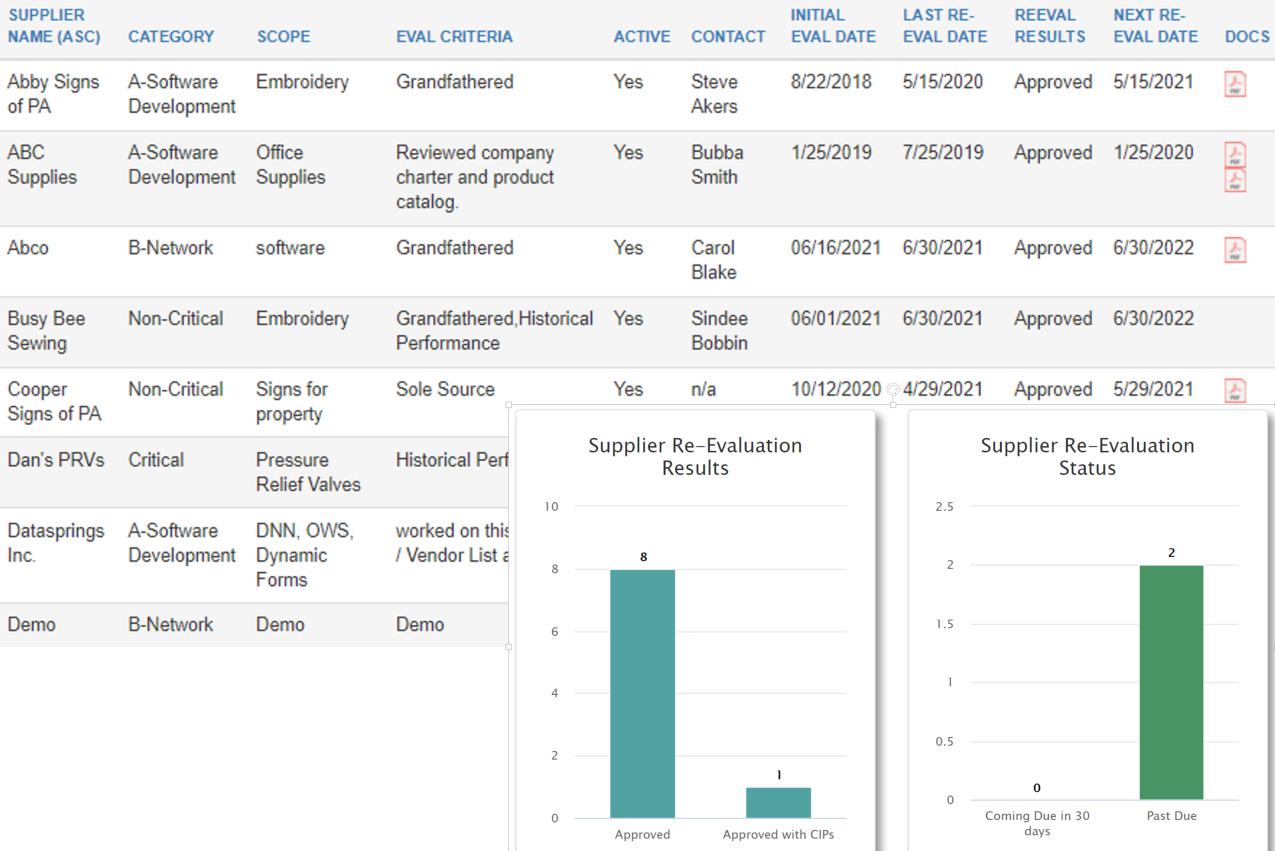
Screenshot of The Dashboard displays tasks pending, such as Documents awaiting approval, Corrective Actions awaiting Root Cause Analysis, NCRs awaiting disposition, equipment in need of calibration, pending training, employee certifications requiring renewal, and more.Screenshot of Calibration app: Keep a register of equipment in need of calibration, with details such as accuracy, calibration intervals, tolerances, etc. Upload certificates or generate your own. Receive notifications for calibration past due or coming due.Screenshot of The Maintenance application uses automated email notifications that include color coded PM Reports to clearly show equipment that is overdue, due, or coming due for maintenance. The E-Learning application tracks course progress, so employees can easily see which training courses they have not completed.Screenshot of Risk Assessment app: Create risk events, add and analyze risks using your own predefined scale, ratings and attributes. Based on your risk appetite, the system will help evaluate risks, and discern significant risks which need to be controlled or treated.Screenshot of The Approved Supplier List (ASL) application helps maintain a register of approved suppliers along with the necessary documentation.  Automatic email notifications provide visibility of suppliers coming due or past due for reevaluation. KPIs available.Screenshot of Organize your electronic library of documents with the Master Documents app. In addition to making documents accessible in the format of choice, you are able to see important details, such as document number, revision, date, owner, and next review date.