TrustRadius: an HG Insights company

Save this comparison

Save this comparison

Add Product

Recommended Comparisons

    Overview
    ProductRatingMost Used ByProduct SummaryStarting Price

    livepro

    Score9.1 out of 10
    Mid-Size Companies (51-1,000 employees)
    livepro headquartered in North Sydney aims to help users provide improved customer service quality and delivery through their simple knowledge management system.N/A

    Scribe

    Score10 out of 10
    N/AScribe automatically creates step-by-step guides for any process completed on a computer. It captures mouse clicks and keystrokes and turns them into editable step-by-step instructions and screenshots instantly. Scribes can be shared to anyone via a link or in-app with team members. They can also be embedded in any other site or platform using HTML. Users can also download a Scribe as a PDF. A Scribe can also be edited in the future if a process changes, and the new version reflects…

    $0

    per month per user

    Pricing
    liveproScribe
    Editions & Modules
    No answers on this topic
    Basic
    $0
    per month per user
    Pro
    $29
    per month per user
    Offerings
    Pricing Offerings
    liveproScribe
    Free Trial
    YesNo
    Free/Freemium Version
    NoYes
    Premium Consulting/Integration Services
    YesNo
    Entry-level Setup FeeNo setup feeNo setup fee
    Additional DetailsProducts and plans are priced per user and only when that user accesses knowledge in that monthly period.—
    More Pricing Information
    Best Alternatives
    liveproScribe
    Small Businesses
    Slite
    Score5.7 out of 10
    No answers on this topic
    Medium-sized Companies
    Bloomfire
    Score8.4 out of 10
    No answers on this topic
    Enterprises
    Bloomfire
    Score8.4 out of 10
    No answers on this topic
    All AlternativesView all alternativesView all alternatives
    User Ratings
    liveproScribe
    Likelihood to Recommend
    9.1
    (2 ratings)
    10.0
    (1 ratings)
    Usability
    -
    (0 ratings)
    10.0
    (1 ratings)
    User Testimonials
    liveproScribe
    Likelihood to Recommend
    livepro
    The great thing about livepro is you can structure your content the way that suits your organisation. livepro are there to support you in deciding what may work best for your team, it is not a one size fits all solution. The system allows you to write complex processes in a simplified view so staff can easily navigate to the solution they need. The 'rocket' knowledge object allows your processes that have a lot of variation to be written up in a simple decision tree setup, taking your staff to the right outcome every time.
    Read full review
    Scribe
    If you need to make any kind of instruction and your programmes are on Chrome you can document any procedure in a matter of minutes, you can then edit it and make extra notes and explain things in more detail. I can't think of any business that could not use this, unless IT block it
    Read full review
    Pros
    livepro
    • Easy to use--livepro is used by our casuals (who have never used the system before) and also our more knowledgeable and experienced staff, all in the same capacity.
    • Positive and engaging training--before implementing livepro, we had on-the-ground training with the livepro team and they have provided us with ongoing support ever since.
    • Anything is possible--livepro encourages users to experiment and to create a system that is unique to their organization/department and to always think outside the box.
    Read full review
    Scribe
    No answers on this topic
    Cons
    livepro
    • Feedback module. I'm scratching for things to record in cons here. The feedback module could be improved by having further display options - being able to preview feedback without clicking into it. However, livepro have taken this feedback on board and are already looking at ways to improve.
    • Admin/roles. The current way to set up the roles/permissions is clunky however this is not a space you need to use often. I'm looking forward to the new and improved version that is being worked on.
    Read full review
    Scribe
    No answers on this topic
    Usability
    livepro
    No answers on this topic
    Scribe
    The layout is easy to follow, when you are looking at their instructions they are very clear and easy to follow, the help section is easy. Once you have learned the control buttons it's very simple. Editing is very easy as you just click on the section, edit what you want. You can delete and copy easily
    Read full review
    Alternatives Considered
    livepro
    SharePoint did not have the functionality that livepro does. We attempted to create a knowledge hub in SharePoint but were left disappointed.
    Read full review
    Scribe
    No answers on this topic
    Return on Investment
    livepro
    • livepro has improved our right first time response for our customer contact center. In the first six months of going live, our RFT response increased to the 60th percentile from 50 percent.
    • One source of truth--our customer service team is confident in the answers they are providing and that they can rely on the accuracy and quality of information.
    • Providing a superior level of customer service--as the team becomes more efficient in using the system, they are processing more calls and creating more meaningful outcomes for our customers. The teams percentage of missed (abandoned) calls has dropped from 4.26 percent to 3 percent since implementation of livepro.
    Read full review
    Scribe
    No answers on this topic
    ScreenShots

    livepro Screenshots

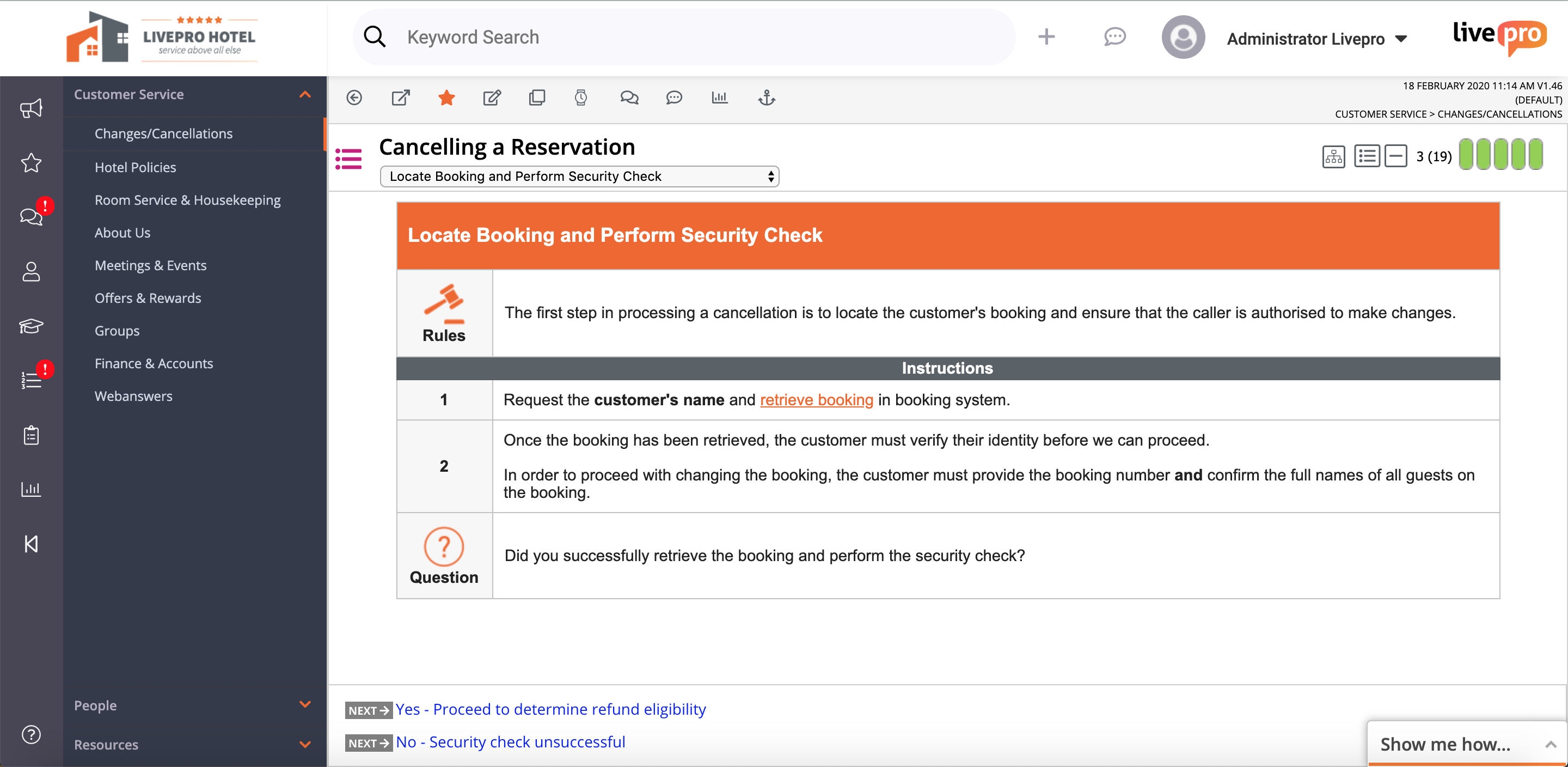
    Screenshot of the Knowledge BaseScreenshot of the Process GuideScreenshot of the Home DashboardScreenshot of Rocket Smart Search

    Scribe Screenshots

    Screenshot of Scribe automatically creates step-by-step instruction guides. All these steps and screenshots were automatically generated from the user's clicks and keystrokes.