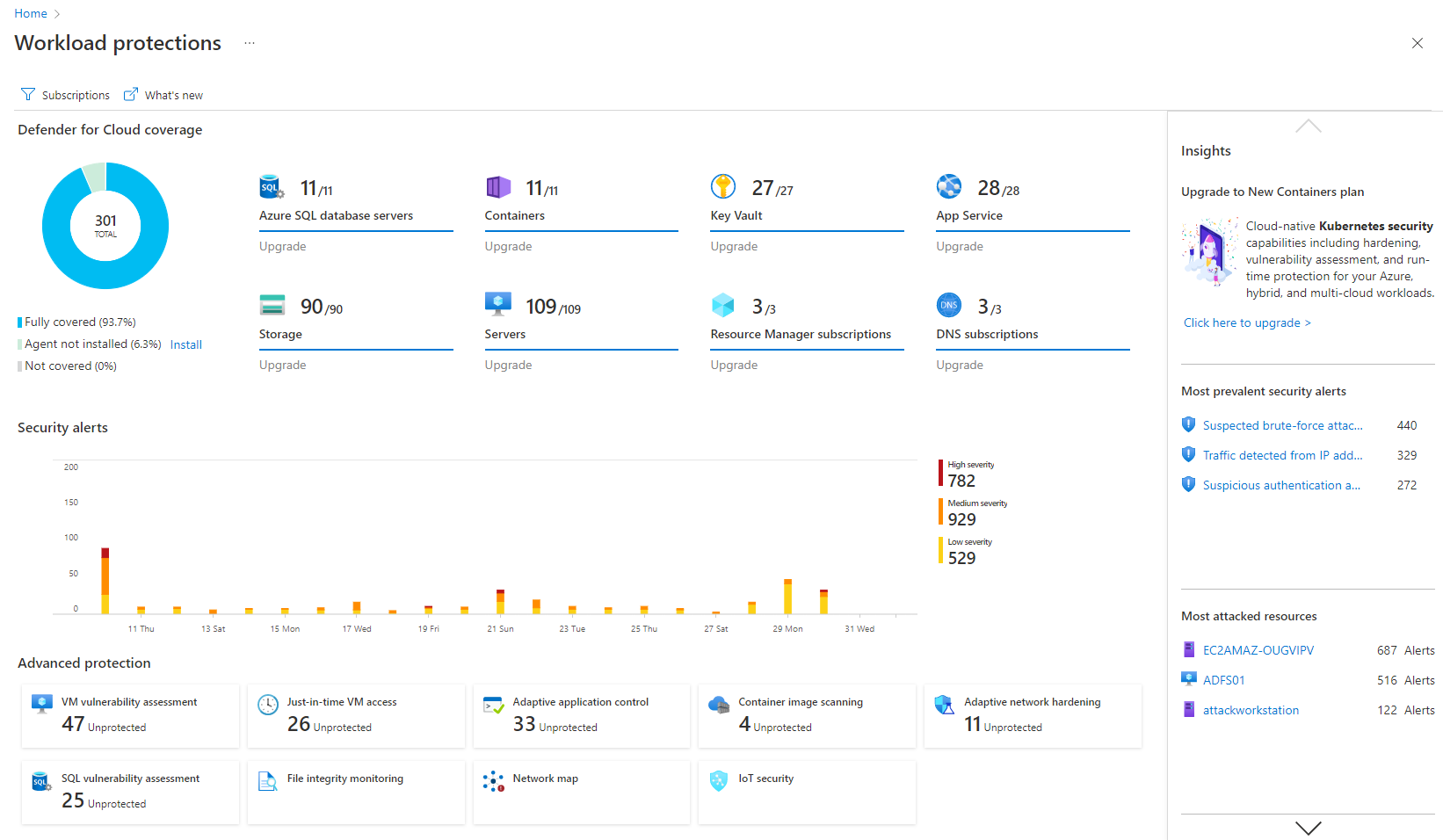
Microsoft Defender for Cloud is a Cloud Security Posture Management (CSPM) and Cloud Workload Protection Platform (CWPP) for Azure, on-premises, and multicloud (Amazon AWS and Google GCP) resources.
N/A
Qualys TruRisk Platform
Score 6.0 out of 10
N/A
Qualys TruRisk Platform (formerly Qualys Cloud Platform, or Qualysguard), from San Francisco-based Qualys, is network security and vulnerability management software featuring app scanning and security, network device mapping and detection, vulnerability prioritization schedule and remediation, and other features to provide vulnerability management and network attack surface reduction.
I think it's good for cloud-native companies. A company that, from day zero, they're like, "We're going cloud, and this is how we're going to do it." They get it. It works well for them. Smaller organizations that are under X amount of resources- I don't know what that X might mean- but I feel like it plays well in smaller, more nimble organizations. If you're an older organization or if you're extremely large, it starts becoming a little difficult to manage at scale. And you have to sometimes throw bodies at the problem. Maybe not the most eloquent way of saying it, but that's what it feels like.
Qualys Cloud Platform is well suited for organizations that need additional tools to secure and bolster their security from end to end. The automated, real-time threat protection is very quick to notify an admin of potential vulnerabilities and risks, as well as recommending quick fixes to resolve/close the gap before an incident occurs. QCP excels at portraying all of these in a single pane of glass, and find that the Qualys reports are more detailed than competitor product lines. One of our big issues with QCP is that you do have to pay for each scanner, which can quickly add up to large costs. For this reason, I would rate Qualys at a ~7 due to great features and functionality, but overall value could be better for a large organization. I would also say that QCP may make more sense for smaller organizations due to this pricing model.
It's really well laid out, with an easy-to-use, accessible UI.
With Microsoft Defender for Cloud, it has everything you need with the Safelink attachment, the Safelink emails for URL, the way it scans those URLs and attachments within the product, and you're seeing the results. And that adds an extra layer of security for the user, so you feel comfortable knowing the product monitors those. That's something I really like about that product.
It really does well at vulnerability scanning, which it is well known for. It's accuracy at finding vulnerabilities is top notch, more so than a lot of other vulnerability tools out there. In an organization/company you want this kind of accuracy at finding vulnerabilities in your network/endpoints
It is very good at managing endpoints on a consistent basis, meaning you can add endpoints to Qualys and have the platform scan/track/protect for vulnerabilities on an ongoing basis, without user intervention
It does really well at separating out and identifying what levels of criticality each vulnerability should fall into. This way, an organization/company can attack the more critical vulnerabilities first
Integrations with on-premise workloads can sometimes be challenging. Needs improvement and well standardised integration points
Vulnerability categories can be difficult to understand. It should allow teams to focus on critical findings and help them keep aside low-severity or suppressed vulnerabilities
Pricing can be improved as it can be over-priced for smaller businesses and would potentially affect their ROI due to the small scale
This program is really complicated, the multiple functions that are presented to us are not very clear and in some cases, it is a matter of intuition to execute a function, it is not very informative.
The interface of this program can be a real problem; for our taste, this program looks a bit messy, and the interface does not help or guide you to find the options you need.
It is a great product that integrates nicely when running an Azure platform and even multi-cloud environment. Not looking for point-solutions but a suite that answers most requirements. It is very comfortable being able to use KQL, workbooks and automation that is native to the azure platform
I would give a rating of nine for the following reasons: - easy to use dashboard with a clear view of our entire security posture -security, recommendations are easy and practical to follow -helps prioritise high risk issues instead of treating all alerts equally
Again, the usability of Qualys has been a pinpoint for this entire review. It was easily the worst thing about the product and because of this, I would not recommend Qualys to anybody in my field. This should be something that Qualys strives to improve if they wish to stay in business.
They had a support page within the WAS to report any concerns or seek help. But the UI of that is not smooth. Regardless support staff were pretty responsive and helpful. They scheduled calls to understand and address our problems. Email support is good as well.
I believe Microsoft Defender for Cloud stacks up well against the other tools we looked at. It is native to the Azure platform and provides the same insights as the other tools. We selected Microsoft Defender for Cloud because it integrates well with the Azure resources and gives the needed insight, security alerts and recommendations.
As described before Qualys is used to scan periodically the environment in order to check if there are some packages (Linux) or Applications (Windows) outdated, generating reports to the Service Owners, fulfilling what's is expected from us, attending all our expectations regarding the tool. That's why we'd choose Qualys to our organization.