Microsoft System Center vs. Octopus Deploy

Overview
ProductRatingMost Used ByProduct SummaryStarting Price
Microsoft System Center
Score 8.3 out of 10
N/A
Microsoft System Center Suite is a family of IT management software for network monitoring, updating and patching, endpoint protection with anti-malware, data protection and backup, ITIL- structured IT service management, remote administration and more. It is available in two editions: standard and datacenter. Datacenter provides unlimited virtualization for high density private clouds, while standard is for lightly or non-virtualized private cloud workloads.
$1,323
per month
Octopus Deploy
Score 8.9 out of 10
Mid-Size Companies (51-1,000 employees)
Australian company Octopus Deploy offers their eponymous automated deployment and release management software that integrates with the user's preferred CI server and adds deployment & ops automation capabilities. Octopus Deploy enables developers, release managers, and operations folks to bring all automation into a single place. The vendor states that by reusing configuration variables, environment definition, API keys, connection strings, permissions, service principals, and automation logic,…
$0
per month
Pricing
Microsoft System CenterOctopus Deploy
Editions & Modules
Standard Edition
$1323
Datacenter Edition
$3607
Octopus Server - Professional
$1920
per year starting with 20 projects
Octopus Cloud - Professional
$4170
per year starting with 20 projects
Octopus Server - Enterprise
$14400
per year starting with 100 projects
Octopus Cloud - Enterprise
$23400
per year starting with 100 projects
Cloud
Free
10 users/10 projects/10 tenants/10 machines
Server
Free
10 users/10 projects/10 tenants/10 machines
Offerings
Pricing Offerings
Microsoft System CenterOctopus Deploy
Free Trial
NoYes
Free/Freemium Version
NoYes
Premium Consulting/Integration Services
NoYes
Entry-level Setup FeeNo setup feeOptional
Additional DetailsOctopus Deploy offers a Free tier (Cloud and Server) and a 30-day free trial of the Enterprise tier. No credit card needed. Octopus also offers a Professional tier with 8/5 support (9 am–5 pm on weekdays). The Enterprise tier provides advanced features for teams to scale, including high availability, DevOps Insights, ServiceNow & Jira Service Management integration, unlimited instances, 24/7 support & service credits, and a dedicated Customer Success Manager.
More Pricing Information
Community Pulse
Microsoft System CenterOctopus Deploy
Best Alternatives
Microsoft System CenterOctopus Deploy
Small Businesses

No answers on this topic

GitLab
GitLab
Score 8.8 out of 10
Medium-sized Companies

No answers on this topic

GitLab
GitLab
Score 8.8 out of 10
Enterprises

No answers on this topic

GitLab
GitLab
Score 8.8 out of 10
All AlternativesView all alternativesView all alternatives
User Ratings
Microsoft System CenterOctopus Deploy
Likelihood to Recommend
9.0
(21 ratings)
8.6
(24 ratings)
Likelihood to Renew
-
(0 ratings)
8.0
(1 ratings)
Usability
9.0
(2 ratings)
8.4
(10 ratings)
Performance
-
(0 ratings)
8.5
(4 ratings)
Support Rating
8.0
(1 ratings)
8.2
(9 ratings)
Contract Terms and Pricing Model
-
(0 ratings)
8.5
(3 ratings)
Ease of integration
-
(0 ratings)
8.5
(4 ratings)
Professional Services
-
(0 ratings)
9.1
(1 ratings)
User Testimonials
Microsoft System CenterOctopus Deploy
Likelihood to Recommend
Microsoft
For companies with more than 10 Windows devices and needing to standardize the OS, AV, access, share resources, and install software. SCCM is the way to go. This software is unnecessary if the business is all remote users and not in an office-type setting. There are cloud offerings or none to accomplish what a business needs.
Read full review
Octopus Deploy
Octopus Deploy is well suited for our requirements of deploying across multiple environments with one consistent release. We are saving a lot of time by not having to package and move release files around. Our release process is more efficient and consistent with automation. There are some parts that we could probably perform with existing tools such as DevOps and there are one or two features we have to workaround to fit for our setup such as the step templates to install websites. These are minor in our opinion.
Read full review
Pros
Microsoft
  • Allows the grouping of devices by user.
  • Allows controlling updates being deployed to user devices.
  • Allows for the repurposing of machines by being able to load new or updated software on machines that already are in the system.
  • Allows us the ability to wipe a machine clean and restore it back to the configuration that was assigned the machine.
Read full review
Octopus Deploy
  • Octopus integrates nicely with TeamCity, our build server.
  • Octopus uses the same deployment packages across environments and makes it easy to track their progress across those environments.
  • Octopus makes it easy to handle configuration across environments which is usually a particularly difficult task.
Read full review
Cons
Microsoft
  • Needs web based storefront for requesting new software
  • Needs ability to manage the packaging work flow better
  • Sometimes is slow to download and there is no indication the entire catalog is being loaded, resulting in confused users not being able to find common software in the available list.
Read full review
Octopus Deploy
  • In the past has been somewhat .net focused but that has been changing in recent times
  • Would be great if community licenses for NFP organizations were perpetual - but in saying that I appreciate that Octopus does provide my organization with a community [license]. Not all organisations do
  • I can’t think of any other
Read full review
Likelihood to Renew
Microsoft
No answers on this topic
Octopus Deploy
Would be a 10 except for the retirement of the free Community Edition.
Read full review
Usability
Microsoft
It is not user-friendly for the most part. With IT infrastructure, sometimes it cannot handle excess requests. Every few months, you will need an upgrade in terms of server resources to keep up with incoming alerts and requests. This does not happen all of the time, but it does happen when there are too many requests.
Read full review
Octopus Deploy
Octopus Deploy has greatly helped us to improve our reliability and frequency of our deployments and given us the confidence to deploy much more often, with a direct benefit to customers. Cross-platform support and release to Cloud require more focus on the product side.
Read full review
Performance
Microsoft
No answers on this topic
Octopus Deploy
Octopus Deploy is a software that runs very effectively, is easy to use, does not require such a high learning curve, provides the necessary tools to carry out the functions it offers, making it a very flexible software, it also allows that can be configured according to the needs of the user and provides integrations with other very advantageous tools since they are carried out in a very favorable way.
Read full review
Support Rating
Microsoft
If I had to dislike something about the system it would be how much it changes once you upgrade. This could be more of a problem of mine since I get used to one way and don't like it when it changes so much. I am enjoying the newest update, but it is a mess when you are actually going through the upgrades.
Read full review
Octopus Deploy
Octopus Deploy support has always been there for us, even when using the free tier, we get responsive hands-on help. We haven't needed to use that level of support since the documentation is clearly written, and help is readily available within the interface itself. Using Octopus Deploy is a truly joyful experience.
Read full review
Alternatives Considered
Microsoft
We previously used a mix of FOG and Clonezilla to image machines. The biggest issues with these products is that changing one piece of the image required you to rebuild the entire image itself. These pieces of software also did not allow you to manage applications and Windows Updates, causing IT to have to constantly touch machines after they were imaged and update or manage them with a much more hands on approach.
Read full review
Octopus Deploy
There aren't really any competitors in the land of ASP.NET. Deployment is too ad-hoc. Other tools exist that have massive downsides, like Web Deploy. Most aren't even supported anymore. You could argue that containers (Docker) are a competitor, but containers cannot be used for everything and solve a somewhat different problem. Octopus Deploy is even able to help with containers. To us, Octopus Deploy was really the only really polished solution.
Read full review
Professional Services
Microsoft
No answers on this topic
Octopus Deploy
Great support from professional services.
Read full review
Return on Investment
Microsoft
  • We have been able to automate our patch management, firmware and other security concerns.
  • We have a standardized "image" ensuring our setup is consistent across the enterprise. This alone has saved us in time to support and time to understand how to use our desktops.
Read full review
Octopus Deploy
  • Allows us to deploy to our fleet quickly and without interruption to service
  • Can roll back to previous releases quickly, allowing us to back out of breaking changes in the worst-case scenarios.
  • Integration with several targets has allowed us to explore new platforms for our products, such as Docker in AWS ECS.
Read full review
ScreenShots

Octopus Deploy Screenshots

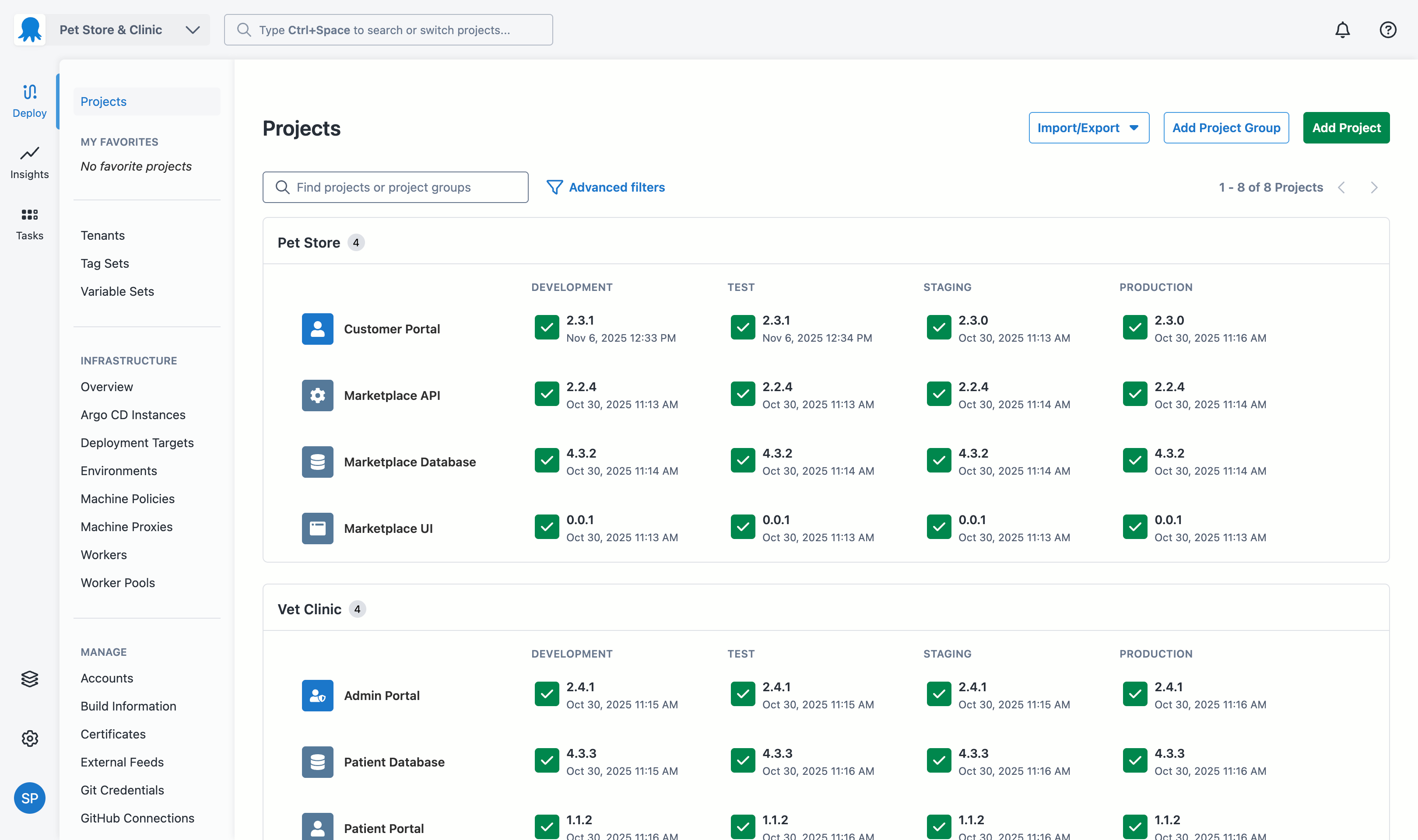
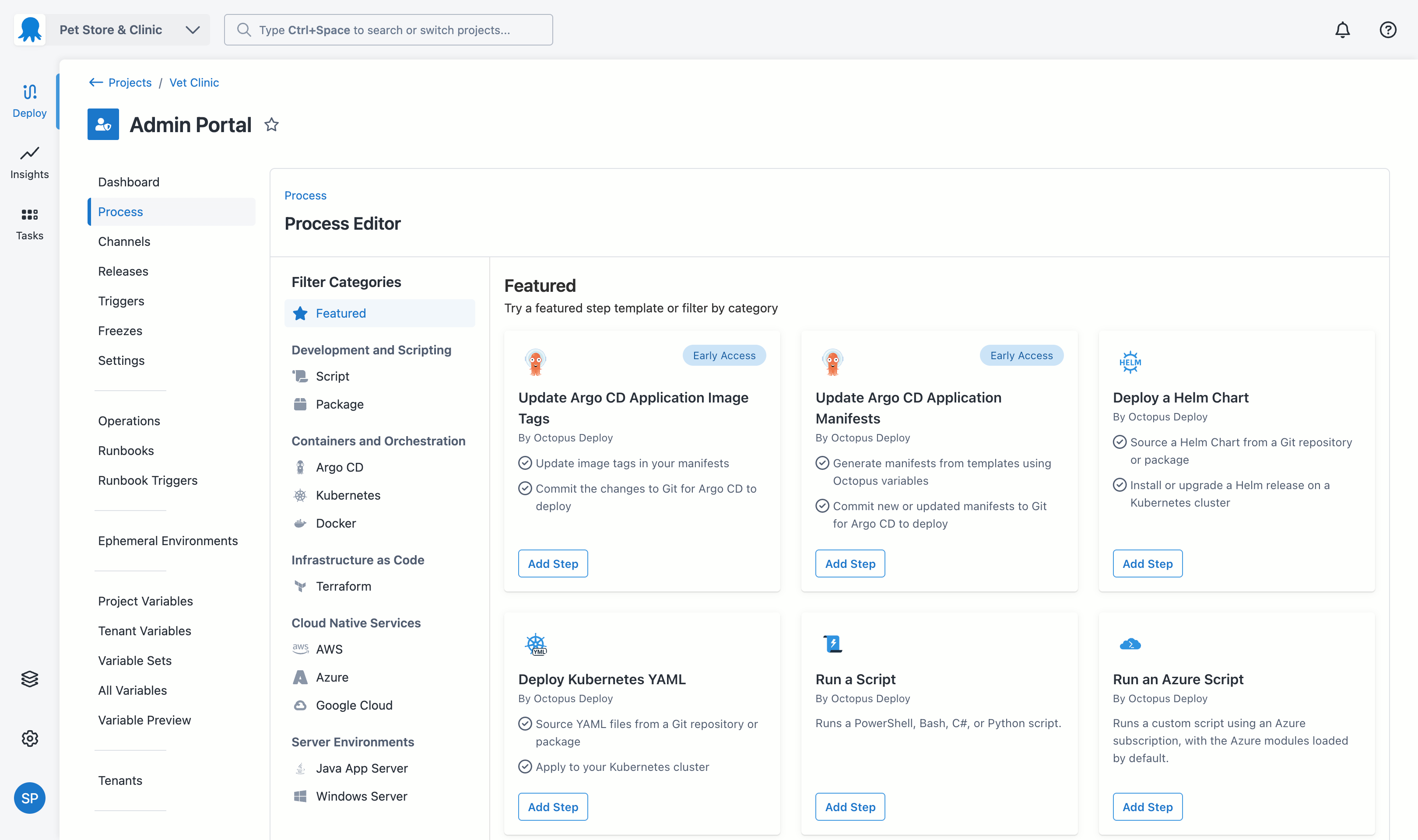
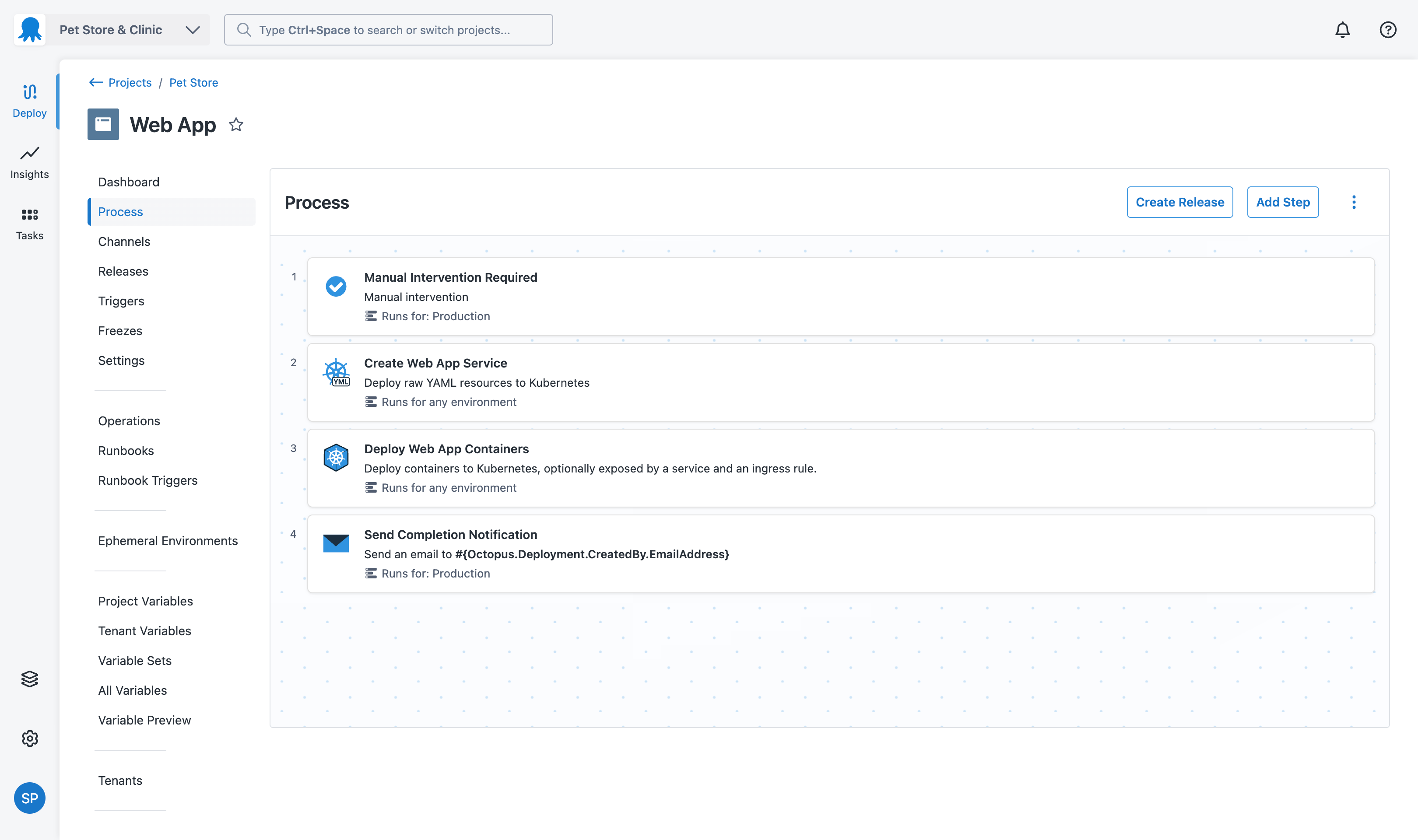
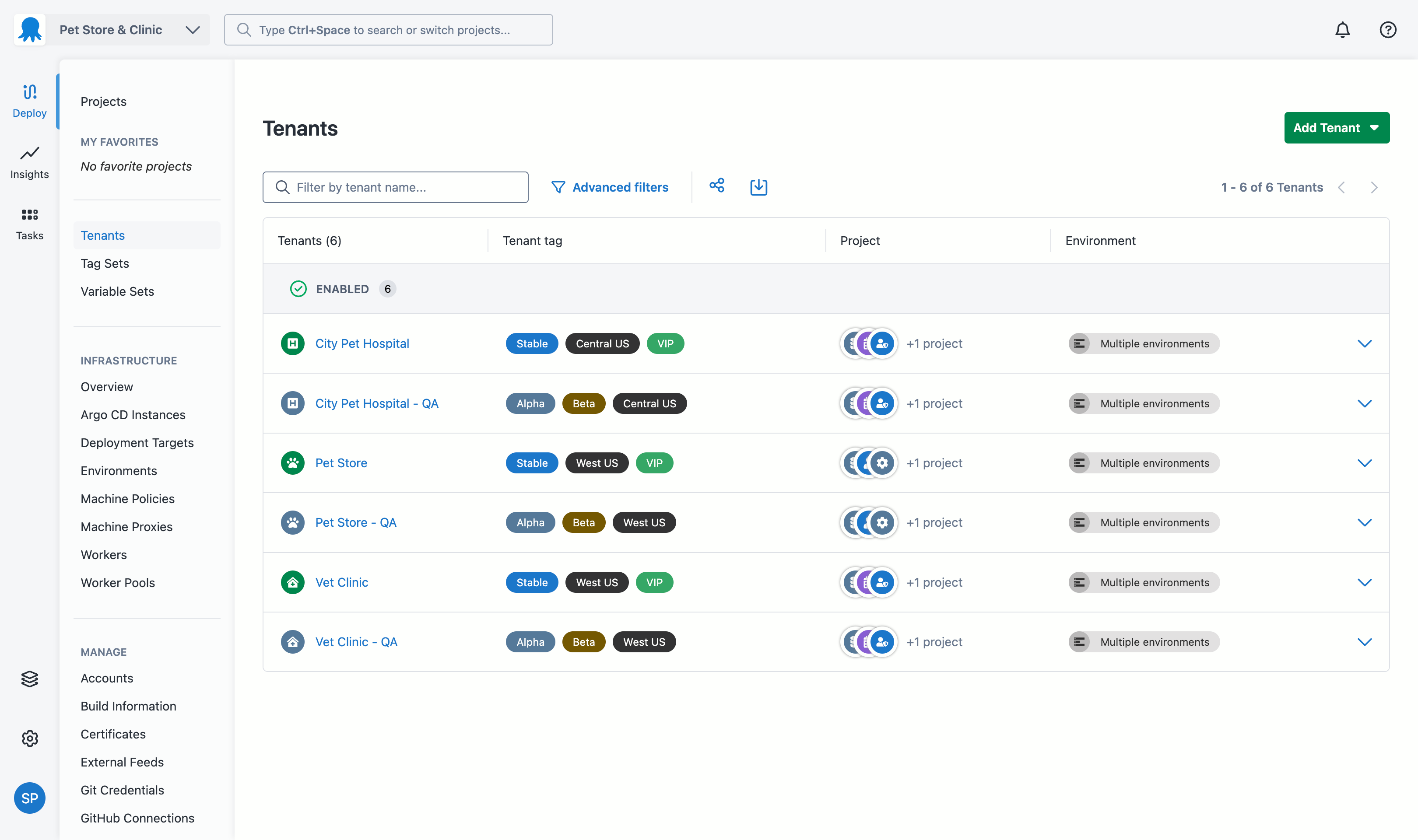
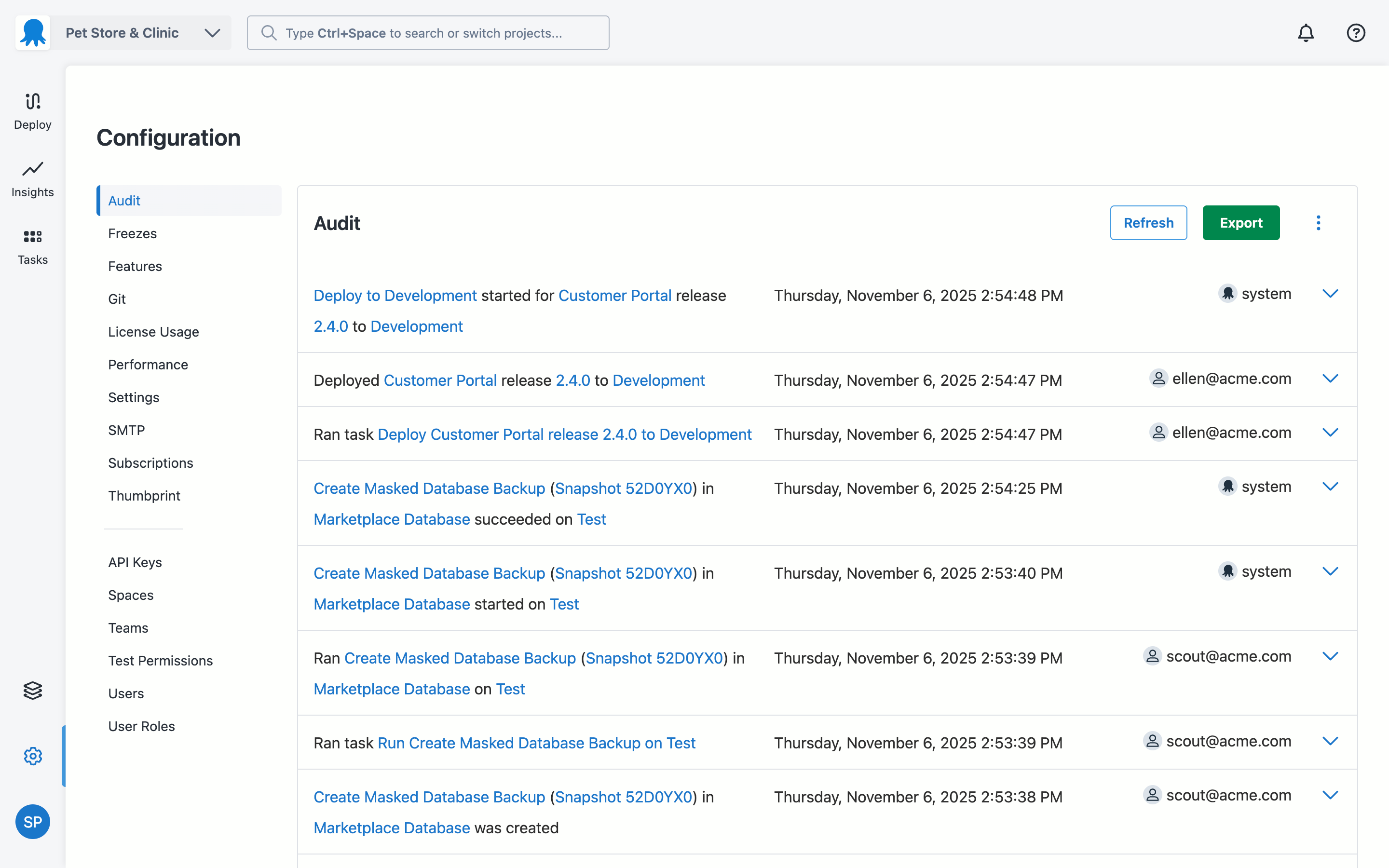
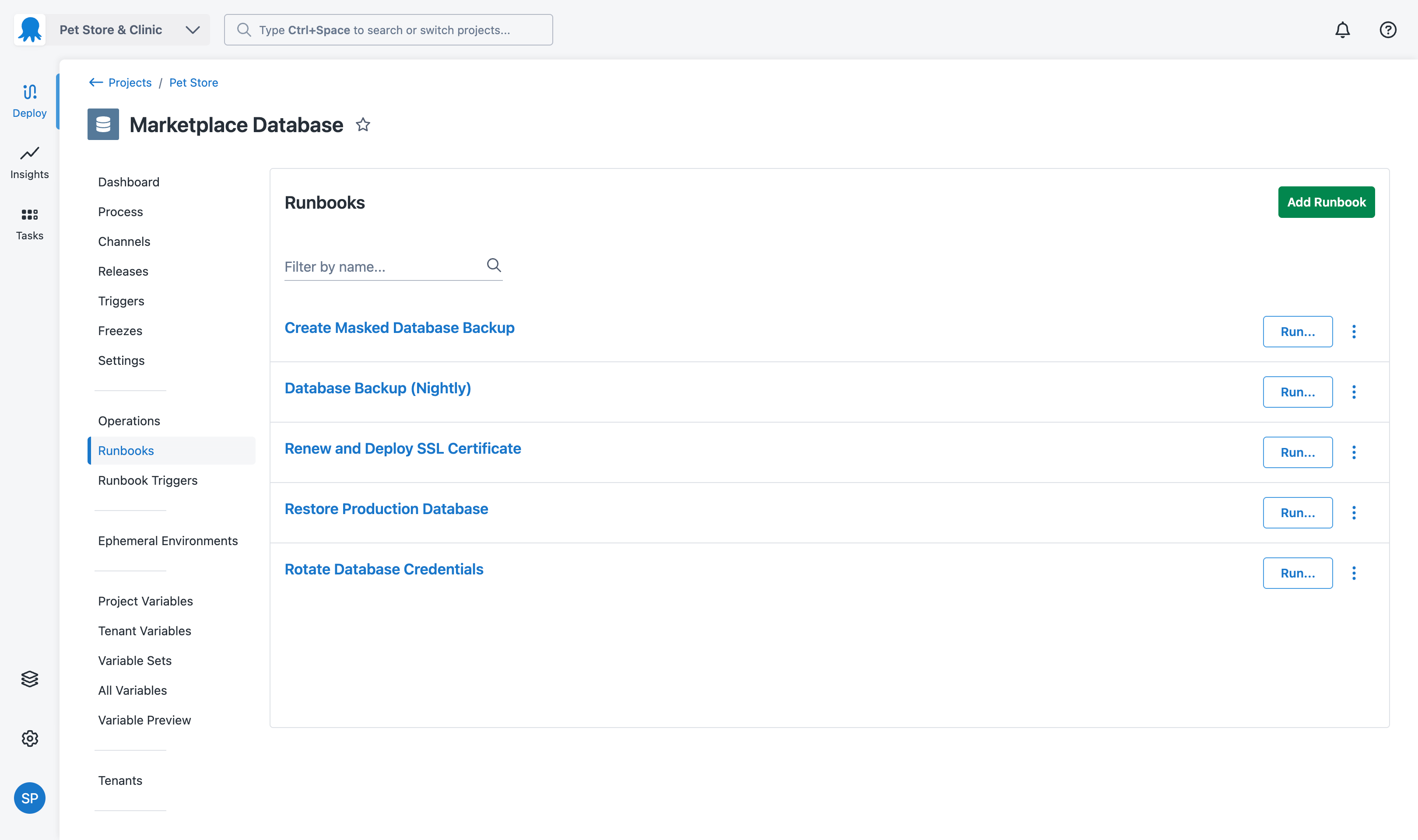
Screenshot of where Octopus provides real-time visibility into which application versions are deployed across all environmentsScreenshot of some of the 500+ pre-built step templates for Kubernetes, AWS, Azure, Terraform, and Docker, to define deployment processes.Screenshot of the interface to create a deployment process once and reuse it across all environments, ensuring consistent deployments from development through production.Screenshot of tenanted deployments, which allow users to deploy unique application versions to individual customers or business units while maintaining centralized control and visibility across all instancesScreenshot of the audit log, which captures every deployment action, change, and user activity with full attribution and timestamps, providing accountability for compliance and security.Screenshot of the Runbooks that enable teams to automate routine operational tasks like backups, certificate renewals, and infrastructure maintenance, reducing manual effort and ensuring consistent execution of critical procedures.