MineTwin vs. Designcenter Solid Edge

Overview
ProductRatingMost Used ByProduct SummaryStarting Price
MineTwin
Score 10.0 out of 10
Enterprise companies (1,001+ employees)
MineTwin is simulation, planning and decision-support software developed for open-pit and underground mining operations. It creates detailed digital representations of mines so that operational plans, fleet configurations, infrastructure investments and new technologies can be tested before resources are committed in the real operation. CORE CAPABILITIES Discrete-event simulation of mining activities, equipment movement,…N/A
Solid Edge
Score 9.1 out of 10
N/A
Solid Edge is a software solutions for product development — 3D design, simulation, manufacturing, data management, and cloud collaboration. Solid Edge aims to combine the speed and simplicity of direct modeling with the flexibility and control of parametric design.
$110
per month
Pricing
MineTwinDesigncenter Solid Edge
Editions & Modules
No answers on this topic
Design and Drafting XaaS
$110.00
per month
Foundation XaaS
$267.00
per month
Classic XaaS
$335.00
per month
Premium XaaS
$481.00
per month
Offerings
Pricing Offerings
MineTwinSolid Edge
Free Trial
YesNo
Free/Freemium Version
NoNo
Premium Consulting/Integration Services
NoNo
Entry-level Setup FeeNo setup feeNo setup fee
Additional Details
More Pricing Information
Community Pulse
MineTwinDesigncenter Solid Edge
Best Alternatives
MineTwinDesigncenter Solid Edge
Small Businesses
SOLIDWORKS
SOLIDWORKS
Score 8.7 out of 10
Onshape
Onshape
Score 6.4 out of 10
Medium-sized Companies
Navisworks
Navisworks
Score 9.1 out of 10
Onshape
Onshape
Score 6.4 out of 10
Enterprises
Navisworks
Navisworks
Score 9.1 out of 10
Rhino
Rhino
Score 8.7 out of 10
All AlternativesView all alternativesView all alternatives
User Ratings
MineTwinDesigncenter Solid Edge
Likelihood to Recommend
10.0
(1 ratings)
8.1
(16 ratings)
Usability
10.0
(1 ratings)
5.3
(2 ratings)
Support Rating
-
(0 ratings)
10.0
(2 ratings)
User Testimonials
MineTwinDesigncenter Solid Edge
Likelihood to Recommend
Amalgama Software Design
MineTwin is well suited if your company operates in the mining industry or related to the mining industry and is looking to make changes or upgrades - this tool provides the means to investigate that at a fraction of the cost. Additionally if you are a consultant providing services to companies in the mining sectors this tool is also for you!
Read full review
Siemens AG
Well Suited for:
  • Integrated designs performed by multiple designers simultaneously (designs requiring a Product Lifecycle Management system);
  • Designs requiring a high degree of parameterisation;
  • Large companies where specific standards and best practices are applied to all models and drawings created.
Not Well Suited for:
  • Personal use in designing one-off models and drawings;
  • Small business use where very few of the expensive features are actually used.
Read full review
Pros
Amalgama Software Design
No answers on this topic
Siemens AG
  • It has very good user interface in classic or ordered environment.
  • In 2D or drafting, you can give any Geometric tolerancing and symbols to any dimension. There is a wide range of options available.
  • You can convert any files in step file (.stp) and can open it in other designing applications easily.
  • After converting 3D drawings in 2D you can make changes in 2D drawing by converting it in the draft. You can also add details like cross-sections and detailed view.
  • You can directly make threads without creating holes.
Read full review
Cons
Amalgama Software Design
No answers on this topic
Siemens AG
  • Being used to 2-key and 3-key commands from the keyboard, it would be nice if this was more robust in Solid Edge. The capability of programming keystroke commands exists in Solid Edge, but it would be more user friendly in that regard.
  • Editing hatches can be a challenge.
  • I'm not a fan of the ribbon bar, but that seems to be a feature across software platforms in Windows.
Read full review
Usability
Amalgama Software Design
As a mentioned before using MineTwin for mining operations is easy as it has prepopulated options for mining equipment, as well as all the necessary operations that a mine can do.
Read full review
Siemens AG
As mentioned previously, Siemens Solid Edge is not the most user-friendly of products at all. It requires intense training to make sure that the basics are understood, and after that, there are numerous other training interventions needed to be able to perform expert-level CAD functions. The GUI is not intuitive, as many other packages are, and the features built-in are not well defined. The process to use many of these features is counter-intuitive and requires a mind-shift.
Read full review
Support Rating
Amalgama Software Design
No answers on this topic
Siemens AG
I have been involved with support and training of Solid Edge for 24 years. Given that I based my business model on support, and have been successful for all these years, I know excellent support. Siemens support for Solid Edge, "GTAC", is the definition of support for a product in every aspect.
Read full review
Alternatives Considered
Amalgama Software Design
No answers on this topic
Siemens AG
FreeCAD is often better than Solid Edge 2021 when converting files, but I hope this changes with 2023 NX is overall more powerful, but that is to be expected (and you cant add it above because it is too short for whatever reason).
Read full review
Return on Investment
Amalgama Software Design
No answers on this topic
Siemens AG
  • It took about 20 hours of use to get the basics of Synchronous Technology, and with just a basic competency I was able to make useful changes to the design. One of those changes was impossible to do our other CAD program.
  • My use lately has mostly been on personal time and self-driven, so learning other aspects and features of Solid Edge has been slower. Creating a drawing for a part required a few hours to learn and do the first time, but luckily there were YouTube videos for examples. With practice, I would expect the time to reflect what it takes in SolidWorks (about 30 minutes).
Read full review
ScreenShots

MineTwin Screenshots

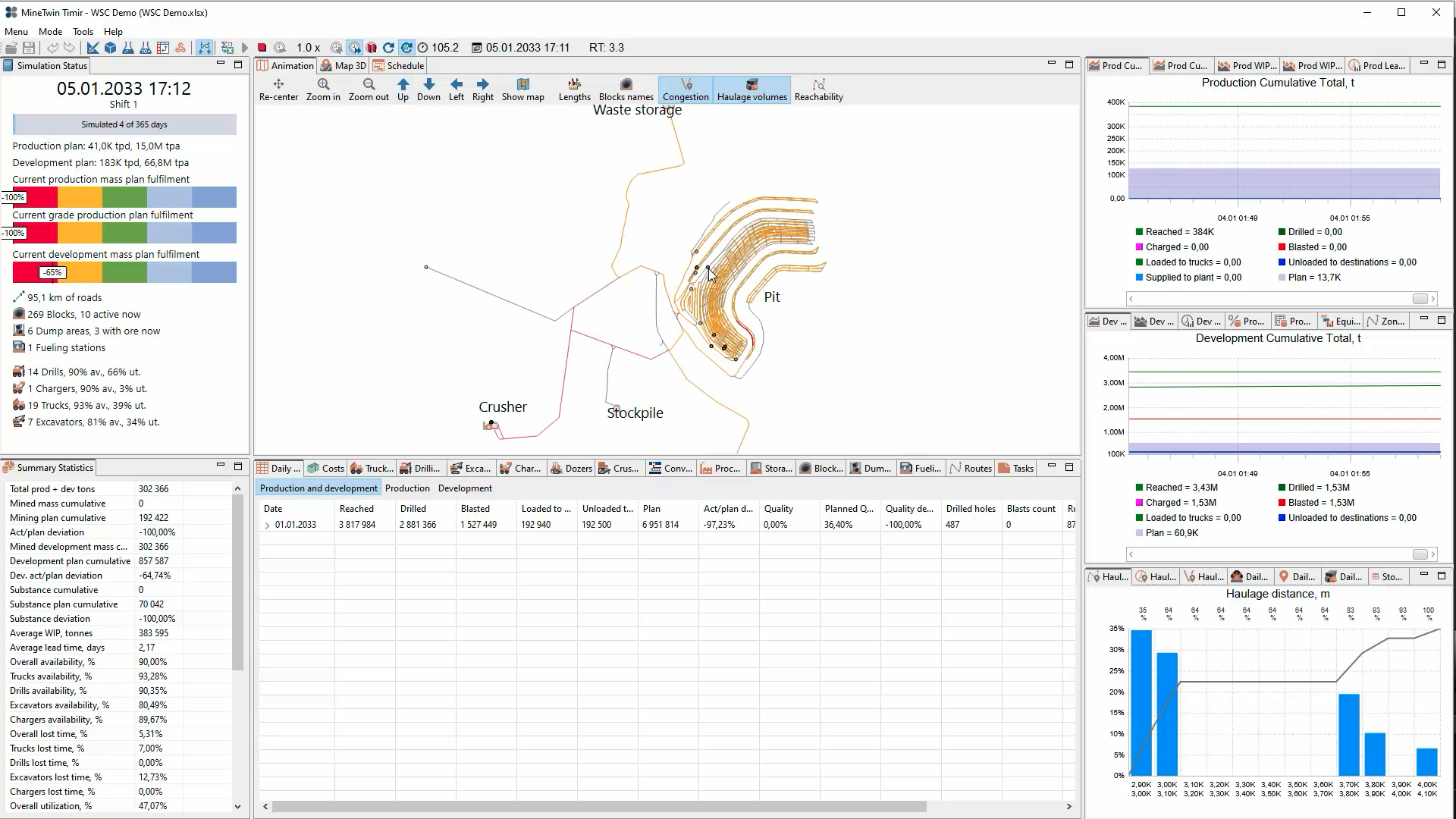
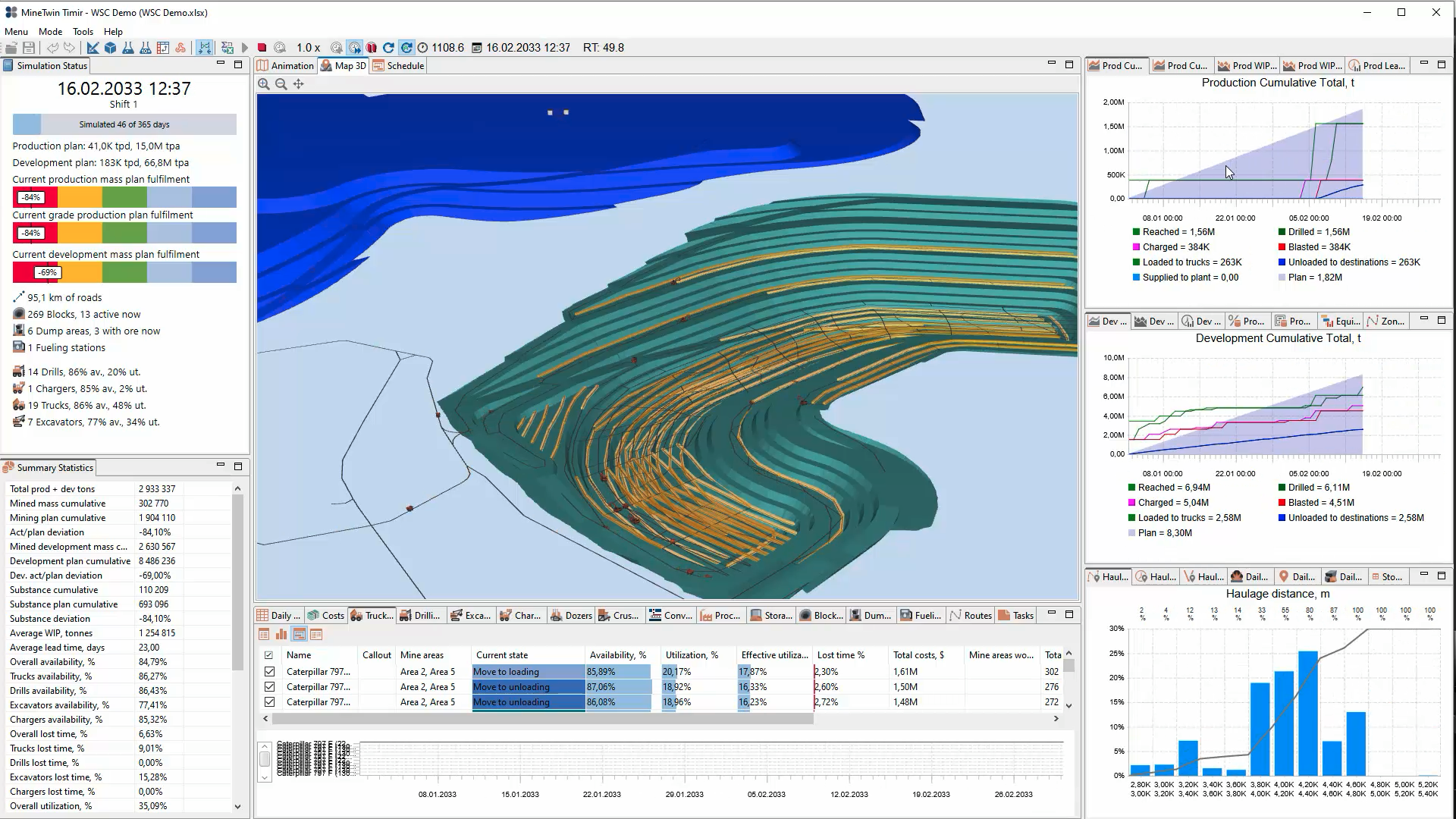
Screenshot of MineTwin’s 2D open-pit simulation view maps the mine, roads, crusher, stockpile and waste storage while displaying plan fulfilment, equipment availability, production and development results, haulage-distance distributions, and daily operating statistics.Screenshot of MineTwin’s 3D open-pit simulation view combines an animated mine model with plan-fulfilment indicators, equipment availability and utilization, cumulative production and development charts, haulage analysis, costs, and detailed summary statistics at once.Screenshot of MineTwin’s schedule-execution Gantt chart shows loader and truck activities over time, including travel, loading, unloading, waiting, haulage and downtime. Colour-coded states make delays, interactions, utilization and schedule feasibility easy to assess.Screenshot of MineTwin’s 3D scenario editor visualizes a complex underground mine network while organizing stopes, ore passes, crushers, conveyors, equipment, schedules, tasks and plans in a structured tree. Detailed property panels support precise model configuration.