TrustRadius: an HG Insights company

Save this comparison

Save this comparison

Add Product

Recommended Comparisons

    Overview
    ProductRatingMost Used ByProduct SummaryStarting Price

    One3D® by Eccentric

    N/A
    Enterprise companies (1,001+ employees)
    Eccentric’s One3D®is an automotive-first visualization 3D engine, helping OEMs to offer interactivity to customers everywhere. One3D® scales across the web, mobile, and in-car experiences. Designed for the connected mobility era, it aims to deliver lightweight, instantly loading, and seamless experiences that engage vehicle buyers around the world.N/A

    SketchUp

    Score8.3 out of 10
    N/ASketchUp is 3D modeling software with an emphasis on usability. SketchUp is a Trimble product.

    $119

    per year

    Pricing
    One3D® by EccentricSketchUp
    Editions & Modules
    No answers on this topic
    Free
    $0.00
    per year
    For Schools (free with G Suite or Microsoft education account)
    $0
    For Students
    $55.00
    per year
    For Educators
    $55.00
    per year
    Studio for Students / Educators (Desktop version)
    $55
    per year
    Shop
    $119.00
    per year
    Pro
    $299.00
    per year
    Professional
    $299.00
    per year
    Studio (Windows only)
    $699
    per year
    Studio
    $1199.00
    per year
    Offerings
    Pricing Offerings
    One3D® by EccentricSketchUp
    Free Trial
    NoNo
    Free/Freemium Version
    NoYes
    Premium Consulting/Integration Services
    NoNo
    Entry-level Setup FeeOptionalNo setup fee
    Additional Details
    More Pricing Information
    Community Pulse
    One3D® by EccentricSketchUp
    Considered Both Products
    Eccentric
    No answer on this topic
    Trimble
    No answer on this topic
    Key User Insights
    Would buy again
    No answers on this topic
    96%
    Would buy again
    23 Answers
    Delivers good value for the price
    No answers on this topic
    100%
    Delivers good value for the price
    22 Answers
    Happy with the feature set
    No answers on this topic
    92%
    Happy with the feature set
    22 Answers
    Lived up to sales and marketing promises
    No answers on this topic
    89%
    Lived up to sales and marketing promises
    17 Answers
    Implementation went as expected
    No answers on this topic
    95%
    Implementation went as expected
    18 Answers
    Best Alternatives
    One3D® by EccentricSketchUp
    Small Businesses
    No answers on this topic
    Autodesk Maya
    Score8.3 out of 10
    Medium-sized Companies
    No answers on this topic
    Navisworks
    Score9.1 out of 10
    Enterprises
    No answers on this topic
    Navisworks
    Score9.1 out of 10
    All AlternativesView all alternativesView all alternatives
    User Ratings
    One3D® by EccentricSketchUp
    Likelihood to Recommend
    -
    (0 ratings)
    8.0
    (47 ratings)
    Likelihood to Renew
    -
    (0 ratings)
    9.0
    (1 ratings)
    Usability
    -
    (0 ratings)
    7.0
    (1 ratings)
    Support Rating
    -
    (0 ratings)
    8.5
    (14 ratings)
    User Testimonials
    One3D® by EccentricSketchUp
    Likelihood to Recommend
    Eccentric
    No answers on this topic
    Trimble
    SketchUp is great for individually studying options for building design. It is an awesome conceptual tool to be able to quickly model and manipulate a building to study different designs. It is not good for complex geometries, especially curves. Surfaces have a hard time registering and cutting into one another. It also eventually needs to go into Revit to be more realistic as it is not good as a documentation tool
    Incentivized
    Read full review
    Pros
    Eccentric
    No answers on this topic
    Trimble
    • Quickly exploring solutions in 3D: We get a lot of "what if" and "what would that look like" questions. While hand-sketching and hand-drafting can be fairly quick, SketchUp allows me to quickly create 3D and 2D views of a detail or solution, change dimensions and materials in a flash, and show a client or installer the plan in minutes.
    • Creating professional design documents in LayOut: Projects of any scale need good documentation. Using a combination of SketchUp and LayOut, I can create a Design Intent Set, plans for permitting, a set for mechanical trades to mark-up, etc. Having clear, appropriately-scaled drawings with dimensions or notations is a must, and we don't always have the time or budget to get an architect involved!
    • Using live files to guide discussions: Not all clients are "visual" people, so opening their model and orbiting around their space in real time has been extremely helpful. Clients and trades enjoy the perspective views so much that we often include them in the full-sized drawing sets to give a good "overall" view of the project intent. For complex or tight spaces, sometimes un-rendered plans and elevations just aren't enough!
    Incentivized
    Read full review
    Cons
    Eccentric
    No answers on this topic
    Trimble
    • Ability to import Revit files and libraries.
    • Ability to export true curved vector linework. There are some workarounds, needs to be refined.
    • Create an OPEN MAPS connection. Since the split from Google, the source for high-quality aerials is limited.
    • Ability to dock all menus to the master window on a Mac
    • Ability to develop dockable menu trays on a Mac
    Incentivized
    Read full review
    Likelihood to Renew
    Eccentric
    No answers on this topic
    Trimble
    We typically wait a few years in between renewing, as even older versions are powerful tools for modeling, and we make sure the amount of feature changes are worth the re-investment.
    Read full review
    Usability
    Eccentric
    No answers on this topic
    Trimble
    It is very user friendly and easy to learn. It's simplicity allows for a low learning curve so more people can learn it faster. The downside is that most schools are no longer teaching it, so many younger professionals come out of school not knowing it and knowing more complex software and they have a hard time "dumbing down" their skillsets
    Incentivized
    Read full review
    Support Rating
    Eccentric
    No answers on this topic
    Trimble
    Sketchup is so intuitive; I can't recall ever looking for official support. However, there are many user forums online that can answer more questions. The usefulness of the online forums is, however, tempered by the fact that there have been many versions of the software under different ownership and support regimes, and thus finding the right information for the right version of the software can be a challenge.
    Incentivized
    Read full review
    Alternatives Considered
    Eccentric
    No answers on this topic
    Trimble
    We have not evaluated any other competing software to this one. I heard about this software from a friend who teaches how to use it. She showed me in just a few minutes and I was HOOKED. I saw immediately the possible help it would be to my business. Thank you.
    Incentivized
    Read full review
    Return on Investment
    Eccentric
    No answers on this topic
    Trimble
    • It's good in the sense that you can quickly make a drawing and speeds up the design process. Not sure how to quantify that from a ROI perspective.
    • Also, good for editing an image after the fact. We can easily add a dimension that was forgotten in the original image.
    • Allows team members to understand a design easier than on other software platforms.
    Incentivized
    Read full review
    ScreenShots

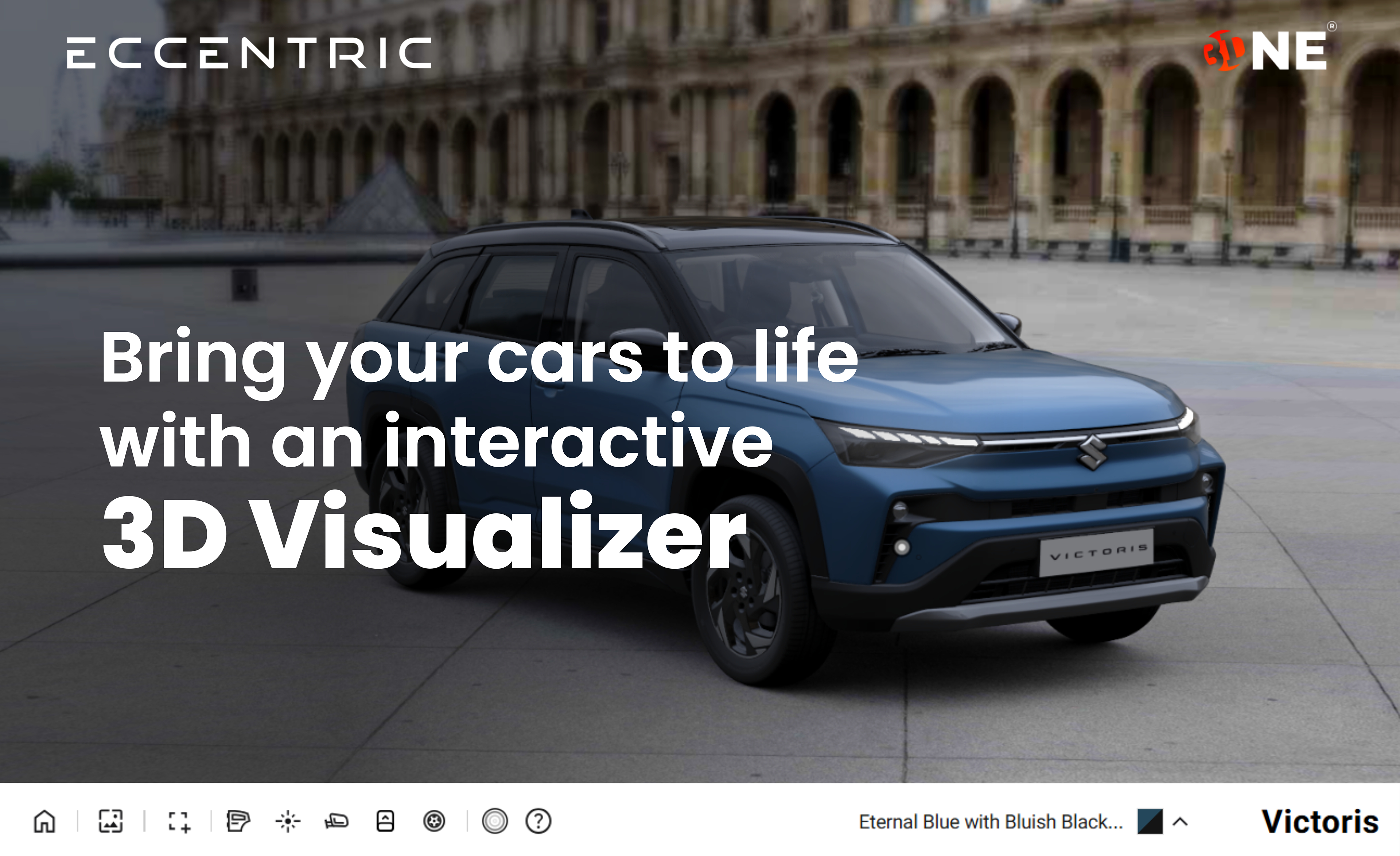
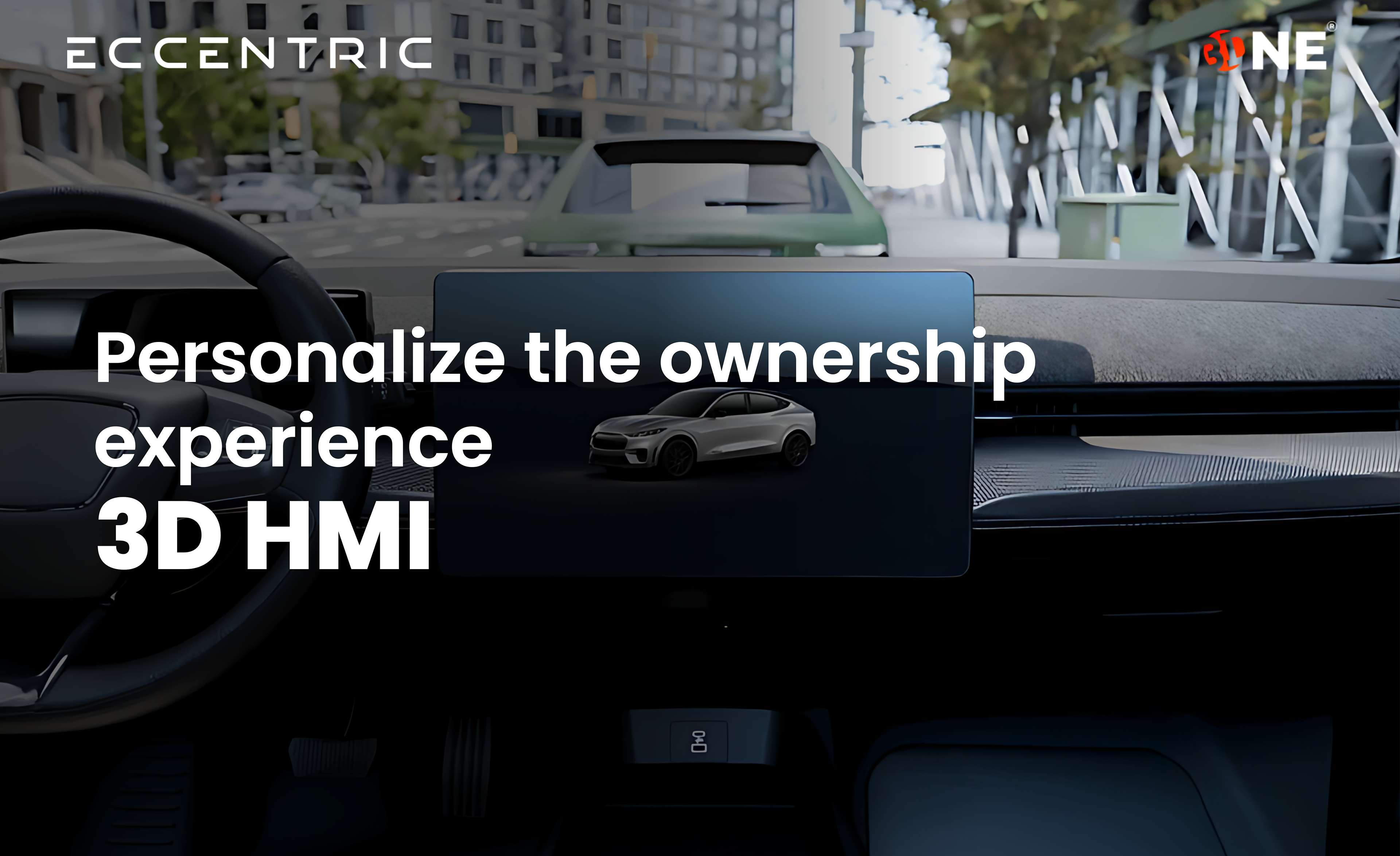
    One3D® by Eccentric Screenshots

    Screenshot of 3D Visualize. For OEMs aiming to bring customers closer to the product, Eccentric’s 3D Vehicle Visualizer creates lifelike experiences that replicates how a buyer interacts with a car in person. Built on our proprietary One3D® engine, it lets users explore every angle and detail - from opening doors to toggling lights and zooming into fine textures, with photoreal precision and instant responsiveness. It delivers immersive showroom engagement across devices, markets and is designed to increase engagement.Screenshot of the 3D Configurator. This provides buyers next-level customization, with an AI-powered 3D Vehicle Configurator. Designed for automotive OEMs and dealers, it offers variant comparisons (petrol, CNG, hybrid), an accessory configurator, and AI-guided feature explorer. The integrated AI agent offers personalized recommendations based on style, preferences and budget, creating a seamless, intelligent, and engaging car-buying experience across web, mobile, and in-dealership displays.Screenshot of 3D HMI. Eccentric’s 3D HMI brings the vehicle to life in the cockpit of the car, engaging owners with a live 3D twin of their vehicle. From opening doors and toggling lights to exploring key features, it makes every interaction intuitive and visually engaging. By extending the 3D experience beyond purchase, it deepens the owner's connection with the vehicle while enabling OEMs to deliver tech-forward, consistent, and premium brand experiences even in the ownership journey.Screenshot of Feature Videos. These CGI Feature-Videos, created using the 3D digital twin, brings your vehicle features to life for the buyer. You can showcase everything from ADAS and automatic emergency braking, to lane keep assist in a realist virtual environment. By recreating real-world driving conditions, these videos demonstrate how intelligent systems function in action, helping customers clearly understand the vehicle’s safety, performance, and innovation through lifelike videos.