Orchard Harvest LIMS vs. Scifeon ELN & LIMS

Overview
ProductRatingMost Used ByProduct SummaryStarting Price
Orchard Harvest LIMS
Score 6.0 out of 10
N/A
Orchard Software in Indiana offers Orchard Harvest LIMS, a laboratory information management system dedicated to providing operational support and streamlining with rules-based decisioning, data analytics and business intelligence, and clear interfaces.N/A
Scifeon ELN & LIMS
Score 0.0 out of 10
N/A
Scifeon ELN & LIMS is a modular, low-code digital platform designed to manage research and quality-control data across biotech, pharma, and CDMO/CRO environments. It combines Electronic Lab Notebook (ELN) and Laboratory Information Management System (LIMS) capabilities in a single environment, enabling scientists to capture, analyze, and share data. Key Features Integrated ELN & LIMS: Unified data capture, sample management, and process…
$180
per month per user
Pricing
Orchard Harvest LIMSScifeon ELN & LIMS
Editions & Modules
No answers on this topic
Offerings
Pricing Offerings
Orchard Harvest LIMSScifeon ELN & LIMS
Free Trial
NoYes
Free/Freemium Version
NoNo
Premium Consulting/Integration Services
NoYes
Entry-level Setup FeeNo setup feeOptional
Additional Details
More Pricing Information
Community Pulse
Orchard Harvest LIMSScifeon ELN & LIMS
User Ratings
Orchard Harvest LIMSScifeon ELN & LIMS
Likelihood to Recommend
6.0
(2 ratings)
-
(0 ratings)
User Testimonials
Orchard Harvest LIMSScifeon ELN & LIMS
Likelihood to Recommend
Orchard Software
Harvest is well suited in a lab or a reference lab of about any size. You can customize the workflow with filters and permissions to ensure that the right people have the right abilities when they need them. I would say that it is not as great for locations that have multiple remote locations without great internet. Because of the underlying technologies, latency between client and server can cause havoc.
Read full review
Scifeon
No answers on this topic
Pros
Orchard Software
  • Good for small labs
  • Good support
  • Configurable for your environment
Read full review
Scifeon
No answers on this topic
Cons
Orchard Software
  • User Interface - The software is like 25 years old, and it feels like it. They have added some buttons and links to try to make it easier, but it's not as flashy as the SaaS applications that are being built these days. It feels like there isn't a lot of time spent on refining the features, just adding more to it.
  • Archaic Architecture - The application use 4D for the database. This means that you can't use SQL for queries, latency is a huge issue and there isn't a hosted option. You have to have your own in-house server to run the server application.
  • Client is an Application - We have workstations dedicated to managing the interfaces. These workstations have to run the application as a program and can not run them as a service. This means that if you want to apply Windows updates it required manually closing and re-launching the application.
  • Data Mining - There are some basic reports, but they do not really allow you to build complex reports about the patients or work being performed.
Read full review
Scifeon
No answers on this topic
Alternatives Considered
Orchard Software
We were looking into changing to another LIS but they failed to get things done and we ended up staying with Orchard. We are now in the process of moving everything to Sequoia since we have grown so much as a lab. I don't have any other experience with another LIS to compare to.
Read full review
Scifeon
No answers on this topic
Return on Investment
Orchard Software
  • The support provided by Orchard Software for Harvest allows me to not have to worry as much about the system. I can grant them access to my system and trust them to work on the issue while I work on other issues.
  • The automation saves a lot of time for those in the lab. There have been a few times that the lab has been down for a couple of hours and having to catch up and enter the results from the instruments manually can take the rest of the day.
Read full review
Scifeon
No answers on this topic
ScreenShots

Scifeon ELN & LIMS Screenshots

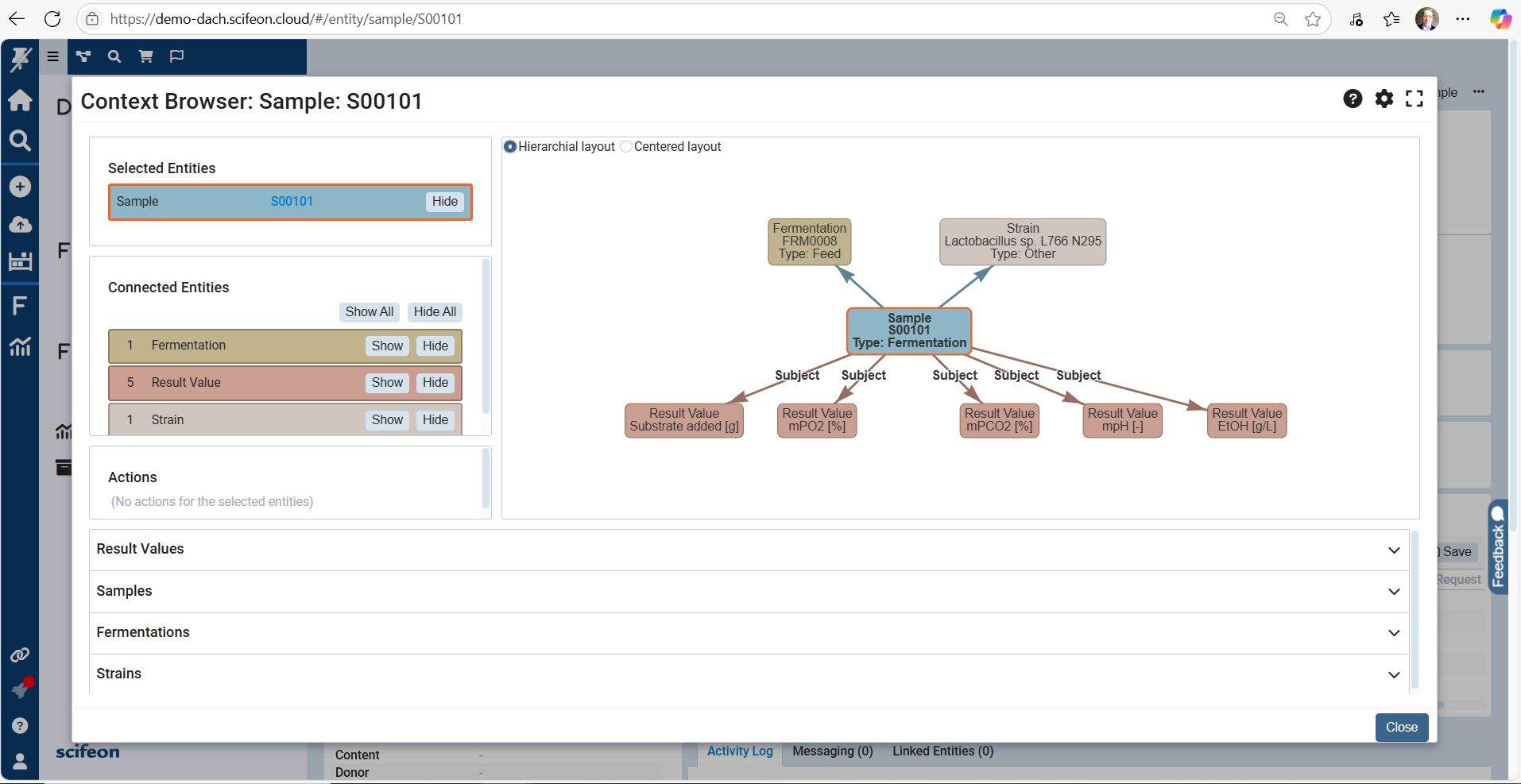
Screenshot of the Context Browser, which gives scientists and QC teams a clear, structured view of all laboratory data. Projects, experiments, samples, and results are organized in a single, connected interface, making it easy to navigate across workflows without losing context.

From a top-level project, users can drill down into experiments, linked samples, and raw measurements. Metadata, attached files, and audit trails are displayed side by side, ensuring that all relevant information is accessible at a glance. Integrated search and filtering functions make it simple to find specific datasets, compare results, or trace dependencies between workflows.

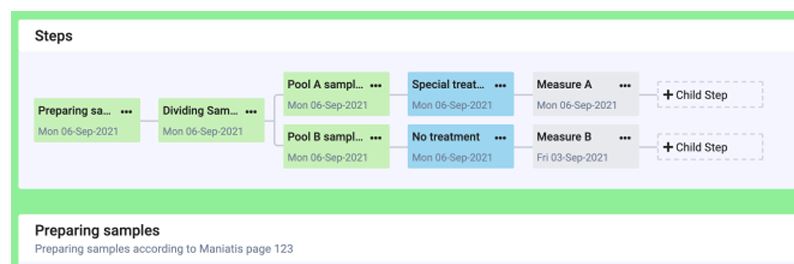
With the Context Browser, labs gain a transparent, FAIR-aligned data environment where relationships between experiments, samples, and results are visible and reusable — enabling faster decisions, smoother collaboration, and easier compliance.Screenshot of the Workflow Builder, a visual, drag-and-drop interface designed to configure laboratory workflows inside Scifeon without coding.Screenshot of the Fermentation Visualization Dashboard

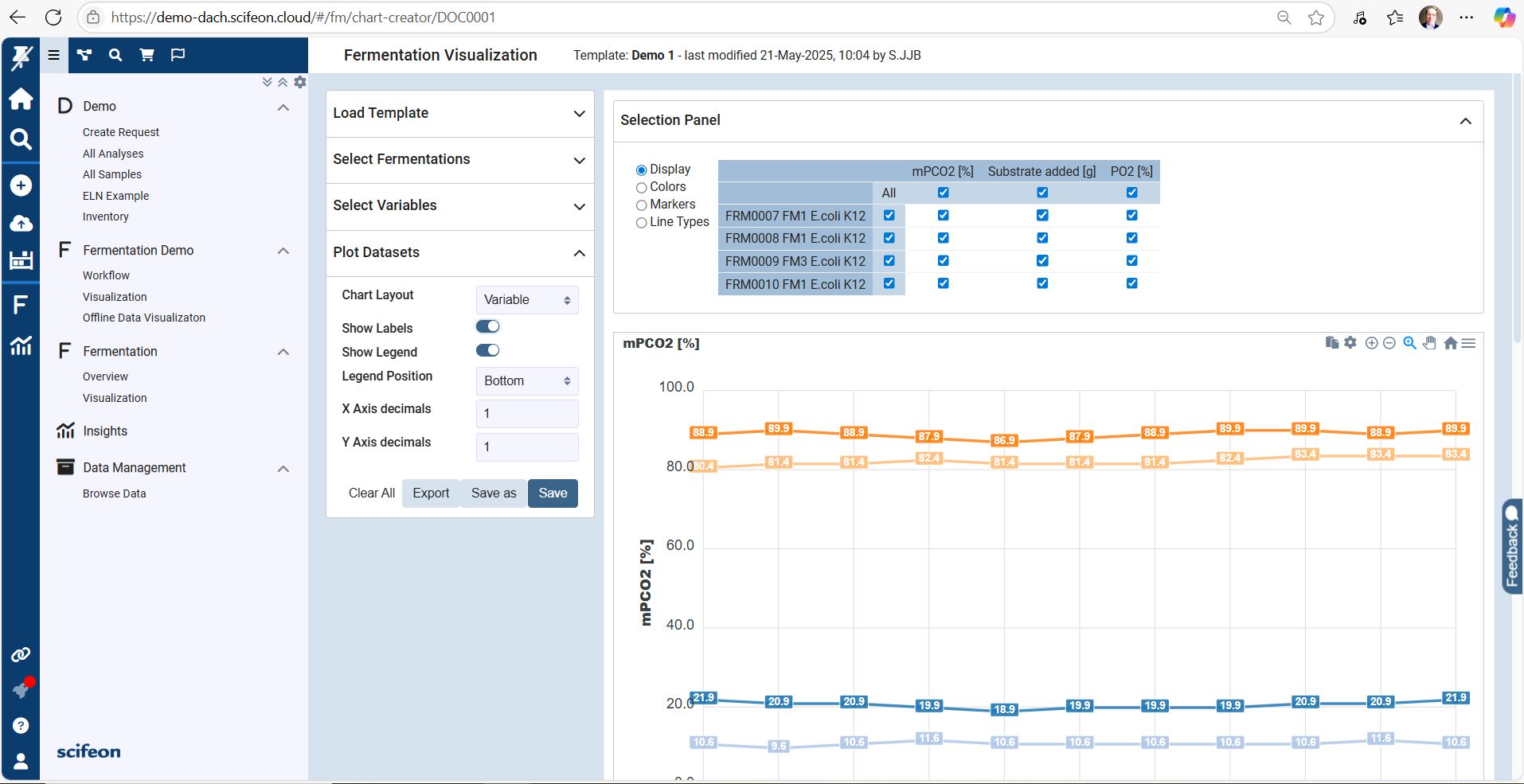
The Fermentation Visualization Dashboard provides a real-time overview of upstream and downstream fermentation data in a single, interactive interface. Scientists and process engineers can monitor critical parameters such as temperature, pH, dissolved oxygen, agitation speed, and feed rates directly as the process runs.

Key features visible in the dashboard screenshot:

Dynamic Time-Series Charts
Multiple parameters are plotted in synchronized graphs, enabling users to spot trends, deviations, and correlations across batches instantly.

Batch Comparison Mode
Overlay data from multiple fermentation runs to compare yields, stability, and process performance at a glance.

Live Instrument Integration
Data streams directly from connected bioreactors, ensuring the dashboard reflects the latest in-process values without manual uploads.

Interactive Data Exploration
Zoom, filter, and highlight specific segments of the fermentation process to investigate anomalies or optimization opportunities.

Compliance & Traceability
Linked audit trails and sample metadata support GMP, GCLP, and 21 CFR Part 11 compliance requirements.

Functional Impression

The dashboard turns complex fermentation datasets into intuitive, actionable insights. It supports faster decision-making, improves process reproducibility, and enables data-driven optimization — without leaving Scifeon’s platform.Screenshot of the Scifeon Workflow Builder – Adding Steps to a Workflow

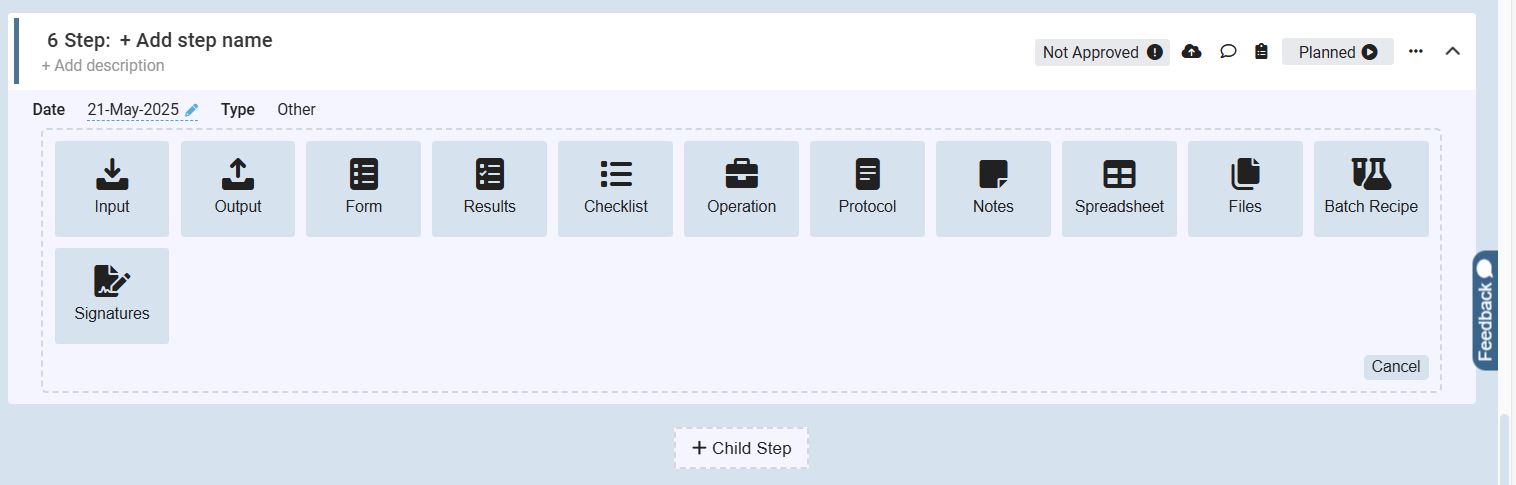
The screenshot shows the step configuration interface within Scifeon’s Workflow Builder, where users define and customize individual steps in a laboratory process.

At the top, the user can name the step and add an optional description. Below, a wide range of predefined step types is available to choose from, making workflows flexible and modular. The visible options include:

Input – Add incoming data, parameters, or metadata

Output – Define resulting data, files, or reports

Form – Include structured data-entry forms for users

Results – Capture and manage experiment results

Checklist – Enforce step-by-step task confirmation

Operation – Represent a laboratory or process operation

Protocol – Attach or link standard operating procedures (SOPs)

Notes – Add contextual annotations or explanations

Spreadsheet – Integrate structured tabular data directly

Files – Upload or attach supporting documents

Batch Recipe – Define recipe parameters for batch processes

Signatures – Insert digital approval and sign-off steps

At the bottom, a “+ Child Step” button allows users to create nested steps within a larger workflow, making complex laboratory processes easy to structure.

The interface also displays controls for status tracking (“Planned” vs. “Not Approved”), adding comments, and attaching files, ensuring each workflow step stays traceable and compliant.