
PingPlotter vs. Squid Alerts
| Product | Rating | Most Used By | Product Summary | Starting Price |
|---|---|---|---|---|
 PingPlotter | Score9 out of 10 | N/A | PingPlotter is a graphical traceroute and ping tool that visualizes network performance in a way that makes identifying the source of problems quicker and easier for everyone from online gamers and video streamers to VoIP admins and IT pros. Features for remote deployment, network monitoring, scripting, and a web interface are included along with several additional capabilities. | $0 per user |
 Squid Alerts | N/A | N/A | N/A | $8 per month |
| PingPlotter | Squid Alerts | |||||||||||||||
|---|---|---|---|---|---|---|---|---|---|---|---|---|---|---|---|---|
| Editions & Modules |
|
| ||||||||||||||
| Offerings |
| |||||||||||||||
| Entry-level Setup Fee | No setup fee | No setup fee | ||||||||||||||
| Additional Details | — | — | ||||||||||||||
| More Pricing Information | ||||||||||||||||
| PingPlotter | Squid Alerts | |
|---|---|---|
| Considered Both Products | No answer on this topic | No answer on this topic |
| Key User Insights | ||
| Would buy again | ||
100% Would buy again 33 Answers | No answers on this topic | |
| Delivers good value for the price | ||
96% Delivers good value for the price 24 Answers | No answers on this topic | |
| Happy with the feature set | ||
100% Happy with the feature set 33 Answers | No answers on this topic | |
| Lived up to sales and marketing promises | ||
100% Lived up to sales and marketing promises 21 Answers | No answers on this topic | |
| Implementation went as expected | ||
100% Implementation went as expected 31 Answers | No answers on this topic | |
| PingPlotter | Squid Alerts | |||||||||||||||||||
|---|---|---|---|---|---|---|---|---|---|---|---|---|---|---|---|---|---|---|---|---|
| Network Performance Monitoring |
| |||||||||||||||||||
| PingPlotter | Squid Alerts | |
|---|---|---|
| Small Businesses |  Auvik Score8.8 out of 10 | No answers on this topic |
| Medium-sized Companies |  Paessler PRTG Score8.5 out of 10 |  Cisco Catalyst Assurance Score8.1 out of 10 |
| Enterprises |  Nmap Score8.7 out of 10 | Cisco Catalyst Assurance Score8.1 out of 10 |
| All Alternatives | View all alternatives | View all alternatives |
| PingPlotter | Squid Alerts | |
|---|---|---|
| Likelihood to Recommend | 9.1 | - |
| Usability | 9.3 | - |
| Support Rating | 9.0 | - |
| PingPlotter | Squid Alerts | |
|---|---|---|
| Likelihood to Recommend |
| No answers on this topic |
| Pros |
| No answers on this topic |
| Cons |
| No answers on this topic |
| Usability |
| No answers on this topic |
| Support Rating |
| No answers on this topic |
| Alternatives Considered |
| No answers on this topic |
| Return on Investment |
| No answers on this topic |
| ScreenShots | PingPlotter Screenshots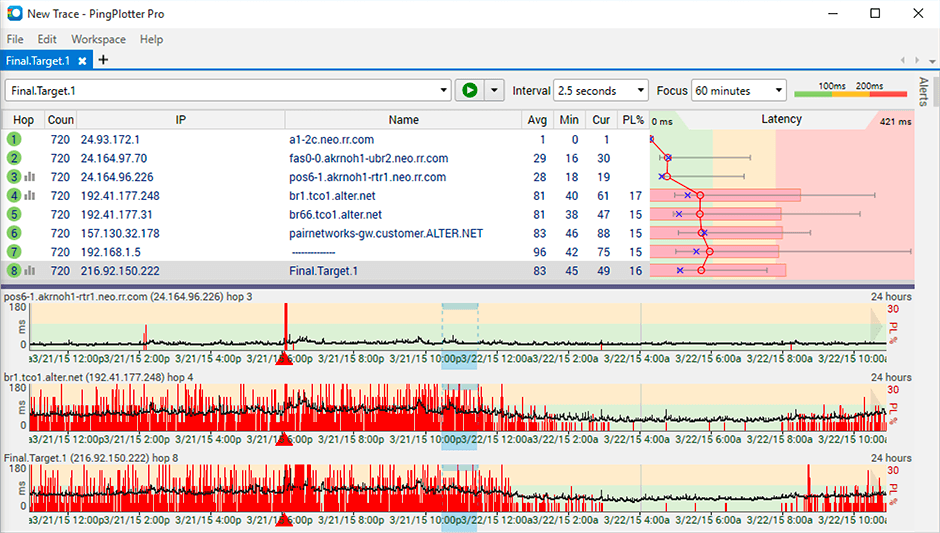   |



