ProWritingAid is a smart writing assistant, providing personalized advice on writing and plaigarism checks, from the company of the same name in Wheatley.
N/A
VistaCreate
Score8.1 out of 10
N/A
What is VistaCreate (ex-Crello)? VistaCreate is an online visual editing tool for creating videos, animations, graphic designs for social media, print, websites, or virtually any kind of static and animated design for commercial, business, or personal needs. On October 27, 2021 Crello joined the Vista group of companies and changed its brand name to VistaCreate. It includes 50,000 professionally designed templates that are already preformatted and…
This platform is really excellent for the creation and implementation in your projects and newsrooms, it helps you improve all your writing, it has incredible implementations such as Gmail, Microsoft Word, among others, through ProWritingAid our company has managed to improve the newsrooms, it provides you a better development and be much more efficient in your projects. through this platform you can not only improve writing and create content without grammatical errors but also eliminate all plagiarized and paraphrased texts, thanks to this tool you can write authentic texts, with a good rhythm and excellent readability.
A de minimis incentive was given to thank the reviewer for their time. The incentive was not used to bias or drive a particular response, nor was the incentive contingent on a positive endorsement. More Info
For creative and captivating presentation slides where you are pitching your ideas to the team, for quick and well-presented pamphlets for the event board, irrespective of university or workplace. I would definitely recommend using existing templates from VistaCreate instead of AI-generated images that are messy and crowded, so you connect with the audience better, and also, of course, people will take it seriously as well..
A de minimis incentive was given to thank the reviewer for their time. The incentive was not used to bias or drive a particular response, nor was the incentive contingent on a positive endorsement. More Info
Fully equipped - the ProWritingAid tool gives you almost all the writing control you could ever need or want.
Ease of use - The ProWritingAid app has an intuitive dashboard and all the features and functionalities listed on the top bar. This writing assistant for online users offers you a great way to improve the content in just a few minutes.
Price: Compared to other online editing programs with grammar checkers like Grammarly, Ginger. ProWritingAid Premium is only $ 60 a year, which is affordable for most people.
Integrate Scrivener and Google docs - We've been waiting for this for a long time. Especially those who use Scrivener. Gdocs is not supported, yet the ProWritingAid fix on your text within your document makes it easier for you.
Style Editor - Comes with an attractive writing and editing tool.
A de minimis incentive was given to thank the reviewer for their time. The incentive was not used to bias or drive a particular response, nor was the incentive contingent on a positive endorsement. More Info
A de minimis incentive was given to thank the reviewer for their time. The incentive was not used to bias or drive a particular response, nor was the incentive contingent on a positive endorsement. More Info
A de minimis incentive was given to thank the reviewer for their time. The incentive was not used to bias or drive a particular response, nor was the incentive contingent on a positive endorsement. More Info
A de minimis incentive was given to thank the reviewer for their time. The incentive was not used to bias or drive a particular response, nor was the incentive contingent on a positive endorsement. More Info
Massive help with candidate facing communication whereas sourcing message, offer letters or rejection notes. Saves time and brain power whereas helps to avoid rewring and overthinking for emails or linkedin postings. Helps with non native English speaker whereas not everyone can speak or write a better english for the others understanding
A de minimis incentive was given to thank the reviewer for their time. The incentive was not used to bias or drive a particular response, nor was the incentive contingent on a positive endorsement. More Info
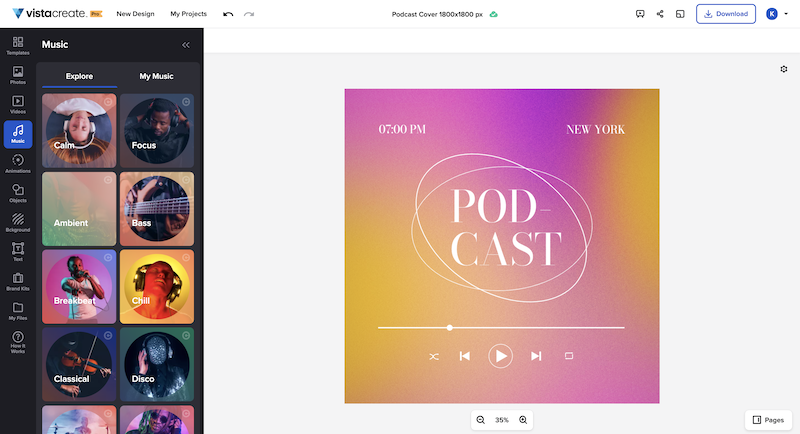
It's a fantastic tool, be it the free or paid version. You can choose different templates from many listed categories and change styles with palettes, add music to your images, and choose from a variety of fonts. All these features are for free users. You unlock gold if you have a paid version of VistaCreate. Some additional useful features like background remover, AI writer, object remover, resize, and many varieties of templates are only for premium users. I give 9 because additional premium useful features are not available for free users
A de minimis incentive was given to thank the reviewer for their time. The incentive was not used to bias or drive a particular response, nor was the incentive contingent on a positive endorsement. More Info
ProWritingAid is a desktop program with add-ins for Word, Outlook, Chrome, and Google Docs. Helping you type wherever you are, its advanced capabilities allow you to select a writing style, create language variants, set unique standards and procedures, and control user classes.
I like to give a chance to other products and try them out. As far as my experience is concerned, I liked the feature of VistaCreate, with palettes, which totally changes the mood and tone of the image. That's something I didn't find in Canva. Additionally, the simplicity and user-friendliness of VistaCreate instead of being crowded with too many features. It's simply the best.
A de minimis incentive was given to thank the reviewer for their time. The incentive was not used to bias or drive a particular response, nor was the incentive contingent on a positive endorsement. More Info
ProWritingAid is perfect if you have words that you use regularly that are not correct words, such as brand names, slang, or abbreviations. It is not necessary to correct each of these errors, just by clicking on "add to dictionary" ProWritingAid reminds that that word has to pass.
A de minimis incentive was given to thank the reviewer for their time. The incentive was not used to bias or drive a particular response, nor was the incentive contingent on a positive endorsement. More Info
A de minimis incentive was given to thank the reviewer for their time. The incentive was not used to bias or drive a particular response, nor was the incentive contingent on a positive endorsement. More Info