PTC Mathcad Prime is a digital engineering notebook enabling engineers, mathematicians, and scientists to solve, analyze, document, and share their calculations. It helps users to solve problems accurately the first time numerically and/or symbolically, and then reuse important intellectual property with templates to save time on the next project.
$735
per year per seat
SOLIDWORKS
Score 8.8 out of 10
N/A
Dassault Systemes offers SOLIDWORKS, a computer-aided design (CAD) system for education and manufacturing supporting 2D or 3D design, electrical design, simulations, and product development with collaboration tools.
$1,295
per year
Vuforia Studio
Score 9.6 out of 10
N/A
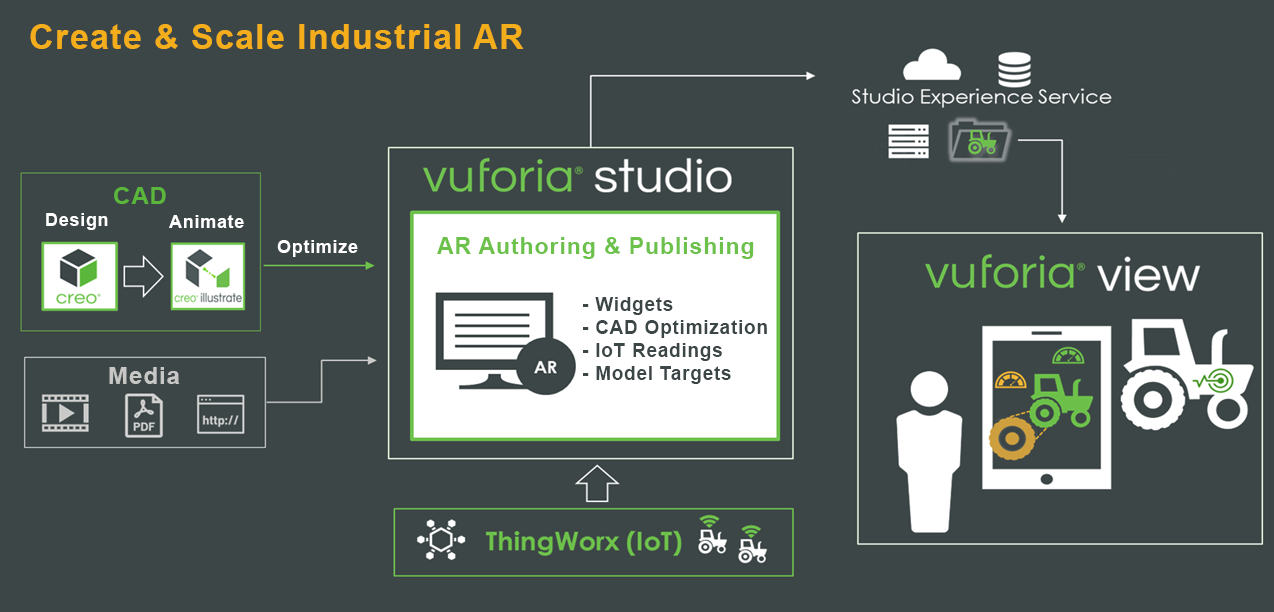
Vuforia Studio allows users to author and publish scalable AR experiences that transform manufacturing, service and training processes without the need for extensive programming or costly custom designers. The vendor states that Studio is the only drag-and-drop authoring environment that enables industrial content creators to: Accelerate content creation —…
N/A
Pricing
PTC Mathcad
SOLIDWORKS
Vuforia Studio
Editions & Modules
Mathcad Prime 10 License
$735
per year
Solidworks Annual Subscription
1,295
per year
Solidworks Standard
3,996
per standalone license
No answers on this topic
Offerings
Pricing Offerings
PTC Mathcad
SOLIDWORKS
Vuforia Studio
Free Trial
Yes
No
No
Free/Freemium Version
Yes
No
No
Premium Consulting/Integration Services
No
No
No
Entry-level Setup Fee
No setup fee
No setup fee
No setup fee
Additional Details
—
—
—
More Pricing Information
Community Pulse
PTC Mathcad
SOLIDWORKS
Vuforia Studio
Considered Multiple Products
PTC Mathcad
No answer on this topic
SOLIDWORKS
Verified User
Engineer
Chose SOLIDWORKS
Onshape is a direct competitor. It has great entry level pricing and it is easy to access with no installation required. Being a web based app there is sometime some lag being based in NZ. Management also have concerns over where the data is stored on the cloud. With SW we can …
It is great for any manual calculation. You can lay it out as you would on paper, but the math is calculated instantly, similar to how it is in excel. It is superior to either method for most engineering calculations. Being able to copy-and-paste is very helpful for considering multiple scenarios. In some situations where you need to do the same calculation on an array of numbers, Excel is still faster.
As a mechanical engineer, it is one of the best tools to just start modeling and engineering with. The UI tools are intuitive and engineering analysis such Mold Analysis, FEA, are great! Other 3D CAD modeling tools have a longer learning curve to master. All in all, if you're not planning to design an entire airplane with large assembly files, then Solidworks is your tool!
Vuforia is free but there is a watermark on the output of it. So if you want to remove it then you have to purchase it. It's easy to use and some features like multiple targeting in images and object and surface tracking help you to achieve what you want.
The collaborative work environment is a cool and useful feature where groups of people can work on the same model at the same time, and SOLIDWORKS ensures that you don't overwrite each other's work.
The ease and amount of customization options are very useful for creating a personalized and intuitive user interface, whether SOLIDWORKS is your native CAD package or not.
It is very easy to quickly edit a model you have already created. The software allows sketch and feature editing without having to take the time to actually enter the sketch/feature environment.
The use of configurations and configurations-specific dimensions in the same sketch is very useful for creating different forms of the same part
Save DWG 2D files in inches or metric easily, defaults to metric and has to be manually converted to inches
When using the sketch feature, the ability to disable ALL references. If I don't know the exact shape and I want to draw/adapt my design, it harshly interprets the references which have no value to me. The easiest exact is to think about when you have a Microsoft Word document that has a lot of formatting, photos, tabs, etc. If you accidentally hit the "enter" key, you can explode the formatting and everything goes crazy. SW does this to me, I just want to "doodle" my sketches, edit/delete/etc and not be bound by arbitrary references.
For the sketch feature, ability to use a DraftSight plugin of some sort. I'm super fast in DS, if I could draw using the commands in SW then I would probably never open DS again and convert to SW full time. Currently, I only use SW as a way to convert 3D files so I can build everything in DraftSight.
Higher-order math, despite symbolics, become tedious and variable nomenclature isn't as forgiving as other programs. Due to it's sheet-like nature, the greater the complexity the more bothersome the screen usage becomes. But it's a trade-off between a sketchpad-like interface or lines and lines of code. Pick your poison but MathCad was our choice.
I have been using SOLIDWORKS for around 12 years as of writing this review, so have learned where most things are and how they work. When first starting out it was quite daunting, but the interface is well laid out with like functions near each other which made finding new functions relatively easy.
We have an unusual arrangement. We don’t pay for support, but we’re partnered with a VAR for second-tier support.
I work with other users if I have questions but when we’ve had to ask the VAR, they always have answers. It appears that all of the VARs have access to a support platform from DS SOLIDWORKS that helps them answer most questions.
MathCAD is easier to learn and faster to start with. It has more user-friendly interface and conventional style toolbox and GUI. It is really good for the beginners and those who are afraid of complex math.
Onshape is a direct competitor. It has great entry level pricing and it is easy to access with no installation required. Being a web based app there is sometime some lag being based in NZ. Management also have concerns over where the data is stored on the cloud. With SW we can control where it is stored
Vuforia studio is well suited in cases like you wants to track objects and surface in the plane. Image recognization at multiple targets is one of the very good functionalities of EasyAR. And if you want to render 3d objects in your mobile application then it's well suited. It is free too so you can create applications at minimal costs.