QGIS (formerly Quantum GIS) is a free and open source geographic information system.
N/A
WhoisXML API IP Geolocation API
Score 8.0 out of 10
N/A
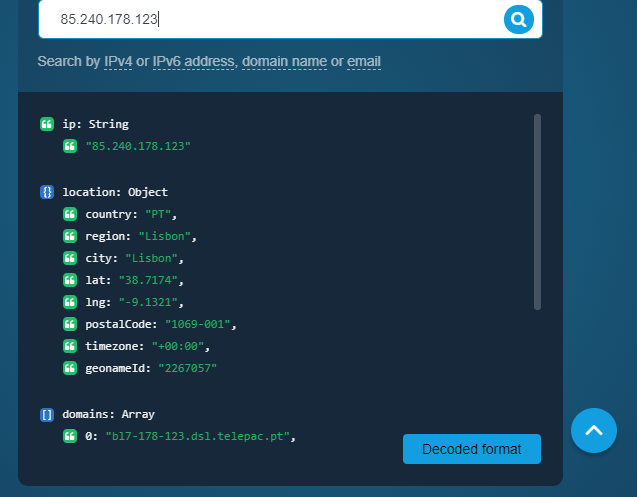
About IP Geolocation API WhoisXML API’s IP Geolocation API is a resource to link an IP address, domain name, or email to its geographical coordinates. For a given input, the API returns various location data points among which the country, city, time zone, postal code, latitude and longitude, ASN type, geoname ID, ISP, as well as associated domains. Marketing Marketers and advertising professionals can use the API to enrich customer profiles with location…
On our end, we've mostly used IP Geolocation API for cybersecurity purposes. A particular scenario that comes to mind is when suspicious IP addresses make it to our site from locations we wouldn't expect. In this context, the API integrated into our existing infosec solutions helps us spot those IP addresses so we can decide how to sort them. Also, say that one of our employees receive a phishing email or one that contains a possible malware file. We can use IP Geolocation API to enrich what we know about a sender and add the related IP address to our blocklist if necessary.
Styling: the styling engine is fantastic with raster styling features that I recognize from apps like Photoshop.
Print layouts: I can set up custom print layouts, and even do automated multi-page atlas style reports that I use for cycling through detailed areas when providing my clients with pdf reports.
Extendable: the plugins are fantastic, and almost anything I need that isn't provided natively with QGIS is available as a plugin.
Community: the QGIS community is passionate about GIS, and are always ready to help. There are great training resources available online.
Aside from identifying the physical location of an IP address owner, the API also provides users with its Internet service provider and connection type. That is handy information if website owners wish to customize their site loading to match the connection speed of the majority of their visitors.
It doesn’t matter whether website visitors use an IPv4 or IPv6 address in that the API works for both spaces. The records in the API’s database are also updated weekly, so users always get the latest results.
Making maps in QGIS is a bit clunky. I also find it to be extremely unintuitive. For basic GIS, it is great, but I would much rather make maps (for publication purposes) in ArcGIS.
Editing and adding feature layers is not very intuitive. Changing colors of added point or line features is a rather convoluted process.
ArcGIS has a huge selection of online courses, and if you have the appropriate license, you can access most for free. I found these to be very helpful when dealing with map projections and other issues. However, QGIS does not have a large library of courses specifically made for that program.
Like most, if not all, IP geolocation services, it does not provide very accurate information down to the street level address. But since we do most of our business transactions online, that doesn’t pose much of a problem for us.
I wasn't a GIS user at all when I started using QGIS, nor did I have any background working with data in anything other than Excel, and as a result, I struggled quite a lot in the beginning (it's not quite Google Maps). But having said that, I haven't come across anything that I couldn't do with a little help from the online community. I've done complex spatial analyses on large datasets of metropolitan cities, designed custom multi-page pdf reports that automatically cycle through different areas of an area, etc.
And the GIS staff that I've appointed, after their initial resistance, took to the tool like a fish to water, and I haven't heard them complain after starting to use the tool for a week or two.
But if you're new to GIS, be patient and invest some time to learn how to use the tool. It is absolutely worth it.
Even though there is a no dedicated support team for QGIS (or at least we are not aware of it), there is a huge online community and a large number of forums catering to every question you may have regarding any particular functionality of QGIS. So, you have a lot of help available but you will have to sift through it on the web.
We had a few questions regarding API set up when we started using IP Geolocation API so we reached out to the support team and they promptly helped us out. We have not experienced any glitch with the product and the data sent to us has always been reliable so far.
QGIS is open source and freely available for Windows and Mac iOS Geographic Information System Software. QGIS is highly customizable as per project requirements and different application usage. QGIS has ample tools and plugins that are useful for the analysis of raster and vector data. It also supports GRASS, GDAL, and SAGA tools.
QGIS gives us more impactful data on children and maternal health issues, which in turn has helped us establish more programs, relationships, and funding opportunities because of the excellent data presentations we can give.
QGIS has allowed our staff to improve their data analysis skills, improving our workforce across the board, with or without the direct use of geographic data.
QGIS has required a lot of staff time to learn, but the ROI on time spent vs the reports we produced afterward has been well worth it.