SketchUp vs. ZW3D

Overview
ProductRatingMost Used ByProduct SummaryStarting Price
SketchUp
Score 8.2 out of 10
N/A
SketchUp is 3D modeling software with an emphasis on usability. SketchUp is a Trimble product.
$119
per year
ZW3D
Score 0.0 out of 10
N/A
ZW3D is a 3D CAD/CAE/CAM solution that can take users through the entire product development journey from conception to production. Harnessing the power of design, simulation, and manufacturing, ZW3D helps users to build better products faster at less cost. Whether for a small workshop or an enterprise organization, ZW3D aims to cover all needs, with features including solid-surface hybrid modeling, structural simulation, 2-5 axis machining and specialized tools for sheet metal,…
$1,800
one-time fee
Pricing
SketchUpZW3D
Editions & Modules
Free
$0.00
per year
For Schools (free with G Suite or Microsoft education account)
$0
For Students
$55.00
per year
For Educators
$55.00
per year
Studio for Students / Educators (Desktop version)
$55
per year
Shop
$119.00
per year
Pro
$299.00
per year
Professional
$299.00
per year
Studio (Windows only)
$699
per year
Studio
$1199.00
per year
ZW3D Lite
$1,800
one-time fee
ZW3D Standard
$3,000
one-time fee
Offerings
Pricing Offerings
SketchUpZW3D
Free Trial
NoYes
Free/Freemium Version
YesNo
Premium Consulting/Integration Services
NoNo
Entry-level Setup FeeNo setup feeNo setup fee
Additional Details1. Depending on the country of residence, relevant taxes will be added at checkout. ​2. Yearly maintenance is optional and not included in prices above, to keep the perpetual license up-to-date with the next annual version and corresponding service packs.
More Pricing Information
Community Pulse
SketchUpZW3D
Best Alternatives
SketchUpZW3D
Small Businesses
Onshape
Onshape
Score 7.5 out of 10
Onshape
Onshape
Score 7.5 out of 10
Medium-sized Companies
Onshape
Onshape
Score 7.5 out of 10
Onshape
Onshape
Score 7.5 out of 10
Enterprises
Navisworks
Navisworks
Score 9.3 out of 10
Navisworks
Navisworks
Score 9.3 out of 10
All AlternativesView all alternativesView all alternatives
User Ratings
SketchUpZW3D
Likelihood to Recommend
8.0
(47 ratings)
-
(0 ratings)
Likelihood to Renew
9.0
(1 ratings)
-
(0 ratings)
Usability
7.0
(1 ratings)
-
(0 ratings)
Support Rating
8.5
(14 ratings)
-
(0 ratings)
User Testimonials
SketchUpZW3D
Likelihood to Recommend
Trimble
SketchUp is great for individually studying options for building design. It is an awesome conceptual tool to be able to quickly model and manipulate a building to study different designs. It is not good for complex geometries, especially curves. Surfaces have a hard time registering and cutting into one another. It also eventually needs to go into Revit to be more realistic as it is not good as a documentation tool
Read full review
ZWSOFT
No answers on this topic
Pros
Trimble
  • Quickly exploring solutions in 3D: We get a lot of "what if" and "what would that look like" questions. While hand-sketching and hand-drafting can be fairly quick, SketchUp allows me to quickly create 3D and 2D views of a detail or solution, change dimensions and materials in a flash, and show a client or installer the plan in minutes.
  • Creating professional design documents in LayOut: Projects of any scale need good documentation. Using a combination of SketchUp and LayOut, I can create a Design Intent Set, plans for permitting, a set for mechanical trades to mark-up, etc. Having clear, appropriately-scaled drawings with dimensions or notations is a must, and we don't always have the time or budget to get an architect involved!
  • Using live files to guide discussions: Not all clients are "visual" people, so opening their model and orbiting around their space in real time has been extremely helpful. Clients and trades enjoy the perspective views so much that we often include them in the full-sized drawing sets to give a good "overall" view of the project intent. For complex or tight spaces, sometimes un-rendered plans and elevations just aren't enough!
Read full review
ZWSOFT
No answers on this topic
Cons
Trimble
  • Ability to import Revit files and libraries.
  • Ability to export true curved vector linework. There are some workarounds, needs to be refined.
  • Create an OPEN MAPS connection. Since the split from Google, the source for high-quality aerials is limited.
  • Ability to dock all menus to the master window on a Mac
  • Ability to develop dockable menu trays on a Mac
Read full review
ZWSOFT
No answers on this topic
Likelihood to Renew
Trimble
We typically wait a few years in between renewing, as even older versions are powerful tools for modeling, and we make sure the amount of feature changes are worth the re-investment.
Read full review
ZWSOFT
No answers on this topic
Usability
Trimble
It is very user friendly and easy to learn. It's simplicity allows for a low learning curve so more people can learn it faster. The downside is that most schools are no longer teaching it, so many younger professionals come out of school not knowing it and knowing more complex software and they have a hard time "dumbing down" their skillsets
Read full review
ZWSOFT
No answers on this topic
Support Rating
Trimble
Sketchup is so intuitive; I can't recall ever looking for official support. However, there are many user forums online that can answer more questions. The usefulness of the online forums is, however, tempered by the fact that there have been many versions of the software under different ownership and support regimes, and thus finding the right information for the right version of the software can be a challenge.
Read full review
ZWSOFT
No answers on this topic
Alternatives Considered
Trimble
We have not evaluated any other competing software to this one. I heard about this software from a friend who teaches how to use it. She showed me in just a few minutes and I was HOOKED. I saw immediately the possible help it would be to my business. Thank you.
Read full review
ZWSOFT
No answers on this topic
Return on Investment
Trimble
  • It's good in the sense that you can quickly make a drawing and speeds up the design process. Not sure how to quantify that from a ROI perspective.
  • Also, good for editing an image after the fact. We can easily add a dimension that was forgotten in the original image.
  • Allows team members to understand a design easier than on other software platforms.
Read full review
ZWSOFT
No answers on this topic
ScreenShots

ZW3D Screenshots

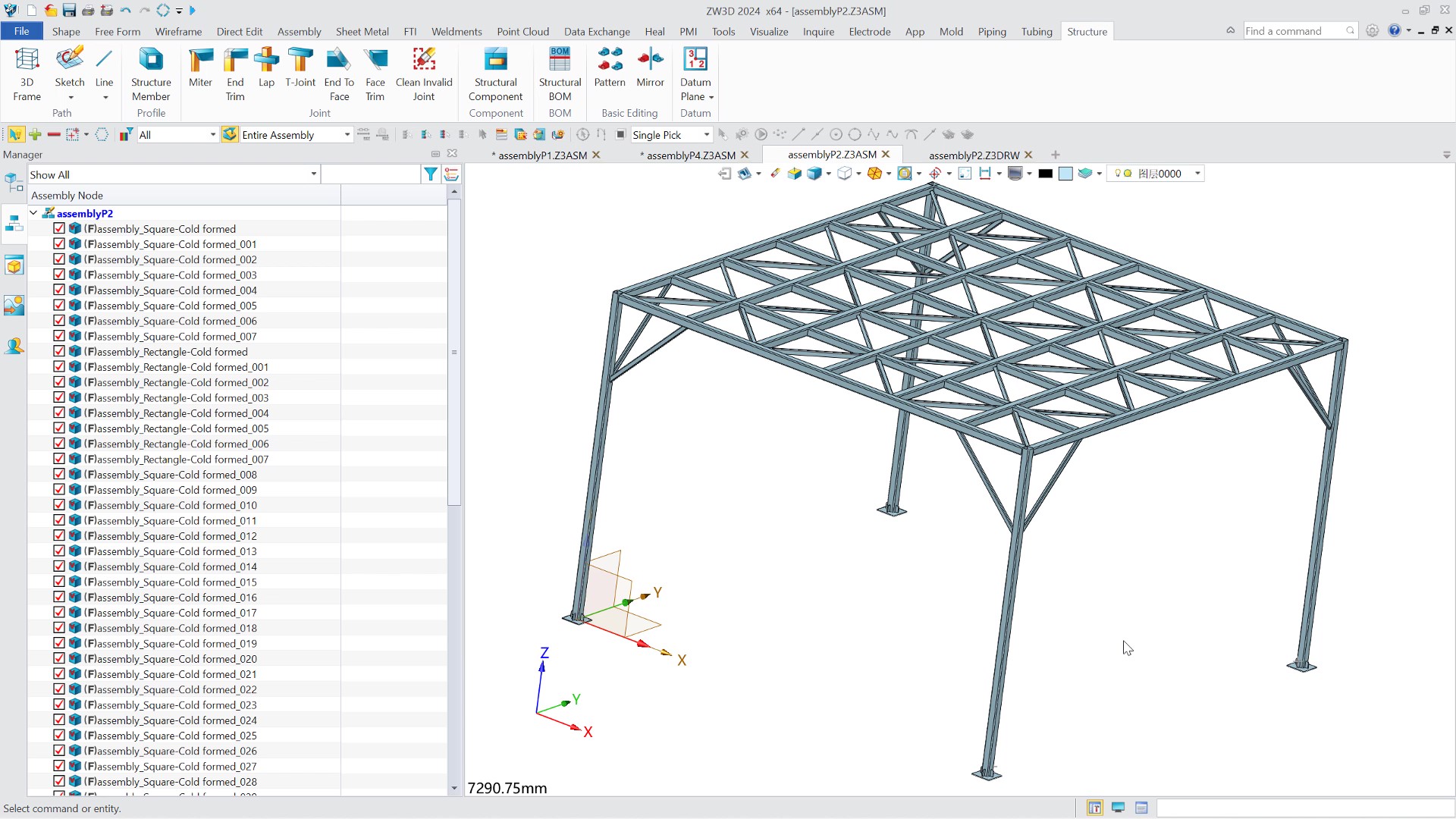
Screenshot of New render engine improves the efficiency of processing multi-solid, large assemblies and complex toolpath models.Screenshot of Layout-based Top-down Design for the assembly design, links the all design phases from top to down and standardizes design logic.Screenshot of Structure Module offers various standard and non-standard profile types. It can quick modify structure's joint types, add profile elements, and generate a structural cutting list.Screenshot of Fatigue analysis helps evaluate product lifecycles and optimize product design.