SolarWinds Engineer's Toolset vs. SourceForge Speed Test

Overview
ProductRatingMost Used ByProduct SummaryStarting Price
SolarWinds Engineer's Toolset
Score 8.0 out of 10
N/A
SolarWinds® Engineer’s Toolset (ETS) helps users monitor and troubleshoot a network with over 60 tools for network management. ETS allows users to monitor and receive alerts in real time on network availability and health, and perform network diagnostics for faster troubleshooting and resolution of complex network issues. With ETS users can deploy an array of network discovery tools including Port Scanner, Switch Port Mapper or advanced Subnet Calculator, manage Cisco® devices with specialized…
$1,585
Per Instance
SourceForge Speed Test
Score 6.1 out of 10
Enterprise companies (1,001+ employees)
The SourceForge speed test is a free speed test that allows users to test their internet speed on any device.N/A
Pricing
SolarWinds Engineer's ToolsetSourceForge Speed Test
Editions & Modules
One Time Price
$1,585
Per Instance
No answers on this topic
Offerings
Pricing Offerings
SolarWinds Engineer's ToolsetSourceForge Speed Test
Free Trial
YesNo
Free/Freemium Version
NoYes
Premium Consulting/Integration Services
NoNo
Entry-level Setup FeeNo setup feeNo setup fee
Additional Details
More Pricing Information
Community Pulse
SolarWinds Engineer's ToolsetSourceForge Speed Test
Best Alternatives
SolarWinds Engineer's ToolsetSourceForge Speed Test
Small Businesses
NinjaOne
NinjaOne
Score 9.1 out of 10
Auvik
Auvik
Score 8.5 out of 10
Medium-sized Companies
Intermapper
Intermapper
Score 8.4 out of 10
PingPlotter
PingPlotter
Score 9.2 out of 10
Enterprises
Cisco Meraki Dashboard
Score 9.1 out of 10
PingPlotter
PingPlotter
Score 9.2 out of 10
All AlternativesView all alternativesView all alternatives
User Ratings
SolarWinds Engineer's ToolsetSourceForge Speed Test
Likelihood to Recommend
8.6
(11 ratings)
4.5
(2 ratings)
Usability
8.2
(1 ratings)
-
(0 ratings)
Support Rating
8.2
(1 ratings)
-
(0 ratings)
User Testimonials
SolarWinds Engineer's ToolsetSourceForge Speed Test
Likelihood to Recommend
SolarWinds
I have found the toolset especially useful for scanning subnets to discover devices, and for setting up temporary real-time monitors when we are troubleshooting or setting up new connections. The most useful aspect has been the ability to apply the tools to help troubleshoot and pinpoint intermittent issues. More general tools like Orion often do not have the granularity to detect issues like intermittent packet loss which are especially impactful to applications like Voice. The toolset gives us another level of capability to dig into issues.
Read full review
SourceForge
The sourceForge speed test would be well suited in most scenarios. From simply measuring your speed when connecting to new networks to trying to diagnose network issues at your house, workplace or any other environment where you may have spotty internet connection. I'd say is not well suited to get perfectly accurate results if needed for any type of network monitoring.
Read full review
Pros
SolarWinds
  • Various monitoring
  • Stores history
  • Suggests indices
  • Helps to find the SQL query text
  • Helps to see what machines/users the bad queries are coming from
  • Shows current blocking session
Read full review
SourceForge
  • Provide the down/up speed
  • Measure the ping speed
  • Determining the internet loss%
Read full review
Cons
SolarWinds
  • The unifying component that is intended to be the initial interface to the tools seems clunky. I prefer to start the tools individually rather than using it.
  • The port scanner could use some improvements to make it easier to use.
Read full review
SourceForge
  • Websocketing can sometimes be unreliable
  • Ui can be slow at times
  • The ads would slow down my pc at times
Read full review
Usability
SolarWinds
Very easy to use and intuitive. Just be careful with the WAN Killer...it does what it says.
Read full review
SourceForge
No answers on this topic
Support Rating
SolarWinds
Our organization uses it regularly. It is reliable, and we keep finding new uses for it
Read full review
SourceForge
No answers on this topic
Alternatives Considered
SolarWinds
I haven't compared any tools similar to SolarWinds Engineer's Toolset. This might be because I'm pretty biased when it comes to monitoring, and reporting solutions. I've found that SolarWinds provides the biggest bang for the buck in my opinion. I'm sure there are other solutions on the market that compete, but I haven't tried any of them because I've been very satisfied with SolarWinds.
Read full review
SourceForge
The main reason why we selected the SourceForge speed test at my job was due the company's heavy and aggressive website whitelisting. The sourceForge speed test was one of the few tests we tried that was able to work fine within our restricted network. Plus it was easy to ready, even to my boss.
Read full review
Return on Investment
SolarWinds
  • Spend less time downloading free buggy tools
  • All the tools in one spot, so you don't have to look around for tools
  • Get to the solution sooner
Read full review
SourceForge
  • We know when the network is congested so we adapt our workflow accordingly.
  • It allowed identification of inconsistencies with the service provided by the ISP.
  • Switching ISPs allowed us to save 10% in our monthly internet bill, while receiving a better service.
Read full review
ScreenShots

SolarWinds Engineer's Toolset Screenshots

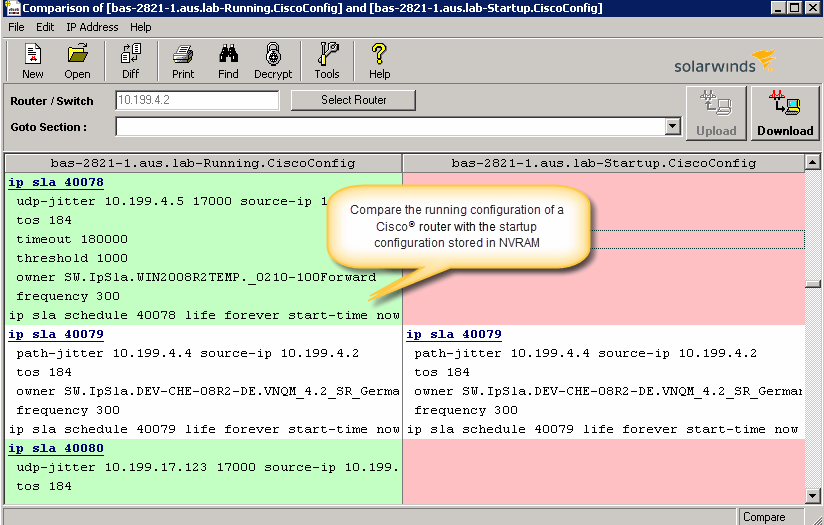
Screenshot of Perform network stress tests with Engineer's Toolset WAN Killer. You don’t need to use real traffic for studying network activities, like testing traffic and load balancing. Instead, deploy Engineer's Toolset WAN Killer to help interactively test connections and adjust the IP traffic generated to achieve the desired network load based on your requirements.Screenshot of Quickly troubleshoot your network with enhanced ping capabilities and packet route tracing, among other network bandwidth usage and monitoring tools included in ETS.Screenshot of Using ETS, you can run scans to gain insight into how routers, hubs switches, and other devices are configured by analyzing SNMP queries and viewing MIB attributes. ETS is designed to help you more easily understand whether your network and ports are using appropriate settings.Screenshot of Config Compare, a part of ETS, is built to compare the running configuration of a Cisco router with the startup configuration. With the Cisco configuration compare tool, you can easily detect the changes made to the network, switch, and router configurations that are not committed to non-volatile memory (NVRAM).Screenshot of Manage your IP network from discovery to address tracking. Discover subnets on a seed router and scan the subnet or a range of IP addresses, generate a list of subnets along with their mask, size, range, and broadcast address and actively monitor subnets to identify and track which IP addresses are in use on your network.