TrustRadius: an HG Insights company

SolarWinds Engineer's Toolset vs. Spirent TestCenter

Save this comparison

Save this comparison

Add Product

Recommended Comparisons

    Overview
    ProductRatingMost Used ByProduct SummaryStarting Price

    SolarWinds Engineer's Toolset

    Score7.6 out of 10
    N/ASolarWinds® Engineer’s Toolset (ETS) helps users monitor and troubleshoot a network with over 60 tools for network management. ETS allows users to monitor and receive alerts in real time on network availability and health, and perform network diagnostics for faster troubleshooting and resolution of complex network issues. With ETS users can deploy an array of network discovery tools including Port Scanner, Switch Port Mapper or advanced Subnet Calculator, manage Cisco® devices with specialized…

    $1,585

    Per Instance

    Spirent TestCenter

    Score8 out of 10
    N/AThe vendor describes Spirent TestCenter is an end-to-end testing solution that delivers performance with deterministic answers. They state service providers, NEMs and enterprises use it to test, measure and validate their networks and deploy services with confidence—from traditional performance testing to the rigorous analysis of Virtualization, Cloud Computing, Mobile Backhaul, and High Speed Ethernet.N/A
    Pricing
    SolarWinds Engineer's ToolsetSpirent TestCenter
    Editions & Modules
    One Time Price
    $1,585
    Per Instance
    No answers on this topic
    Offerings
    Pricing Offerings
    SolarWinds Engineer's ToolsetSpirent TestCenter
    Free Trial
    YesNo
    Free/Freemium Version
    NoNo
    Premium Consulting/Integration Services
    NoNo
    Entry-level Setup FeeNo setup feeNo setup fee
    Additional Details——
    More Pricing Information
    Community Pulse
    SolarWinds Engineer's ToolsetSpirent TestCenter
    Considered Both Products
    SolarWinds
    No answer on this topic
    Spirent Communications
    No answer on this topic
    Key User Insights
    Would buy again
    100%
    Would buy again
    11 Answers
    No answers on this topic
    Delivers good value for the price
    90%
    Delivers good value for the price
    9 Answers
    No answers on this topic
    Happy with the feature set
    100%
    Happy with the feature set
    11 Answers
    No answers on this topic
    Lived up to sales and marketing promises
    100%
    Lived up to sales and marketing promises
    10 Answers
    No answers on this topic
    Implementation went as expected
    100%
    Implementation went as expected
    10 Answers
    No answers on this topic
    Best Alternatives
    SolarWinds Engineer's ToolsetSpirent TestCenter
    Small Businesses
    No answers on this topic
    No answers on this topic
    Medium-sized Companies
    No answers on this topic
    No answers on this topic
    Enterprises
    No answers on this topic
    Tricentis NeoLoad
    Score8.2 out of 10
    All AlternativesView all alternativesView all alternatives
    User Ratings
    SolarWinds Engineer's ToolsetSpirent TestCenter
    Likelihood to Recommend
    8.6
    (11 ratings)
    8.0
    (1 ratings)
    Likelihood to Renew
    -
    (0 ratings)
    7.0
    (1 ratings)
    Usability
    8.2
    (1 ratings)
    -
    (0 ratings)
    Support Rating
    8.2
    (1 ratings)
    -
    (0 ratings)
    User Testimonials
    SolarWinds Engineer's ToolsetSpirent TestCenter
    Likelihood to Recommend
    SolarWinds
    I have found the toolset especially useful for scanning subnets to discover devices, and for setting up temporary real-time monitors when we are troubleshooting or setting up new connections. The most useful aspect has been the ability to apply the tools to help troubleshoot and pinpoint intermittent issues. More general tools like Orion often do not have the granularity to detect issues like intermittent packet loss which are especially impactful to applications like Voice. The toolset gives us another level of capability to dig into issues.
    Incentivized
    Read full review
    Spirent Communications
    Spirent solution is well suited to qualify a Lan infrastructure bandwidth capacity or a device itself capacity such as a router or a firewall for example. But this solution in our case is also well suited to test a complex and numbered mpls environment. I would not recommend it to a small business as the solution is very expensive: châssis and card cost are expensive and the solution requires to be an advanced user in system, not only on network devices
    Incentivized
    Read full review
    Pros
    SolarWinds
    • Various monitoring
    • Stores history
    • Suggests indices
    • Helps to find the SQL query text
    • Helps to see what machines/users the bad queries are coming from
    • Shows current blocking session
    Incentivized
    Read full review
    Spirent Communications
    • Bandwidth test
    • QoS and traffic type generation
    • Software platform availability
    • Technical Support
    Incentivized
    Read full review
    Cons
    SolarWinds
    • The unifying component that is intended to be the initial interface to the tools seems clunky. I prefer to start the tools individually rather than using it.
    • The port scanner could use some improvements to make it easier to use.
    Incentivized
    Read full review
    Spirent Communications
    • QA
    • Various bugs to fix on software installation
    • Technical documentation
    • No Spirent classes available
    • Lack to fix major issues such as ntp for latency calculation
    Incentivized
    Read full review
    Likelihood to Renew
    SolarWinds
    No answers on this topic
    Spirent Communications
    7 because they lack to improve some major bugs we have exchanged about with them
    Incentivized
    Read full review
    Usability
    SolarWinds
    Very easy to use and intuitive. Just be careful with the WAN Killer...it does what it says.
    Incentivized
    Read full review
    Spirent Communications
    No answers on this topic
    Support Rating
    SolarWinds
    Our organization uses it regularly. It is reliable, and we keep finding new uses for it
    Incentivized
    Read full review
    Spirent Communications
    No answers on this topic
    Alternatives Considered
    SolarWinds
    I haven't compared any tools similar to SolarWinds Engineer's Toolset. This might be because I'm pretty biased when it comes to monitoring, and reporting solutions. I've found that SolarWinds provides the biggest bang for the buck in my opinion. I'm sure there are other solutions on the market that compete, but I haven't tried any of them because I've been very satisfied with SolarWinds.
    Incentivized
    Read full review
    Spirent Communications
    I wasn't able to specifically test other big products but I did use other free products in the past such as iperf, but free softwares don't allow the same level of support ans ease to use than Spirent
    Incentivized
    Read full review
    Return on Investment
    SolarWinds
    • Spend less time downloading free buggy tools
    • All the tools in one spot, so you don't have to look around for tools
    • Get to the solution sooner
    Incentivized
    Read full review
    Spirent Communications
    • Allows to qualify a link or a project to validate end of this one
    • Allowed to detect various configuration issues that were fixed right after
    • Allow to use virtual machines for easy remote deploykents
    • Neharive: upgrade can depreciate products and newer products have sometimes better bandwidth capacity but less features
    Incentivized
    Read full review
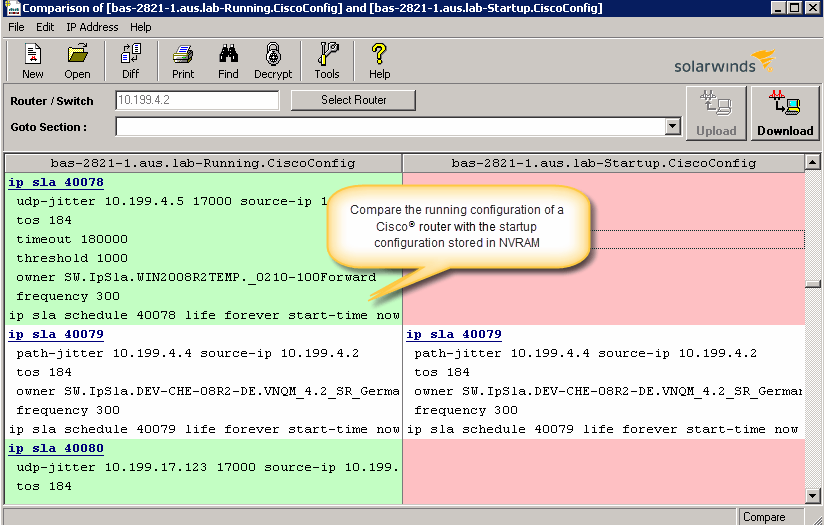
    ScreenShots

    SolarWinds Engineer's Toolset Screenshots

    Screenshot of Perform network stress tests with Engineer's Toolset WAN Killer. You don’t need to use real traffic for studying network activities, like testing traffic and load balancing. Instead, deploy Engineer's Toolset WAN Killer to help interactively test connections and adjust the IP traffic generated to achieve the desired network load based on your requirements.Screenshot of Quickly troubleshoot your network with enhanced ping capabilities and packet route tracing, among other network bandwidth usage and monitoring tools included in ETS.Screenshot of Using ETS, you can run scans to gain insight into how routers, hubs switches, and other devices are configured by analyzing SNMP queries and viewing MIB attributes. ETS is designed to help you more easily understand whether your network and ports are using appropriate settings.Screenshot of Config Compare, a part of ETS, is built to compare the running configuration of a Cisco router with the startup configuration. With the Cisco configuration compare tool, you can easily detect the changes made to the network, switch, and router configurations that are not committed to non-volatile memory (NVRAM).Screenshot of Manage your IP network from discovery to address tracking. Discover subnets on a seed router and scan the subnet or a range of IP addresses, generate a list of subnets along with their mask, size, range, and broadcast address and actively monitor subnets to identify and track which IP addresses are in use on your network.