eSUB Construction Software vs. SubTrade Software

Overview
ProductRatingMost Used ByProduct SummaryStarting Price
eSUB Construction Software
Score 7.0 out of 10
N/A
eSUB is a SaaS platform for commercial subcontractors running large, complex, long duration projects to proactively track and manage their costs, deadlines, deliverables and correspondence; the vendor says this can result in operational efficiencies and improved profits. eSUB is a cloud and mobile-based solution enabling real-time field updates from connected smartphones, tables and mobile PC users.
$39
per month per user
SubTrade Software
Score 0.0 out of 10
Small Businesses (1-50 employees)
SubTrade is a construction management platform built exclusively for trade subcontractors in electrical, HVAC, plumbing, drywall, and concrete. Unlike general contractor tools, SubTrade is designed around the workflows subcontractors actually use in the field. Core Features SubTrade includes GPS-based time tracking with real job costing, crew scheduling across multiple active projects, digital daily logs with photo…
$299
per month Per Company
Pricing
eSUB Construction SoftwareSubTrade Software
Editions & Modules
Base
$39
per month (annually) per user
Advanced
$59
per month (annually) per user
Premium
Contact
SubTrade Pro
$299
per month per company
Offerings
Pricing Offerings
eSUB Construction SoftwareSubTrade Software
Free Trial
YesYes
Free/Freemium Version
NoNo
Premium Consulting/Integration Services
NoYes
Entry-level Setup FeeNo setup feeNo setup fee
Additional DetailsSubTrade is offered as a single all-inclusive plan at $299/month CAD or $2,870.40/year CAD (20% annual discount). The base plan includes 5 full users with access to all features — time tracking, crew scheduling, daily logs, change orders, safety forms, drawings, and submittals. Additional full users are added at tiered per-user pricing: $25/user/month for users 6–15, $20/user/month for users 16–30, and $15/user/month for 31+ users. A 14-day free trial is available with no credit card required.
More Pricing Information
Community Pulse
eSUB Construction SoftwareSubTrade Software
Features
eSUB Construction SoftwareSubTrade Software
Human Resource Management
Comparison of Human Resource Management features of Product A and Product B
eSUB Construction Software
1.0
1 Ratings
150% below category average
SubTrade Software
-
Ratings
Employee demographic data1.01 Ratings00 Ratings
Employment history1.01 Ratings00 Ratings
Job profiles and administration1.01 Ratings00 Ratings
Workflow for transfers, promotions, pay raises, etc.1.01 Ratings00 Ratings
Organizational charting1.01 Ratings00 Ratings
Organization and location management1.01 Ratings00 Ratings
Compliance data (COBRA, OSHA, etc.)1.01 Ratings00 Ratings
Payroll Management
Comparison of Payroll Management features of Product A and Product B
eSUB Construction Software
1.0
1 Ratings
148% below category average
SubTrade Software
-
Ratings
Pay calculation1.01 Ratings00 Ratings
Support for external payroll vendors1.01 Ratings00 Ratings
Off-cycle/On-Demand payment1.01 Ratings00 Ratings
Benefit plan administration1.01 Ratings00 Ratings
Direct deposit files1.01 Ratings00 Ratings
Salary revision and increment management1.01 Ratings00 Ratings
Reimbursement management1.01 Ratings00 Ratings
Asset Management
Comparison of Asset Management features of Product A and Product B
eSUB Construction Software
1.0
1 Ratings
149% below category average
SubTrade Software
-
Ratings
Tracking of all physical assets1.01 Ratings00 Ratings
Reporting & Analytics
Comparison of Reporting & Analytics features of Product A and Product B
eSUB Construction Software
2.5
1 Ratings
102% below category average
SubTrade Software
-
Ratings
Dashboards4.01 Ratings00 Ratings
Standard reports4.01 Ratings00 Ratings
Custom reports1.01 Ratings00 Ratings
Data exportability1.01 Ratings00 Ratings
Construction Project & Field Management
Comparison of Construction Project & Field Management features of Product A and Product B
eSUB Construction Software
3.5
2 Ratings
72% below category average
SubTrade Software
-
Ratings
Plan distribution & viewing1.02 Ratings00 Ratings
Plan markups & sharing1.02 Ratings00 Ratings
Issue tracking & punchlists1.02 Ratings00 Ratings
Photo documentation1.02 Ratings00 Ratings
Jobsite reports10.02 Ratings00 Ratings
Document sharing1.02 Ratings00 Ratings
RFI tools10.02 Ratings00 Ratings
Collaboration & approvals1.02 Ratings00 Ratings
As-built drawings1.02 Ratings00 Ratings
Mobile app5.02 Ratings00 Ratings
Submittal design and management4.02 Ratings00 Ratings
Checklists1.01 Ratings00 Ratings
Meeting Minutes3.01 Ratings00 Ratings
Specifications2.01 Ratings00 Ratings
Change orders10.01 Ratings00 Ratings
Estimating
Comparison of Estimating features of Product A and Product B
eSUB Construction Software
2.4
2 Ratings
104% below category average
SubTrade Software
-
Ratings
Takeoff tools1.01 Ratings00 Ratings
Job costing7.02 Ratings00 Ratings
Cost databases2.02 Ratings00 Ratings
Cost calculator1.02 Ratings00 Ratings
Bid creation1.01 Ratings00 Ratings
Best Alternatives
eSUB Construction SoftwareSubTrade Software
Small Businesses
FollowUp CRM
FollowUp CRM
Score 2.1 out of 10
FollowUp CRM
FollowUp CRM
Score 2.1 out of 10
Medium-sized Companies
InEight
InEight
Score 8.4 out of 10
InEight
InEight
Score 8.4 out of 10
Enterprises
InEight
InEight
Score 8.4 out of 10
InEight
InEight
Score 8.4 out of 10
All AlternativesView all alternativesView all alternatives
User Ratings
eSUB Construction SoftwareSubTrade Software
Likelihood to Recommend
2.0
(3 ratings)
-
(0 ratings)
Support Rating
9.0
(2 ratings)
-
(0 ratings)
User Testimonials
eSUB Construction SoftwareSubTrade Software
Likelihood to Recommend
eSUB Construction Software
If you are doing any sort of new construction, eSUB is a budget friendly option for managing the process. It's helpful for keeping track of submittals, RFI's and for foreman doing Daily Work Reports. It is not suited really well for plan management and scheduling. The modules for these are not well thought through. Also if you specialize in service work or projects that have short durations (i.e. 1-2 weeks or less), eSUB isn't the best option for you. It would take too long to set up a job vs the time it takes to do the job.
Read full review
SubTrade Software Ltd
No answers on this topic
Pros
eSUB Construction Software
  • It is built with subcontractors in mind. There are many PM software available but this one aims at the commercial subcontractor.
  • It does a great job covering the basics of typical commercial work. There are areas that allow you to customize such as adding reservations of rights to documents.
  • It can integrate with Microsoft quite a bit, we use this in our work every day and being able to export or sync data/calendars has been helpful.
Read full review
SubTrade Software Ltd
No answers on this topic
Cons
eSUB Construction Software
  • I have no suggestions at the moment and if I ever do have a question, concern or suggestion, a quick email to eSUB gets a quick response.
Read full review
SubTrade Software Ltd
No answers on this topic
Support Rating
eSUB Construction Software
It has been helpful whenever I've called. They have been able to walk me through solutions and even direct me to the right answer. There was only 1hr difference between time zones so this was manageable. If we experienced bugs, their IT department was helpful at remedying and they were always rolling out updates.
Read full review
SubTrade Software Ltd
No answers on this topic
Alternatives Considered
eSUB Construction Software
eSUB is not even close when it comes to the offerings that the others have. eSUB is a happy medium for the functionality it provides and is at an affordable price point that it doesn't break the bank. Other solutions are a lot more integrated into the company processes and procedures, which means more upfront investment to get the platform to go live. eSUB's simplicity makes it easier to roll out because it doesn't integrate with as many aspects of the business.
Read full review
SubTrade Software Ltd
No answers on this topic
Return on Investment
eSUB Construction Software
  • eSUB saves time as you don't have to type, print and send documents.
  • I like to call it "set it up once, use it a million times" as once you set up a customer, vendor etc... you can use them across multiple platforms.
  • It saves money as you don't need a pool of resources to manage a project due to its ease of use.
Read full review
SubTrade Software Ltd
No answers on this topic
ScreenShots

SubTrade Software Screenshots

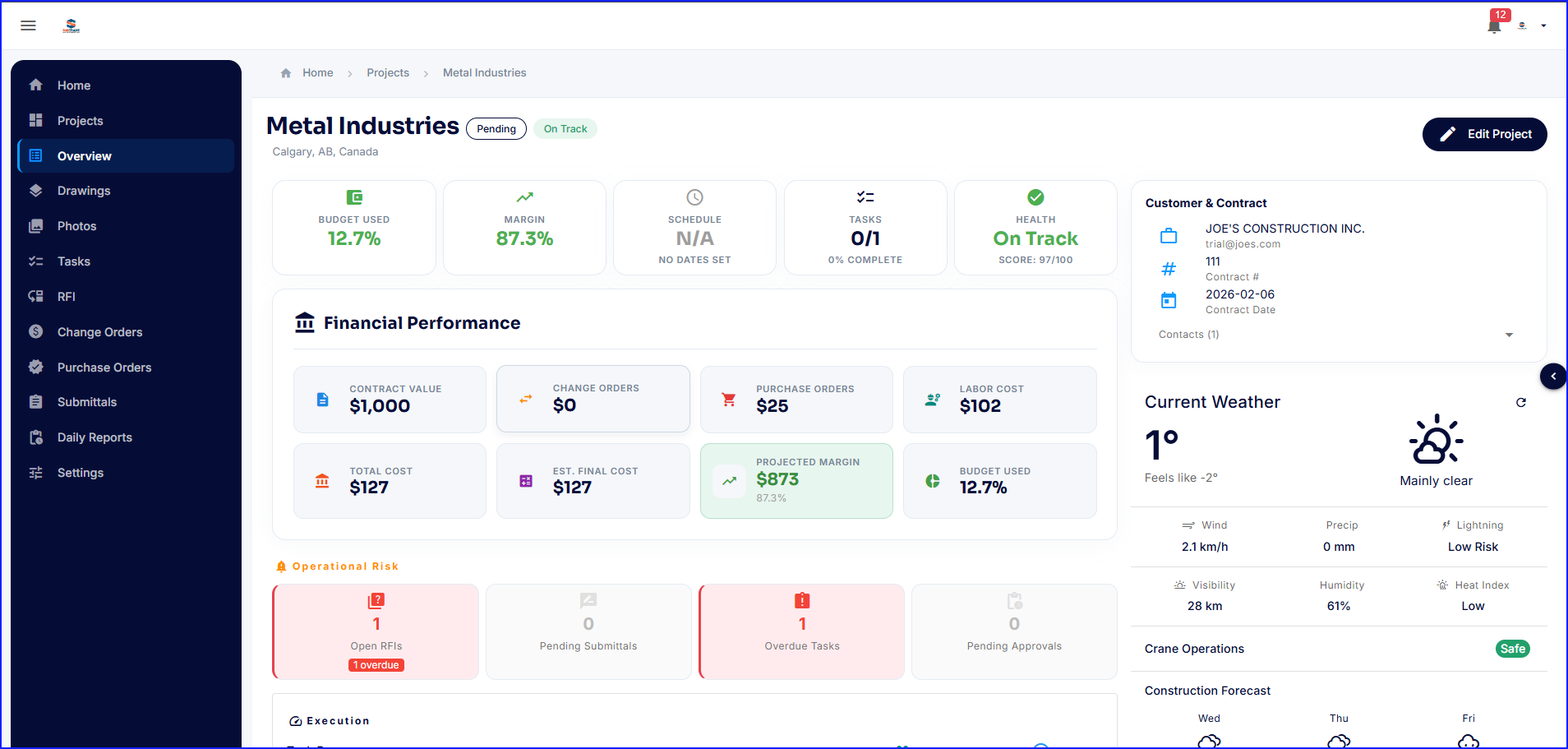
Screenshot of the Project Dashboard. This offers a real-time snapshot of every active job with budgets, margins, schedules, team, and costs.Screenshot of SubTrade Employee Management. User profiles display assigned roles, contact information, and trade certifications. Admins can create and manage field workers, project managers, estimators, and schedulers from one central directory.Screenshot of the interface to schedule crews across multiple projects. SubTrade's weekly scheduling view shows every worker's shifts, project assignments, and total hours at a glance. Filter by employee or project, switch between daily and weekly views, and add shifts in seconds.Screenshot of SubTrade's time tracking dashboard, which shows gross hours, payable hours, break deductions, and total labour cost in real time — across every employee and project. Review and approve pending entries, export to CSV for payroll, and always know labour costs before the invoice comes in.Screenshot of SubTrade's role management, which lets users create custom roles like Estimator, Field Worker, Project Manager, Scheduler, and Labour, then assign crew members in seconds. Control who sees what across every project and keep any operation organized.Screenshot of SubTrade's project dashboard, which shows contract value, change orders, labour cost, projected margin, and budget used in real time. Operational risks like open RFIs and overdue tasks are flagged instantly, and live weather and construction forecast data keeps your crew prepared before they even hit the job site.