TrustRadius: an HG Insights company

Terracotta vs. SolarWinds Database Performance Monitor

Save this comparison

Save this comparison

Add Product

Recommended Comparisons

    Overview
    ProductRatingMost Used ByProduct SummaryStarting Price

    Terracotta

    Score10 out of 10
    N/ATerracotta from German company Software AG presents a database management and development solution.N/A

    SolarWinds Database Performance Monitor

    Score9 out of 10
    N/AVividCortex, acquired by SolarWinds in December 2019, provides database performance monitoring designed to increase system performance, team efficiency, and infrastructure cost savings. The GDPR- and SOC 2-compliant platform offers visibility into major open-source databases—MySQL, PostgreSQL, Amazon Aurora, MongoDB, and Redis—for the engineering team at scale. Industry leaders like Etsy, GitHub, SendGrid, and Yelp rely on Database Performance Monitor for all-query monitoring and drill…N/A
    Pricing
    TerracottaSolarWinds Database Performance Monitor
    Editions & Modules
    No answers on this topic
    No answers on this topic
    Offerings
    Pricing Offerings
    TerracottaSolarWinds Database Performance Monitor
    Free Trial
    NoYes
    Free/Freemium Version
    NoNo
    Premium Consulting/Integration Services
    NoYes
    Entry-level Setup FeeNo setup feeNo setup fee
    Additional Details——
    More Pricing Information
    Features
    TerracottaSolarWinds Database Performance Monitor
    Database Development
    Comparison of Database Development features of Terracotta and SolarWinds Database Performance Monitor
    Feature
    Terracotta
    10.0
    2 Ratings
    16% above category average
    SolarWinds Database Performance Monitor
    -
    Ratings
    Version control tools10.02 Ratings00 Ratings
    Test data generation10.02 Ratings00 Ratings
    Performance optimization tools10.02 Ratings00 Ratings
    Schema maintenance10.02 Ratings00 Ratings
    Database change management10.02 Ratings00 Ratings
    Database Administration
    Comparison of Database Administration features of Terracotta and SolarWinds Database Performance Monitor
    Feature
    Terracotta
    10.0
    2 Ratings
    22% above category average
    SolarWinds Database Performance Monitor
    -
    Ratings
    User management10.02 Ratings00 Ratings
    Database security10.02 Ratings00 Ratings
    Database status reporting10.02 Ratings00 Ratings
    Change management10.02 Ratings00 Ratings
    Best Alternatives
    TerracottaSolarWinds Database Performance Monitor
    Small Businesses
    DBeaver
    Score8.6 out of 10
    No answers on this topic
    Medium-sized Companies
    DBeaver
    Score8.6 out of 10
    SolarWinds Database Performance Analyzer
    Score5.6 out of 10
    Enterprises
    DBeaver
    Score8.6 out of 10
    Foglight
    Score10 out of 10
    All AlternativesView all alternativesView all alternatives
    User Ratings
    TerracottaSolarWinds Database Performance Monitor
    Likelihood to Recommend
    10.0
    (2 ratings)
    9.0
    (2 ratings)
    Usability
    -
    (0 ratings)
    9.0
    (1 ratings)
    User Testimonials
    TerracottaSolarWinds Database Performance Monitor
    Likelihood to Recommend
    Software AG
    Magnificent for data virtualization. Terrific to reduce infrastructure cost on IT operations. Excellent with workflow management. Great with data configuration and on-premise installation. Fabulous with data warehousing.
    Read full review
    SolarWinds
    Computing resources consumed by the DB instance, DPA queries & wait time, deadlock conditions, virtual infrastructure resources. The addition of NPM & DPA integration as well as cross-correlation in the identification of issues with the network or server or DB is all stupid-proof. Monitoring is more than just health and resource consumption, it's also performance. DB performance analysis is key to maintaining healthy DB instances.
    Incentivized
    Read full review
    Pros
    Software AG
    No answers on this topic
    SolarWinds
    • Simple to use and very easy to learn.
    • The execution engines run in parallel, can execute any syntax or query.
    • DPN can run all queries for both Oracle and SQL with no additional support.
    Incentivized
    Read full review
    Cons
    Software AG
    No answers on this topic
    SolarWinds
    • The Reporting feature currently doesn't allow customization.
    Incentivized
    Read full review
    Usability
    Software AG
    No answers on this topic
    SolarWinds
    I would say it is a very good tool from overall perspective compared to what I have used till now, still I will give it like 9 just for the sake of the interface and the integration which they should be doing soon with the main module which is SAM , NPM etc.
    Incentivized
    Read full review
    Alternatives Considered
    Software AG
    Super friendly and responsive customer service. Reliable and consistent with data management. Great with data visualization. Efficient with data replication.
    Incentivized
    Read full review
    SolarWinds
    SolarWinds DPA gives you a very deep analysis and monitoring of the devices which these tools will not give you neither Datadog or ManageEngine. It even gives you job rate , db locks and all other parameters to monitor which we usually do manually by going in to the DB and not from the tools. It also creates a dashboard out of the same.
    Incentivized
    Read full review
    Return on Investment
    Software AG
    No answers on this topic
    SolarWinds
    • What is the cost of a downed DB instance? That's your ROI. DPM lets you see issues before they become critical.
    Incentivized
    Read full review
    ScreenShots

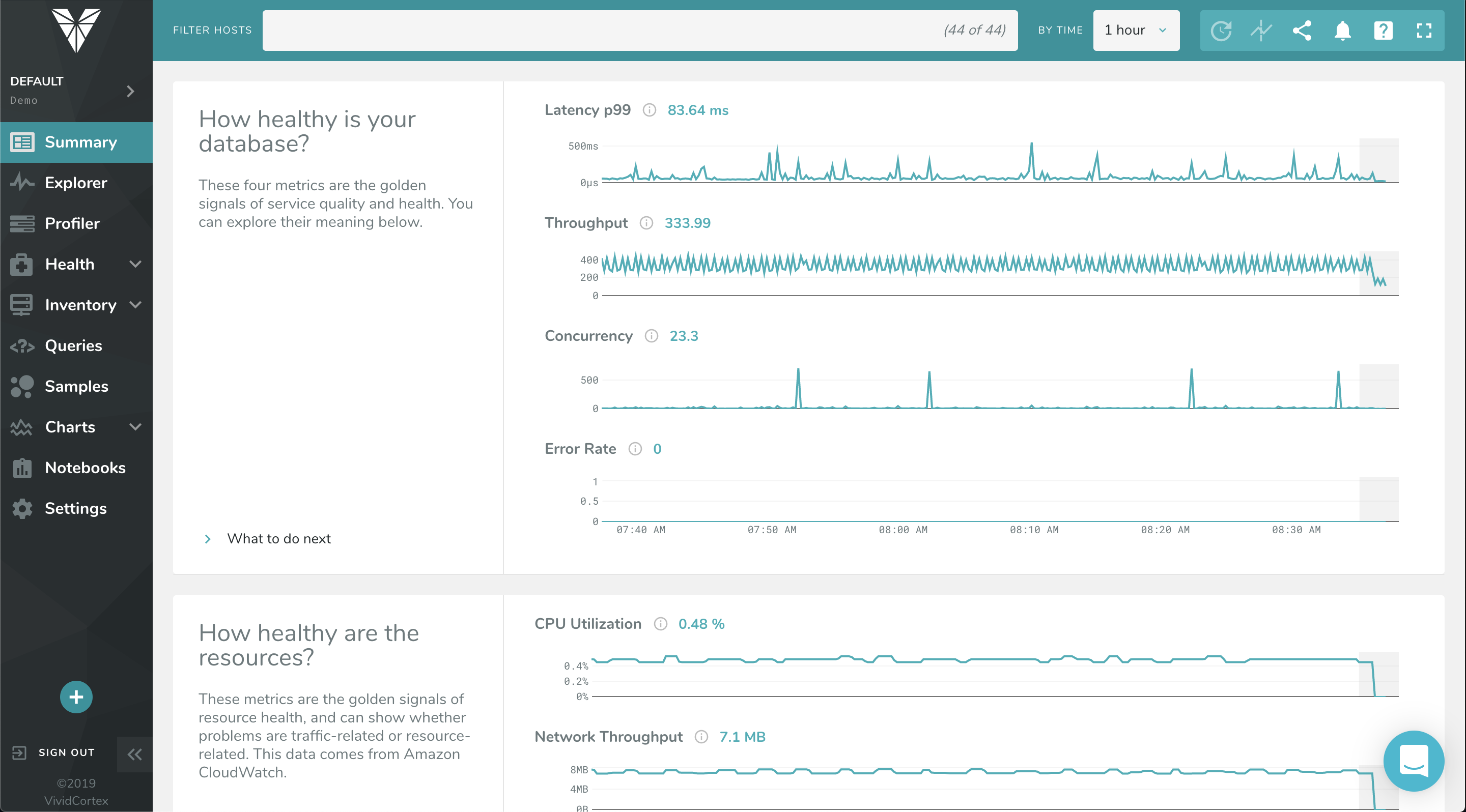
    SolarWinds Database Performance Monitor Screenshots

    Screenshot of The Profiler Dashboard is a powerful, dynamic dashboard for ranking and filtering activity on your servers: It can instantly show you what needs attention and it provides a unified view of all your database types that VividCortex monitors. It enables you to view and understand your system by profiling it according to its most significant attributes—customized and selected by you.Screenshot of This dashboard displays a list of queries and allows you to filter them with powerful specificity. Filters can be set according to query text, host, and timeframe when the query was first seen / last active.Screenshot of VividCortex captures an enormous amount of data, and the Summary Dashboard helps users make sense of it, reducing their time-to-insight. It features widgets with automatic displays for Top 5 Queries by Total Time, Top 5 Queries by User CPU, Application Overview, Critical Events, and more.Screenshot of VividCortex monitors thousands of metrics in your system, and the Charts and Dashboard’s navigation pane allows you to toggle, customize, and enable various categories of generated charts. You can then easily navigate and examine the charts’ metrics with mouseover and zoom capabilities.