TrustRadius: an HG Insights company

Save this comparison

Save this comparison

Add Product

Recommended Comparisons

    Overview
    ProductRatingMost Used ByProduct SummaryStarting Price

    WebWave

    Score9.5 out of 10
    N/AWebWave — an alternative for agencies and freelancers for creating custom websites for clients with the support of CMS. Using CMS with no sacrifices WebWave is a CMS platform that gives a designer precision up to 1 px in every single detail just like in more sophisticated graphic programs such as Photoshop while remaining a drag and drop software. This is to make creating websites much faster without loosing on details. Spend less time talking WebWave…N/A

    Zenario

    Score10 out of 10
    N/AZenario is a Content Management platform for organizations that need to create, manage, and publish public websites, multilingual content, and secure user areas. Its hosted offering, OnZenario Cloud, provides a guided setup for teams that do not need to write code, while retaining layout, Cascading Style Sheets (CSS), HyperText Markup Language (HTML), and JavaScript controls for authorized designers. Website creation and content publishing As a Website…

    $30

    per month

    Pricing
    WebWaveZenario
    Editions & Modules
    No answers on this topic
    Zenario Community
    £30
    per month
    Zenario Pro
    £65
    per month
    Zenario ProBusiness
    £100
    per month
    Offerings
    Pricing Offerings
    WebWaveZenario
    Free Trial
    YesYes
    Free/Freemium Version
    YesNo
    Premium Consulting/Integration Services
    YesNo
    Entry-level Setup Fee$7 per monthOptional
    Additional Details——
    More Pricing Information
    Community Pulse
    WebWaveZenario
    Considered Both Products
    WebWave
    No answer on this topic
    Tribal Systems
    No answer on this topic
    Key User Insights
    Would buy again
    98%
    Would buy again
    50 Answers
    No answers on this topic
    Delivers good value for the price
    100%
    Delivers good value for the price
    51 Answers
    No answers on this topic
    Happy with the feature set
    98%
    Happy with the feature set
    50 Answers
    No answers on this topic
    Lived up to sales and marketing promises
    100%
    Lived up to sales and marketing promises
    45 Answers
    No answers on this topic
    Implementation went as expected
    98%
    Implementation went as expected
    48 Answers
    No answers on this topic
    Features
    WebWaveZenario
    Security
    Comparison of Security features of WebWave and Zenario
    Feature
    WebWave
    -
    Ratings
    Zenario
    10.0
    1 Ratings
    19% above category average
    Role-based user permissions00 Ratings10.01 Ratings
    Platform & Infrastructure
    Comparison of Platform & Infrastructure features of WebWave and Zenario
    Feature
    WebWave
    -
    Ratings
    Zenario
    9.5
    1 Ratings
    20% above category average
    API00 Ratings9.01 Ratings
    Internationalization / multi-language00 Ratings10.01 Ratings
    Web Content Creation
    Comparison of Web Content Creation features of WebWave and Zenario
    Feature
    WebWave
    -
    Ratings
    Zenario
    9.6
    1 Ratings
    20% above category average
    WYSIWYG editor00 Ratings10.01 Ratings
    Code quality / cleanliness00 Ratings10.01 Ratings
    Admin section00 Ratings9.01 Ratings
    Page templates00 Ratings9.01 Ratings
    Library of website themes00 Ratings9.01 Ratings
    Mobile optimization / responsive design00 Ratings10.01 Ratings
    Publishing workflow00 Ratings10.01 Ratings
    Form generator00 Ratings10.01 Ratings
    Web Content Management
    Comparison of Web Content Management features of WebWave and Zenario
    Feature
    WebWave
    -
    Ratings
    Zenario
    9.4
    1 Ratings
    22% above category average
    Content taxonomy00 Ratings10.01 Ratings
    SEO support00 Ratings9.01 Ratings
    Bulk management00 Ratings9.01 Ratings
    Availability / breadth of extensions00 Ratings10.01 Ratings
    Community / comment management00 Ratings9.01 Ratings
    Best Alternatives
    WebWaveZenario
    Small Businesses
    Wix
    Score8.1 out of 10
    Umbraco CMS
    Score7 out of 10
    Medium-sized Companies
    10Web
    Score7.7 out of 10
    Square Online
    Score7.7 out of 10
    Enterprises
    No answers on this topic
    RWS Tridion Sites
    Score9 out of 10
    All AlternativesView all alternativesView all alternatives
    User Ratings
    WebWaveZenario
    Likelihood to Recommend
    9.6
    (53 ratings)
    10.0
    (1 ratings)
    Usability
    10.0
    (1 ratings)
    10.0
    (1 ratings)
    Support Rating
    5.3
    (2 ratings)
    -
    (0 ratings)
    User Testimonials
    WebWaveZenario
    Likelihood to Recommend
    WebWave
    Well suited: Small businesses and entrepreneurs: WebWave is an excellent option for small businesses and entrepreneurs who need a professional-looking website without spending a lot of time and money. It's easy to use, customizable, and offers fast load times and responsive design. Less appropriate: Large e-commerce websites: If you're looking to create a large e-commerce website with a vast number of products and advanced features, WebWave may not be the best option. Its e-commerce functionality is limited compared to other website builders, and it may not be able to accommodate the needs of a large-scale online store. Also, if you need much coding, you would rather have it with something that is wordpress-based.
    Incentivized
    Read full review
    Tribal Systems
    No answers on this topic
    Pros
    WebWave
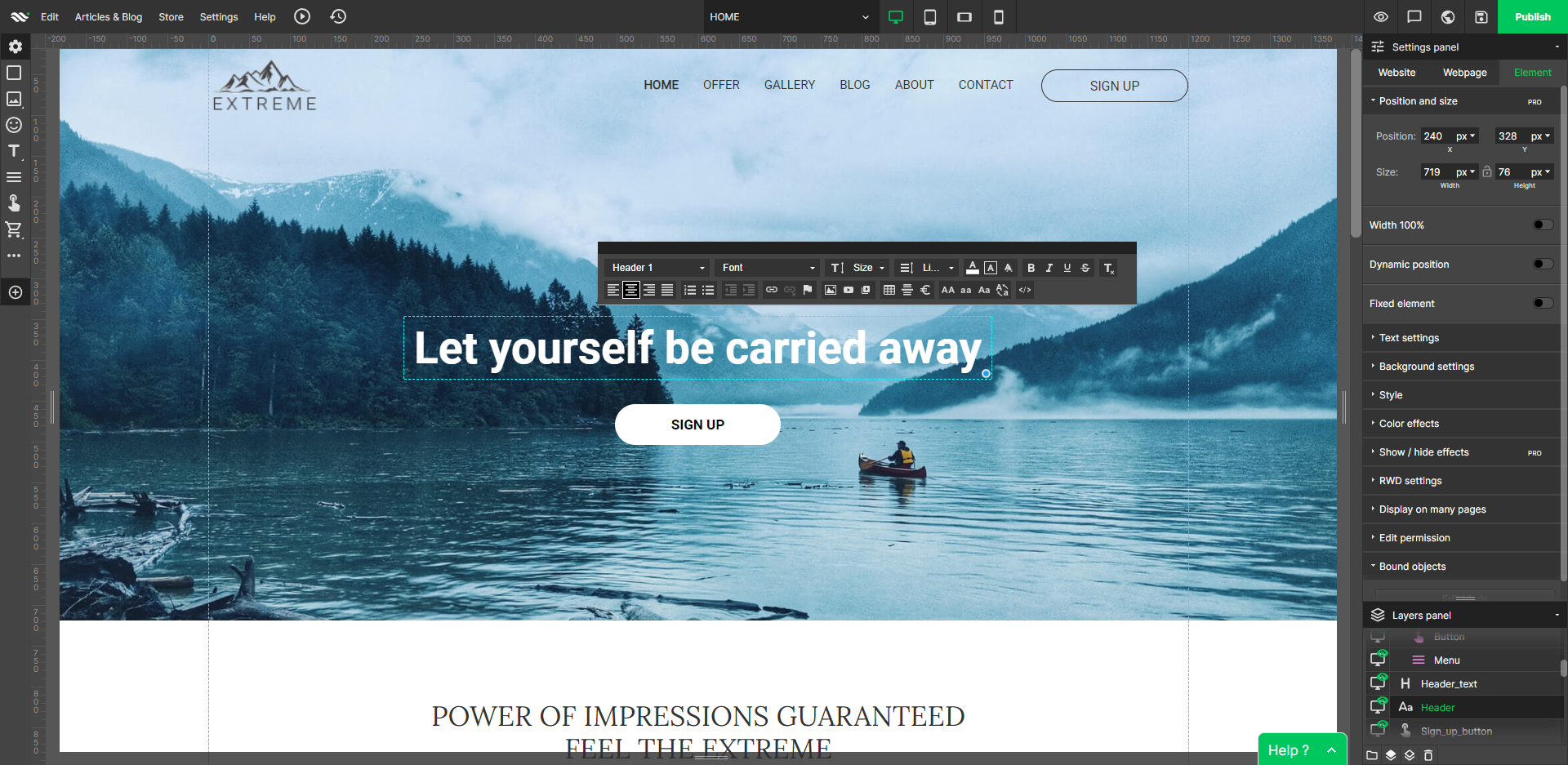
    • WebWave's site builder is the platform's truly innovative feature. I've never come across another service that deploys a layer-based approach in web design, as most of them usually deploy a grid-based system. This is an incredible alteration that ensures WebWave behaves much like a traditional graphic design tool, thereby resulting in an experience that is a lot more intuitive and instinctive. I believe this has the potential to radically change the way people approach no-code web design.
    • WebWave provides automatic, daily backups and a free SSL certificate for every website. This results in excellent security.
    • WebWave's support team is first-class! I had some teething-issues in the beginning, but the support team quickly got me back on track.
    • WebWave's community/forum is an excellent place to vote and request new features. This proves the development team is committed to making WebWave better by listening to their users.
    Read full review
    Tribal Systems
    No answers on this topic
    Cons
    WebWave
    • Some scope for improvement in UX (colors are not very appealing). It is simple to use but design is a little dated. Especially in the builder section, I'd like to see modern design for buttons and maybe gradients also: as this is where visual motivation is also important
    • Some edits take effect only after pressing OK. That should be eliminated as it's an unnecessary addition. It's also kind of annoying to do that again and again, which can add up to a lot as we do so many small tweaks while building the website.
    • Few things (maybe glitches) in design. The rectangle below the footer was uneditable for me. I spent quite some time trying to figure it out so I'm convinced it's a glitch.
    • Website speed should be increased.
    Read full review
    Tribal Systems
    No answers on this topic
    Usability
    WebWave
    Very easy to use, intuitive, has many options and plug-ins, and is cheap.
    Read full review
    Tribal Systems
    No answers on this topic
    Support Rating
    WebWave
    1. The support person does not seem to understand the issues, and seems like they go off to talk to somebody and revert back every 5 to 10 minutes. It takes up a lot of time. 2. There is a lack of reading material to address simple issues like changing the website name in the dashboard, pasting a code, etc.
    Incentivized
    Read full review
    Tribal Systems
    No answers on this topic
    Alternatives Considered
    WebWave
    WordPress is a more flexible and adaptive content management system than Webwave. In addition to the functionalities that are already built-in, I am unable to add any customizable plugins or add-ons. However, in the majority of cases, the inherent features of Webwave are sufficient for developing a website that serves its intended purpose. Webwave also makes it possible for you to add animations and the appearance of each of your design elements, whereas WordPress builders require additional plugins in order for users to access most of such capabilities. Webwave has several essential design features available internally, thus saving money and time.
    Read full review
    Tribal Systems
    No answers on this topic
    Return on Investment
    WebWave
    • saved 30 hours per year per site (previously I had to manually run updates and check if everything is fine)
    • earns money for me without a touch (thanks to automatic billing of my customers for hosting and support) - additional (ca.) 120 USD per year per site
    • no negatives so far
    Read full review
    Tribal Systems
    No answers on this topic
    ScreenShots

    WebWave Screenshots

    Screenshot of Customize the interfaceScreenshot of Edit desktop websiteScreenshot of Edit mobile websiteScreenshot of Free stock imagesScreenshot of InterfaceScreenshot of Layers panel