TrustRadius: an HG Insights company

Save this comparison

Save this comparison

Add Product

Recommended Comparisons

    Overview
    ProductRatingMost Used ByProduct SummaryStarting Price

    CELUM Creative Collaboration

    Score7.7 out of 10
    N/AWorkRooms blends agile task management with file organization. Users get a visual overview of projects, reviews and approvals and can share files with anyone. Built with a content-centric approach, WorkRooms focuses on the production, management and approval of content such as photos and graphics, audio or video material. Kanban-style boards are enhanced by clearly defined processes, smart access…N/A

    Worksection

    Score10 out of 10
    Small Businesses (1-50 employees)
    Worksection is a project management platform that brings tasks, planning, time tracking, team communication, and file storage into a single system. It provides task and subtask management, Gantt charts, Kanban boards, and a calendar for planning; built-in time tracking with hourly rates for client billing; per-task discussions, role-based access permissions, and reporting dashboards. Pricing is charged per user, with a free plan for up to five users. It is used by teams of 5 to 50+ employees in…

    $5

    per month per user

    Pricing
    CELUM Creative CollaborationWorksection
    Editions & Modules
    No answers on this topic
    Free
    $0
    Basic
    $5
    per month per user
    Business
    $10
    per month per user
    Premium
    $15
    per month per user
    Offerings
    Pricing Offerings
    CELUM Creative CollaborationWorksection
    Free Trial
    YesYes
    Free/Freemium Version
    NoYes
    Premium Consulting/Integration Services
    YesNo
    Entry-level Setup FeeNo setup feeNo setup fee
    Additional Details—All paid plans are priced per user. Annual billing −25%; 2-year billing −30%. Free plan for teams of up to 5 users.
    More Pricing Information
    Features
    CELUM Creative CollaborationWorksection
    Project Management
    Comparison of Project Management features of CELUM Creative Collaboration and Worksection
    Feature
    CELUM Creative Collaboration
    6.8
    2 Ratings
    12% below category average
    Worksection
    7.7
    1 Ratings
    0% above category average
    Task Management7.02 Ratings7.01 Ratings
    Scheduling9.02 Ratings9.01 Ratings
    Mobile Access1.02 Ratings8.01 Ratings
    Search7.02 Ratings00 Ratings
    Visual planning tools10.02 Ratings00 Ratings
    Resource Management00 Ratings6.01 Ratings
    Gantt Charts00 Ratings8.01 Ratings
    Workflow Automation00 Ratings8.01 Ratings
    Team Collaboration00 Ratings7.01 Ratings
    Support for Waterfall Methodology00 Ratings8.01 Ratings
    Document Management00 Ratings8.01 Ratings
    Timesheet Tracking00 Ratings8.01 Ratings
    Change request and Case Management00 Ratings8.01 Ratings
    Budget and Expense Management00 Ratings7.01 Ratings
    Communication
    Comparison of Communication features of CELUM Creative Collaboration and Worksection
    Feature
    CELUM Creative Collaboration
    5.3
    2 Ratings
    40% below category average
    Worksection
    -
    Ratings
    Chat3.01 Ratings00 Ratings
    Notifications6.02 Ratings00 Ratings
    Discussions6.02 Ratings00 Ratings
    Internal knowledgebase6.02 Ratings00 Ratings
    File Sharing & Management
    Comparison of File Sharing & Management features of CELUM Creative Collaboration and Worksection
    Feature
    CELUM Creative Collaboration
    6.9
    2 Ratings
    15% below category average
    Worksection
    -
    Ratings
    Versioning7.02 Ratings00 Ratings
    Video files6.02 Ratings00 Ratings
    Audio files4.02 Ratings00 Ratings
    Document collaboration6.02 Ratings00 Ratings
    Access control9.02 Ratings00 Ratings
    Advanced security features8.02 Ratings00 Ratings
    Device sync8.02 Ratings00 Ratings
    Professional Services Automation
    Comparison of Professional Services Automation features of CELUM Creative Collaboration and Worksection
    Feature
    CELUM Creative Collaboration
    -
    Ratings
    Worksection
    7.3
    1 Ratings
    6% below category average
    Quotes/estimates00 Ratings8.01 Ratings
    Invoicing00 Ratings7.01 Ratings
    Project & financial reporting00 Ratings7.01 Ratings
    Best Alternatives
    CELUM Creative CollaborationWorksection
    Small Businesses
    Flock
    Score9.5 out of 10
    Any.do
    Score8 out of 10
    Medium-sized Companies
    Troop Messenger
    Score9.8 out of 10
    KanbanFlow
    Score7.3 out of 10
    Enterprises
    Cisco Business Edition 7000 (discontinued)
    Score9 out of 10
    Microsoft To Do
    Score7.9 out of 10
    All AlternativesView all alternativesView all alternatives
    User Ratings
    CELUM Creative CollaborationWorksection
    Likelihood to Recommend
    7.0
    (2 ratings)
    6.0
    (1 ratings)
    User Testimonials
    CELUM Creative CollaborationWorksection
    Likelihood to Recommend
    CELUM
    If you are debating how on getting an easy to use or more advanced solution. I would recommend going for WorkRooms. It has the perfect balance that you are looking for. It is very easy for small companies that want to grow and make it easy for employees and costumers.
    Incentivized
    Read full review
    Worksection
    I can prescribe Worksection for computerized offices, for organizations that consider the season of their representatives and who pitch time to their clients
    Incentivized
    Read full review
    Pros
    CELUM
    • Task management
    • File management using tags and simple search
    • Adding external users for a restricted set of information
    Read full review
    Worksection
    • I like adaptable assignments and subtasks, extended security for errands and remarks (since we are working with our customers inside Worksection) and inherent clock with hourly rates.
    • Worksection encourages us to break down complex undertaking into assignments and subtasks, set due dates and control time spent.
    • We additionally share reports from Worksection to our customers, it encourages us to assemble straightforward relations with our customers. What's more, we figure pay for our representative in view of these reports.
    Incentivized
    Read full review
    Cons
    CELUM
    • Finding it online
    • Downloading it
    • Subscribing/buying
    Incentivized
    Read full review
    Worksection
    • Issues with composing editorial - must reload page to write
    • Old style design
    • Unfortunately there is no work area customer, it would be exceptionally valuable. Continually fixing to the Internet, extremely awkward when it isn't. I have this happens all the time. I'm sitting tight for new forms and I trust that I won't be disillusioned.
    Incentivized
    Read full review
    Alternatives Considered
    CELUM
    Read full review
    Worksection
    I like flexible tasks and subtasks, expanded privacy for tasks & comments (because we are working with our clients inside Worksection) and built-in timer with hourly rates. Worksection helps us to decompose complex project into tasks and subtasks, set deadlines and control time spent.
    Incentivized
    Read full review
    Return on Investment
    CELUM
    • More productivity
    • More spare time
    • Not accessible on phones
    Incentivized
    Read full review
    Worksection
    • With this application, we have essentially enhanced the nature of our work, because everything is organized and reasonable. It is exceptionally advantageous that we can interface the customer to Worksection, which streamlines activities.
    • Incredible cost. The greatest arrangement of 250 GB and a boundless number of "ventures", "organizations" and "individuals" on the record, makes this program the most beneficial - now it is $120 every month, considering the markdown when paying yearly. This is finished opportunity and trustworthiness - lead somewhere around 10 distinct organizations and 1000 individuals.
    Incentivized
    Read full review
    ScreenShots

    CELUM Creative Collaboration Screenshots
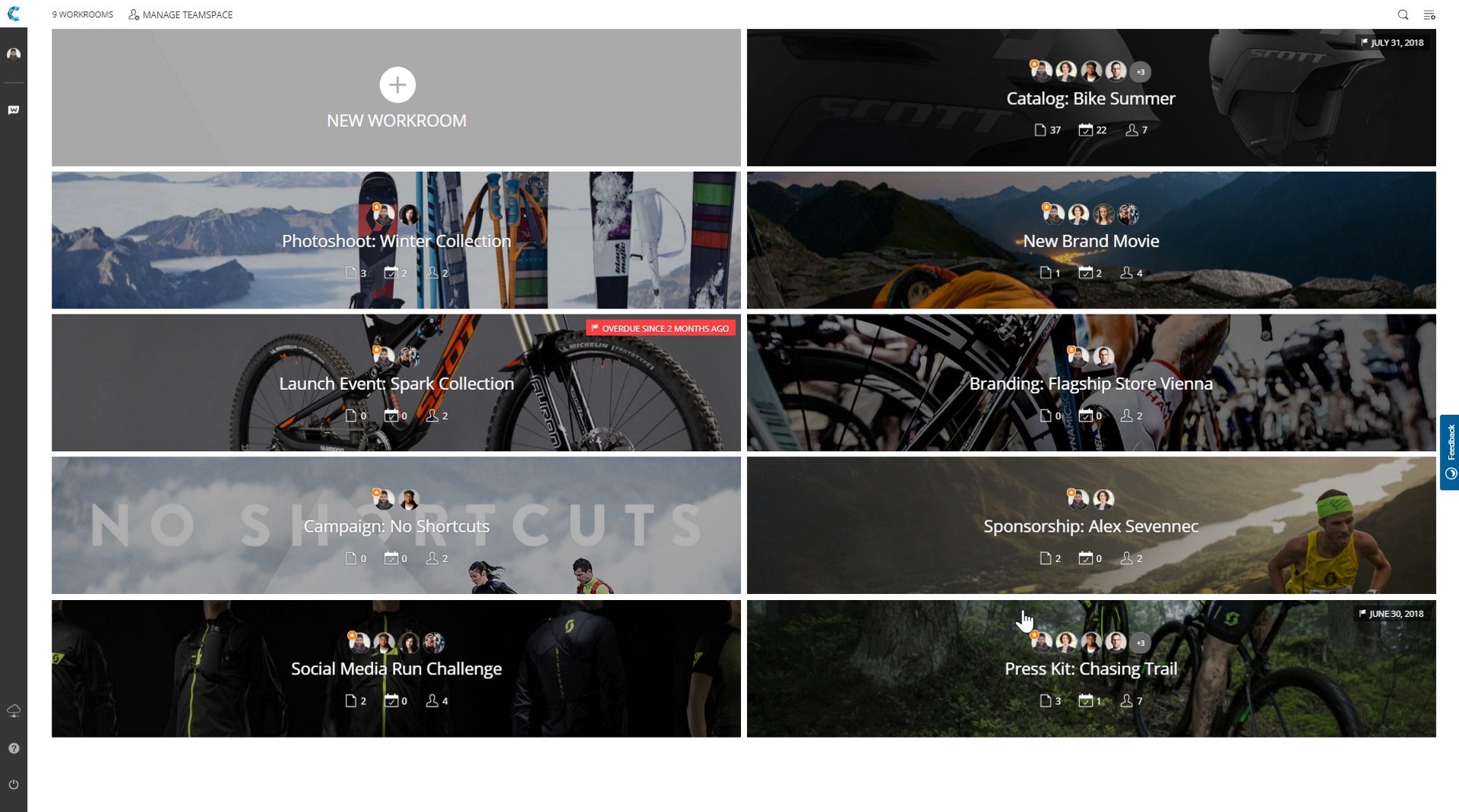
    Product screenshotProduct screenshotProduct screenshotProduct screenshot

    Worksection Screenshots

    Screenshot of Project Dashboards with AI - Key project indicators are centralized — progress, workload, time and budget. Interactive charts and AI summaries help analyze the whole project at a glance.Screenshot of a Gantt chart - Visualizes the project timeline with task dependencies, drag-and-drop dates and milestones.Screenshot of a Kanban board, with Automations. The visual board lets status-based automations move tasks, assign people and cut routine clicks.Screenshot of the Task view, with subtasks, checklists, files, deadlines, time and a discussion thread.Screenshot of Team Collaboration - Built-in chats in every task keeps discussions, files and decisions right next to the work — no switching to a separate messenger.Screenshot of Customizable Reports used to analyze status, time and costs for any period.