TrustRadius: an HG Insights company

What is AI SoloHR?

AI SoloHR is HR case management software for U.S. small businesses and lean HR teams that need a structured way to manage sensitive HR workflows. The product is designed for teams that handle HR in-house and need more than spreadsheets, inbox threads, and shared folders to track case activity.

AI SoloHR helps users organize FMLA, ADA accommodation, employee relations, benefits renewal, leave-related, and other HR follow-up workflows in a case-based workspace. Each case can include tasks, due dates, notes, documents, status history, communication drafts, and timeline records so HR teams can see what happened, what is still open, and what needs attention next.

The platform is not positioned as a payroll system or full HRIS replacement. It focuses on the operational workflow layer around HR cases that often sits outside core employee record systems. AI SoloHR includes reviewed AI draft support to help reduce blank-page work for employee, manager, broker, or leadership communications, while keeping human review in the process. AI output is not used to make legal, medical, benefits, or compliance decisions.

Key capabilities include case tracking, employee records, task and deadline management, document organization, audit-friendly timeline history, intake links, outbound email support, risk and missing-evidence reviews, reporting, role-based access controls, audit readiness exports, legal hold, retention controls, and multi-entity support depending on plan tier. AI SoloHR is built for U.S. small businesses that want clearer visibility, stronger documentation, and a more defensible paper trail for recurring HR workflows without adopting a heavy enterprise HR platform.

Categories & Use Cases

Screenshots

Screenshot of AI SoloHR FMLA workflow screen showing how HR teams can track leave request details, eligibility review, notice dates, certification deadlines, designation status, payroll or benefits status, and return-to-work readiness in one structured case workflow. The screen shows a case moving from intake through certification and designation, with workflow state, blocking reason, key dates, status fields, notes, and a save action for maintaining an organized FMLA case record.
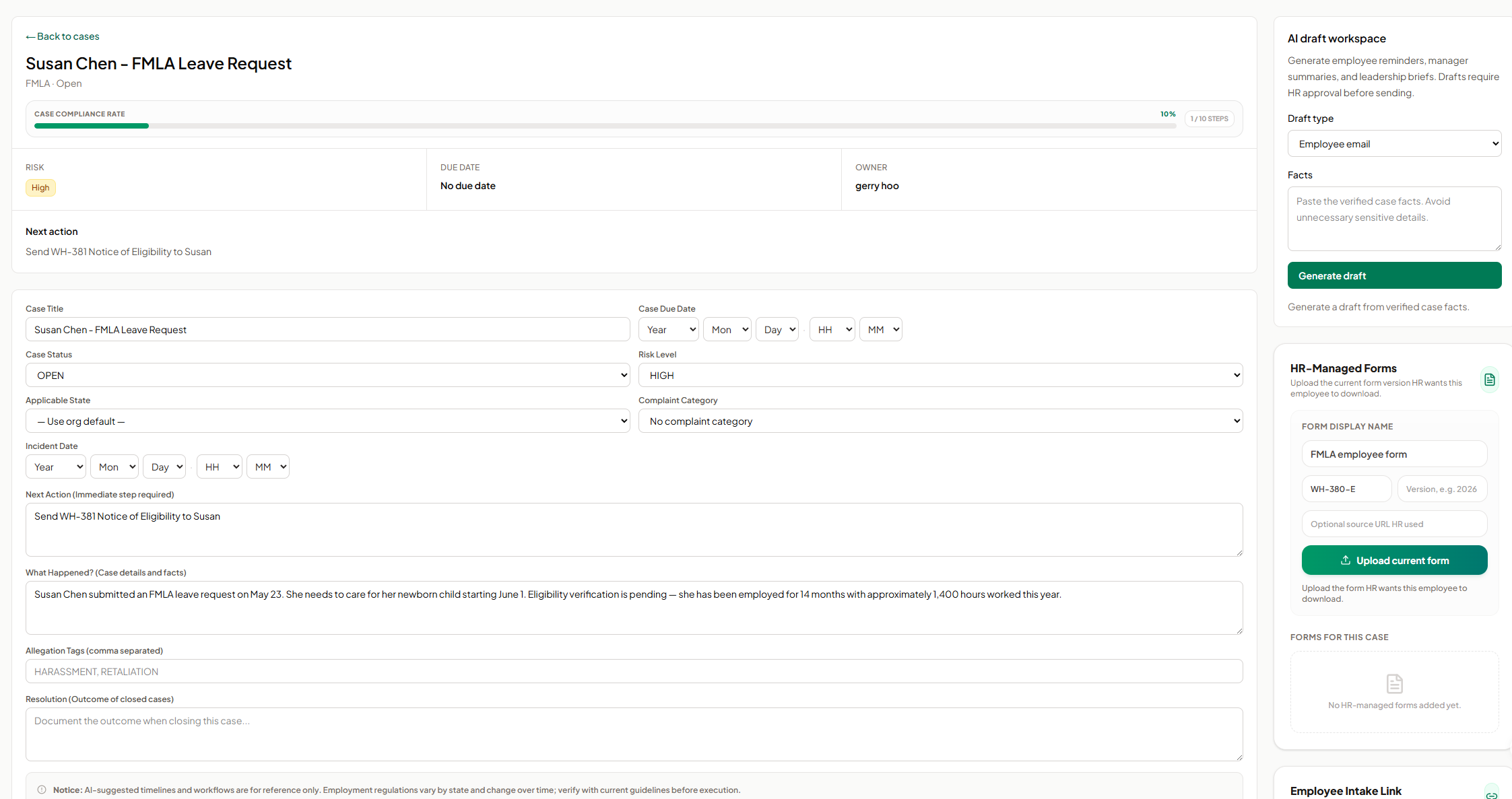
Screenshot of AI SoloHR HR-managed forms screen showing how HR can upload and organize the current form version for an employee case. The panel includes fields for form display name, form code, version, optional source URL, and an upload action, helping HR keep case-specific forms such as FMLA employee forms connected to the relevant case record.
Screenshot of AI SoloHR AI draft workspace showing how HR can generate draft communications from verified case facts. The screen includes a draft type selector for employee emails, manager summaries, or leadership briefs, a case facts field, and a generate action, with drafts positioned for HR review before sending.
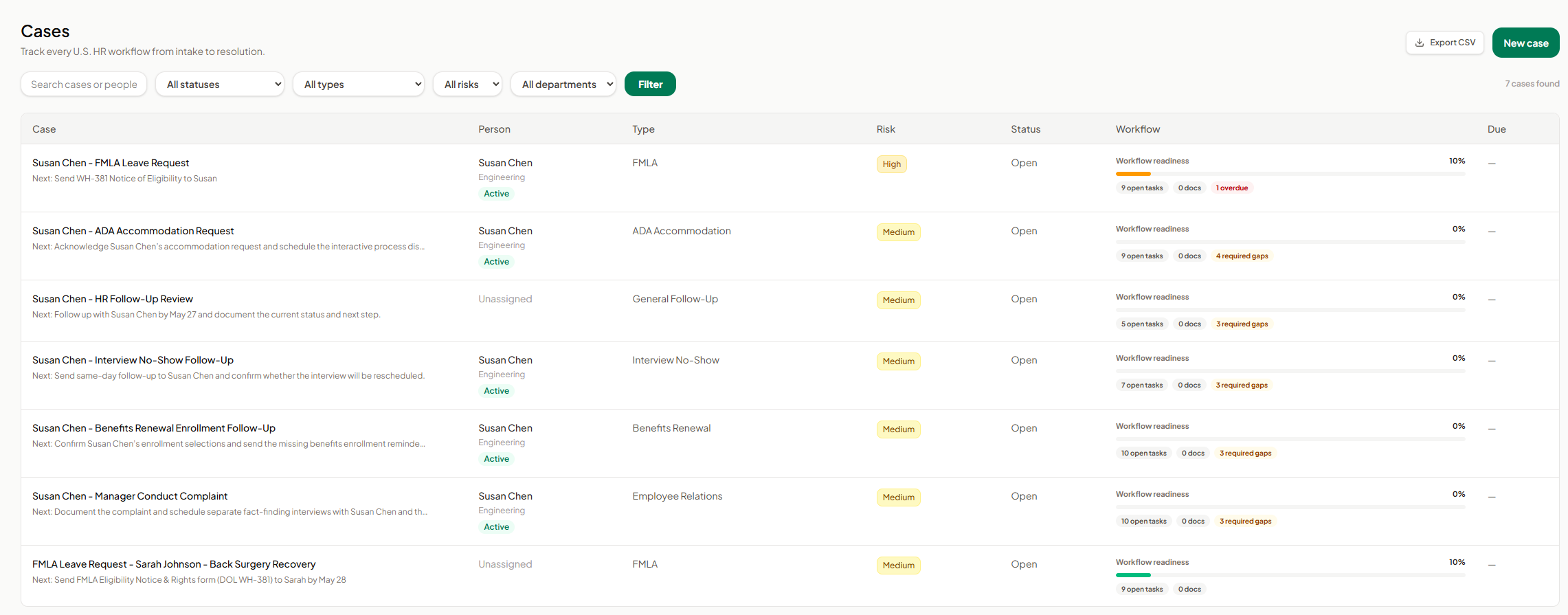
Screenshot of AI SoloHR cases dashboard showing a centralized list of HR workflows from intake to resolution. The screen includes search, status, type, risk, and department filters, plus case rows for FMLA, ADA accommodation, interview no-show, benefits renewal, employee relations, and general follow-up workflows. Each row shows the related person, case type, risk level, status, workflow readiness, open tasks, document count, required gaps, overdue items, and export or new case actions.
Screenshot of AI SoloHR case detail screen for an FMLA leave request, showing the case summary, compliance progress, risk level, owner, next action, due date, editable case fields, incident details, case facts, tags, and resolution notes. The screen also includes side panels for AI draft generation and HR-managed forms, helping HR keep case tracking, communication drafts, and required form uploads connected to the same employee case record.
Screenshot of AI SoloHR new case screen showing how HR can create a structured HR case by capturing the minimum facts first. The form includes primary person, case title, workflow type, risk level, applicable state, next action, and case summary fields, with a disclaimer reminding users to verify AI-generated workflow guidance against current official requirements.
Screenshot of AI SoloHR task list screen showing case-specific HR follow-up tasks for an FMLA workflow. The list includes eligibility notice, certification review, designation notice, leave tracking, payroll notification, mid-leave check-in, return-to-work documentation, certification deadlines, and form delivery tasks, with due date visibility, completion checkboxes, edit and delete actions, custom task creation, and Google Calendar sync status.
Screenshot of AI SoloHR case timeline screen showing chronological activity history for an HR case. The timeline records key events such as calendar event creation, task completion, and case creation, with event type, date, actor, title, and supporting detail so HR teams can review what happened during the case workflow.

1 / 8

Screenshot of AI SoloHR FMLA workflow screen showing how HR teams can track leave request details, eligibility review, notice dates, certification deadlines, designation status, payroll or benefits status, and return-to-work readiness in one structured case workflow. The screen shows a case moving from intake through certification and designation, with workflow state, blocking reason, key dates, status fields, notes, and a save action for maintaining an organized FMLA case record.

Technical Details

Technical Details
Deployment TypesSaaS
Mobile ApplicationNo
Supported CountriesUnited States
Supported LanguagesEnglish

FAQs

How much does AI SoloHR cost?
AI SoloHR starts at $79.
What are AI SoloHR's top competitors?
Gusto and Rippling are common alternatives for AI SoloHR.