

iBackup Extractor
What is iBackup Extractor?
iBackup Extractor — iPhone Backup Explorer and Data Recovery Tool for Windows & Mac
Overview
iBackup Extractor is a desktop application that helps users access and recover data stored in iPhone, iPad, and iPod touch backups created by iTunes, Apple Devices app, or Finder (macOS Catalina and later). Because iOS backups are not designed to be human-readable, iBackup Extractor provides a structured way to preview backup contents and selectively extract individual items to a computer—even if the original iOS device is no longer available.
Key Features
What sets iBackup Extractor apart?
Ideal Users
iBackup Extractor is suited for individuals, IT support teams, and businesses that need a straightforward way to inspect and recover iOS data from local backups. Typical use cases include device loss or damage, accidental deletion, audit and recordkeeping needs, and printing communications for legal or business purposes.
Privacy & Security
All backup analysis and data extraction are performed locally on the user’s computer, and no backup content is uploaded to external servers or cloud services. Encrypted backups remain protected by the user’s password and are accessed only when the correct credentials are provided. No data is collected or shared by Wide Angle Software. This ensures that users retain full control over their personal data throughout the recovery and extraction process.
Categories & Use Cases
Videos
Screenshots


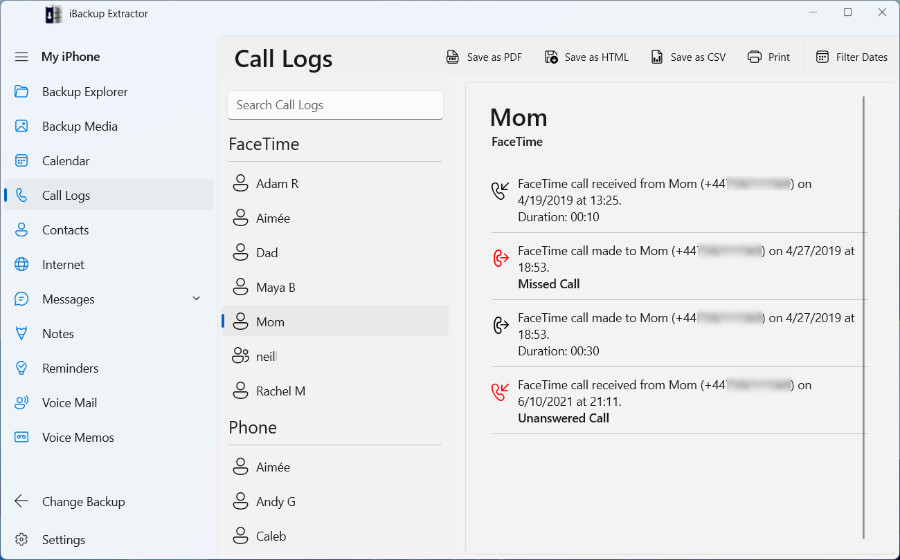
1 / 3
Screenshot of recovering iPhone photos and videos from a backup.
Technical Details
| Deployment Types | On-Premise |
|---|---|
| Operating Systems | Windows, Mac |
| Mobile Application | No |
| Supported Languages | English, Dutch, French, German, Italian, Spanish, Japanese |