iBackup Extractor — iPhone Backup Explorer and Data Recovery Tool for Windows & Mac
Overview
iBackup Extractor is a desktop application that helps users access and recover data stored in iPhone, iPad, and iPod touch backups created by iTunes, Apple Devices app, or Finder (macOS Catalina and later). Because iOS backups are not designed to be human-readable, iBackup Extractor provides a structured way to preview backup contents and selectively extract individual items to a computer—even if the original iOS device is no longer available.
Key Features
Automatic Backup Discovery: Finds local iOS device backups stored on the computer and enables quick selection between multiple backups.
Backup Browser: Lets users inspect the contents of a backup by category or through a file-level explorer for deeper access.
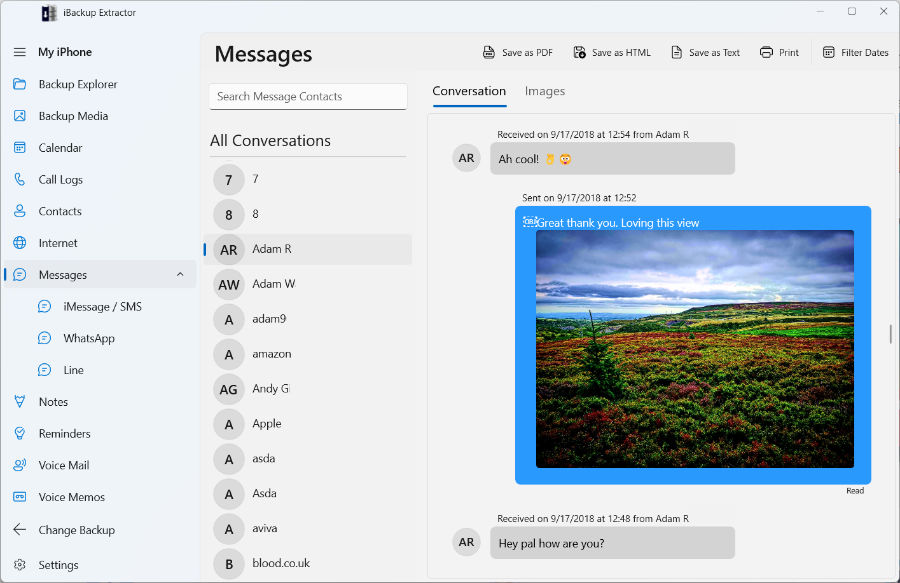
Text Message Export: Extract SMS, iMessage, WhatsApp and LINE conversations, including all important details (timestamps, contact info, and attachments). Export conversations as PDF, HTML, CSV or Plain Text, or print out directly for a hard copy.
Media Retrieval: Extract photos and videos stored in a backup to recover or archive media locally.
Contacts & Calendars: Retrieve key personal data from a backup, including contacts and calendar entries, for use on a new device or existing account.
Voicemail & Voice Memos: Extract voicemail messages and voice memos saved within an iOS backup, in a format users can listen to and share.
Notes, Reminders & More: Access additional content types commonly stored in backups, such as notes, reminders, and other user data.
Encrypted & Unencrypted Backup Support: Both encrypted and unencrypted backups can be accessed.
Selective Extraction: Copy only the items needed rather than restoring an entire device backup, helping reduce recovery time and storage overhead.
What sets iBackup Extractor apart?
Backup-first recovery: Designed specifically to work with existing local iOS backups, including scenarios where the device is unavailable.
Readable exports: Focuses on extracting usable items and records (not just creating inaccessible backup archives).
Cross-platform availability: Available for both Windows and macOS for teams and users in mixed environments.
Data-preserving extraction: Allows users to extract only the content they need to their computer, rather than completely restoring a backup to a device, which would cause data loss.
Ideal Users
iBackup Extractor is suited for individuals, IT support teams, and businesses that need a straightforward way to inspect and recover iOS data from local backups. Typical use cases include device loss or damage, accidental deletion, audit and recordkeeping needs, and printing communications for legal or business purposes.
Privacy & Security
All backup analysis and data extraction are performed locally on the user’s computer, and no backup content is uploaded to external servers or cloud services. Encrypted backups remain protected by the user’s password and are accessed only when the correct credentials are provided. No data is collected or shared by Wide Angle Software. This ensures that users retain full control over their personal data throughout the recovery and extraction process.