TrustRadius: an HG Insights company

Microsoft Defender for Cloud

Score8.7 out of 10

124 Reviews and Ratings

What is Microsoft Defender for Cloud?

Microsoft Defender for Cloud is a Cloud Security Posture Management (CSPM) and Cloud Workload Protection Platform (CWPP) for Azure, on-premises, and multicloud (Amazon AWS and Google GCP) resources.

Read more details.

Media

Screenshot of Remediation of critical issues in code
Screenshot of Cloud security benchmark mapped to industry Framworks
Screenshot of Prioritization of critical risks with contextual threat analysis
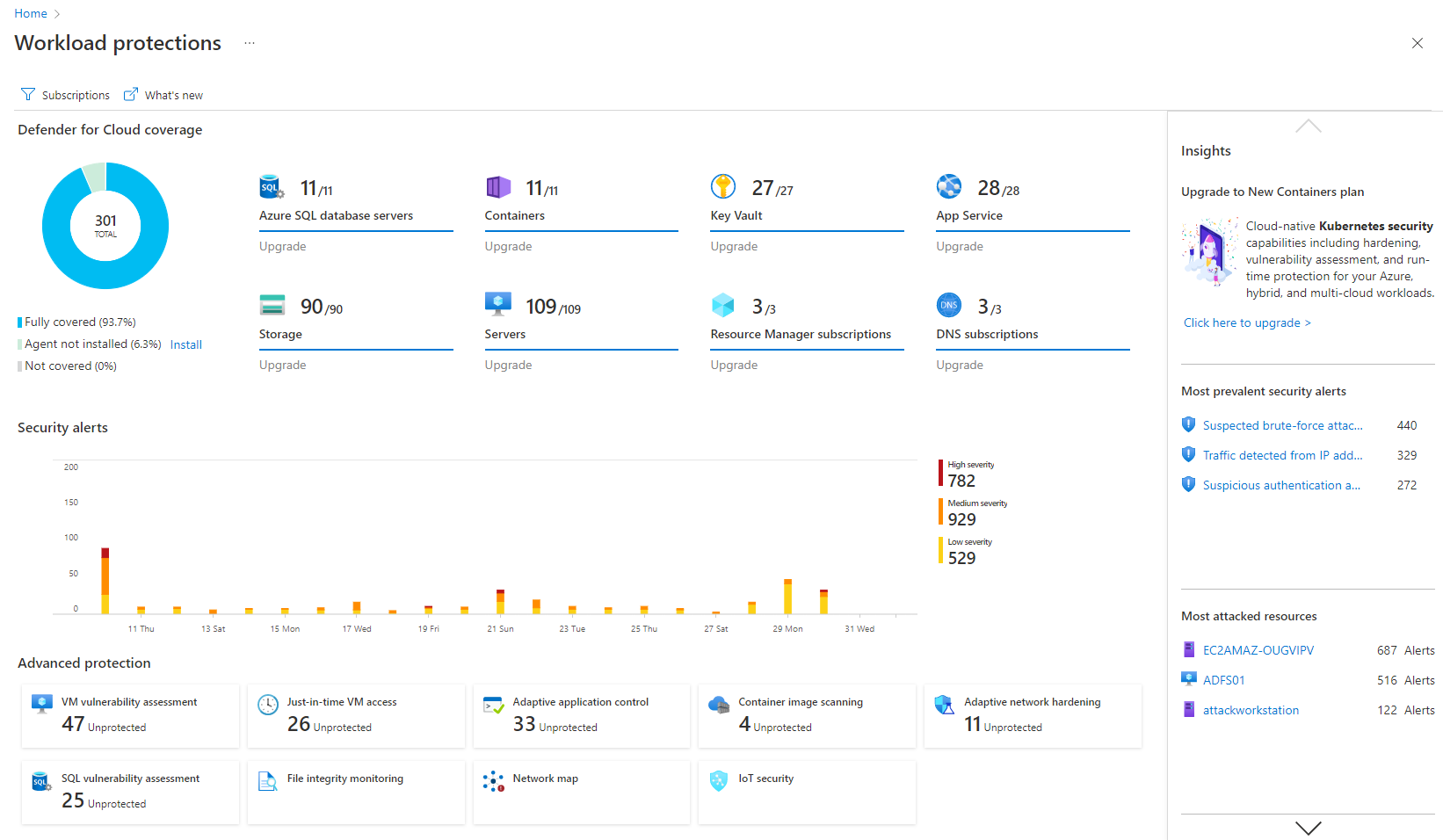
Screenshot of Workload protection
Screenshot of Unified DevOps Visibility
Screenshot of Visualizations to improve security posture proactively

1 / 6

Screenshot of Remediation of critical issues in code

Who Buys & Uses Microsoft Defender for Cloud

Pros

  • Robust threat detection and response capabilities across cloud environments.
  • Seamless integration within the Microsoft ecosystem, simplifying deployment.
  • Centralized visibility and risk assessment for cloud security posture.

Cons

  • Complex initial configuration and setup, requiring significant effort.
  • High volume of security findings and alerts, leading to potential alert fatigue.
  • Challenges in prioritizing critical risks from the numerous warnings generated.

Robust Multi-Cloud Security Management Tool

Use Cases and Deployment Scope

Microsoft Defender for Cloud unifies compliance across multiple clouds in a single place, which reduces management overhead. It continuously assesses our cloud infrastructure against industry compliances and provides actionable insights. Its one-click fixes allow us to remediate vulnerabilities within SLAs. It allows central management of cloud security across organizational units.

Pros

  • Intelligent Threat Protection - AI powered monitoring and remediation of vulnerabilities
  • On-demand and automated scanning of cloud infrastructure across cloud providers like AWS, GCP, etc.
  • Supports integration with on-premise workloads, thereby reducing the overhead of managing on-premise infrastructure separately

Cons

  • Integrations with on-premise workloads can sometimes be challenging. Needs improvement and well standardised integration points
  • Vulnerability categories can be difficult to understand. It should allow teams to focus on critical findings and help them keep aside low-severity or suppressed vulnerabilities
  • Pricing can be improved as it can be over-priced for smaller businesses and would potentially affect their ROI due to the small scale

Return on Investment

  • Reduced time to investigate and react to vulnerabilities by 30% to 35%. This helped save overall spends on security posture of the business.
  • Helped manage false positives easily (which is a major drawback of other tools) thereby allowing security teams to focus on important aspects of security.
  • We have moved away from several third-party tools to Microsoft Defender for Cloud as it is an all-in-one package for security management at a comparatively lower cost.

Usability

Alternatives Considered

Orca Cloud Security Platform, AWS Security Hub, Amazon GuardDuty and Google Security Command Center

Other Software Used

Azure Cloud Services, IBM Terraform, GitHub

Microsoft Defender for Cloud review

Use Cases and Deployment Scope

For my organization, we assess other companies' use of it. I think the biggest problem right now is that smaller companies lack understanding of exactly how it works and how it applies to the requirements they have to maintain for security. But Microsoft does a really good job of providing training to them. So if we do identify something where they're deficient in training, Microsoft usually comes in and takes care of it pretty quickly.

Pros

  • So one of our biggest concerns with the Department of Defense is FedRAMP and cloud security. And this does an excellent job of providing that level of security that we need for controlled unclassified information.

Cons

  • For a while, it didn't do a really good job of handling things like vulnerability scanning. I believe they bought a module for that, and now it's one of the options that some companies can select. And it does an excellent job of doing good vulnerability scanning on the products that it covers. I would prefer it to be able to do an agent-based scan of some other things that are not Microsoft-based, but that may be something for their future development.

Usability

Small Firm looking for less Malware

Use Cases and Deployment Scope

We, here at [...]use it to secure our cloud based files. We have a backup server that is local. But I do IT here and having very important files safely and securely backed up in one place is a life saver. I really like how its just all associated with my google account and I can just log right in. And Storage isnt a problem.

Pros

  • Secure File Storage
  • Keeps malware off my computer
  • Runs fast

Cons

  • I would like to see it be a bit more integrated into other platforms.

Return on Investment

  • Definity cost savings in comparison to other security products

Usability

Other Software Used

Revit, AutoCAD LT, Adobe Acrobat

Microsoft Defender for Cloud Review

Use Cases and Deployment Scope

We use the product as a CSPM. We deploy all of our cloud compute workloads in Azure. Not all of them, but a lot of our workloads are in Azure. We enforce controls to, first of all, get visibility on what's going on there. Get notifications, alerts on, am I in auto compliance? Is there a security risk? Is there a security misconfiguration? What is the potential impact? Low, medium, high, critical. So it's a combination of all those things. Overall, improving our cloud security health posture is the number one goal. And that means reducing risk across the board.

Pros

  • It's native to the Microsoft ecosystem, so it is fairly easy to enable and just get it running. That is probably one of the benefits of being baked into the platform. It plays well with other Microsoft services, so it does a good job of giving us additional SaaS telemetry that they have in their own insights.

Cons

  • There's probably some issues with the level of effort that it takes to operationalize after you get it enabled. The findings, alerts, and the information can be overwhelming sometimes. And visibility is good, but you're greeted by lots of warnings or pop-ups or things like that that are related to the findings. So you could have one resource with 5, 10, or 20 findings, and that can easily overwhelm you at a scale of magnitude. So if we're talking about hundreds or thousands of resources, now that becomes a challenge. Being able to bubble up risk still needs some work so that we can focus on more critical or potential exposure. And I think that's what some other vendors do a lot better when they bubble up issues instead of just bubbling up everything and telling me what's critical or not. If I give somebody a list of 1,000 critical things, they might fall over.
  • But if I break it down and give them something like, "This is why," and I narrow the margin down, that could be an area of improvement.

Return on Investment

  • Visibility. If you have no visibility, we don't know the risk. So being able to have visibility, being able to get the telemetry, being able to feed the telemetry into the other systems that Microsoft has. And then being able to work with Microsoft, our TAM and our engineers and our resources helps us work with them to say, "Hey, how are we measuring against other energy customers? How are we measuring against this? How are we measuring against CIS?" And all these other industry standards.
  • Better utilization of the Microsoft ecosystem since it is Microsoft-centric. Improvement in the security posture. Again, discovery or visibility. Being able to see, discover all your resources, and see the risk. Being able to quantify that risk. We use the metrics from Microsoft Defender for Cloud, convert that into our risk metrics, and then portray the potential metric or the risk outcome or appetite to the business units. That is some of the bigger things. Everything else is translated into business processes, and every company is different.

Usability

Microsoft Defender for Cloud Review

Use Cases and Deployment Scope

It's very useful when it comes to finding out what applications people are using and sometimes blocking them, sometimes whitelisting the application. The cons would most likely be that it's not that accurate in terms of finding the latest AI tools. Other than that, that's very good.

Pros

  • Blocking tools. Blocking applications.

Cons

  • I would like to see the sync improve. It takes a long time for it to actually reach certain devices.

Return on Investment

  • I would say mainly positive, as I use it quite frequently. So it helps me a lot with my day-to-day tasks.

Usability