TrustRadius: an HG Insights company

PingPlotter

Score8.7 out of 10

44 Reviews and Ratings

What is PingPlotter?

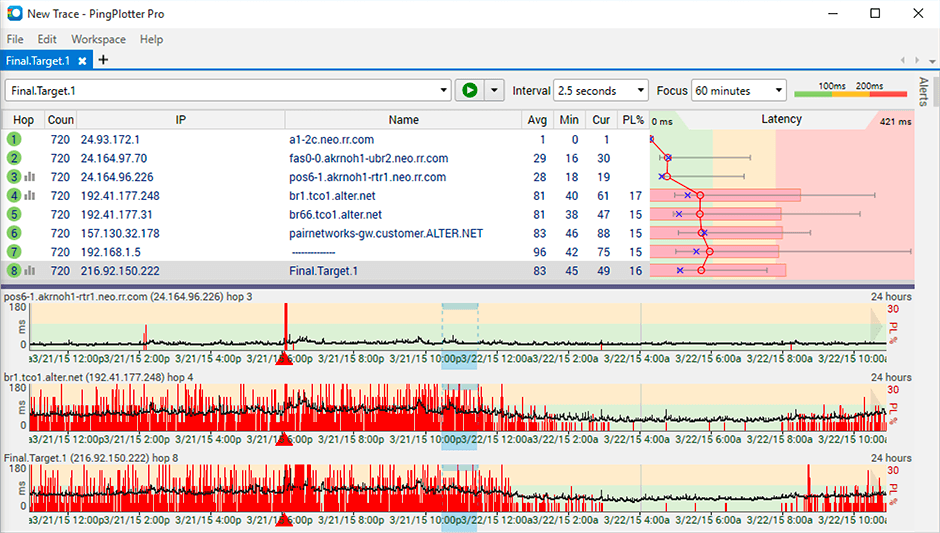
PingPlotter is a graphical traceroute and ping tool that visualizes network performance in a way that makes identifying the source of problems quicker and easier for everyone from online gamers and video streamers to VoIP admins and IT pros. Features for remote deployment, network monitoring, scripting, and a web interface are included along with several additional capabilities.

Media

PingPlotter
PingPlotter
PingPlotter

1 / 3

Top Performing Features

  • Baseline threshold calculation

    Calculation of baseline thresholds so to establish warning thresholds

    Category average: 8.5

  • Network monitoring

    Monitoring network device availability and performance indicators like bandwidth, packet loss, CPU, WAN links, etc.

    Category average: 9.4

  • Automated network device discovery

    Automated network device discovery allows all devices in the environment to be found and tracked

    Category average: 8.7

Areas for Improvement

  • Customizable reports

    Ability to schedule, generate, and deliver custom performance and availability reports

    Category average: 7.9

  • Alerts

    Alerts warning of critical infrastructure component failure can be sent via email or SMS or other channel

    Category average: 8.7

Pros

  • Robust network monitoring and diagnostics capabilities
  • Real-time visualization of network performance
  • Detailed data logging for historical analysis

Cons

  • Limited automated assistance for identifying network faults
  • User interface could be clearer for feature discoverability
  • Lacks proactive suggestions for underlying network issues

One simple tool for complex network troubleshooting.

Use Cases and Deployment Scope

We use PingPlotter to troubleshoot issues from within our network on a regular basis. The best use of this tool is to confirm whether the reachability of an external network resource, server, or website is a problem within our network or outside it. With the evidence PingPlotter provides, we can confidently engage the provider's support team and guide them to the issues we see as needing their attention. Most often, we act on behalf of our staff who are experiencing problems with software-as-a-service, for instance.

Pros

  • Finding latency in the path of any network based service.
  • Determining the reach-ability of any software-as-a-service.
  • Confirming that the final destination in the path of a network is reachable.
  • Connection consistency to any network service/s.

Cons

  • My limited experience suggests we cannot ping/trace multiple TCP ports at once. If that is true, it would be helpful to have that ability. Also, place the port field out in the open instead of burying it in the Options submenu.
  • Reach into the offending network and fix their problems so I don't have to spend hours on the phone trying to get someone else to fix them for my clients.

Return on Investment

  • Simple evidence of network problems that most tech support can understand.
  • We use it as a training tool for new network staff.
  • Provides satisfaction to our clients that we are able to see where problems exist.
  • We are a public agency. Our ROI is based entirely on customer satisfaction, which PingPlotter provides very well.

Usability

Other Software Used

Cisco ThousandEyes, SolarWinds AppOptics, Nmap

A nice tool to better understand your network.

Use Cases and Deployment Scope

We used PingPlotter to track service outages in our building, run diagnostics to present to our service provider, and establish where the problems lie. We were able to use the data to negotiate the support process and get technicians out to repair a fault line.

Pros

  • Timeline tracking.
  • Easy to read graphs and charts.
  • Details regarding connection.

Cons

  • Being able to export data would have been helpful for a larger analysis.
  • It is a robust program and probably more than we needed for a small business; some options that were better aligned with our budget would have been good.
  • As a non-technical person in the networking space, I found the data helpful for communicating, but not always easy to understand.

Return on Investment

  • We saved significant investment in upgraded hardware that wasn't necessary.
  • Saved time arguing with the service provider's support because we could clearly show disruption.

Usability

Other Software Used

Canva, HubSpot CRM, Microsoft 365

Find the Bad Hop Right Away

Use Cases and Deployment Scope

I was having serious problems with my Verizon FIOS and had no good way of seeing what was happening or where the problem was. I have FIOS going to the ONT going to a MOCA cable adaptor going upstairs to the other MOCA adaptor which was going to an Eero and then to my WYZE hub. Yeah I know. But I sure didn't want to diagnose all of that!

So I installed PingPlotter and immediately discovered that all of that was just fine. But Verizon was dropping packets at every hop! I was able to explain this and after they updated some firmware somewhere, I've got my 1G/1G working and I know that internally, my network is solid!

So PingPlotter was fundamental in seeing this in realtime and giving really great tools for outputting it in all the different forms. I'm sure if I had more complicated situations, it would be a necessary tool!

Great tool!

Pros

  • Graphing every network hop and tracking the averages and the instantaneous
  • Providing export capabilities. No copy/paste or screenshots!
  • It just keeps running and tracking for me. Awesome.

Return on Investment

  • It allowed me to get back to work instead of worrying about the network. Critical.

Usability

Other Software Used

Beyond Compare, IntelliJ IDEA, Anthropic Claude

Great way to monitor your connection

Use Cases and Deployment Scope

I use it personally to monitor ISP stability. As we are all work from home, it is important to have a stable connection. Sometimes we don't know where the issue is coming from. Pingplotter lets us know very quickly if the issue is the ISP, the route or the service we are using. Its been very helpful in diagnosing connection issues.

Pros

  • Reporting
  • Logs
  • Live data

Cons

  • More information on what some of the features are for
  • Add multi-window. Allow multiple destinations to be logged in a single window.

Return on Investment

  • The free version has helped remote workers with their ISP issues

Usability

Alternatives Considered

Nagios Network Analyzer

Great tool for easier network diagnostics and monitoring

Use Cases and Deployment Scope

I use PingPlotter to diagnose networks and identify communication issues. It's a great tool to locate patterns and issues and evaluate network health. In large scale deployments, pinpointing a point of fault in a large multi-layered network can be a nightmare and constant monitoring tools are not that easy to come by. Thankfully PingPlotter saved the day and allowed us to have a very good overview of what's happening with the time stamps and ultimately locate the issues and faults.

Pros

  • monitoring connection health
  • locating points of fault
  • monitoring performance patterns and degradation causes

Cons

  • information filtering. PingPlotter can take it a step further by providing summaries and outliers and detecting patterns
  • further diagnostics assistance, by detecting potential faults and suggesting the potential underlying issues

Return on Investment

  • It improves the time taken to resolve the issue therefore client happier (in the simplest of terms)
  • cost saving by reducing hours needed for a task

Usability
