The world of work is constantly changing. Agile work processes in particular are becoming increasingly popular. Even large companies are trying to introduce agile working methods. For many, the Scaled Agile Framework (SAFe) is the right solution for their agile teams. However, implementing SAFe with all its features such as providing reports, visualizing dependencies and automated documentation is not always easy in reality. Many companies spend a lot of time and money searching for the right…
N/A
Planview AgilePlace
Score7.4 out of 10
N/A
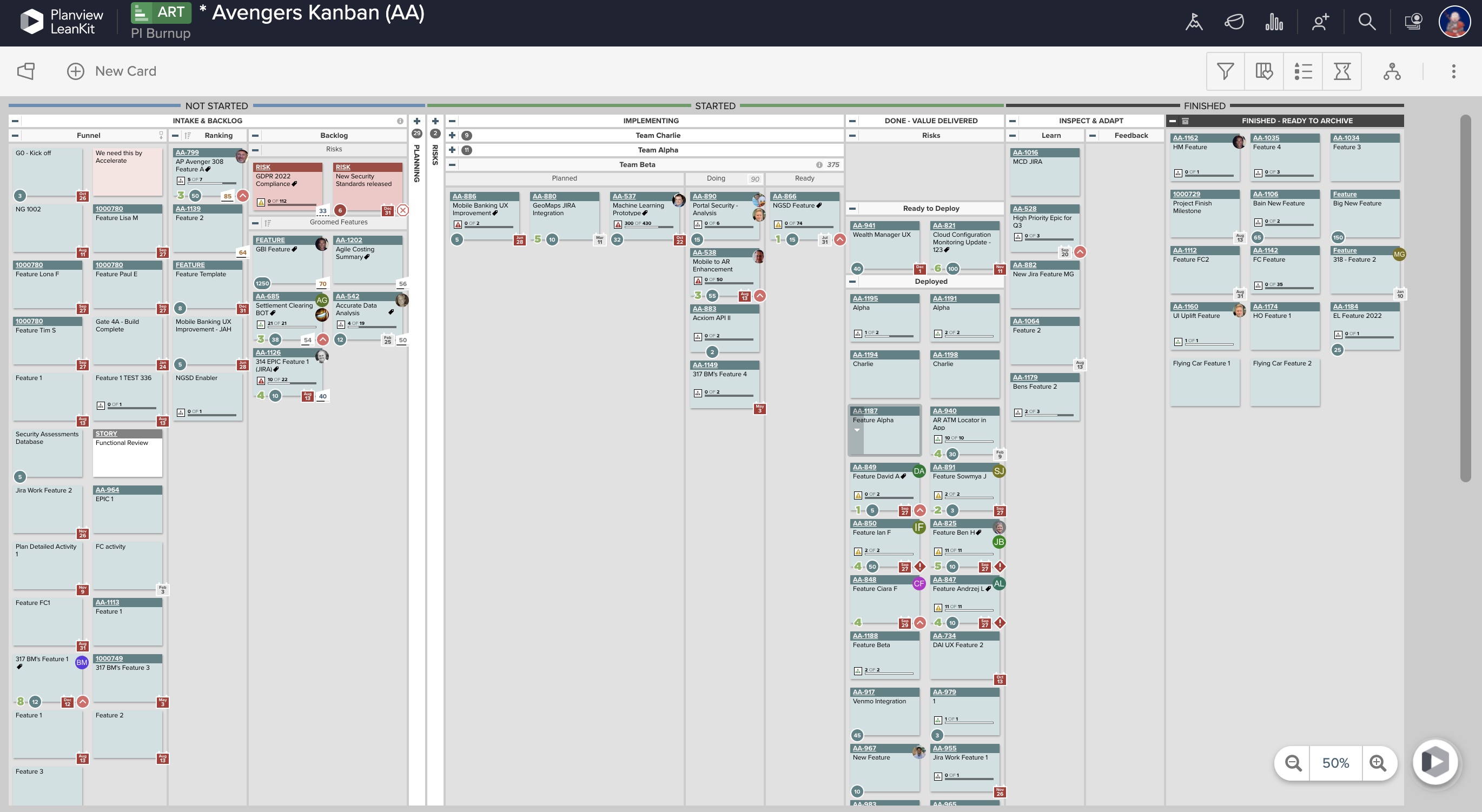
AgilePlace is a project management solution built around flexibility, data-driven analytics, and workflow automation. The software was acquired by Planview in December 2017 to expand that company's capabilities.
Agile Hive is used for our value train within a SAFe setup. Every quarter we organize a so-called Product Increment (PI) Planning, where we plan all Features and Enablers in Agile Hive. Based on the priority of the Product Manager all teams plan their Features and Enablers accordingly to the sprints that are determined by the Release Train Engineer and set up in Agile Hive. The teams then create User Stories and estimate them and based on their sprint velocity (defined in Agile Hive) Product Owners can see how many Features and Enablers are realistic in one quarter (Product Increment). Further, dependencies across teams can be defined and made visible in Agile Hive, so that the plan is feasible. Without Agile Hive it would be hard or impossible to plan across several teams within a value train and to manage all dependencies. Additionally, with Agile Hive the plan is more realistic, so what can be achieved within one quarter in product development.
A de minimis incentive was given to thank the reviewer for their time. The incentive was not used to bias or drive a particular response, nor was the incentive contingent on a positive endorsement. More Info
This tool enables the visual management needed in many offshore teams to easily and quickly see the pending work, work in progress and completed work.For teams that work with a waterfall methodology and do not have AGILE internalized, I believe there are other solutions from Planview or other providers.
A de minimis incentive was given to thank the reviewer for their time. The incentive was not used to bias or drive a particular response, nor was the incentive contingent on a positive endorsement. More Info
Ability to add more than 1 visual cue to the card. We use custom icons and sometimes more than 1 is appropriate but you have to choose which is most important since only 1 can be applied.
Better visibility to board access from the user administration screens. Currently have to run 1-2 reports to see this information. Would like to be able to click on a user within Configure Users and see what boards they have access to quickly.
It has in general a good usability, but there are some downsides, the big picture view of the entire product increment is too static, so there is no zoom in or zoom out. Mostly throughout planning it is necessary to zoom in to a sprint level and manage the user stories there. Also, the pig picture view has some limitations, because you cannot read the entire user story name (boxes are too small).
A de minimis incentive was given to thank the reviewer for their time. The incentive was not used to bias or drive a particular response, nor was the incentive contingent on a positive endorsement. More Info
LeanKit isn't the best designed Kanban system I've seen, but overall it's pretty usable. The boards I've used are pretty complex, so it can be difficult to find things. I found that searching and filtering for specific cards was somewhat of a challenge. Dragging a card from one lane to another is kind of a fun way to get things done though.
A de minimis incentive was given to thank the reviewer for their time. The incentive was not used to bias or drive a particular response, nor was the incentive contingent on a positive endorsement. More Info
A de minimis incentive was given to thank the reviewer for their time. The incentive was not used to bias or drive a particular response, nor was the incentive contingent on a positive endorsement. More Info
A de minimis incentive was given to thank the reviewer for their time. The incentive was not used to bias or drive a particular response, nor was the incentive contingent on a positive endorsement. More Info
Every time I have reached out to the AgilePlace support team I have received a timely response in addition to professional & personal feedback. Their consultants are knowledgeable and the management team is happy to jump in and help when needed.
A de minimis incentive was given to thank the reviewer for their time. The incentive was not used to bias or drive a particular response, nor was the incentive contingent on a positive endorsement. More Info
With Jira Software alone it is also possible to plan a SAFe product increment planning, but it would be nearly impossible to see the overall big picture of all product teams involved in a release train. So, the planning on sprint level for one team would be more efficient, but the planning for a whole quarter with all dependencies across teams would be not feasible to present. Therefore, Agile SAFe enables value trains an efficient way to plan a product increment.
A de minimis incentive was given to thank the reviewer for their time. The incentive was not used to bias or drive a particular response, nor was the incentive contingent on a positive endorsement. More Info
Originally, we had evaluated two other tools next to Planview LeanKit: Kanbantool and Kanbanflow. The latter was a close contestant for productive use, as it was also very customizable and a joy to work with and look at. It also had lower user fees and a mobile integration. In the end, we picked Planview LeanKit because of several reasons: Aesthetics: The look was much more clean and professional. Reporting: It was obvious from the start that we could use Planview LeanKit as a tool for improvement. API: We needed to integrate the Kanban into our central systems and Planview LeanKit API was (and still is) a way to do it. Card Headers: This sounds like a simple thing, but the headers above the titles fit our work perfectly and looked perfect, which helped the decision.
A de minimis incentive was given to thank the reviewer for their time. The incentive was not used to bias or drive a particular response, nor was the incentive contingent on a positive endorsement. More Info
A de minimis incentive was given to thank the reviewer for their time. The incentive was not used to bias or drive a particular response, nor was the incentive contingent on a positive endorsement. More Info
A de minimis incentive was given to thank the reviewer for their time. The incentive was not used to bias or drive a particular response, nor was the incentive contingent on a positive endorsement. More Info